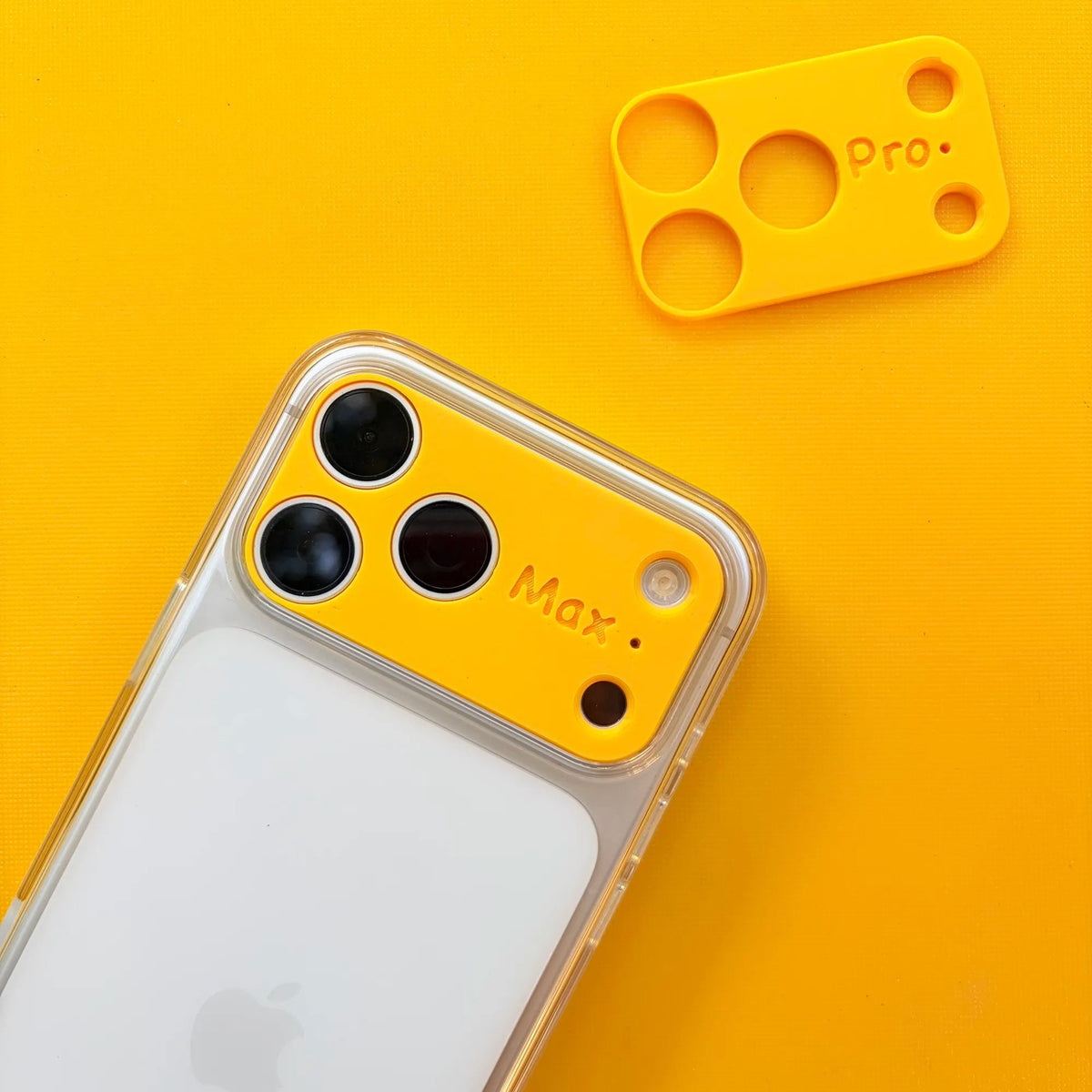
If your iPhone rocks slightly when you tap it on a table, you’re not imagining things.
This “iPhone wobble” has become more noticeable in recent years—especially on newer models like the iPhone 17 Pro Max and the ultra-thin iPhone 17 Air.
But here’s what most people don’t realize:
👉 Not all iPhone models wobble the same way.
Some are significantly more unstable than others, depending on their camera design and overall thickness.
Why Do iPhones Wobble on a Table?
The main cause is the camera bump.
Modern iPhones now feature:
Larger sensors
Advanced stabilization systems
Thicker camera modules
This creates an uneven back. When placed on a flat surface, the phone rests partially on the camera bump—causing it to rock when touched.
Fix the wobble. Upgrade the feel.
Designed to do both
ZEERA AirFlat Pro
Lens Cover for iPhone Air - Make Your iPhone Air Truly Flat
iPhone Wobble Compared: 17 Pro Max, 17 Air, and Standard Models
Recent iPhone models wobble differently. The iPhone 17 Pro Max usually has the most noticeable wobble due to its large and heavy camera system. Its weight distribution and thicker lens module make it rock easily when typing or tapping on a table.
The iPhone 17 Air, while lighter and thinner, experiences a different kind of wobble. Its ultra-thin body exaggerates the camera bump, producing a sharper, “tippier” movement. For many users, this can feel even more unstable than heavier models.
Standard iPhone models fall somewhere in between. Their smaller camera modules still cause minor wobble, but it is less distracting in daily use.
How to Fix iPhone Wobble Without a Bulky Case
Fortunately, you don’t have to live with a wobbling iPhone—or sacrifice the sleek design. Here are three practical solutions:
1. Thick Case (Maximum Stability, But Bulkier)
A traditional case can completely level out the back.
Pros:
Eliminates wobble
Adds protection
Cons:
Makes the phone thicker
Alters the original feel
2. Zeera AirFlat Pro Lens Cover (Best for iPhone 17 Air)
For iPhone 17 Air users, the ultra-thin design can make wobble more pronounced—but the Zeera AirFlat Pro Lens Cover solves this elegantly.
Benefits:
Flattens the camera bump, making your iPhone Air sit evenly on any surface
Preserves the original thin feel of the device
Compatible with MagSafe accessories
This small upgrade delivers a stable, wobble-free experience without adding bulk, keeping your iPhone Air looking and feeling premium.
FAQ: iPhone Wobble Explained
Q: Does the iPhone 17 Pro Max wobble more than other models? A: Yes. Its larger camera system makes it one of the most noticeable.
Q: Is the iPhone 17 Air completely flat? A: Not by default. Its slim body exaggerates the camera bump, but the Zeera AirFlat Pro Lens Cover fixes this.
Q: Can you fix wobble without a case? A: Absolutely. Ultra-thin solutions like Zeera AirFlat Pro stabilize the phone without adding bulk.
ZEERA Dopamine Collection
ZEERA MagFlat Deco
Camera Leveling Cover for iPhone 17 Pro / Pro Max / Air | Make Your iPhone Perfectly Flat
Modern iPhones, especially the iPhone 17 Pro Max and iPhone 17 Air, wobble because of their advanced camera systems.
The good news? You don’t need a bulky case to solve the problem. For iPhone 17 Air users, the Zeera AirFlat Pro Lens Cover is a sleek, practical solution that flattens the phone while preserving its design and MagSafe functionality.
👉 Enjoy a stable, wobble-free iPhone experience without compromising style or performance.
Guichang Chen ·
✓ Verified
Apple Supply Chain & Product Development Specialist
Guichang Chen has over 10 years of experience in consumer electronics, with hands-on involvement in Apple accessory development, manufacturing, and supply-chain operations. At ZEERA, he combines industry experience with technical research, product testing, and supply-chain verification.
⚠️ Reposting Notice: Please properly credit Guichang Chen · ZEERA WIRELESS when sharing or republishing this article.