
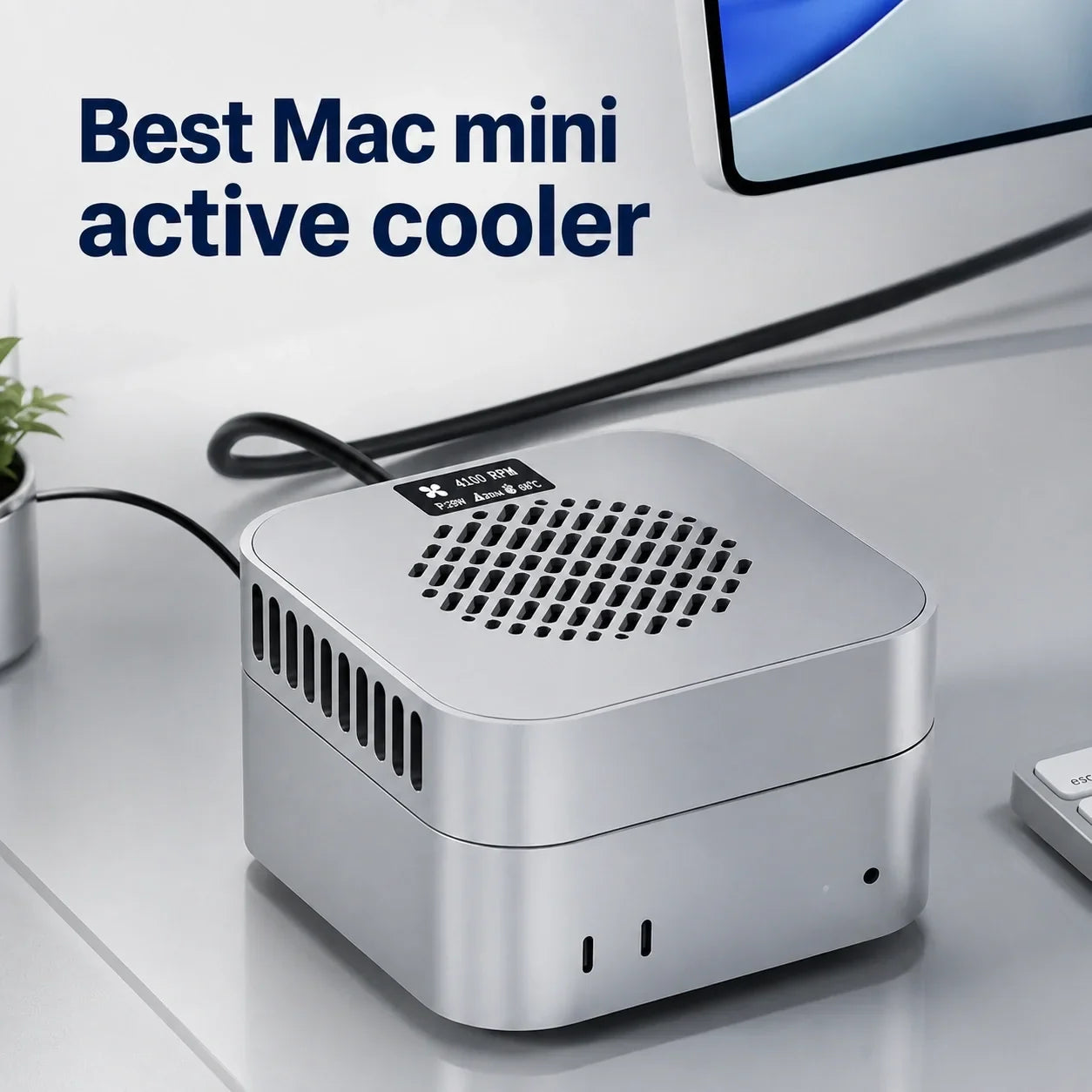
Per gli utenti di Mac mini M6 che eseguono regolarmente lunghe esportazioni video, modelli AI locali, rendering 3D o build di codice di grandi dimensioni, il Dissipatore attivo ZEERA MacFrost Pro + supporto in alluminio è uno degli aggiornamenti più specifici disponibili.
I test di ZEERA hanno registrato la temperatura più bassa del sensore del dissipatore di 15°C al Livello 1, 10.1°C al Livello 2 e 6.9°C al Livello 3. Il primo livello da 7W è la scelta migliore per la maggior parte delle sessioni lunghe; le modalità più rumorose da 20W e 30W sono progettate per carichi di lavoro sostenuti sempre più impegnativi.
Il Mac mini M6 ha già un sistema di raffreddamento interno per l'uso normale. Un dissipatore attivo dedicato diventa utile quando lo stesso compito che richiede un uso intensivo di CPU e GPU viene eseguito abbastanza a lungo da causare un accumulo continuo di calore.
MacFrost Pro affronta questo problema con il raffreddamento termoelettrico a contatto diretto sopra il Mac mini e una maggiore distanza per il flusso d'aria sotto di esso. Non è semplicemente un supporto con ventola: è un sistema combinato di dissipatore attivo + supporto in alluminio costruito attorno al formato compatto del Mac mini.

Risultati del test ZEERA MacFrost Pro: 7W vs 20W vs 30W
ZEERA ha testato tutti e tre i livelli di raffreddamento manuale e ha registrato la temperatura più bassa mostrata dal sensore del dissipatore stesso. All'aumentare della potenza e della velocità della ventola, la temperatura del sensore è scesa da 15°C a 10.1°C e infine a 6.9°C.
| Modalità di raffreddamento | Potenza | Velocità ventola | Temperatura sensore più bassa | Rumore misurato* | Miglior utilizzo |
|---|---|---|---|---|---|
| Livello 1 | 7W | 1.980 RPM | 15°C | 38 dB | Uso quotidiano e sessioni lunghe |
| Livello 2 | 20W | 2.880 RPM | 10.1°C | 55 dB | Esportazioni e carichi di lavoro sostenuti |
| Livello 3 | 30W | 4.080 RPM | 6.9°C | 60 dB | Massimo raffreddamento sotto carico estremo |
Come interpretare i risultati: La temperatura è misurata dal sensore MacFrost Pro nel sistema di raffreddamento, non dal sensore di CPU o GPU del Mac mini. Dimostra l'intensità di raffreddamento crescente di ogni modalità, ma i risultati effettivi varieranno in base alla temperatura ambiente, all'umidità, al contatto del pad termico, all'alimentazione e al carico di lavoro.
*ZEERA ha misurato il rumore a circa 50 cm dal dissipatore nel suo ambiente di test.

Livello 1: La migliore modalità di raffreddamento per Mac mini per l'uso quotidiano
Raffreddamento attivo efficace senza la massima velocità della ventola
Il Livello 1 è la modalità con cui la maggior parte dei possessori di Mac mini M6 dovrebbe iniziare. Utilizza 7W di potenza di raffreddamento e fa girare la ventola a 1.980 RPM, mentre ZEERA ha registrato una temperatura del sensore più bassa di 15°C.
A 38 dB nella misurazione di ZEERA, è il più silenzioso dei tre livelli manuali. La ventola rimane udibile in una stanza silenziosa, ma è considerevolmente più sopportabile durante una lunga sessione di lavoro rispetto alle due modalità superiori.
Questo livello è il migliore per il multitasking prolungato, l'editing fotografico, il lavoro di sviluppo e le esportazioni più leggere, dove si desidera un margine termico extra senza trasformare il desktop in un ambiente di test delle prestazioni.
Consigliato per: sessioni quotidiane lunghe, lavori creativi leggeri e utenti che danno priorità a un migliore equilibrio tra raffreddamento e rumore.

Livello 2: Raffreddamento più potente per lunghe esportazioni e lavori pesanti
Un netto miglioramento sia nella potenza di raffreddamento che nel rumore
Il Livello 2 aumenta la potenza di raffreddamento a 20W e la velocità della ventola a 2.880 RPM. Nel test di ZEERA, il sensore del dissipatore ha raggiunto una temperatura minima registrata di 10.1°C.
La temperatura più bassa della piastra fredda fornisce un percorso più forte per il calore per lasciare l'involucro in alluminio del Mac mini attraverso il pad termico in dotazione. Questo rende il Livello 2 più adatto a un carico di lavoro ripetibile che rimane pesante per più di un breve periodo.
Il compromesso è acustico: ZEERA ha misurato 55 dB a circa 50 cm. Questo è notevolmente rumoroso e può essere fastidioso durante le chiamate o il lavoro d'ufficio silenzioso, ma è più facile da giustificare durante un'esportazione non presidiata o un rendering con scadenza ravvicinata.
Consigliato per: esportazioni video 4K o 8K lunghe, attività AI locali sostenute, rendering 3D e build di software di grandi dimensioni.

Livello 3: Massimo raffreddamento da 30W per sessioni ad alte prestazioni
Il risultato più freddo, con il costo acustico più elevato
Il Livello 3 sblocca la piena potenza termoelettrica di 30W e aumenta la ventola a 4.080 RPM. ZEERA ha registrato la temperatura più bassa del sensore del dissipatore di 6.9°C, il risultato più freddo nel test a tre livelli.
Questo non è l'impostazione predefinita ideale per la navigazione o il lavoro d'ufficio. Il suo scopo è massimizzare il raffreddamento esterno durante un carico estremo e prolungato, quando il margine termico è più importante del silenzio.
ZEERA ha misurato 60 dB a circa 50 cm, quindi la ventola è molto rumorosa in un normale ambiente di lavoro. Usala selettivamente per i carichi di lavoro che possono beneficiare del raffreddamento extra, quindi torna al Livello 1 o Auto quando l'attività è completata.
Si consiglia un adattatore di alimentazione USB-C PD da 45W per un funzionamento stabile a piena potenza. Poiché il raffreddamento termoelettrico può abbassare una superficie al di sotto del punto di rugiada della stanza, monitora l'installazione in condizioni di umidità e interrompi il raffreddamento se appare umidità.
Consigliato per: rendering a massimo carico, esportazioni professionali ripetute, elaborazione AI intensiva e altre sessioni che privilegiano le prestazioni.

Come MacFrost Pro raffredda un Mac mini M6?
La maggior parte dei supporti per Mac mini si basa sull'elevazione passiva o indirizza un'altra ventola verso il computer. MacFrost Pro crea un percorso di trasferimento del calore separato attraverso l'involucro in alluminio del Mac mini.
Il dissipatore attivo si trova sopra il Mac mini. Un pad termico in silicone da 100 × 100 × 3 mm incluso migliora il contatto tra la piastra di raffreddamento termoelettrica e la superficie in alluminio del Mac.
Il calore si sposta dall'involucro alla piastra fredda, mentre la ventola del dissipatore rimuove il calore dal lato caldo del modulo termoelettrico. Non viene intenzionalmente soffiata aria nel Mac mini.
Nel frattempo, il supporto in alluminio solleva il computer dal basso. Ciò preserva lo spazio intorno alla ventilazione inferiore originale del Mac mini invece di competere con il suo design del flusso d'aria nativo.
Perché il dissipatore attivo + supporto in alluminio funzionano meglio insieme
Il sistema affronta due diverse esigenze termiche contemporaneamente. L'unità superiore aggiunge un raffreddamento attivo a contatto diretto, mentre l'unità inferiore offre al sistema di raffreddamento integrato del Mac mini maggiore spazio per respirare.
Dissipatore Attivo
- 127 × 127 × 29,4 mm
- Raffreddamento TEC fino a 30W
- Display OLED da 0,96 pollici
- Ingresso alimentazione USB-C
- Contatto diretto tramite pad termico
Mac mini M6
- L'involucro originale rimane visibile
- Le porte native rimangono accessibili
- Il raffreddamento interno continua a funzionare normalmente
- Il telaio in alluminio diventa parte del percorso di calore aggiunto
- Nessuna installazione di software richiesta
Supporto in alluminio
- 127 × 127 × 18 mm
- Spazio aggiuntivo per il flusso d'aria inferiore
- Apertura dedicata per il pulsante di accensione
- Anello di contatto in silicone
- Resistenza ai graffi e allo scivolamento

Design in alluminio CNC: da MacForge Gen3 a MacFrost Pro
Gli accessori Mac di ZEERA seguono un'idea riconoscibile: un aggiornamento funzionale dovrebbe avere un aspetto altrettanto curato del Mac che supporta.
Il ZEERA MacForge Gen3 esprimeva questa filosofia attraverso un involucro in alluminio ispirato al Mac Pro e una struttura focalizzata sul flusso d'aria. MacFrost Pro applica lo stesso equilibrio di estetica e utilità al raffreddamento attivo.
Entrambe le parti di MacFrost Pro sono lavorate a CNC in alluminio e condividono l'ingombro di 127 × 127 mm del Mac mini. Il risultato è un sistema desktop intenzionale piuttosto che una ventola generica per laptop posizionata accanto a un computer premium.
Il materiale è funzionale oltre che visivo. L'alluminio aiuta a distribuire il calore attraverso la struttura di raffreddamento, mentre la forma precisa mantiene il dissipatore, il Mac mini e il supporto allineati come un'unica pila.
Monitoraggio OLED e semplici controlli hardware
L'OLED integrato da 0,96 pollici mostra in tempo reale la temperatura del sensore del dissipatore, i giri al minuto della ventola, la tensione operativa e le informazioni sulla potenza. Non richiede un'app, un driver o un processo in background di macOS.
Tieni premuto il pulsante di accensione posteriore per tre secondi per accendere o spegnere il dissipatore. Una breve pressione scorre tra le modalità di raffreddamento disponibili.
La modalità Auto può regolare il raffreddamento in base alla temperatura quando non si desidera selezionare manualmente un livello fisso. Per un profilo di rumore prevedibile, tuttavia, un livello manuale è più facile da abbinare a un flusso di lavoro specifico.
Quale modalità MacFrost Pro dovresti usare?
- Scegli il Livello 1 per lunghe sessioni quotidiane e il miglior equilibrio complessivo tra raffreddamento e rumore.
- Scegli il Livello 2 quando un'esportazione, un rendering, un'attività AI o una build di codice prolungati richiedono un raffreddamento più forte e il rumore della ventola udibile è accettabile.
- Scegli il Livello 3 solo quando il massimo raffreddamento esterno è più importante del comfort acustico.
- Scegli Auto quando preferisci un funzionamento sensibile alla temperatura invece di un livello manuale fisso.
La regola pratica è semplice: usa la modalità più bassa che mantiene il tuo carico di lavoro ripetibile in esecuzione costante. Più potenza è utile solo quando il raffreddamento aggiuntivo produce un beneficio significativo per l'attività.
Chi dovrebbe acquistare un dissipatore attivo per Mac mini M6?
MacFrost Pro è più adatto a creatori, sviluppatori e utenti tecnici che mantengono il Mac mini M6 sotto carico continuo. È particolarmente rilevante per lunghe esportazioni video, rendering 3D, generazione AI locale, calcolo scientifico e compilazioni di grandi dimensioni.
È meno necessario per la navigazione web, i documenti, lo streaming e le brevi attività creative. In questi casi, il raffreddamento interno del Mac mini è normalmente sufficiente e il solo supporto in alluminio potrebbe essere l'aggiornamento più utile se lo spazio inferiore è limitato.
Un dissipatore esterno non dovrebbe inoltre essere utilizzato per nascondere un problema software, una ventilazione bloccata o un guasto hardware. Se il Mac si surriscalda inattivo, investigare la causa prima di aggiungere ulteriore raffreddamento.
Verdetto finale: Il miglior accessorio di raffreddamento specifico per Mac mini M6
Lo ZEERA MacFrost Pro si distingue perché combina tre elementi raramente ben integrati: fino a 30W di raffreddamento termoelettrico a contatto diretto, un supporto abbinato che preserva il flusso d'aria inferiore e una costruzione in alluminio CNC che si adatta visivamente a un Mac.
Il test a tre livelli di ZEERA rende anche facile comprendere il compromesso. Il Livello 1 è la raccomandazione per l'uso quotidiano, il Livello 2 è l'opzione per il lavoro sostenuto e il Livello 3 offre il risultato del sensore più freddo di 6.9°C per le sessioni di massimo raffreddamento.
Acquista ZEERA MacFrost ProDomande frequenti
Qual è il miglior dissipatore attivo per Mac mini M6?
Per carichi di lavoro professionali sostenuti, ZEERA MacFrost Pro è un'ottima opzione specifica perché combina un raffreddamento TEC fino a 30W con un supporto in alluminio CNC che preserva il flusso d'aria inferiore originale del Mac mini.
Ogni Mac mini M6 ha bisogno di un dissipatore attivo?
No. Il normale lavoro d'ufficio, la navigazione e lo streaming generalmente non richiedono un raffreddamento esterno. MacFrost Pro è progettato principalmente per carichi di lavoro lunghi che mantengono CPU e GPU sotto carico continuo.
Il risultato di 6,9°C è la temperatura della CPU del Mac mini?
No. È la temperatura più bassa registrata dal sensore di raffreddamento del MacFrost Pro nel test di Livello 3 di ZEERA. Non è la temperatura interna della CPU, GPU o del chip riportata da macOS.
Qual è la modalità MacFrost Pro migliore per l'uso quotidiano?
Il Livello 1 è il miglior punto di partenza. Fornisce 7W di raffreddamento attivo a 1.980 RPM ed è stato misurato a 38 dB, rendendolo notevolmente più silenzioso delle modalità da 20W e 30W.
La modalità da 30W è rumorosa?
Sì. ZEERA ha misurato circa 60 dB a 50 cm, quindi il Livello 3 è destinato a sessioni che privilegiano le prestazioni piuttosto che al lavoro quotidiano silenzioso.
Quale adattatore di alimentazione richiede MacFrost Pro?
Utilizzare un adattatore USB-C PD con una potenza nominale di 20W o superiore. ZEERA consiglia un caricabatterie USB-C PD da 45W per un funzionamento stabile al massimo livello di raffreddamento di 30W.
Il supporto in alluminio blocca il flusso d'aria del Mac mini?
No. Solleva il Mac mini per fornire maggiore spazio sotto il computer, mantenendo accessibili la ventilazione inferiore originale e il pulsante di accensione.
MacFrost Pro è compatibile con Mac mini M5 Pro e M4?
Sì. MacFrost Pro è progettato per i modelli Mac mini M6, M5 Pro e M4 che condividono l'attuale ingombro dell'involucro di 127 × 127 mm.









