If your iPhone 17 Pro Max doesn’t lay flat on a desk, you are not alone. The large camera module can make the phone wobble when you tap, type, or use it on a flat surface.
A regular case can help, but many cases solve the wobble problem by adding extra thickness around the camera area. That works for stability, but it also takes away the original iPhone feel.
For users who want an iPhone wobble fix without turning their phone into a bulky case setup, an ultra-thin magnetic back plate and lens cover can be a cleaner middle-ground solution.
That is exactly where ZEERA MagSkin Pro fits in. It is designed for iPhone 17 Pro and iPhone 17 Pro Max users who want a stronger MagSafe experience, a cleaner bare-phone feel, and a flatter, more stable back without using a bulky case.

Quick Answer: What Is the Best Way to Fix iPhone 17 Pro Max Wobble?
The best way to reduce iPhone 17 Pro Max wobble without using a bulky case is to level the camera area and create a flatter contact surface.
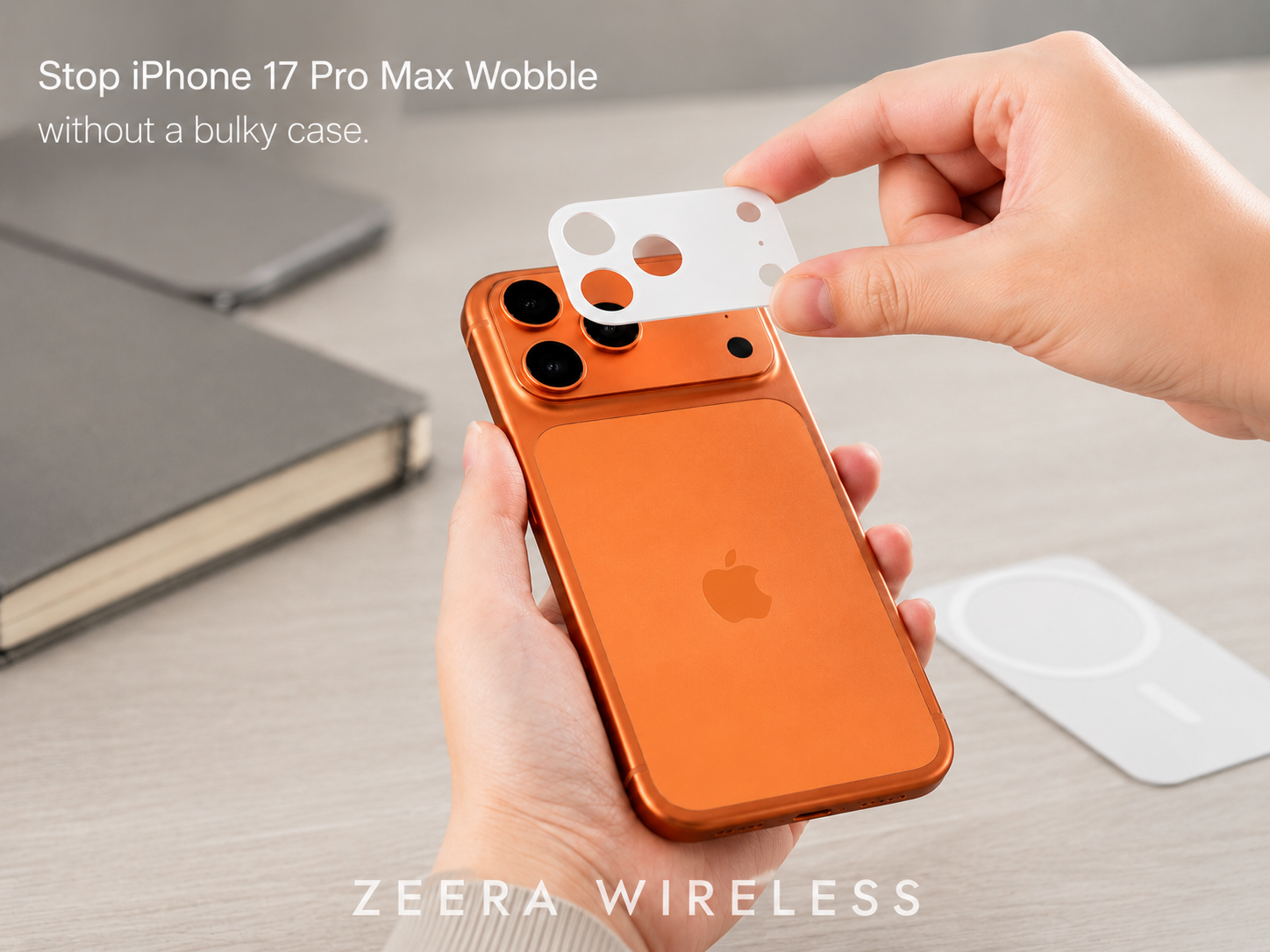
A traditional case can do this, but it usually adds bulk. A thinner option is a magnetic back plate paired with a camera-leveling lens cover. This helps the iPhone sit more evenly on desks and flat surfaces while keeping the phone closer to its original slim feel.
Why the iPhone 17 Pro Max Doesn’t Lay Flat
The reason the iPhone 17 Pro Max doesn’t lay flat is simple: the camera module is raised higher than the rest of the back.
When the phone is placed screen-up on a desk, the camera bump becomes one of the main contact points. As a result, the phone may rock slightly when you:
- tap the screen
- type on the keyboard
- swipe through photos
- use the phone on a desk
- place it on a wireless charger
- press near the upper corners
This does not mean anything is wrong with your iPhone. It is a design tradeoff. A larger camera system improves photography and video capability, but it also creates an uneven back surface.
For many users, the wobble is most noticeable when using the phone without a case. If you like the bare iPhone feel, the raised camera area becomes harder to ignore.

Why Most Lay-Flat iPhone Cases Add Too Much Bulk
Many users search for an iPhone 17 Pro Max case no wobble or an iPhone case that sits flat because they want the phone to feel more stable on a desk. Most traditional cases solve this by adding extra thickness around the camera area, creating a flatter back surface so the iPhone does not rock as much when you tap or type.
The problem is that this often makes the phone feel noticeably thicker and less like the original iPhone. For users looking for an iPhone 17 Pro Max lay flat case, the real goal is usually not heavy-duty protection. They want a slimmer way to fix iPhone wobble, reduce camera bump rocking, and keep the bare-iPhone feel.
That is why an ultra-thin magnetic back plate with a camera-leveling lens cover can make more sense. It works more like a thin iPhone 17 Pro Max case alternative than a bulky protective case, helping the phone sit flatter while keeping the setup clean, light, and MagSafe-friendly.
Ultra-Thin MagSafe Back Plate Series
ZEERA MagSkin Air Ultra-Thin Magnetic Plate
- Only 0.3mm thin
- MagSafe compatible
- Preserves Air feel
- Light back guard
- Case-free carry

ZEERA MagSkin Pro Ultra-Thin Magnetic Back Plate
- Ultra-thin Pro fit
- MagSafe compatible
- Bare-phone feeling
- Camera deco guard
- Minimal daily carry

ZEERA AirFlat Lens Cover for iPhone Air
- Makes back flat
- Stops desk wobble
- Protects camera lens
- Slim matching look
- Easy clean design

A Better Middle Ground: Ultra-Thin Back Plate + Lens Cover
A bulky case is not the only way to fix iPhone wobble.
For users who prefer using their iPhone 17 Pro Max without a full case, a two-part solution can make more sense:
- A camera-leveling lens cover to help reduce the uneven camera bump effect
- An ultra-thin MagSafe back plate to improve grip, back protection, and magnetic accessory support
ZEERA MagSkin Pro is built around this idea. It is not a traditional phone case. It is an ultra-thin magnetic back plate designed for users who want a minimal iPhone setup, better MagSafe strength, back protection, and reduced wobble while keeping the original iPhone feel.
This matters because the iPhone 17 Pro Max wobble problem is not only about protection. It is also about how the phone feels during everyday use.
The same minimal-accessory approach also works for iPhone 17 Air users. If you want to keep the phone slim while improving back and camera-area protection, ZEERA offers the AirFlat Pro lens cover for iPhone Air and the MagSkin Air ultra-thin magnetic plate.


How ZEERA MagSkin Pro Helps Fix iPhone 17 Pro Max Wobble
ZEERA MagSkin Pro solves the wobble problem in a more minimalist way than a regular case.
Instead of wrapping the entire phone, it focuses on the two areas that matter most for this issue: the back surface and the camera area.
1. The Lens Cover Helps Reduce Camera Wobble
The raised camera area is the main reason the iPhone 17 Pro Max rocks on a table.
ZEERA MagSkin Pro includes an adhesive flush camera-leveling lens cover. The lens cover is designed to sit nearly flush with the camera area after installation, helping create a more balanced contact surface.
This helps reduce the rocking motion when the phone is placed on a desk, table, nightstand, or flat charger.
It is especially useful for users who often use their iPhone while it is lying flat, such as when:
- replying to messages at a desk
- checking notifications during work
- editing photos on a table
- using the phone beside a laptop
- charging on a flat surface
- tapping the screen while the phone is screen-up
A small wobble may not sound serious, but it becomes annoying when it happens dozens of times a day.

2. The Back Plate Keeps the Bare-iPhone Feel
Many users buy the iPhone 17 Pro Max because they like the design, materials, and premium feel. A thick case can hide all of that.
MagSkin Pro is designed for users who prefer a slim, case-free iPhone feel. The magnetic back plate measures about 1.15 mm thick, with the iPhone 17 Pro Max version weighing about 12.8g and the iPhone 17 Pro version weighing about 11g.
That makes it very different from a traditional protective case.
It does not try to turn your iPhone into a rugged device. Instead, it gives you a cleaner way to improve daily usability while keeping the phone slim.
This is why MagSkin Pro makes sense for users searching for:
- iPhone 17 Pro Max without case
- thin iPhone 17 Pro Max case alternative
- bare iPhone feel
- ultra-thin MagSafe back plate
- iPhone 17 Pro Max no case protection

3. The Magnetic Back Plate Improves MagSafe Grip
Another common issue with using an iPhone without a case is MagSafe strength.
Some users love the bare-phone feel but still want reliable magnetic attachment for:
- MagSafe chargers
- MagSafe car mounts
- magnetic wallets
- MagSafe stands
- magnetic grips
- tripod mounts
MagSkin Pro includes a built-in magnetic array to help strengthen MagSafe accessory connection and alignment. ZEERA’s product page specifically mentions improved magnetic stability for chargers, car mounts, stands, wallets, and magnetic grips.
That makes it more than just an anti-wobble accessory. It also supports the way many iPhone users actually use MagSafe every day.

Who Should Use ZEERA MagSkin Pro?
MagSkin Pro is best for iPhone 17 Pro Max users who want a slimmer way to reduce camera wobble without using a bulky case.
It is a good fit if you:
- want your iPhone 17 Pro Max to sit flatter on a desk
- prefer the bare-iPhone feel over a traditional case
- use MagSafe chargers, car mounts, or magnetic accessories often
It is not the best fit if you need rugged drop protection or full side-frame coverage.
MagSkin Pro is not trying to replace every iPhone case. It is designed for users who already know they want a thinner, cleaner, more minimal iPhone setup.
The Best Use Case: A Minimal iPhone Setup That Sits Flatter
The best way to understand MagSkin Pro is not as a case replacement for everyone.
It is better understood as a flat-back MagSafe case alternative.
It is for users who like the original iPhone 17 Pro Max feel but want to solve three daily problems:
- the phone wobbles on a desk
- the camera area needs light protection
- MagSafe accessories could feel more secure
If that describes you, MagSkin Pro makes a lot of sense.
It gives you a cleaner solution than a bulky case, while still addressing the parts of the iPhone experience that feel unfinished when using the phone bare.
ZEERA Mac Aluminum Case Series
ZEERA MacForge CNC Mac Studio Aluminum Case
- CNC aluminum
- Mac Pro style
- Cooling grille
- Tool-free fit
- Studio guard

ZEERA MacForge Gen3 CNC Aluminum Mac Mini Case
- Mac Pro grille
- CNC chassis
- Better airflow
- SSD expansion
- Front ports

Final Verdict: The Best iPhone Wobble Fix for No-Case Users
If your iPhone 17 Pro Max doesn’t lay flat, the easiest fix is to level the camera area.
A regular case can do that, but it often adds more bulk than many users want. For people who love the original iPhone design, that can feel like overkill.
ZEERA MagSkin Pro offers a more minimal solution. It combines an ultra-thin magnetic back plate with a camera-leveling lens cover to help reduce wobble, improve MagSafe grip, protect the camera area, and keep the phone feeling slim.
It is not a rugged case. It is not designed for heavy drop protection. And it does not cover the sides or full frame.
But for users searching for an iPhone 17 Pro Max case no wobble solution without the bulk of a traditional case, MagSkin Pro is one of the cleanest approaches.
It is made for people who want their iPhone to feel like an iPhone — just flatter, more stable, and more MagSafe-friendly.
FAQ
Why doesn’t my iPhone 17 Pro Max lay flat?
Because the raised camera module sits higher than the rest of the back. When the phone is placed on a flat surface, the camera bump can cause slight rocking during taps or typing.
How can I make my iPhone 17 Pro Max sit flatter without a thick case?
You can either use a lay-flat case or a thinner back-plate solution. If you prefer a bare-iPhone feel, an ultra-thin magnetic back plate with a camera-leveling lens cover can help reduce rocking without adding the bulk of a traditional case.
Is there an iPhone 17 Pro Max case that does not wobble?
Yes, some cases are designed to level the camera area so the phone sits flatter on a desk. The tradeoff is that many of them add extra bulk, especially around the camera bump.
Will a magnetic back plate affect MagSafe charging?
A well-designed magnetic back plate should maintain MagSafe alignment and wireless charging compatibility. ZEERA MagSkin Pro is designed to support MagSafe chargers, wallets, stands, and car mounts while keeping the setup slim.
Can I still use MagSafe wallets and car mounts?
Yes. A magnetic back plate is especially useful if you want a slim setup while keeping stronger attachment for MagSafe wallets, charging stands, and car mounts.
Is it difficult to install?
No. Installation only takes a few minutes. For the best fit, clean the back of the iPhone carefully before applying the back plate.
Is it removable?
Yes, but frequent removal can gradually reduce adhesive performance over time. For best results, apply it carefully once and avoid removing it unnecessarily.
Will it leave residue on the iPhone?
It is designed for clean removal, but residue risk can depend on heat, usage time, and how it is removed. Peel it off slowly instead of pulling aggressively from one corner.
Will it scratch the back of my iPhone?
Not if the phone is clean before installation. Dust, sand, or debris trapped underneath can create friction marks over time, so cleaning the back first is important.
Does it protect the phone from drops?
No. It can help protect the back and camera area from daily surface contact, but it is not a rugged case and does not provide full side or corner protection.
Will it affect heat dissipation?
Any added layer can slightly change how heat feels on the back of the phone. For normal use, this should be minor; heat during gaming, navigation, or wireless charging depends more on workload and environment.
Who is MagSkin Pro best for?
It is best for users who like the bare-iPhone feel but want better desk stability, stronger MagSafe attachment, and light protection for the back and camera area. It is not for users who need full drop protection.