
Quick Answer
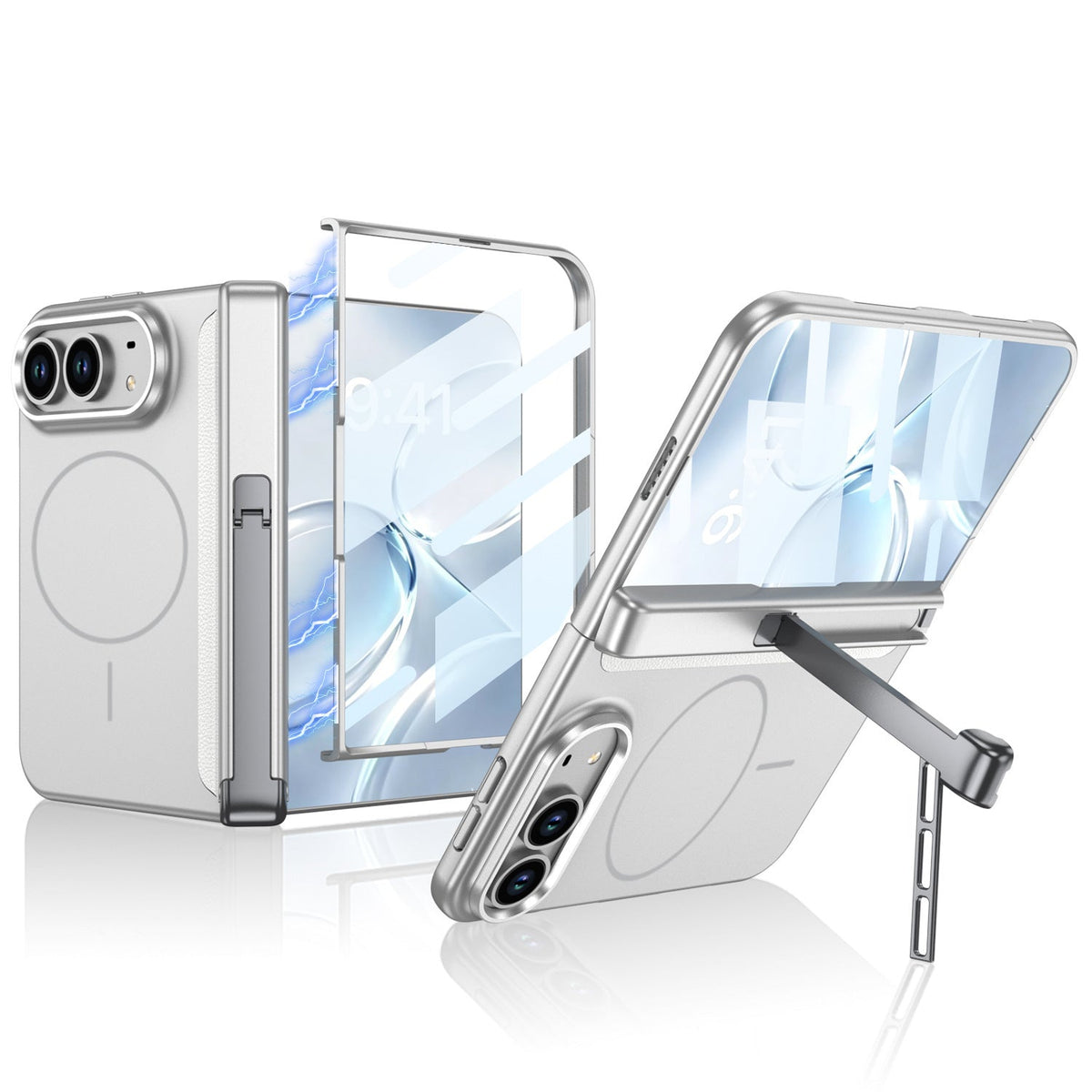
Usually, no extra glass is needed with an iPhone Duo case that already has a built-in outer-screen protector.
Do not stack a second protector underneath or on top unless the exact case-and-protector combination is approved.
Extra thickness can affect front-frame seating, edge clearance and touch response; two layers do not establish better drop protection.
FoldArmor Pro and FoldStand Pro explicitly list integrated tempered glass; FoldSlim Pro and FoldPivot Pro list built-in outer-screen protection.
For FoldFlex Pro, confirm the supplied front-frame configuration. This guide concerns the outer display, not adding glass to the flexible inner screen.
What does a built-in screen protector actually include?
An iPhone Duo case with a built-in screen protector combines the front frame and outer-display coverage in one assembly. It is different from a raised screen lip, an empty front bumper or a separate glass sheet supplied in the box. Check the exact product description rather than judging from the words “full cover.”
Think of the integrated front section as one fitted system. Adding another layer changes that system. The case collection above includes different designs; the five options below should not all be assumed to use the same protector material or front-frame configuration.
Product details checked October 15, 2026. Recommendations below are based on listed construction and fit considerations, not a ZEERA double-glass impact test or a measured clearance specification.
Which ZEERA iPhone Duo cases have integrated outer-screen protection?
FoldArmor Pro: integrated tempered glass and hinge coverage
The front frame incorporates tempered glass for the outer display. Choose it if you want the front protector, hinge coverage, a hinge kickstand and MagSafe in one case. A separate outer glass sheet is not needed to provide the protection already integrated into the frame.
FoldStand Pro: integrated tempered glass with a two-way stand
FoldStand Pro also combines its front frame with tempered glass for the outer screen. Its two-way hinge stand is the reason to consider it for portrait and landscape desk viewing. Use the integrated front section as designed rather than assuming it leaves room for a second glass layer.
FoldSlim Pro: built-in front protection with a simpler rear profile
FoldSlim Pro lists a built-in outer-screen protector, a lightweight PC shell and a fixed MagSafe ring without a rotating stand. It suits buyers who want an integrated front protector and fewer moving rear parts. The listing's integrated-protection claim does not establish compatibility with additional glass.
FoldPivot Pro: built-in front protection and a rotating stand
FoldPivot Pro integrates outer-screen protection into its front section and adds a 360° rotating MagSafe stand. Choose it when you want a stand in a slim, open-hinge design. Do not treat the front assembly as an empty frame made for an arbitrary third-party protector.
FoldFlex Pro: confirm the exact front-frame configuration
FoldFlex Pro is worth comparing if a Kickstand with Integrated Finger Strap, hinge coverage and MagSafe are your priorities. The current listing emphasizes those functions and raised screen edges, but does not clearly specify an integrated outer-screen protector.
Confirm what is supplied with your selected version before buying extra glass. A raised screen lip is not itself a screen protector. If your supplied front section includes integrated protection, use the no-stacking approach; if it is an open frame, ask about the separate protector's exact fit.
For broader differences between the cases, see our ZEERA iPhone Duo case comparison. Protector compatibility and stand preference are separate buying decisions.
Can you put extra glass underneath or on top of the built-in protector?
Underneath: do not assume the front frame has spare clearance
A glass sheet already attached to the phone sits between the display and the case's integrated front section. Its thickness, adhesive and edge shape can affect how that section seats. If the frame needs extra force, lifts at a corner or will not sit evenly, stop. Do not use stronger adhesive to force incompatible layers together.
On top: a second surface is not automatically a suitable bonding surface
Glass sold for the bare outer display may not match the shape, coating or edge dimensions of the case's protector. Stacking it on top can introduce another adhesive interface and an exposed edge. Use an additional layer only when the exact pairing is expressly supported—not merely because both products say “for iPhone Duo.”
These are potential fit problems, not a claim that every double-layer setup will fail. ZEERA has not supplied a universal extra-glass thickness allowance for the combinations discussed here.
What problems should you watch for with two screen-protection layers?
Front-frame lift or incomplete seating
One corner may stand proud, an edge may fail to settle, or the front section may move after installation. Extra glass is one possible cause, alongside incorrect alignment or an unsuitable protector footprint. If the frame is loose, our loose front-frame guide covers the broader attachment problem.
Bubbles, dust or a visible gap
Multiple surfaces create more places for dust and imperfect contact. A bubble does not prove the display is damaged, but pressing harder is not a reliable fix. Inspect the installation and use only the cleaning and refitting method specified for the case.
Missed taps or difficult edge gestures
If touch behavior changes after adding layers, check the accessory setup before assuming the phone is defective. Apple's general touchscreen troubleshooting includes cleaning the screen and removing cases or screen protectors. That guidance is a diagnostic step, not approval to dismantle an integrated case protector. See Apple's touchscreen support instructions.
How should you install a case with integrated screen protection?
- Identify the front section. Check whether it contains permanent integrated protection, an open window or a separately supplied protector.
- Check any protector already on the outer display. If another third-party sheet is installed, confirm compatibility before fitting the integrated frame over it. Remove only a user-added outer protector, following its manufacturer's removal instructions, if required.
- Distinguish shipping liners from permanent parts. Peel only liners identified for removal in the installation instructions. Do not pull out the integrated protective panel.
- Clean and align as instructed. Work in a clean area and avoid trapping dust. Use the supplied adhesive only as directed.
- Seat the frame gently. Stop if it needs abnormal pressure, lifts at an edge or interferes with normal opening and closing. Never force the phone shut to seat the case.
- Check everyday use. Verify touch response, edge gestures and visual clarity before relying on the installation. Contact support with photos if anything does not fit.
What if you already use privacy glass, matte glass or a thin film?
Choose one compatible front-protection setup. If a particular privacy or matte protector matters more to you, look for a case whose open-front design explicitly fits that protector. If simpler installation is the priority, an integrated-protector case avoids having to match two separately designed products.
A thin film is not automatically compatible either: its edges, adhesive and position still matter. There is no universal answer based only on a “0.3 mm,” “9H” or “case-friendly” label. Ask about the exact case version and protector model.
Do not remove bonded case glass to create an open frame unless ZEERA provides a supported procedure. If the built-in protector cracks or scratches, ask about the appropriate front-frame or case replacement; do not assume a separate replacement panel is available.
Does this advice also apply to the flexible inner display?
No—the two displays require separate guidance. Integrated outer-screen protection does not establish protection for the inner display. Do not transfer rigid outer-display glass onto the folding screen or peel a factory inner-display layer as part of case installation. Follow Apple's model-specific care and service instructions for the inner surface. Our iPhone Duo cover-layer guide explains why that surface is a separate topic.
Buying verdict: integrated protector or separate glass?
For an all-in-one front assembly: compare FoldArmor Pro and FoldStand Pro for explicitly listed tempered glass, or FoldSlim Pro and FoldPivot Pro for listed integrated outer-screen protection.
For a specific separate protector: choose a case with confirmed clearance for that exact product. Confirm FoldFlex Pro's supplied front configuration rather than assuming its grip and MagSafe functions establish screen-protector compatibility.
The useful upgrade is a correctly fitted system—not simply a second glass sheet. No case-and-protector combination makes the phone unbreakable or establishes waterproofing.
Related iPhone Duo guides
- Does iPhone Duo need a screen protector? Outer and inner display guidance
- Why an iPhone Duo front frame can come loose
- Choosing a case with MagSafe, a stand and screen protection
- Compare ZEERA iPhone Duo cases by feature
- iPhone Duo case buying guide: slimness, wallets and hinge protection
- iPhone Duo cover layer and inner-screen care explained
Sources and compatibility limits
Checked October 15, 2026. Product construction is based on ZEERA's current listings. The advice against unapproved stacking is a fit-based recommendation, not a published test of every third-party protector. No universal clearance, double-layer touch-performance result or improved impact rating is claimed. Confirm your exact configuration if its packaging or supplied parts differ from the listing.
- ZEERA FoldArmor Pro: integrated tempered-glass outer protector
- ZEERA FoldStand Pro: integrated tempered glass and two-way hinge stand
- ZEERA FoldSlim Pro: built-in outer-screen protection
- ZEERA FoldPivot Pro: integrated front protector and rotating stand
- ZEERA FoldFlex Pro: listed grip, hinge protection and MagSafe features
- Apple Support: troubleshooting an unresponsive touchscreen
FAQ: built-in screen protector compatibility
Can I leave my existing glass on when switching to an integrated-protector case?
Do not assume so. Confirm that exact pairing first. Existing glass can change front-frame clearance even when both products are made for iPhone Duo. If the pairing is not approved, choose one supported protection system.
Does “case-friendly” glass work with every built-in protector?
No. The label may describe clearance around an ordinary case lip, not space beneath an integrated front panel. Check the dimensions and the exact case-and-protector combination.
Is every built-in screen protector tempered glass?
No. “Built-in” describes how protection is supplied, not necessarily its material. FoldArmor Pro and FoldStand Pro explicitly list tempered glass. Check the material specification for other models rather than transferring one product's claim to the whole range.
Should I remove the built-in protector if touch response changes?
Do not dismantle a bonded panel. Check for shipping liners, dust, incorrect seating or an unapproved extra protector, and follow the case instructions. If the problem persists with the intended setup, contact support. Persistent screen faults may require device service.
Will two glass layers give twice the protection?
That conclusion is not supported. Impact performance depends on the whole assembly, fit and impact conditions. An extra layer is not a substitute for a compatible case and does not establish a higher drop rating.
What should I send ZEERA to check screen-protector compatibility?
Send the case name and selected version, the separate protector's brand and model, whether it is already installed, and photos of the front frame and any lifting edge. State whether you mean the outer display or inner screen.









