
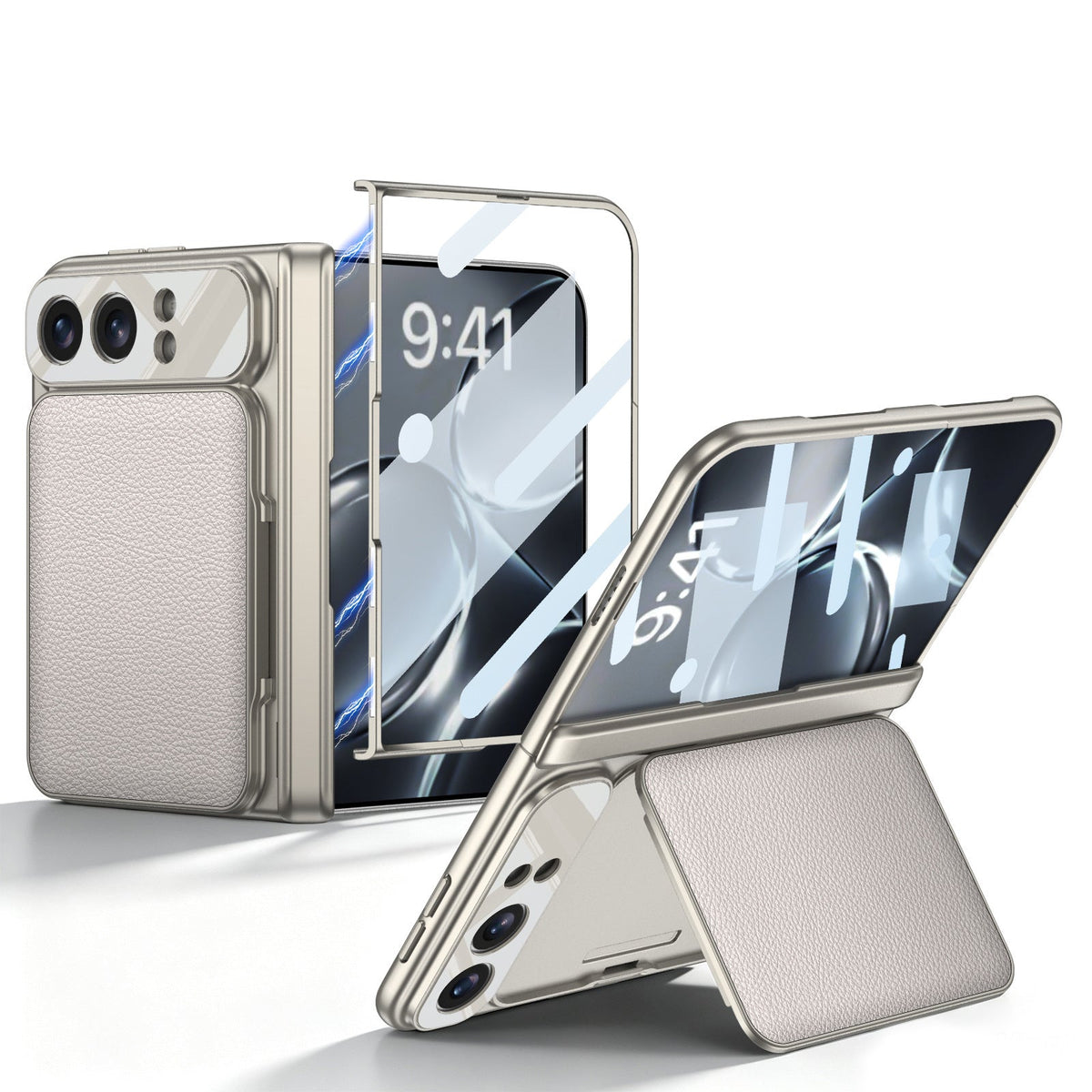
Quick Answer
For hinge-based support, choose ZEERA FoldArmor Pro for a single-section stand or ZEERA FoldStand Pro for a two-section design with portrait and landscape viewing.
For cards and hands-free viewing together, choose ZEERA FoldWallet Pro; for an optional detachable ring stand, choose ZEERA FoldAero Pro with the ring accessory selected.
For an integrated rear ring, compare ZEERA FoldFlex Pro and ZEERA FoldPivot Pro: FoldFlex adds a finger strap and hinge coverage; FoldPivot has a 360° rotating stand and an open hinge.
For a camera-frame stand, choose ZEERA FoldGrip Pro; for a recessed pop-out rear stand, compare ZEERA FoldTitan Pro and ZEERA FoldPen Pro.
The right iPhone Duo kickstand case depends on viewing orientation, pocket comfort and whether you want the stand permanently attached. FoldTitan Pro does not support MagSafe.
Which iPhone Duo kickstand design fits your routine?
Start with what happens after you put your phone down. Watching a video at lunch, keeping a call upright and reading while occasionally tapping the screen place different demands on a stand. Its location, opening mechanism and support geometry matter more than the word “kickstand.”
This guide compares nine ZEERA cases across seven stand designs. Recommendations are based on listed features and ZEERA-supplied mechanism details, checked for this guide on October 18, 2026. They are design-based buying assessments; comparative tipping resistance, joint endurance and exact angle ranges have not been measured here.
iPhone Duo kickstand cases compared at a glance
Use this overview to narrow your shortlist, then compare the tradeoffs below. A rotating ring, a two-section hinge stand and a wallet panel achieve support in different ways.
| Case | Stand design | Main reason to choose it |
|---|---|---|
| ZEERA FoldArmor Pro | Single-section hinge stand | A straightforward hinge-integrated prop. |
| ZEERA FoldStand Pro | Two-section hinge stand | Portrait and landscape viewing. |
| ZEERA FoldWallet Pro | Wallet-panel stand | Card storage and a stand in one case. |
| ZEERA FoldAero Pro | Optional detachable magnetic ring | Remove the stand when you want a simpler carry setup. |
| ZEERA FoldFlex Pro | Integrated rotating rear ring | A stand plus an integrated finger strap. |
| ZEERA FoldPivot Pro | Integrated 360° rotating rear ring | An always-attached rotating stand with an open hinge. |
| ZEERA FoldGrip Pro | Camera-frame kickstand | A camera surround that opens into a support. |
| ZEERA FoldTitan Pro | Recessed pop-out rear stand | A stand integrated into a rugged case; no MagSafe. |
| ZEERA FoldPen Pro | Recessed pop-out rear stand | A built-in stand alongside stylus storage. |
Stand type does not establish total case thickness, hinge protection or wireless-charging compatibility. For the shell and finish differences, see our iPhone Duo case materials comparison.
How the seven types of iPhone Duo kickstand work
1. Single-section hinge stand: FoldArmor Pro
ZEERA FoldArmor Pro builds a single-section stand into the hinge-protection structure. Its listing describes an approximately 45° kickstand, combining hinge coverage, outer-screen glass and a viewing prop in one case.
Why choose it: You want to open one support section for casual viewing and fold it away afterward. It suits buyers who want a protective case with a useful stand rather than a more elaborate viewing mechanism.
Tradeoff: A single-section structure offers fewer ways to reposition its support than a two-section design. The stated angle should not be read as a continuously adjustable range or a promise that every orientation will work.
Choose over FoldStand: When straightforward deployment matters more than switching regularly between upright and sideways viewing.
2. Two-section hinge stand: FoldStand Pro
ZEERA FoldStand Pro uses two stand sections in the hinge area. The practical distinction is its listed support for both portrait and landscape viewing: upright for calls or scrolling, sideways for video.
Why choose it: Your desk routine changes throughout the day. You want a built-in support that can accommodate more than one orientation without attaching a separate rear accessory.
Tradeoff: There are more support positions to understand when setting it up. Two sections do not automatically mean infinite angles, greater load capacity or better durability.
Choose over FoldArmor: When portrait viewing is a regular requirement. FoldStand is the clearer starting point here because its two-orientation function is explicitly described.
3. Wallet-panel stand: FoldWallet Pro
ZEERA FoldWallet Pro combines a two-card vegan-leather wallet with a panel that opens into a kickstand. The wallet itself supplies the support, so you are carrying one integrated system rather than a separate card holder and stand.
Why choose it: You carry a payment card and another essential card, then use your phone for occasional hands-free viewing at lunch, at a hotel or beside your laptop.
Tradeoff: Card storage adds material behind the phone. You also need room for the panel to open; its viewing position depends on the wallet structure rather than a rotating ring.
Choose over a ring: When reducing the number of separate everyday items is more useful than changing the support direction frequently.
4. Detachable ring stand: FoldAero Pro
ZEERA FoldAero Pro takes a modular approach: its optional matching MagSafe ring stand attaches magnetically and can be removed. The case itself has no built-in kickstand.
Why choose it: You want a slim aramid shell most of the time and a grip or stand only when needed. Remove the accessory for a cleaner rear profile; reattach it for a viewing session.
Tradeoff: The accessory becomes another item to keep track of. Magnetic attachment can separate, so do not treat the ring as a permanently secured carrying handle.
Configuration matters: Select “With Ring Stand” to receive it. The listed 18.2g case weight excludes the ring. FoldAero has no hinge cover or integrated outer-screen glass; see our ultra-thin case weight and thickness guide for the separate bulk discussion.
5. Integrated rotating rear ring: FoldFlex Pro vs FoldPivot Pro
Both designs keep a rear ring stand attached to the case. Unlike FoldAero’s optional accessory, the support stays with the phone when folded away.
ZEERA FoldFlex Pro: Choose it when handheld grip is as useful as desk viewing. Its Kickstand with Integrated Finger Strap combines the ring with an auto-retracting silicone finger hold, and the case adds hinge coverage. Solid-color versions have a PU-leather back; the clear version uses PC.
ZEERA FoldPivot Pro: Choose it for a 360° rotating ring in a streamlined PC case with an integrated outer-screen protector. It leaves the hinge exposed, which is an important difference from FoldFlex.
Tradeoff: The ring mechanism remains on the rear even when you do not need it. Rotating the support changes its direction; it does not guarantee every screen angle or phone posture will remain stable.
Decision: Start with FoldFlex for grip plus hinge coverage, or FoldPivot for an open-hinge case with an explicitly specified 360° ring.
6. Camera-frame stand: FoldGrip Pro
ZEERA FoldGrip Pro turns its aluminum-alloy camera surround into a multi-angle kickstand. The support opens from the camera area rather than from the hinge or a central rear ring.
Why choose it: You want the stand to share an existing case feature. FoldGrip also combines hinge coverage, a wrist strap and stylus storage, making it worth comparing when handling features matter alongside viewing.
Tradeoff: A stand near the camera creates a different support layout from a centrally placed ring. Position the phone carefully for your chosen screen orientation, particularly before tapping near an unsupported edge.
Choose over a ring: When you prefer the camera surround to perform the stand function. Select the iPhone Duo version; the listing also offers a Galaxy Z Fold8 model.
7. Recessed pop-out rear stand: FoldTitan Pro vs FoldPen Pro
These designs store the stand within the rear panel and let it pop out for viewing. “Pop-out” describes the deployable support; it does not mean either stand is motorized or opens automatically.
ZEERA FoldTitan Pro: The rugged option combines an integrated kickstand, reinforced protective structure and outer-screen glass. Choose it when that protective construction is your priority. It does not support MagSafe, so it is not the right choice for a magnetic-accessory routine.
ZEERA FoldPen Pro: A PC case with an integrated stand, outer-screen tempered glass, hinge protection and stored stylus. Choose it when you want the viewing support and pen to travel with the phone. The stylus-release button ejects the pen from its slot; it should not be confused with a stand-release button.
Tradeoff: Recessing the stand keeps the mechanism within the back-panel design, but does not prove the complete case is thinner. Compare the surrounding frame and pen compartment as well.
What makes a kickstand useful on a foldable phone?
Stand shape alone cannot tell you which case will be most stable. The following are practical design considerations, not results from comparative testing.
Viewing orientation and touch interaction
A support that works for watching a video may feel different when you repeatedly tap a high corner of the screen. Your finger applies force beyond the phone’s resting load. Check the exact folded or unfolded posture and orientation you plan to use.
For calls, consider camera position as well as screen visibility. For regular portrait use, start with a design whose listing specifically describes that function, such as FoldStand Pro.
Contact points, surface and clearance
Stability depends on where the case and stand meet the table, the spread of those contact points and the position of the phone’s weight above them. A metal stand is not automatically more stable than a plastic one.
Use a firm, level surface. Allow space for the support to open, and keep the phone near your hand while finding a supported position. Soft bedding and uneven tray tables change the setup.
Pocket comfort and magnetic accessories
Check the phone with the stand fully stowed. A hinge stand changes the folding-side profile; a rear ring changes the back; a wallet adds card storage; a detachable ring lets you remove that component.
For FoldAero, remove the detachable ring before placing a charger directly against the case. FoldFlex’s listing instructs users to retract the strap and fold the ring flat for compatible wireless charging. FoldTitan has no MagSafe support. Do not assume that a wallet panel or recessed stand permits wireless charging merely because another model does.
For attachment and charger-clearance questions, read our iPhone Duo magnetic accessory fit guide. A magnetic connection and a physically suitable accessory are separate checks.
Which iPhone Duo kickstand case should you buy?
Choose by your most frequent task: FoldArmor for a straightforward hinge prop; FoldStand for portrait and landscape; FoldWallet for cards; FoldAero with its optional ring for removable support.
For a permanently attached rear ring, compare FoldFlex’s finger strap and hinge cover with FoldPivot’s open-hinge design. Choose FoldGrip for a camera-frame stand, FoldTitan for rugged construction without MagSafe, or FoldPen when stored stylus access matters.
Browse the ZEERA iPhone Duo case collection to check the exact model, configuration and current product details before ordering.
Frequently asked questions
Does a 360° ring stand provide 360° of screen tilt?
No. Rotation describes how the ring turns around its mounting point. The ring’s opening angle and the phone’s supported viewing angle are different measurements.
Is a two-section hinge stand automatically stronger?
No. Two sections create additional support configurations. Strength and endurance also depend on the joints, materials and load path; section count alone does not establish a ranking.
Can I use a kickstand while writing on the screen?
Do not assume a viewing stand is a drawing support. Writing applies repeated pressure, and a case stylus does not establish pressure-sensitive pen support. For sustained handwriting, use a position and support intended for that task.
Does every FoldAero Pro include the detachable ring?
No. Choose the With Ring Stand configuration to receive the optional matching accessory. The Without Ring Stand configuration contains the case without that ring.
Should I leave the stand open when folding or carrying the phone?
Stow the stand before pocketing the phone. Follow the model’s opening and closing instructions, and stop if any part catches or resists; do not use the stand as leverage on the phone’s hinge.
Which case combines a kickstand with a pen-ejection button?
FoldPen Pro combines a built-in rear stand with stylus storage and a button that releases the pen. The button’s pen-ejection function is separate from deploying the stand.
Related articles
- iPhone Duo Case Buying Guide: Slim, Wallet or Hinge Protection?
- Aramid Fiber vs PC vs Vegan Leather: iPhone Duo Case Materials
- Ultra-Thin iPhone Duo Cases: Weight and Bulk Explained
- Can iPhone Duo Hinge Protectors Scratch the Hinge?
- iPhone Duo Case Falling Off? Fix a Loose Front Frame
- FoldFolio Pro vs FoldWallet Pro: Wallet Case Comparison
Sources and method: ZEERA product listings linked within each comparison, plus mechanism details supplied by ZEERA for this guide. Where exact angle ranges, stand dimensions or comparative test results are unavailable, no numerical ranking is assigned. Recommendations reflect the described designs and intended uses.






