
Updated: August 29, 2026
Quick Answer
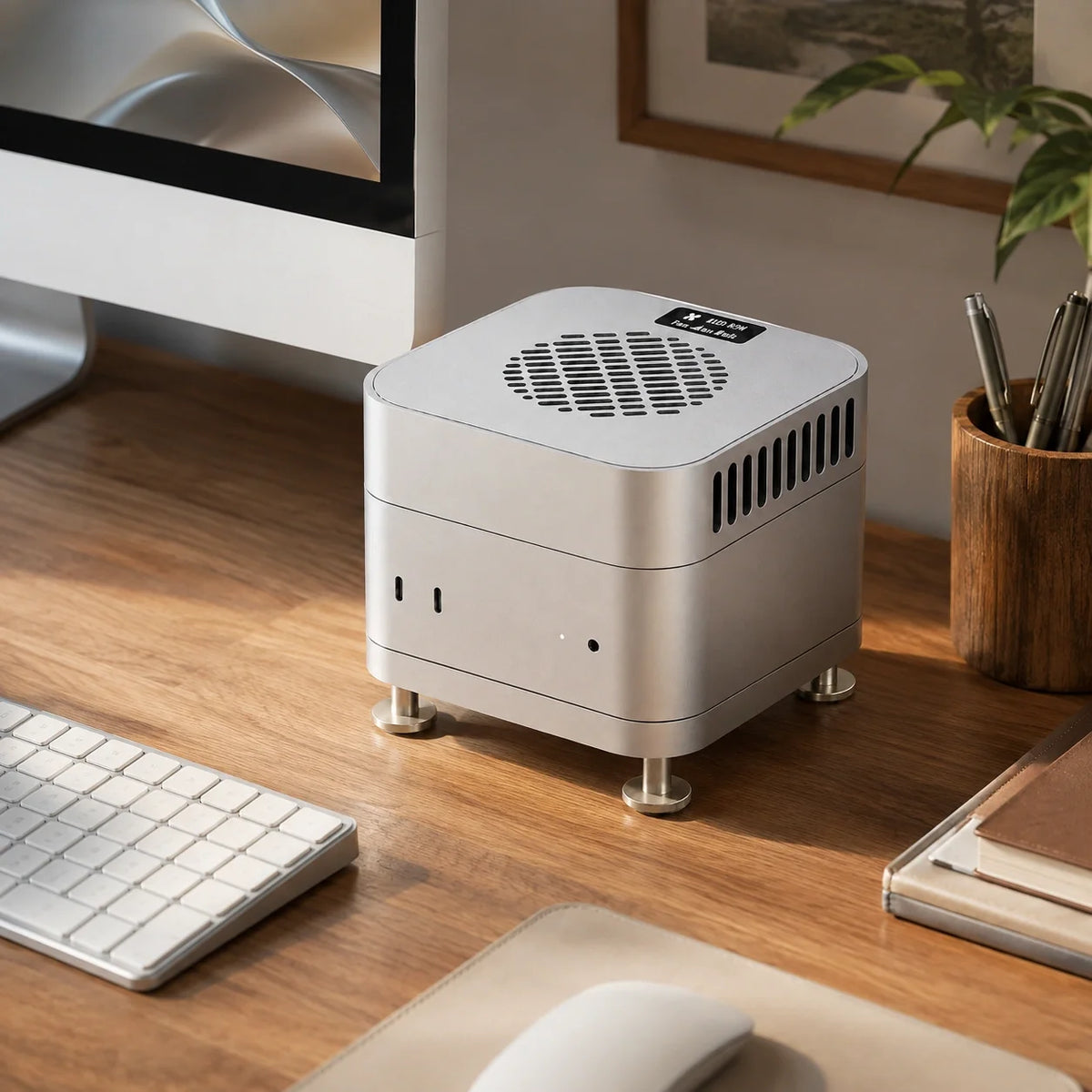
A warm Mac mini is usually normal. If it slows down during long video exports, local AI generation, 3D rendering or large code builds, first clear its bottom vents, use a hard surface and check Activity Monitor. Raising the Mac improves access to cooler air. For users who need more thermal headroom during prolonged high-load workloads, the ZEERA MacFrost Pro Active Cooler for Mac Mini M6, M5 Pro & M4 uses top-contact thermoelectric cooling to draw heat through the Mac mini’s aluminum enclosure, without directing dust or recently exhausted hot air back into the bottom intake.

Key Facts
| Question | Short Answer |
|---|---|
| Is a hot Mac mini automatically overheating? | No. The aluminum enclosure can feel hot because it spreads heat away from internal components. |
| Where does the compact Mac mini breathe? | Its intake and exhaust openings are divided into different sections around the bottom assembly. |
| Does lifting a Mac mini help? | Yes, when a desk, shelf or accessory restricts the clearance beneath the vents. |
| What is the weakness of a bottom fan? | It can move more dust toward the intake and may recirculate warm exhaust if airflow is poorly directed. |
| Who benefits most from active cooling? | Users running long, repeatable CPU/GPU workloads where performance declines as the system heats up. |
Is Your Mac mini Really Overheating, or Just Running Warm?
Mac mini M6, M5 Pro and M4 systems can become warm during demanding work. Heat at the top or sides is not, by itself, proof of a fault.
The more useful question is: does performance become slower after the same heavy task has been running for a while? A long export that starts fast and then loses speed, unusually persistent fan noise after the workload ends, or heat at idle with little CPU activity deserves investigation.
Apple explains that kernel_task can help manage CPU temperature. High kernel_task activity alongside increased fan activity can therefore be a sign that macOS is protecting the system, not necessarily a rogue app. A single third-party temperature number should not be treated as a diagnosis.
Apple specifies an operating environment of 10° to 35°C (50° to 95°F) for Mac mini. A hot room, enclosed cabinet or sunny desk reduces the temperature difference available to the cooling system before the workload even begins.

How the Mac mini Cooling Airflow Works
The compact Mac mini places both ventilation paths around its lower assembly, but the intake and exhaust are not the same opening. A teardown of the M4 design identifies the central circular and lower semicircular grilles as intake areas, while the upper fan-shaped section serves as the fan exhaust.
In practical terms, the internal blower draws cooler air through the intake zone, moves it through the tightly packed chassis and thermal assembly, then sends warmed air through the separate exhaust zone near the rear of the base.

Mac mini airflow diagram: cool air enters through the lower intake area and moves through the internal thermal path.

The bottom assembly contains distinct intake and exhaust zones, so clearance and airflow direction both matter.
This layout is efficient for a five-by-five-inch desktop, but it explains why the space under the computer matters. A soft mat, tight shelf, solid-bottom hub or poorly shaped stand can restrict the air supply or keep discharged heat close to the intake.
Why Mac mini M6, M5 Pro and M4 Can Get Hot Under Sustained Loads
Apple silicon is power-efficient, but efficient does not mean heat-free. A task that uses the CPU, GPU, media engines or Neural Accelerators continuously still produces heat that must leave a very small enclosure.
The Mac mini M6 is designed for faster local AI and graphics work, while M5 Pro targets heavier app development, video, 3D and scientific workloads. These are exactly the tasks that can hold multiple processing blocks under load for minutes or hours.
Short bursts are rarely the challenge. Sustained workloads allow heat to accumulate until the native fan reaches a higher speed or the system reduces performance to remain within its thermal limits.
Best Ways to Cool a Mac mini, in the Right Order
- Give the bottom vents clear space. Place the Mac mini on a hard, flat surface. Keep papers, fabric, cables and solid accessory plates away from the ventilation area.
- Lower the ambient temperature. Moving the Mac out of a cabinet or away from direct sunlight can be more effective than adding a small fan in already-warm air.
- Check the workload. Open Activity Monitor, select CPU and sort by CPU usage. If the Mac is hot while supposedly idle, identify the process creating the load before buying a cooler.
- Restart and update macOS. Unexpected fan behavior can come from a stalled process. Apple recommends a restart for Apple silicon Macs when fans run fast without heavy use.
- Remove dust from the setup, not by pushing tools into the Mac. Apple warns against using Mac mini in areas with significant airborne dust and against inserting anything into its vents.
- Add external cooling only when the workload justifies it. Choose the type of cooler according to the actual thermal bottleneck and acceptable noise level.
Mac Mini M4 & Mac Studio Aluminum Cases
ZEERA MacForge CNC Mac Studio Aluminum Case
- CNC aluminum
- Mac Pro style
- Cooling grille
- Tool-free fit
- Studio guard

ZEERA MacForge Gen3 CNC Aluminum Mac Mini Case
- Mac Pro grille
- CNC chassis
- Better airflow
- SSD expansion
- Front ports

Mac mini Cooling Stand vs Bottom Fan vs Thermoelectric Cooler
| Cooling Method | How It Helps | Main Limitation | Best For |
|---|---|---|---|
| Raised stand | Improves clearance and lets the native fan access room air more easily. | Adds no active heat-removal capacity when the original airflow is already unobstructed. | Desks, shelves and hubs that sit too close to the bottom vents. |
| Bottom fan cooler | Increases air movement near the Mac mini intake. | May push more dust toward the chassis or mix warm exhaust back into the intake when the fan and ducting do not match the Mac's divided vent layout. | Clean rooms and carefully ducted setups where the fan supplies genuinely cool air. |
| Top-contact thermoelectric cooler | Draws heat through a large contact area on the aluminum enclosure while leaving the native bottom airflow unobstructed. | Higher cooling modes add clearly audible fan noise and require external power. | Long exports, local AI, rendering and compilation where stable sustained performance matters. |
Do Bottom Fan Coolers Work?
They can, but more airflow is not automatically better airflow.
A simple upward-blowing fan does not distinguish between the Mac mini's intake and exhaust zones. If it pulls recently discharged warm air back toward the intake, part of its airflow is recirculating heat rather than supplying cooler room air.
It can also increase the volume of dust moved toward the ventilation openings. That does not mean every bottom fan is ineffective; a well-sealed duct that aligns with the intake can help. The concern is the common open fan base that blows broadly across the entire bottom.
ZEERA Cooling Insight: Cool the Enclosure Without Fighting the Native Fan
The ZEERA MacFrost Pro: 30W Thermoelectric CNC Aluminum Active Cooler for Mac Mini M6, M5 Pro & M4 takes a different route. It sits on top of the Mac mini instead of forcing air into the bottom vents.
A 100 × 100 × 3 mm thermal silicone pad fills microscopic gaps between the cooler and the Mac mini. The thermoelectric module lowers the temperature of the large contact plate, and the pad transfers heat between that plate and the aluminum enclosure.
That creates a secondary path for heat to leave the computer through its chassis. Lowering the enclosure temperature can also reduce heat stored around the internal air path, giving the Mac mini's original fan and heatsink more thermal headroom during a long workload. The size of the improvement depends on room temperature, workload, contact quality and the Mac mini configuration.
Because MacFrost Pro does not blow air into the Mac mini, it avoids intentionally feeding extra dust toward the intake and does not disturb the separation between the native bottom intake and exhaust.

MacFrost Pro Cooling Modes, Fan Speed and Noise
Maximum cooling is not the best default. The useful setting is the quietest mode that keeps your repeatable workload from losing speed.
| Input / Mode | Cooling Power | Fan Speed | Noise Level* | Recommended Use |
|---|---|---|---|---|
| 5V Standard / 12V Level 1 | 7W | 1,980 RPM | 38 dB — Relatively Quiet | Everyday use and long working sessions |
| 12V Level 2 | 20W | 2,880 RPM | 55 dB — Noticeably Loud | Long exports and sustained workloads |
| 12V Level 3 | 30W | 4,080 RPM | 60 dB — Very Loud | Maximum cooling for extreme sustained loads |
*ZEERA mode data. Perceived loudness varies with distance, room acoustics and background noise.
For office work, browsing and short creative tasks, the Mac mini's built-in cooling is normally sufficient. If additional cooling is desired, 7W is the sensible starting point.
For repeated 4K/8K exports, long builds or local AI generation, 20W balances stronger cooling with clearly audible noise. The 30W mode is intended for performance-first sessions where maximum thermal headroom matters more than acoustics.
The integrated 0.96-inch OLED displays the cooler's sensor temperature, fan speed, voltage and power. Its temperature is measured by MacFrost Pro; it is not the Mac's internal CPU or GPU temperature.
Important Thermoelectric Cooling Note
Use the cooler on a stable, dry setup with the thermal pad installed correctly. In a very humid room, any surface cooled far enough below the air's dew point can collect condensation. Use Auto or a lower mode when maximum cooling is unnecessary, and stop the cooler if moisture appears.
How to Test Whether MacFrost Pro Actually Helps Your Workflow
Do not judge a cooler only by how cold the case feels. Test the result that matters: whether the Mac completes the same sustained task faster or holds performance more consistently.
- Let the Mac mini return to the same idle condition before each run.
- Record room temperature and keep the Mac in the same position.
- Run the same export, render, model or compile once with native cooling.
- Repeat it with MacFrost Pro at 7W, 20W or 30W.
- Compare completion time, performance over the final third of the task, Mac fan behavior and noise—not just the peak sensor reading.
This A/B method separates a real sustained-performance benefit from a cooler surface that does not change the workload.
When an External Cooler Is Not the Right Fix
If your Mac mini is hot and noisy while Activity Monitor shows little work, investigate software or hardware first. Restart the Mac, install updates and disconnect unusual peripherals to isolate the cause.
If the Mac shuts down unexpectedly, reports a hardware fault, or its fan stays at high speed after a restart in a properly ventilated room, run Apple Diagnostics and contact Apple Support. An accessory should not be used to hide an underlying fault.
Final Recommendation
For most Mac mini owners, the best cooling solution costs nothing: keep the bottom vents clear, use a hard surface, avoid a hot enclosure and remove unnecessary CPU load.
A raised stand is the next step when clearance is poor. A bottom fan can help only when its airflow is properly directed; a broad upward fan risks dust movement and warm-air recirculation around the divided bottom vent.
For Mac mini M6, M5 Pro or M4 users who repeatedly run long exports, local AI, 3D renders or large code builds, the ZEERA MacFrost Pro is the more targeted approach. It adds up to 30W of direct-contact thermoelectric cooling through the aluminum enclosure while preserving the Mac mini's native bottom airflow. Start with the lowest effective mode, then move higher only when the measured performance gain justifies the extra noise.


Frequently Asked Questions
Why is the top of my Mac mini so hot?
The aluminum enclosure spreads internal heat, so a warm top can be normal during intensive work. Check for sustained performance loss, abnormal idle heat or persistent fan behavior before calling it overheating.
Does the Mac mini M6 need a cooling stand?
Not for normal office use. A stand is useful when your desk, shelf or hub leaves too little space beneath the bottom intake and exhaust areas.
Will lifting a Mac mini lower its temperature?
It can improve cooling when the original bottom airflow is restricted. If the vents already have clear access to cool room air, lifting alone may produce only a small change.
Can a bottom fan push dust into a Mac mini?
Yes. A fan that increases airflow toward the intake can also move more airborne particles toward the chassis. A broad fan may additionally mix warm exhaust with intake air if it does not align with the separated vent zones.
Can external cooling stop Mac mini thermal throttling?
It can add thermal headroom and may delay or reduce performance loss during a sustained workload, but results vary. Compare the same long task with and without cooling instead of relying on one temperature reading.
Is 30W mode too loud for everyday use?
At the listed 60 dB, it is intended for maximum-cooling sessions rather than quiet daily work. The 7W mode is the better starting point for long general use, while 20W suits sustained work where some fan noise is acceptable.
Sources









