Quick Answer
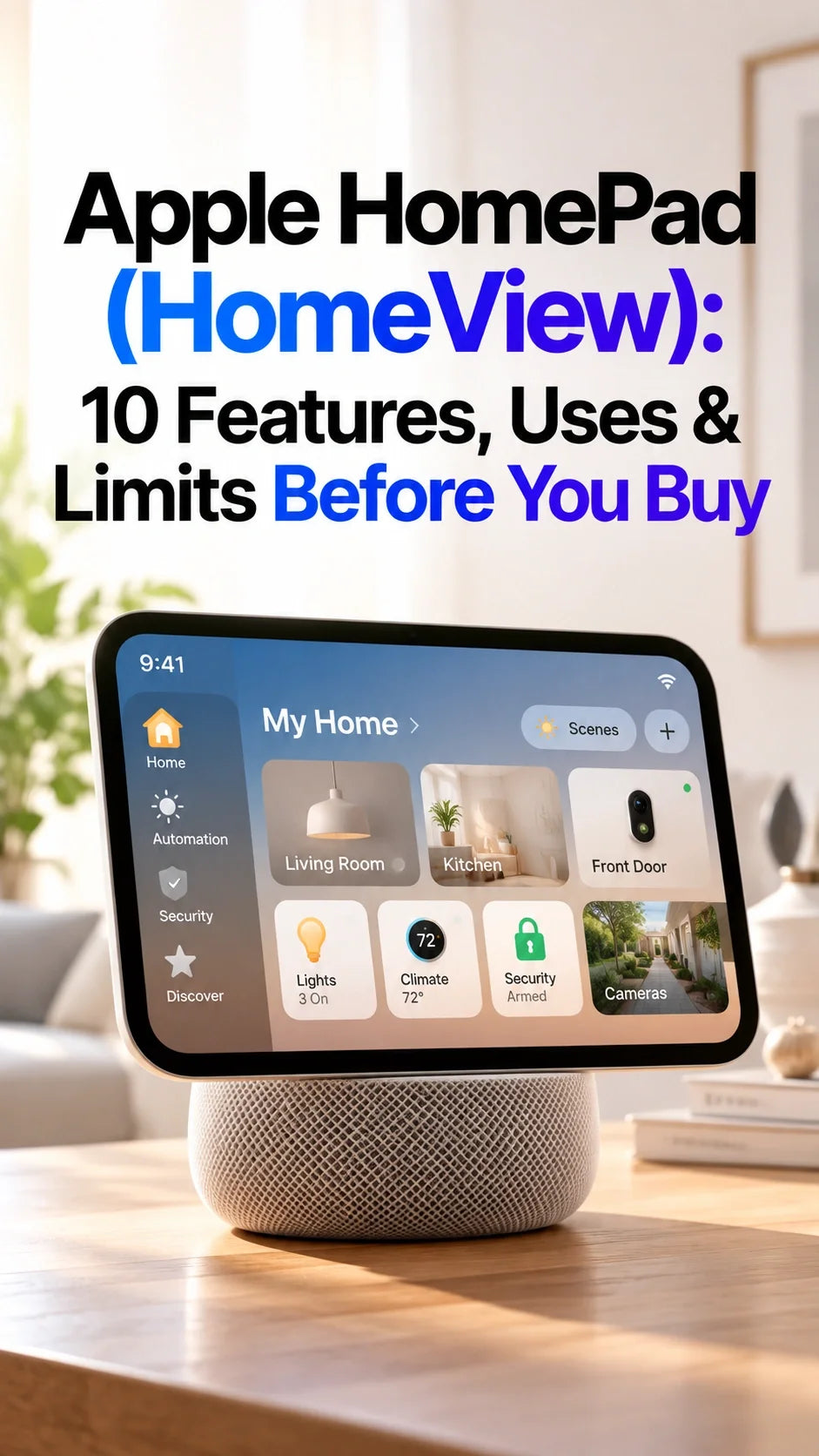
Apple HomeView is Apple's officially announced smart home display, previously discussed under the rumor name HomePad.
It combines a 7-inch Liquid Retina display, A18 chip, 12MP Center Stage camera and recognition for up to six people.
Use it for Apple Home controls, music, photos, FaceTime, recipes and compatible third-party audio and video apps from your iPhone.
Apple's US page lists availability starting November 13, 2026, with tabletop and wall-mounted options.
Siri AI starts in English, is in beta in HomeView software 27.2, and has device requirements and usage limits. Both models require wired power.
What Is Apple HomeView? Is It the Device Called HomePad?
HomeView is the official product name. HomePad was the name used in earlier reporting. Apple positions HomeView as a shared household screen for communication, entertainment and smart home control, with separate personal experiences for recognized users.
This guide replaces our earlier rumor-based feature discussion with information from Apple's official HomeView page, including its FAQ and footnotes, checked October 13, 2026. It is an assessment of Apple's published features; ZEERA has not conducted a hands-on HomeView test.
Apple HomeView Specs, Release Date and Model Options
Official hardware and availability snapshot
- Display: 7-inch Liquid Retina with True Tone; measured diagonal is 6.98 inches, with less actual viewable area because of rounded corners.
- Brightness: up to 500 nits and down to 0.3 nits; select features show more information as you approach.
- Chip: A18, with Secure Exclaves for protected camera and microphone processing.
- Camera and microphones: 12MP Center Stage camera and four beamforming microphones.
- Tabletop model: adjustable display on an aluminum base with a stainless steel hinge; Silver, Starlight, Rose Pink and Space Gray.
- Wall-mounted model: Silver or Space Gray, with wired and plug-in wall mount options.
- Power: wired power required for both models. The tabletop model includes a USB-C cable and USB-C power adapter; the wall-mounted model's compatible mount, cable and adapter are sold separately.
- Availability: November 13 on Apple's US product page. Availability of devices and features varies by region.
- Price: the supplied official product page does not state a retail price. Check Apple's local store for the model price and complete installation cost.
What Can Apple HomeView Do? 10 Official Features and Everyday Uses
The functions below are described by Apple. The buying observations explain where they could help in daily life; they are not measured performance results.
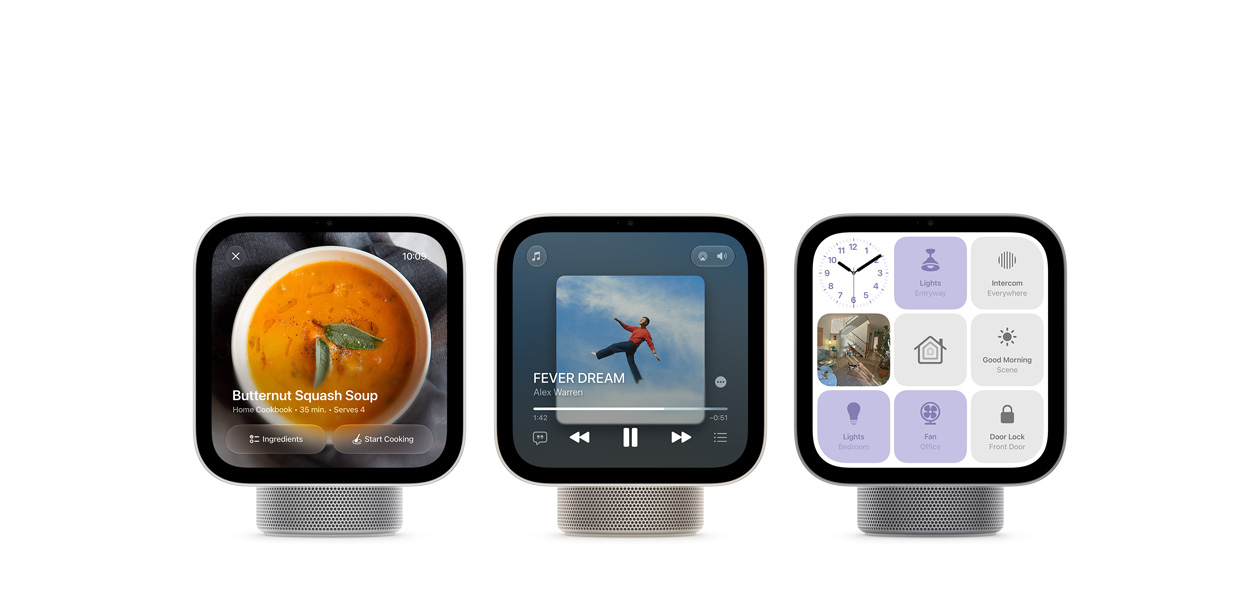
1. Play Music With Lyrics, Artwork and Multiroom Audio
HomeView displays Apple Music lyrics and artwork, and supports entertainment including podcasts, audiobooks and TV shows. Apple Music requires a subscription. Spatial Audio works with compatible content in supported apps; not every title is available in Dolby Atmos.
The tabletop model combines two full-range drivers in the display with a down-firing woofer and two force-cancelling passive radiators in the base. The wall-mounted model uses two custom drivers with computational audio tuned for wall placement. AirPlay supports multiroom listening with HomePod, Apple TV 4K and compatible speakers running the required software.
2. Keep Calendars, Reminders and Multiple Timers Within Reach
Apple confirms Calendar, Reminders and to-do list tasks, plus multiple timers. Live Activities let you keep an eye on timers while using other apps, which is useful when a recipe and several cooking tasks compete for screen space.
Personal calendars are subject to Apple's account and device conditions. A shared household device does not automatically make every person's private appointments visible to everyone.
3. Recognize Up to Six People and Show Personal Content
HomeView can recognize up to six people and switch between their experiences. For the full personalized experience, each user needs an Apple Account, a compatible iPhone or iPad, and membership in the shared home in the Home app.
The personal-content conditions matter
Apple says the paired iPhone or iPad must be on the same Wi-Fi network and recently unlocked, and HomeView must recognize the person by face. Guests and unrecognized users can control smart home accessories, check weather, set timers and play music without accessing anyone's personal information.
4. Work as a Digital Photo Frame With Customizable Faces
The Photos face can show one image or a rotating gallery from your collections or shared albums. Other faces include Snoopy, Calendar and Weather. The Flow face responds to movement with changing colors and light, while select dynamic faces change through the day.
True Tone and the 0.3-nit minimum brightness make the bedside use case more concrete than the old leaks suggested. Whether it suits your room still depends on placement and personal preference.
5. Control Apple Home Accessories and View Up to Nine Camera Feeds
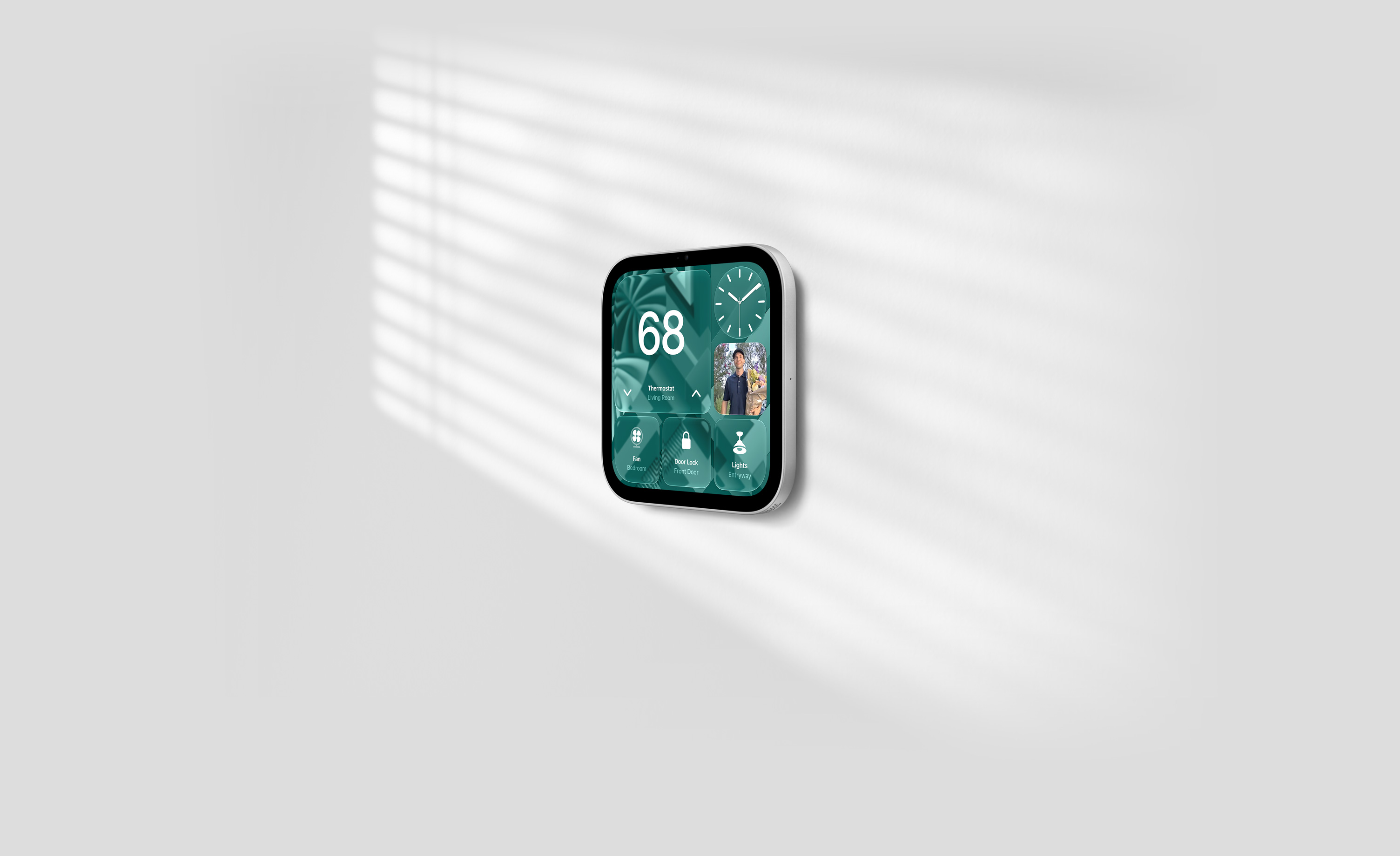
The built-in Home app provides controls for compatible lights, locks, temperature settings, scenes and automations. Apple's Home Modular face presents accessory information at a glance; the Home Camera face can stream up to nine videos simultaneously.
Apple specifies HomeKit- or Matter-enabled accessories, sold separately, and points buyers to products carrying the Works with Apple Home logo. A Wi-Fi connection alone does not establish compatibility with your existing camera or light.
HomeView can also recognize the sounds of smoke and carbon monoxide alarms and notify your iPhone, iPad or Apple Watch. That describes recognition of an existing alarm's sound, not a built-in smoke or carbon monoxide sensor. Apple also describes AI grouping of related Home notifications and descriptions of video activity.
6. Use Siri AI for Personal Context and Ongoing Conversations
Siri AI is powered by Apple Intelligence and built into HomeView. Apple describes general-knowledge answers, natural follow-up conversations and conversation syncing to the Siri app on your other Apple devices.
Personal-context requests can draw on relevant messages or calendar content through a paired Apple Intelligence-enabled iPhone or iPad. The paired device needs the latest software, Siri AI enabled and a supported language. Basic device compatibility and compatibility with these personal AI features are separate checks.
Siri AI is initially available in English and is in beta in HomeView software version 27.2. Apple's footnote says certain server-model features have daily usage limits, with expanded access available for a fee in the future. Apple does not give that future fee or a daily allowance on the supplied page.
7. Make Hands-Free FaceTime Calls With Center Stage
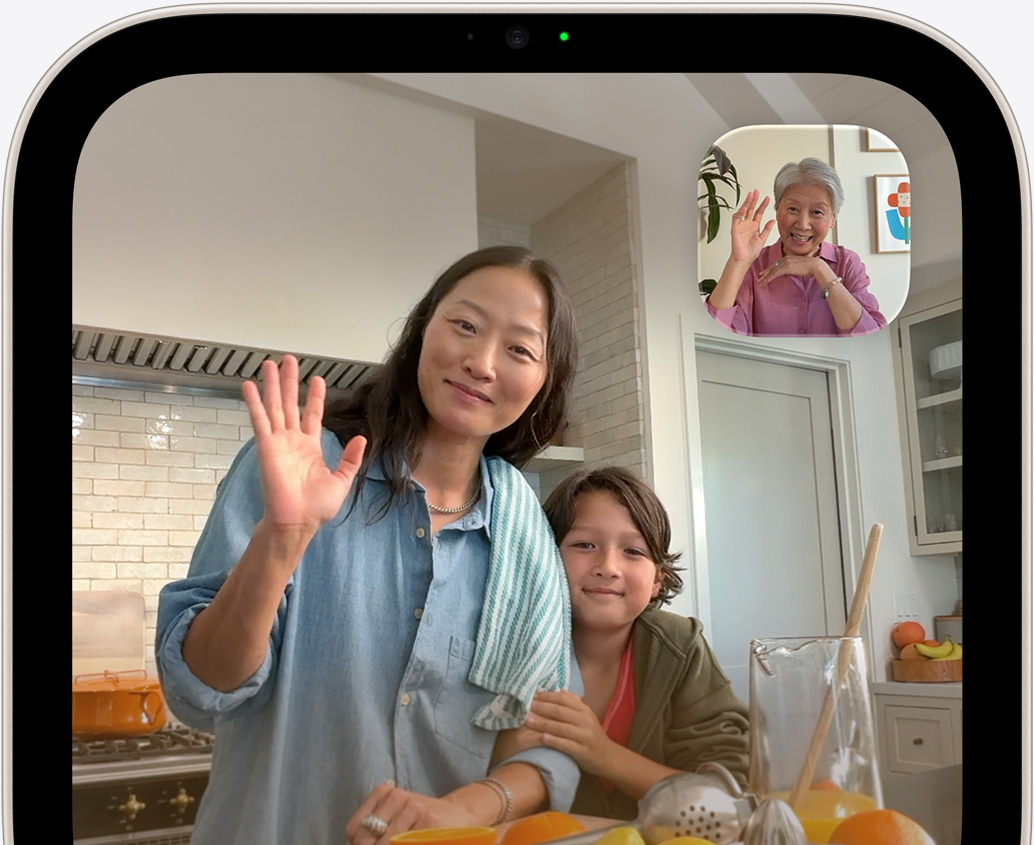
The 12MP Center Stage camera keeps people framed as they move or others join a FaceTime call. Four beamforming microphones pick up voices and reduce background noise for calls and Siri requests.
Apple also confirms Handoff for calls from iPhone. Choose a location where the camera can see the people who normally use it; a kitchen screen hidden behind appliances will be less useful for family calls.
8. Provide a Wall-Mounted Dashboard or Adjustable Tabletop Screen
The tabletop model suits a counter, bedside table or shared living space. Its hinge lets you adjust the display. The wall-mounted model puts Home controls within reach in places such as an entrance or hallway.
Budget for the whole wall setup: Apple lists the compatible wall mount, USB-C cable and USB-C power adapter as separate purchases, with power mounts also sold separately. Both versions require wired power. Apple's US page offers ADT professional installation in most areas, subject to local availability.
9. Open Recipes in Safari and Continue Content From iPhone
Safari is explicitly part of Apple's cooking example. When you find a recipe, tapping Start Cooking presents a simplified format designed to be easier to follow. The earlier suggestion that browser access was entirely unconfirmed is now outdated.
Handoff also lets you start a song, podcast, call, video or recipe on iPhone and continue on HomeView. Apple confirms compatible third-party audio and video apps from your iPhone, but individual service support still needs checking.
10. Use Intercom, Messages, Phone Calls and Find My
Apple confirms Intercom with HomeView and HomePod speakers, with communication also reaching personal devices such as iPhone, iPad and Apple Watch. You can send messages and make phone calls by voice.
Find My can help locate your devices, items carrying an AirTag and people who choose to share their location. It does not grant access to someone's location without their sharing choice.
Feature source for all ten sections: Apple HomeView product page, FAQ and footnotes. App, service, language and regional requirements apply.
Can Apple HomeView Play YouTube, Netflix or Other Third-Party Apps?
Apple confirms compatible third-party audio and video apps from your iPhone. That is the important correction to the earlier rumor-based discussion. HomeView's entertainment options extend beyond a small set of Apple services.
However, the supplied official page does not identify YouTube, Netflix, Spotify or Zoom as supported apps, list every compatible service, or promise an unrestricted iPad-style App Store. Do not turn the compatibility statement into a guarantee that any iPhone app will run on HomeView.
Safari is confirmed through the recipe feature, but that alone does not prove that a particular streaming website supports playback. If one service is essential, confirm its HomeView support, region and subscription requirements before ordering.
How Does HomeView Keep a Shared Household Screen Private?
Apple says A18's Secure Exclaves process camera and microphone feeds in an isolated compartment that the operating system and Apple cannot access. This supports face and voice recognition without exposing the recognition data to the operating system.
Apple also describes Private Cloud Compute for appropriate Apple Intelligence requests and separation of each user's personal information. The same-Wi-Fi, recent-unlock and face-recognition conditions remain central to displaying private content.
Facial recognition here should not be relabeled as Face ID: the supplied product page does not make that authentication claim. Nor does this privacy design mean every AI operation runs entirely on HomeView; Apple explicitly describes server-side models and Private Cloud Compute.
Will HomeView Replace Your HomePod, Apple TV or Kitchen iPad?
Apple calls HomeView a central hub for compatible smart home accessories and shows it working with HomePod and Apple TV 4K through AirPlay and Intercom. Its main additional value is a shared screen with user recognition, visible controls and video calls.
A household that already likes its HomePod speakers or Apple TV setup may prefer adding that screen experience rather than replacing working devices. The official page does not provide enough radio specifications to make a separate claim about HomeView's Thread border-router capabilities.
For a portable tablet with broad app flexibility, an iPad serves a different purpose. Our earlier HomePad versus iPad comparison explains that purchasing question, but its pre-announcement specifications should be read alongside the official details in this guide.
Is Apple HomeView Worth Buying? Check These Limits First
ZEERA's assessment after reviewing Apple's official page and footnotes is that HomeView has the clearest purpose when several people repeatedly need the same household screen. Shared controls, family calls and kitchen information are more persuasive reasons than simply having another device that can play music.
Five checks before you order
- Language: is English suitable for the people who will use Siri AI?
- Personalization: does each user have the required account and compatible iPhone or iPad? Personal AI requests need an Apple Intelligence-enabled device.
- Services: are your essential third-party apps compatible, and do you need additional subscriptions?
- Placement: is there wired power where everyone can see the screen and use the camera?
- Total cost: include wall-mount hardware and installation where needed, and note the future fee for expanded access to certain AI features.
Apple's new Home Collection includes accessories developed with selected brands, such as smart cameras, thermostats and a door lock. The HomeView page labels that collection coming later; it should not be treated as a promise that every accessory ships on November 13.
Wait for shipping-device reviews if your decision depends on recognition with several people nearby, microphone performance in a noisy kitchen or your exact camera setup. Those behaviors need real-world verification.
If an iPhone 18 Pro Max or iPhone Duo already covers your occasional calls and media, choose HomeView for the benefit of a permanent shared location. For your existing phone setup, the ZEERA iPhone Duo case comparison addresses stand, grip and protection choices separately.
FAQ
When is Apple HomeView available?
Apple's US product page lists availability starting November 13, 2026, and displays a pre-order link. Check Apple's local store for regional ordering and delivery details; that date should not be assumed to apply everywhere.
Do you need an iPhone to use HomeView?
Guests can use basic functions such as weather, timers, music and smart home controls without accessing private information. A full personalized experience requires an Apple Account, a compatible iPhone or iPad, and shared-home membership.
Can HomeView show my messages while my iPhone is away?
Apple's stated personal-content conditions require the paired iPhone or iPad to be on the same Wi-Fi network and recently unlocked, with HomeView recognizing you by face. Do not assume private messages remain available when those conditions are unmet.
Is Siri AI free and unlimited?
Apple does not promise unlimited use. Certain server-model features have daily limits, and expanded access will be offered for a fee in the future. The supplied HomeView page does not specify that fee or the exact allowance. See Apple's Apple Intelligence Usage Terms.
Does the wall-mounted HomeView include a mount and charger?
No. Apple lists the compatible mount, USB-C cable and USB-C power adapter as sold separately for the wall-mounted model. The tabletop model includes its USB-C cable and adapter.
Can HomeView show a doorbell camera continuously?
Apple confirms compatible camera viewing and up to nine simultaneous video streams in the Home Camera face. Its page does not specify an unrestricted, permanent live-view mode for every doorbell camera.
How much does Apple HomeView cost?
The supplied official product page does not state a retail price. Check Apple's regional store for the model price and any required accessories; earlier rumored prices are not an official quotation.
Related Reading
Some related guides were written before the announcement and retain rumor-era titles. Use the official HomeView details above for current specifications.
- Earlier HomePad Price and Release-Date Guide
- HomePad vs iPad on a Stand: Choosing a Household Screen
- Apple TV 4K 2026 vs 2022: Buying Comparison
- HomePod mini 2 vs HomePod mini: Upgrade Questions
- iPhone Duo RAM, Multitasking and Siri AI
- ZEERA iPhone Duo Cases Compared
Official Sources and Editorial Status
- Apple HomeView — official product page: specifications, model options, November 13 availability, features, privacy design, FAQ and numbered footnotes. The supplied saved copy includes the software, power, subscription and usage-limit notes used in this article.
- Apple Intelligence Usage Terms — Apple Support: requirements, availability and the effect of reaching feature-specific usage limits.
Information checked October 13, 2026. This article replaces the earlier reported-feature version. The approximately 6-inch screen estimate has been corrected to Apple's 7-inch specification; A18, Center Stage, Safari, third-party media compatibility and the November 13 date are now based on official information. Retail pricing was not verifiable from the supplied product page or the linked storefront during this check. ZEERA's recommendations are editorial assessments, not hands-on test results.