
Quick Answer
A MagSafe wallet can attach to iPhone Duo yet still overhang, touch the camera surround or make cards awkward to remove.
Check the wallet's full footprint on your exact case, then confirm it stays flat and the phone folds freely.
Remove a detachable wallet before wireless charging; keep cards out of the space between the phone and charger.
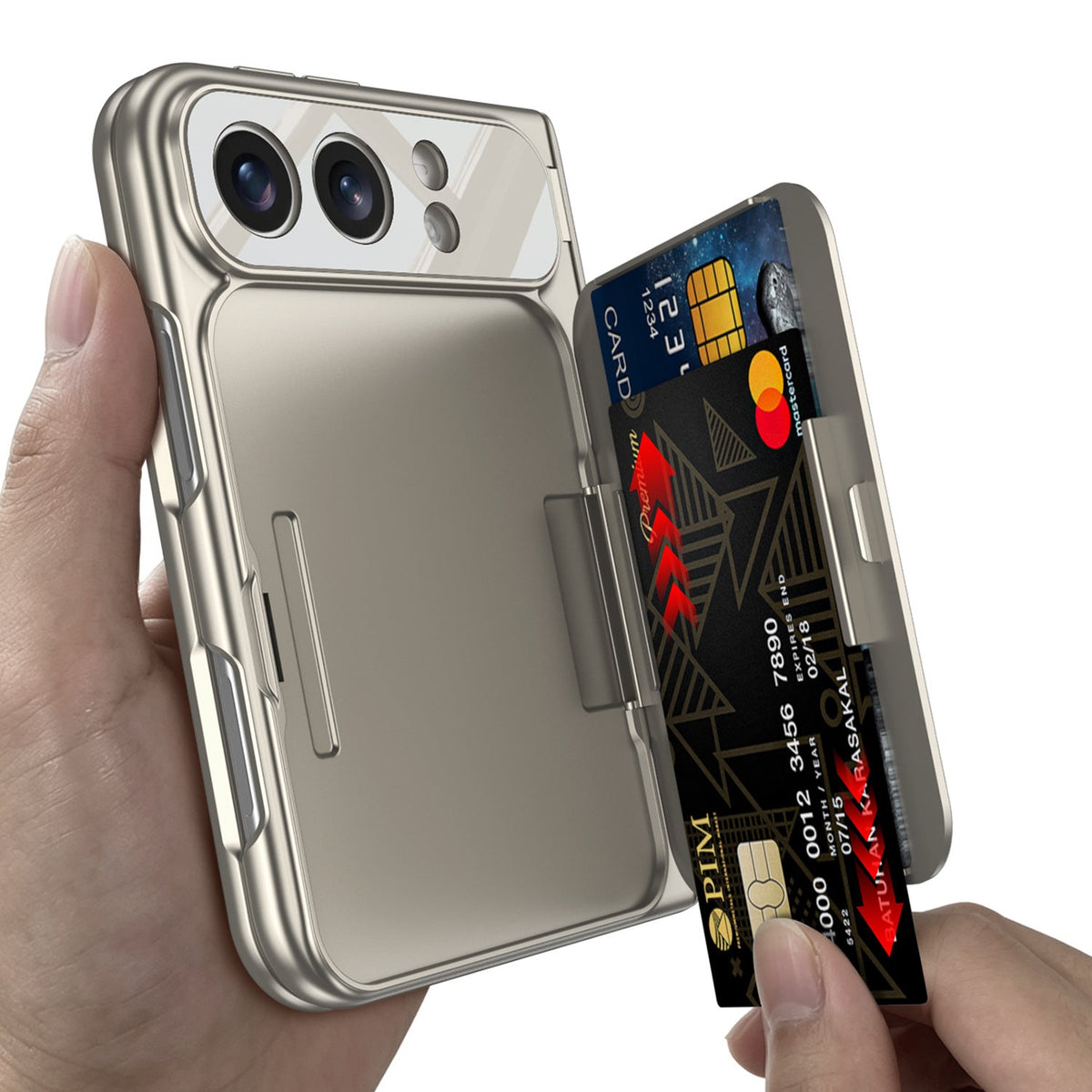
For two everyday cards and a built-in stand, an integrated wallet case such as ZEERA FoldWallet Pro is another option.
Choose around your charging, car-mount and tracking needs: these features require separate compatibility checks.
Does a MagSafe Wallet Fit iPhone Duo Properly?
Magnetic attachment and a comfortable physical fit are different checks. A wallet that worked on your previous iPhone may behave differently on the Duo's shorter folded body.
iPhone Duo: the fit facts
Folded size: 117.8 mm tall, 84.1 mm wide and 11.3 mm deep.
Wireless charging: Apple lists MagSafe and Qi2 charging up to 25W.
What this tells you: MagSafe support does not establish the clearance, grip or card access of every wallet.
Owners in the MacRumors MagSafe wallet discussion have shared overhang concerns and debated alternative layouts. These are reports about particular combinations, rather than proof that every wallet fails.
After reviewing Apple's specifications and owner discussions, ZEERA's assessment is that wallet clearance should be checked before buying, alongside magnetic compatibility.
1. Why does my wallet hang below the phone?
The wallet's size and the position where its magnets align can leave part of it beyond the bottom edge. Measuring phone height alone misses that attachment position.
Solution: Check an installed photo or measure your wallet while aligned on the phone. Choose a Duo-specific layout if the lower edge catches on your pocket or feels uncomfortable. See our wallet and battery-pack fit guide for the geometry behind this problem.
2. What if the wallet hits the camera bump?
Contact with a raised camera surround can prevent the wallet from sitting flat. A case's camera lip may change clearance even when the wallet appears to fit the bare phone.
Solution: Check the top edge, lenses and card opening with your case installed. If the wallet rocks or rests on the surround, use a different design rather than pushing it higher.
3. Can I turn the MagSafe wallet sideways?
Rotating the wallet changes its footprint, but does not guarantee useful magnetic alignment or edge clearance. The wallet shell and seams also add size beyond the cards inside it.
Solution: Look for a wallet designed for that orientation. Check both side edges, card retention and camera access; do not assume a rotated vertical wallet is a secure horizontal wallet.
Why Does My Wallet Slip, Rotate or Catch When Folding?
4. Why does the wallet slide off or rotate?
A wallet that touches the camera lip, sits over an uneven case or is pulled by a pocket can move even after it snaps into place.
Solution: Clean the contact surfaces, confirm the case is designed for magnetic accessories and check that the wallet lies flat. Over a soft surface, gently check sliding and rotation with your normal cards loaded. If it keeps moving, change the wallet-and-case combination.
5. Can I use a wallet kickstand as a grip?
A panel designed to support a phone on a desk is not automatically designed to carry the phone's weight in your hand.
Solution: Use it as a grip only if the manufacturer explicitly supports that use. This matters particularly when the Duo is unfolded and your hand puts leverage on the attachment.
6. What if the wallet interferes with opening or closing?
Watch for contact between the wallet, hinge cover and moving case sections. A bulky attachment can also make the opening motion awkward without physically blocking the hinge.
Solution: Open and close the phone slowly, without forcing it. If there is resistance, remove the wallet and check whether the case itself is seated correctly. Keep any attachment clear of the hinge's movement.
How Do You Use a Wallet With Wireless Charging and a Car Mount?
The wallet occupies the same rear area used by many chargers and mounts. Plan how you will switch between carrying cards, charging at home and using navigation in the car.
7. Can I charge through a MagSafe wallet?
Remove a detachable wallet before placing the phone on a wireless charger. For an integrated wallet case, follow the case maker's instructions; emptying the slots alone does not establish charging compatibility.
If the wallet structure prevents proper charger contact, use USB-C or remove the case as directed. Do not sandwich a charger against a loaded card holder.
8. Can wireless charging damage the cards?
Apple advises keeping credit cards, security badges and similar items out of the space between an iPhone and its MagSafe charger because charging can damage magnetic strips or RFID chips.
Solution: Remove the cards or wallet as required before charging. A claim about shielding during normal wallet use is not permission to charge through stored cards.
Source: Apple's MagSafe charger guidance.
9. Why is charging slow or the phone getting warm?
Start by removing the wallet and checking alignment, case compatibility, charger and power adapter. If the problem disappears with the wallet removed, that setup needs changing.
Wireless charging can generate warmth, and temperature can limit charging. Let the phone cool and try a compatible setup. A charger advertised as 25W describes peak capability, rather than a constant output.
10. Can a car mount hold the phone through the wallet?
Do not assume that a mount can securely hold a phone through a wallet, or that a wallet's outer surface provides the intended magnetic connection.
Solution: Remove a detachable wallet and attach the mount directly to the phone or a compatible case. With a fixed wallet case, check explicit mount compatibility; a suitable clamp mount may be more practical. Confirm the installed setup before driving.
How Do You Solve Card Access, Screen Access and Find My Problems?
11. Why are my cards difficult to remove?
A slot opening may end up too close to the camera surround, or become tight when cards have raised lettering or extra thickness.
Solution: Check which direction cards exit and whether removal requires detaching the wallet. Start with one card, then add the second within the stated capacity. Avoid forcing an extra card or folded cash into a snug slot.
12. Can I carry cards without a front folio flap?
Yes. A rear card-holder design can leave the outer display accessible. A front-cover folio offers a different routine because you need to open its cover to view that display.
Solution: If quick notification checks matter, choose a rear wallet layout and inspect how its panel opens. Product names alone do not tell you where the cover or card slots sit.
13. Can I tap a transit or payment card inside the wallet?
Card storage does not guarantee contactless reading through the holder, especially with several contactless cards together. The result depends on the holder, card and reader.
Solution: Remove the physical card when tapping is unreliable. Use a supported digital card in Apple Wallet if your issuer allows it. Physical card access and the phone's digital Wallet app are separate features.
14. Why does my wallet not appear in Find My?
MagSafe magnets do not provide tracking. The wallet must explicitly support Find My, and the manufacturer must list your phone as compatible.
Solution: Check the model before troubleshooting. For a compatible Apple wallet, attach it and follow the setup prompt, or use Find My → Add → Add MagSafe Accessory. A previous owner may need to remove it from their account.
Apple describes last-known-location and detachment features for supported wallets. Check the specific product's tracking functions rather than assuming AirTag-style capabilities.
Which iPhone Duo Wallet Solution Fits Your Daily Routine?
Choose the design that makes your most frequent action easy: accessing a card, charging the phone, mounting it in the car or watching a video.
Keep a detachable wallet if you swap accessories often
This suits users who want to remove their cards at home and expose the phone's rear for a charger or mount. Choose a verified Duo-compatible wallet-and-case combination with enough clearance.
If you like your existing wallet, check its fit before replacing it. A brand's general MagSafe label is not a substitute for seeing that exact model installed.
Choose an integrated wallet case for two cards and a stand
ZEERA FoldWallet Pro combines a rear two-card vegan leather wallet with a wallet panel that opens into a kickstand. Its listed protection includes an integrated outer-screen protector, hinge coverage and raised screen and camera edges.
It is a practical option for carrying an ID and payment card together with the phone and using a stand at a desk. Card storage is built into the case, so there is no separate magnetic wallet to align.
Buying check: Confirm wireless-charging and magnetic-mount compatibility for your intended setup. The published feature list does not establish Find My tracking or charge-through-wallet support.
Choose a front-cover folio or a separate wallet for other priorities
A front-cover folio may suit you if covering the outer display matters more than immediate screen access. Check whether its flap clears the camera when folded back.
A separate slim wallet may work better if you carry several cards, cash or travel documents and want the phone's rear available for accessories.
If you are deciding between ZEERA's two integrated designs, read FoldFolio Pro vs FoldWallet Pro for the product comparison.
Before ordering: ask for these four answers
- Can I see this exact wallet installed on iPhone Duo with my case?
- Can I remove my cards and open the phone comfortably?
- What must I remove before charging or using my car mount?
- Does the wallet explicitly include any tracking feature I need?
FAQ
Can an iOS update fix wallet overhang?
No. Overhang is a physical size and placement issue. Software cannot shorten a wallet or create clearance around the camera.
Will an iPhone 18 Pro Max wallet work on iPhone Duo?
Check the wallet model rather than the previous phone's name. Its footprint, magnetic alignment and card opening must work on the Duo with your chosen case.
Can I keep cash in a two-card wallet?
Only if its manufacturer lists space for cash. A two-card rating does not automatically allow folded notes in addition to two cards.
Does a wallet attachment protect the hinge?
A rear wallet alone does not establish hinge protection. Look for a case with a dedicated hinge cover if that coverage is a priority.
Should I buy the wallet before choosing a case?
Choose them together when possible. Case thickness, camera lips and hinge covers can change how a wallet fits and how easily you access it.
Related iPhone Duo Guides
- Best iPhone Duo Wallet Solution: FoldFolio Pro vs FoldWallet Pro
- iPhone Duo MagSafe Wallet and Battery-Pack Fit Problems
- Alternatives When an iPhone Duo MagSafe Wallet Does Not Fit
- iPhone Duo Wallet Cases With a Built-In Kickstand
- iPhone Duo Wallet Case: Card Storage and Hinge Protection
- Apple iPhone Duo Case vs Folio









