
MagSafe makes wireless charging convenient, but after using it every day, a few common problems quickly become noticeable.
Your iPhone can get warm. Charging may slow as temperatures rise. Some MagSafe stands are so light that the entire charger lifts off the desk when you remove your phone. Others have noisy fans, distracting LEDs, weak magnets, loose hinges or limited viewing angles.
And as wireless charging moves toward 25W speeds, temperature control becomes even more important.
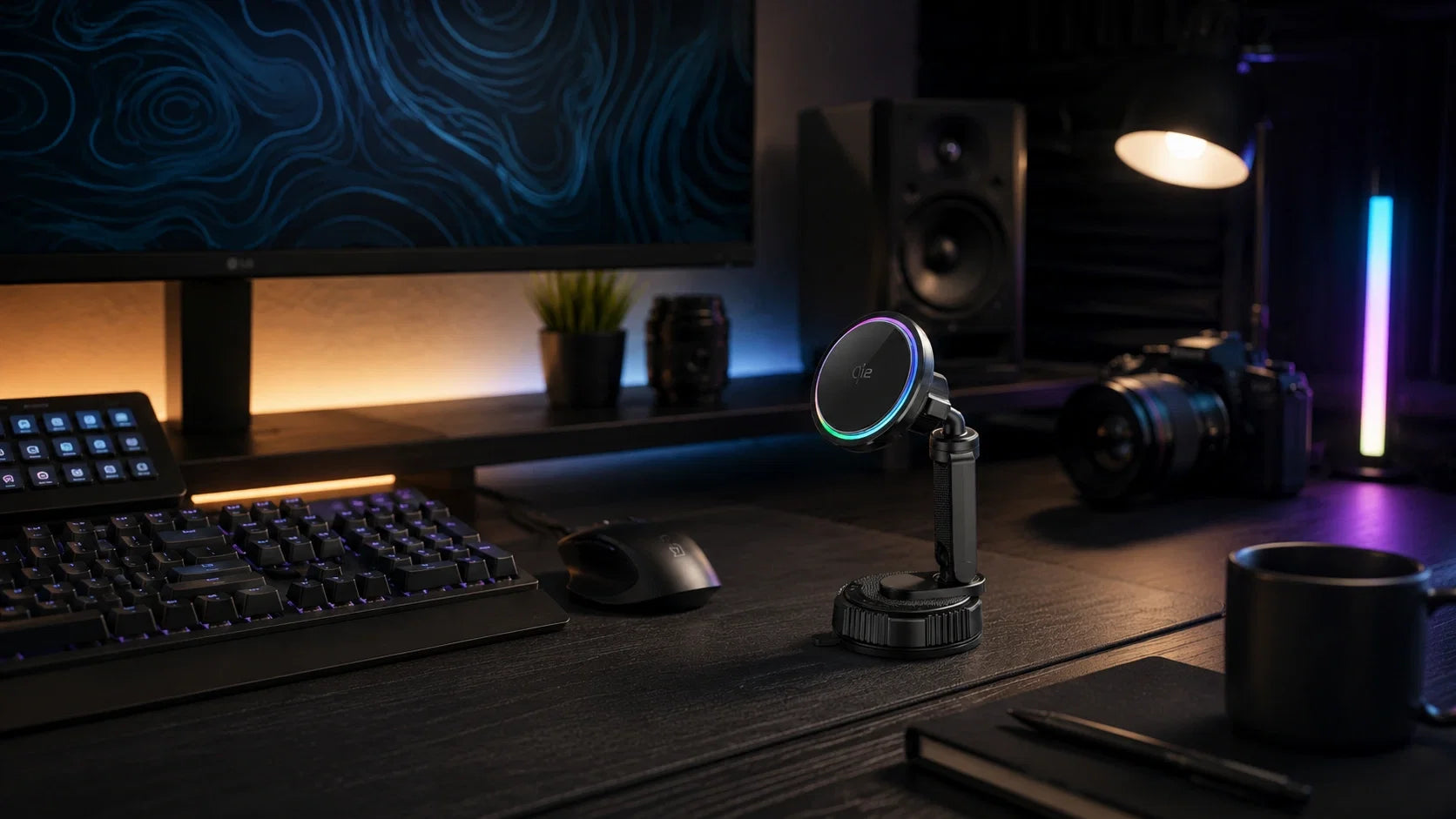
That is why the ZEERA SuVolt Gen5 Qi2.2 25W is interesting not only as a magnetic car charger, but also as a powerful MagSafe desk charger for iPhone.
With its new suction-cup mounting system, active cooling, adjustable arm and 360° rotation, SuVolt Gen5 can be securely mounted on a suitable smooth desk surface and used as an everyday wireless charging stand at home or in the office.
Quick Answer: What Makes a Good MagSafe Desk Charger?
The best MagSafe desk charger should do more than simply hold your iPhone upright.
- Fast wireless charging without ignoring heat
- Active cooling to help manage charging temperature
- A stable base that does not lift when removing the phone
- Quiet operation for desks and bedrooms
- Lights that can be completely turned off
- Strong but practical magnetic attachment
- Multiple viewing angles for work, video and StandBy
- Compatibility with MagSafe cases
SuVolt Gen5 was designed around these exact problems.
ZEERA MagSafe Wireless Charging Series
ZEERA MagTri Gen2 Qi2.2 Foldable MagSafe Charger
- 25W Qi2.2
- 3-in-1 fold
- Active cooling
- Travel size
- 3-device ready

ZEERA MagSion 5-in-1 Dual MagSafe Charger Stand
- Dual MagSafe
- 5-in-1 stand
- Watch charging
- Angle adjust
- Clean setup

ZEERA SuVolt Gen5 Qi2.2 Active Cooling Car Charger
- 25W Qi2.2
- Active cooling
- Strong magnet
- CarPlay ready
- Heat control

8 Common MagSafe Charging Problems SuVolt Gen5 Is Designed to Solve
1. Your iPhone Gets Hot While Using MagSafe
Heat is one of the most common frustrations with wireless charging.
Some warmth is normal, but when the phone and charging coil become too hot, charging performance can suffer. This becomes even more noticeable during long charging sessions or when the iPhone is being used at the same time.
For example, your phone may be charging while you are:
- watching video
- using FaceTime
- running navigation
- streaming music
- gaming
- using the iPhone as a StandBy display
How SuVolt Gen5 Helps
Instead of relying entirely on passive heat dissipation, SuVolt Gen5 uses an active cooling system directly behind the magnetic charging surface.
The cooling system continuously moves heat away from the charging area while your iPhone is attached.
This makes active cooling useful not only inside a warm car, but also during longer desktop charging sessions.
The goal is simple:
Keep charging temperature under better control before excessive heat becomes a problem.
2. 25W Wireless Charging Can Create More Heat
Faster wireless charging is one of the biggest improvements users want from MagSafe-style chargers.
But simply increasing charging power does not solve everything.
Higher wireless charging output also makes thermal management increasingly important, especially when the phone is already warm from normal use.
25W Charging + Active Cooling
SuVolt Gen5 combines Qi2.2 25W wireless charging for compatible devices with active cooling.
That combination is more important than simply putting “25W” on the box.
A good high-performance wireless charger needs to balance:
Charging speed + temperature + stability.
Instead of treating cooling as an optional extra, SuVolt Gen5 makes it part of the charging system itself.
3. The MagSafe Stand Lifts Off the Desk When You Remove Your iPhone
This is one of the most annoying problems with lightweight magnetic charging stands.
The magnets hold your iPhone securely, but the base of the charger is too light.
You pull the phone away and:
the entire charger comes with it.
Now you need one hand to hold the stand and another hand to remove your iPhone.
That defeats one of the biggest advantages of magnetic charging.
The Suction Base Changes the Experience
The new SuVolt Gen5 mount uses a strong suction base that can attach securely to a suitable clean, smooth surface.
Instead of depending only on the weight of a traditional desktop stand, the suction mount anchors the charger to the desk.
This makes it much easier to:
- attach your iPhone with one hand
- remove it with one hand
- keep the charger in the same position
- avoid constantly repositioning the stand
For everyday desk use, this can make a bigger difference than simply adding more weight to the base.
4. Active Cooling Fans Can Be Annoyingly Loud
Active cooling has an obvious advantage: it helps remove heat.
But adding a fan creates another possible problem.
Noise.
A cooling fan may not bother you inside a moving car, but on a quiet desk beside your keyboard or next to your bed, even a small amount of unnecessary fan noise can become distracting.
Cooling Without Dominating Your Desk
SuVolt Gen5 is designed with an optimized cooling system that delivers strong airflow while keeping operation quiet.
That makes it better suited to environments where you may be:
- working
- reading
- editing
- joining video calls
- charging beside your bed
A cooling system should solve the heat problem without becoming a new problem itself.
5. Bright LED Lights Are Distracting at Night
Lighting looks great in product photos.
It can be much less attractive when the charger is sitting next to your bed at 2 a.m.
Many desktop chargers use status lights or ambient LEDs that stay illuminated whenever power is connected.
That may be fine during the day, but bedroom users should have a choice.
Turn the Lighting Completely Off
SuVolt Gen5 includes ambient lighting, but the lighting can be completely turned off whenever you prefer.
That means you can enjoy the visual effect when using the charger in your car or on your desk, then disable it when you want a darker environment.
No need to cover the LED with tape.
6. MagSafe Magnets Are Either Too Weak or Too Strong
Magnetic strength is more complicated than simply making the magnets as powerful as possible.
If the magnetic hold is too weak, your iPhone does not feel secure.
If it is excessively strong, removing the phone from a desk stand becomes unnecessarily difficult.
The ideal system needs to balance both sides:
secure attachment without making everyday removal frustrating.
Secure Hold With Convenient Removal
SuVolt Gen5 is designed to create a secure MagSafe connection while still making everyday attachment and removal convenient.
The suction-mounted base also helps here.
Because the charger itself stays firmly attached to the desk, you can peel the iPhone away naturally without needing to grab the charging stand with your other hand.
A MagSafe Charger Built for More Than the Car
Mount SuVolt Gen5 on your desk for active-cooled 25W wireless charging, then move it back to your car whenever you need it.
Explore SuVolt Gen57. Fixed or Wobbly MagSafe Stands Have the Wrong Viewing Angle
There is no perfect fixed angle for every desk.
Your ideal phone position depends on:
- desk height
- chair height
- where the charger sits
- whether you are sitting or standing
- whether the iPhone is in portrait or landscape
A stand positioned beside your monitor may need a different angle from one sitting next to your keyboard.
Multi-Angle Adjustment and 360° Rotation
The new suction-cup mounting system gives SuVolt Gen5 much more flexibility when used as a desktop MagSafe stand.
You can adjust the position to find a comfortable viewing angle and rotate your iPhone through 360 degrees.
That makes it easy to use the phone in:
- portrait orientation
- landscape orientation
- StandBy mode
- FaceTime calls
- video playback
- music controls
- notification viewing
Instead of forcing you to adapt to one fixed angle, the mount adapts to your desk.
8. Some MagSafe Chargers Do Not Work Well With Cases
A wireless charger becomes much less convenient if you need to remove your case every time you want to charge.
Case thickness, magnetic ring position and materials can all affect the charging and magnetic experience.
Designed for MagSafe-Compatible Cases
SuVolt Gen5 is compatible with Apple official MagSafe cases and most third-party MagSafe-compatible cases.
That means you can normally leave your MagSafe case installed and simply attach your iPhone to the charging surface.
The magnetic alignment helps keep the charging coils properly positioned while also holding the phone in place.
For the best experience, a properly designed MagSafe-compatible case is recommended.
Why a Car Charger Can Make an Excellent MagSafe Desk Charger
A car is actually one of the most demanding environments for a wireless charger.
A charger needs to deal with movement, vibration, changing angles, heat and frequent phone removal.
Those same design requirements can translate surprisingly well to desktop use.
SuVolt Gen5 already combines:
- Qi2.2 25W wireless charging
- active cooling
- strong magnetic alignment
- a stable suction mount
- multi-angle adjustment
- 360° rotation
- switchable ambient lighting
Those are exactly the features many users want from a premium MagSafe desk stand.
Use Your iPhone as a Real Desk Display
A good MagSafe desk charger should not simply charge your battery.
It should put the iPhone in a useful position while charging.
With SuVolt Gen5 mounted beside your monitor, the iPhone can remain visible instead of lying flat on the desk.
You can use it for:
- StandBy
- calendar and clock information
- notifications
- music controls
- FaceTime
- video
- timers
- smart home controls
Rotate it horizontally when you want a wider display.
Turn it vertically when you want easier access to messages and apps.
Adjust the angle until it matches your desk setup.
One Charger for Your Desk and Your Car
This is where SuVolt Gen5 becomes different from a traditional desktop MagSafe stand.
Most desk chargers stay on the desk.
Most magnetic car chargers stay in the car.
SuVolt Gen5 can serve both roles.
At home or in the office, the suction mount turns it into an adjustable 25W MagSafe desk charger.
In the car, the same charger provides magnetic mounting, active cooling and wireless charging while you use navigation or other driving-related features.
Instead of buying two completely separate charging systems, you can use one device across multiple environments.
DESK + CAR
One MagSafe Charger. Two Everyday Setups.
Qi2.2 25W wireless charging, active cooling, suction mounting and 360° adjustment in one compact system.
View ZEERA SuVolt Gen5Is SuVolt Gen5 the Best MagSafe Desk Charger for You?
Not everyone needs active cooling or 25W wireless charging.
If you only place your iPhone on a charger overnight and rarely touch it until morning, a simple MagSafe stand may already be enough.
SuVolt Gen5 makes more sense if you want your charger to become part of your everyday desk setup.
It is especially worth considering if you want:
- up to 25W wireless charging on compatible devices
- active temperature management
- a stable suction-mounted base
- one-handed phone removal
- 360° rotation
- multiple viewing angles
- portrait and landscape use
- lighting that can be turned off
- MagSafe case compatibility
- one charger for both your desk and your car
Years of MagSafe Development Matter
ZEERA has been developing MagSafe accessories since the early days of Apple's magnetic charging ecosystem.
Over multiple generations, the technology has evolved from simple magnetic attachment into faster wireless charging, stronger magnetic systems, better thermal management and more flexible mounting designs.
SuVolt Gen5 brings those years of development together in one product.
Instead of focusing on only one headline specification, it is designed around the small problems users actually notice after living with MagSafe every day:
Heat. Charging speed. Stability. Noise. Lighting. Magnetic balance. Viewing angle. Case compatibility.
FAQ
Can SuVolt Gen5 be used as a MagSafe desk charger?
Yes. The new suction-cup mount allows SuVolt Gen5 to attach to a suitable clean, smooth desktop surface, turning it into an adjustable magnetic wireless charging stand for home or office use.
Does SuVolt Gen5 support 25W wireless charging?
SuVolt Gen5 supports Qi2.2 wireless charging up to 25W with compatible devices and the appropriate power source. Actual charging performance can vary depending on the iPhone, battery level, temperature and other conditions.
Why is active cooling useful for a MagSafe charger?
Wireless charging generates heat. Active cooling helps move heat away from the charging area and is designed to help maintain a better balance between charging performance and temperature during longer or higher-power charging sessions.
Can I rotate my iPhone horizontally?
Yes. SuVolt Gen5 supports 360° rotation, so you can quickly switch between portrait and landscape orientation for StandBy, video, FaceTime or other desk use.
Can the light be turned off?
Yes. The ambient lighting can be completely turned off when you prefer a darker desk or bedroom environment.
Does it work with a MagSafe case?
SuVolt Gen5 is compatible with Apple official MagSafe cases and most third-party MagSafe-compatible cases. Very thick cases, metal accessories or poorly positioned magnetic rings may affect wireless charging performance.
Bottom Line
The best MagSafe desk charger should not force you to choose between charging speed and everyday usability.
It should charge quickly, manage heat, stay securely attached to your desk, hold your iPhone at the right angle and stay out of your way when you are working or sleeping.
The ZEERA SuVolt Gen5 Qi2.2 25W is designed around exactly those priorities.
Active cooling helps manage charging temperature. The suction mount keeps the stand securely positioned. Multi-angle adjustment and 360° rotation make it easy to find the right viewing position. Ambient lighting can be turned off. MagSafe-compatible cases can stay installed.
And when you leave your desk, the same charger can go back into the car.
That combination makes SuVolt Gen5 more than a magnetic car mount.
It is one of the most complete MagSafe charging setups ZEERA has built for the desk, home, office and car.









