
Quick Answer
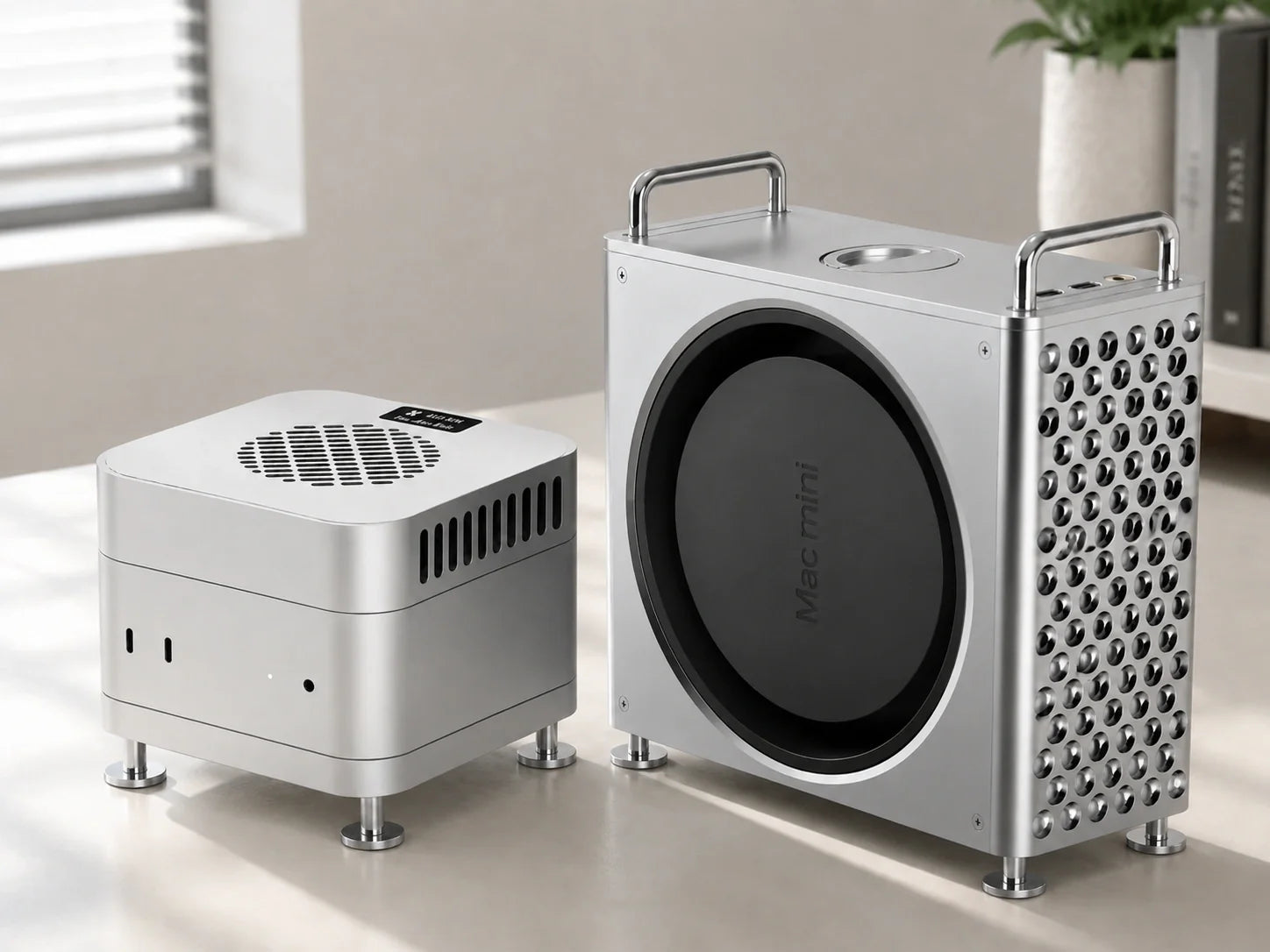
The best Mac mini accessory depends on what you want to improve. Choose the ZEERA MacForge Gen3 if you want a premium CNC aluminum enclosure, Mac Pro-inspired styling, easier top port access and passive heat dissipation.
Choose the ZEERA MacFrost Pro if your Mac mini regularly handles long video exports, local AI, 3D rendering or large code compilations and needs additional active cooling.
Both are designed for the compact 127mm Mac mini generation, including Mac mini M6, M5 Pro, M4 and M4 Pro.
The Mac mini is already a compact and capable desktop, but the right accessory can improve how it looks, how it fits into a workspace and how it handles sustained workloads.
Some users need a Mac mini aluminum stand or case that matches Apple’s metal design. Others are searching for a Mac mini cooling base with a fan because their workflow keeps the CPU and GPU under load for extended periods.
This guide compares two accessories built for those different needs: the ZEERA MacForge Gen3 CNC Aluminum Case and the ZEERA MacFrost Pro Active Cooler + Aluminum Stand.
Which Mac Mini Accessory Should You Choose?
| Accessory | Best For | Cooling Type | Key Advantage |
|---|---|---|---|
| ZEERA MacForge Gen3 | Premium desk setups, organization and Mac Pro styling | Passive airflow and aluminum thermal diffusion | CNC aluminum enclosure with top I/O extension |
| ZEERA MacFrost Pro | Video editing, local AI, rendering and sustained workloads | Direct-contact 30W thermoelectric active cooling | Adds external thermal headroom without blowing air into the Mac mini |
MacForge Gen3 is primarily an enclosure and desk-design upgrade. MacFrost Pro is a performance-focused cooling accessory. They target different search intentions and should not be treated as interchangeable products.
1. ZEERA MacForge Gen3: A Premium CNC Aluminum Mac Mini Case
The ZEERA MacForge Gen3 transforms the compact Mac mini into a more substantial desktop centerpiece. Its wider geometry and precision grille take inspiration from the Mac Pro while keeping the workstation clean and balanced.
This is not a painted plastic shell. The enclosure is machined from aluminum and finished through multiple stages to preserve the appearance and feel of the metal itself.
Brushed aluminum texture
Fine directional brushing creates a controlled satin texture. Light moves softly across the surface instead of producing the flat appearance common to coated plastic accessories.
The texture gives MacForge Gen3 a tactile, architectural quality that visually complements the aluminum finish of the Mac mini.
Hard-anodized surface
A hard-anodized layer improves surface hardness, corrosion resistance and color stability. Because the finish is built into the aluminum surface rather than applied like ordinary paint, there is no painted outer layer designed to peel away.
The final sealing and polishing process adds smoothness while retaining the natural depth of the brushed metal.
Passive heat dissipation
MacForge Gen3 is designed as a ventilated aluminum enclosure rather than a sealed decorative case. Its larger internal air volume and optimized airflow channels help reduce thermal congestion around the Mac mini.
The solid aluminum structure can also spread heat across a broader surface. This makes it a suitable option for users searching for a Mac mini heat dissipation bracket or aluminum mini PC cooler stand without an additional powered fan.
Passive cooling does not replace the Mac mini’s internal thermal system or provide the same effect as a thermoelectric cooler. Its advantage is silent operation with no additional power connection.
Top-access USB-C and headphone ports
A custom cable system extends both front USB-C ports and the headphone jack to the top of the enclosure. Frequently used connections remain easier to reach, even when the MacForge is positioned deeper on a desk.
This is especially useful for users who regularly connect external drives, headphones, card readers or other temporary accessories.
Optional SSD enclosure storage
MacForge Gen3 is available with or without a dedicated top storage area. The storage version holds an external SSD enclosure measuring up to 120 × 60 × 19mm.
This area stores the external enclosure; it is not an integrated NVMe SSD enclosure or multiport hub. Users who need built-in SD card readers, additional USB ports or an NVMe controller will still need a separate Mac mini hub.

ZEERA MacForge Gen3 CNC Aluminum Mac Mini Case
A Mac Pro-inspired aluminum enclosure made for users who want a more refined, organized and substantial Mac mini desktop setup.
- Material: Precision-machined solid aluminum structure
- Texture: Fine directional brushing with soft satin reflections
- Surface: Hard-anodized, sealed and polished finish
- Cooling: Passive airflow channels and broad aluminum heat diffusion
- Access: Two USB-C ports and the headphone jack extended to the top
- Storage option: Space for an external SSD enclosure up to 120 × 60 × 19mm
- Design: Wider Mac Pro-inspired grille and balanced desktop proportions
2. ZEERA MacFrost Pro: Active Cooling for Sustained Workloads
The ZEERA MacFrost Pro is designed for a different type of Mac mini user. It combines a direct-contact thermoelectric cooler with a matching CNC aluminum stand.
Unlike a typical Mac mini cooling base with a fan, MacFrost Pro does not simply blow air toward the computer’s bottom vents. Its cooling plate sits on top of the Mac mini and draws heat through the aluminum enclosure.
30W thermoelectric cooling
A supplied 100 × 100 × 3mm thermal silicone pad sits between the cooling plate and the Mac mini. It improves contact and transfers heat from the computer’s aluminum top surface into the active cooler.
This direct-contact design can add thermal headroom during long 4K or 8K exports, local AI generation, 3D rendering and large software builds.
It may help delay or reduce thermal throttling, but the result depends on the Mac model, workload, ambient temperature and selected cooling mode.
CNC aluminum construction
The upper active cooler and lower stand are both made from CNC-machined aluminum. Their matching 127 × 127mm footprint follows the dimensions of the current compact Mac mini chassis.
The metal construction gives the system a solid, precise texture that visually integrates with the Mac mini instead of looking like a lightweight plastic fan accessory.
Power button access and bottom airflow clearance
The lower aluminum stand raises the Mac mini while preserving clearance around its original bottom ventilation. A dedicated opening also keeps the bottom-mounted power button accessible.
This directly addresses two common searches for the newer chassis: Mac mini power button access stand and Mac mini cooling stand that does not block the vents.
A silicone contact ring protects the computer where it meets the stand and helps reduce unwanted sliding.
Four cooling options
MacFrost Pro offers 7W, 20W and 30W cooling levels plus an automatic temperature-controlled mode.
- 7W: 1,980 RPM and approximately 38 dB; recommended for everyday use and longer working sessions.
- 20W: 2,880 RPM and approximately 55 dB; intended for long exports and sustained production workloads.
- 30W: 4,080 RPM and approximately 60 dB; maximum cooling for demanding continuous loads.
- Auto: Adjusts cooling operation according to the cooler’s temperature sensor.
The listed noise levels were measured from approximately 50cm away. The 20W and 30W modes are noticeably louder, so the 7W setting is the better choice for routine long-term use.
OLED monitoring without software
The integrated 0.96-inch OLED shows the cooler’s sensor temperature, fan speed, voltage and power information. It works without an app or additional macOS software.
The displayed temperature comes from MacFrost Pro’s own sensor. It is not the internal CPU or GPU temperature reported by macOS monitoring tools.

ZEERA MacFrost Pro Active Cooler + Aluminum Stand
A direct-contact cooling system for Mac mini users who need additional thermal capacity during long, processor-intensive workloads.
- Material: CNC-machined aluminum upper cooler and matching stand
- Texture: Solid, finely finished metal surface designed to complement the Mac mini
- Cooling: Up to 30W thermoelectric cooling instead of fan-only airflow
- Contact: Included 100 × 100 × 3mm thermal silicone pad
- Monitoring: 0.96-inch OLED with sensor temperature, RPM, voltage and power
- Airflow: Leaves the Mac mini’s original bottom ventilation unobstructed
- Access: Dedicated opening for the bottom power button
- Modes: 7W, 20W, 30W and automatic temperature control
Passive Cooling vs Active Cooling
A passive aluminum stand or enclosure improves clearance, airflow and heat distribution without using a powered cooling component. It is silent and best suited to normal office work, media consumption and users who mainly want a cleaner desktop.
An active cooler adds its own cooling capacity. It is more appropriate when video encoding, local AI, rendering or compilation keeps the Mac mini under continuous load.
The Mac mini’s built-in cooling system is sufficient for normal everyday use. Buying an active cooler only makes sense when your workload, room temperature or session length creates a real need for additional thermal headroom.
What About Vertical Stands, Under-Desk Mounts and VESA Mounts?
A Mac mini vertical stand is useful when saving horizontal desk space is the priority. However, it changes the computer’s orientation and may not provide the same desktop stability or visual integration as a full aluminum enclosure.
A Mac mini under-desk mount or VESA mount hides the computer below a desk or behind a monitor. This creates a minimalist appearance, but it can make ports and the power button harder to reach.
MacForge Gen3 and MacFrost Pro are desktop products. Neither is an under-desk bracket, wall mount or VESA monitor mount.
What About Mac Mini Hub Stands?
A Mac mini hub stand is the better choice when extra ports are the main requirement. Some models combine USB ports, SD card readers and an NVMe SSD enclosure in one base.
MacForge Gen3 extends the Mac mini’s existing front USB-C and headphone connections to the top, but it does not create additional data ports. Its optional SSD area stores a separate external SSD enclosure rather than functioning as a built-in SSD dock.
MacFrost Pro is dedicated to cooling and elevation. It does not include an SSD enclosure, card reader or multiport hub.
Compatibility With Mac Mini M6, M5 Pro, M4 and M4 Pro
The current compact Mac mini chassis measures approximately 127 × 127mm. Both featured accessories are designed around this footprint and support Mac mini M6, M5 Pro, M4 and M4 Pro configurations.
Before purchasing any Mac mini stand, cooling base or aluminum case, check the product’s stated model compatibility. Older accessories made for the larger pre-M4 Mac mini body may not fit the newer compact chassis.
Final Verdict
The best Mac mini accessory is the one that solves a specific problem in your setup.
The ZEERA MacForge Gen3 is the stronger choice for users who want a premium aluminum Mac mini case, a distinctive Mac Pro-inspired texture, better cable organization and silent passive thermal support.
The ZEERA MacFrost Pro is the better option for sustained professional workloads. Its thermoelectric system, aluminum stand, power-button opening and unobstructed bottom airflow provide a more focused cooling solution than an ordinary fan base.
You can also explore the complete ZEERA Mac mini and Mac Studio aluminum accessory collection.
Frequently Asked Questions
What is the best accessory for a Mac mini M6?
MacForge Gen3 is best for appearance, organization and passive cooling. MacFrost Pro is better for users running long exports, local AI, rendering or other sustained workloads.
Does a Mac mini need a cooling stand?
Not for ordinary use. A stand can improve bottom clearance, while an active cooler is mainly useful for sustained high-load workflows or warmer environments.
Does MacFrost Pro block the Mac mini air vents?
No. The cooler contacts the top aluminum surface, while the lower stand keeps the original bottom ventilation unobstructed.
Can I still reach the Mac mini power button?
Yes. The MacFrost Pro aluminum stand includes a dedicated opening for access to the bottom-mounted power button.
Is MacForge Gen3 a Mac mini hub?
No. It extends the original front USB-C ports and headphone jack to the top but does not add extra data ports, an SD card reader or an integrated NVMe controller.
Does MacForge Gen3 include an SSD enclosure?
No. One version provides a dedicated storage area for a separate external SSD enclosure up to 120 × 60 × 19mm.
Is MacFrost Pro noisy?
The recommended 7W mode is approximately 38 dB in ZEERA’s test environment. The 20W and 30W modes are noticeably louder and are intended for workloads where stronger cooling matters more than acoustic comfort.
What power adapter does MacFrost Pro need?
Use a USB-C PD adapter rated at 20W or higher. A 45W USB-C PD adapter is recommended for stable operation at the full 30W cooling level.






