
Updated: September 6, 2026
Quick Answer
Wireless charging often becomes slower in the car because the iPhone is using power and generating heat at the same time it is charging. GPS navigation, Wireless CarPlay and cellular data increase the phone's workload, while sunlight and wireless charging add more heat.
If the iPhone gets too warm, charging can slow or temporarily pause. Poor magnetic alignment, a thick case or an underpowered car adapter can reduce charging performance even further.
A magnetic car charger may show the charging icon while the battery percentage rises slowly, stays unchanged or even drops during navigation.
In most cases, the problem comes from a combination of heat, power consumption, magnetic alignment and available charging power rather than a defective battery or charger.

What Makes Wireless Charging Slower in the Car?
Charging an iPhone in a moving car is very different from charging it indoors while idle. Navigation, wireless connections and a warmer environment can all affect how much power actually reaches the battery.
Heat Builds Up Quickly
Wireless charging produces some heat, while sunlight, a hot dashboard and navigation add even more. If the iPhone becomes too warm, iOS may reduce charging power.
Built-In Car Wireless Chargers Can Have a Different Heat Problem
Built-in wireless charging pads can behave differently from a dedicated magnetic car charger. The phone may sit flat inside a center console or charging tray with relatively little airflow around the back of the device.
At the same time, Wireless CarPlay, navigation and cellular data may already be increasing the iPhone's workload. If charging adds more heat faster than the surrounding area can remove it, charging performance may become less consistent during a long drive.
This is one reason a charger should not be judged by wattage alone. Airflow, magnetic alignment and thermal management can all affect sustained in-car charging performance.
GPS, CarPlay and Cellular Data Use Power
Apple Maps, Google Maps and Waze continuously use location services and often cellular data. Wireless CarPlay, music streaming and calls add further power consumption during the drive.
Usable charging power − iPhone power consumption = actual battery gain.
If the phone is using almost as much power as the charger can provide, the battery percentage may barely increase.
If the battery percentage is not just increasing slowly but is actually dropping while the charging icon remains visible, that is a slightly different problem. See our guide to why an iPhone can lose battery while charging in the car for a step-by-step diagnosis of power consumption, input power and heat.
Magnetic Alignment Affects Efficiency
The charging coils work best when they are properly aligned. A thick case, poorly positioned magnetic ring, wallet or metal plate can reduce efficiency and create additional heat.
Your Car Adapter May Limit Charging Power
A wireless charger cannot deliver its full potential if the car adapter or USB port provides too little power. An unsuitable cable can create another bottleneck.

How to Improve Wireless Charging in the Car
Most slow-charging problems can be improved by reducing heat, using a suitable power source and keeping the phone correctly aligned with the charger.
A faster charger does not automatically mean faster real-world charging. In a car, sustained charging depends on available input power, iPhone temperature, magnetic alignment and the workload running on the phone.
In practical terms, drivers need both charging headroom and thermal headroom.
1. Keep the Phone Out of Direct Sunlight
Avoid positions where sunlight heats the phone through the windshield. Using the vehicle's air conditioning can also help keep charging temperatures under control.
2. Use the Right Car Adapter and Cable
Use a USB-C car adapter that meets the charger's recommended power requirements together with a reliable USB-C cable.
3. Check the Case and Magnetic Alignment
Remove wallets, metal plates and other accessories between the phone and charger. Testing briefly without the case can help identify alignment or heat problems.
4. Reduce Unnecessary Power Use
Turn off the iPhone display when it is not needed and close demanding background apps. Offline maps may also reduce network activity during long trips.
5. Manage Heat During Long Drives
Long periods of navigation, Wireless CarPlay and wireless charging make temperature control more important. Active cooling can help reduce heat buildup around the charging surface.

A Better Charging Setup for the Car
If heat is one of the main reasons wireless charging slows down in the car, simply switching to another passive wireless charger does not fully address the problem.
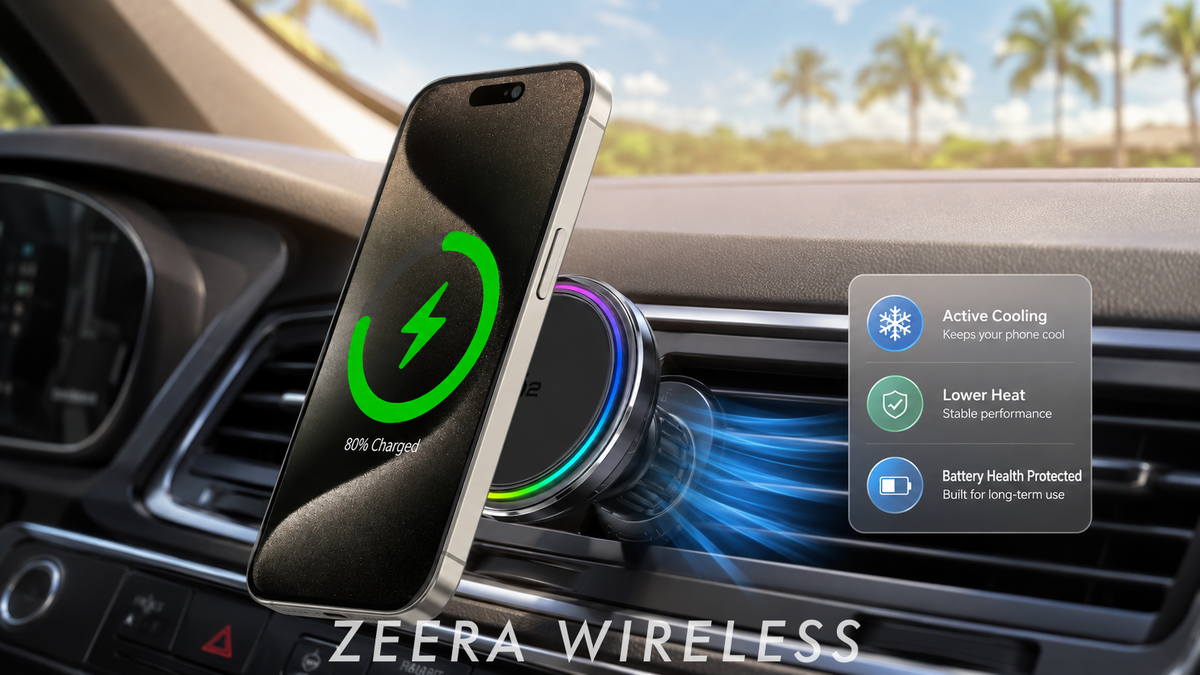
ZEERA SuVolt Gen5 Qi2 25W Active Cooling Car Charger
The ZEERA SuVolt Gen5 is not a conventional magnetic wireless charger. Its key difference is an integrated semiconductor active cooling system designed to actively remove heat from the charging contact area while the iPhone is charging.

- Active Cooling: Helps remove heat from the charging surface, reducing the thermal buildup that can slow iPhone charging during navigation and Wireless CarPlay.
- Qi2 25W Charging: Provides higher charging potential for compatible iPhones, giving more headroom during demanding in-car use.
- Stable Magnetic Alignment: Keeps the charging coils properly positioned while driving, helping reduce efficiency loss and extra heat.
Unlike a standard passive magnetic charger, ZEERA SuVolt Gen5 actively addresses heat—the main factor that often limits real-world wireless charging performance in the car.
If you are choosing a magnetic mount specifically for long drives, see our guide to the best MagSafe car mount charger for iPhone 18 Pro Max.

A Car Wireless Charging Problems: Quick Diagnosis
The way charging slows down can often reveal the most likely cause.
| What you notice | Most likely cause |
|---|---|
| Charging starts fast but becomes slower later | Heat buildup or thermal charging limits |
| Charging icon appears but battery barely increases | GPS, CarPlay or other workloads are using much of the available power |
| Battery percentage drops while charging | Usable charging power is lower than the phone's current power consumption |
| Charging is much worse in hot or sunny weather | Direct sunlight and high cabin temperature |
| Charging improves after removing the case | Case thickness, magnetic alignment or trapped heat |
| The charger never reaches expected performance | Low-power car adapter, USB port or unsuitable cable |
If the same charger works normally indoors or during a cooler evening drive but slows significantly during daytime navigation, temperature is likely playing a major role.


Frequently Asked Questions
Why does wireless charging slow down in the car?
Heat, GPS navigation, Wireless CarPlay, magnetic alignment and the car's power source can all affect charging speed. High temperature can also cause the iPhone to reduce charging power.
Can GPS navigation make wireless charging slower?
Yes. Navigation continuously uses location services, map processing and often cellular data, increasing both power consumption and heat.
Does Wireless CarPlay affect charging speed?
It can. Wireless CarPlay adds continuous wireless communication and processing, leaving less of the charger's usable power available for increasing the battery level.
Does magnetic alignment affect wireless charging?
Yes. Poor coil alignment can reduce charging efficiency and turn more of the transferred energy into heat.
Is active cooling useful for a MagSafe or Qi2 car charger?
It can be useful during long navigation sessions or hot-weather driving because it helps manage heat around the wireless charging surface.
Why Does Wireless Charging Start Fast but Slow Down Later in the Drive?
Heat can build gradually during navigation, Wireless CarPlay and wireless charging. As the iPhone gets warmer, charging performance may be reduced, so a charger that appears fast at the beginning of a drive can deliver less useful charging power later.









