
Quick Answer: To take better photos with an iPhone 17 Pro, iPhone 17 Pro Max, iPhone 18 Pro or iPhone 18 Pro Max, use 24MP for everyday shooting, switch to 48MP when you need extra detail, stay close to the native zoom options, control exposure and keep the camera clean.
However, camera settings cannot fully remove polarized reflections from windows, water, car paint and other glossy non-metallic surfaces. That is where a rotating CPL filter such as ZEERA SnapLens Trio can make a visible optical difference before the photo is taken.
Best Camera Settings for iPhone 17 and iPhone 18 Pro
You do not need to change every Camera setting to take a better photo. Start with the few controls that affect everyday shooting most often.
| Setting | Recommended Use |
|---|---|
| 24MP | Best balance for everyday photos, detail and manageable file sizes. |
| 48MP | Use in good light when you need fine detail or more room for cropping. |
| Grid | Turn it on to improve framing and subject placement. |
| Level | Turn it on to keep horizons and architecture straight. |
| Macro Control | Turn it on for more control when photographing close subjects. |
| Lens Correction | Keep it on for more natural-looking Ultra Wide and front-camera photos. |
For most people, 24MP is the better default. It provides plenty of detail without creating a large file for every casual photo.
Use 48MP for landscapes, products, architecture or other well-lit scenes where small details matter. It is not automatically the best option for every night, macro or fast-moving photo.
You should also tap the main subject to set focus. Drag the sun icon slightly downward when highlights look washed out, or press and hold the subject to activate AE/AF Lock when the composition is not changing.
These controls improve how your iPhone captures the image, but they cannot solve every lighting problem in front of the lens.
Use the Right iPhone Camera Lens Before You Zoom
Many disappointing iPhone photos are caused by using too much digital zoom. Choose the most suitable built-in camera first, then move closer when it is safe and practical.
0.5x: Wide Scenes
Use the Ultra Wide camera for landscapes, large buildings, group photos and tight interiors. Keep important people away from the edges, where the wide perspective can stretch faces and objects.
1x: The Best Everyday Choice
The 1x camera is usually the most reliable option for everyday photography. It provides a natural field of view and a strong balance between detail, stabilization and low-light performance.
2x: People, Food and Products
The 2x option is useful when you want a tighter composition without standing too close. It can create a more natural perspective for portraits, food, accessories and product photography.
Telephoto: Distant Subjects
Use the dedicated telephoto camera for distant details, architecture and portraits with a more compressed background. Avoid zooming far beyond the available optical options unless capturing the moment matters more than maximum detail.
Better iPhone photography often begins with choosing the right lens, not changing every available setting.

Why Do My iPhone Photos Still Have Glare and Reflections?
You may clean the camera, select 48MP, lower the exposure and choose the correct lens, yet still see a bright reflection covering the subject.
This often happens when photographing:
- Through car windows or windshields
- Through store, hotel or museum glass
- Lakes, oceans and swimming pools
- Painted cars and other glossy surfaces
- Wet leaves, roads and outdoor objects
- Glass buildings and modern architecture
This is not mainly a resolution, HDR or exposure problem. It is a light problem.
Reflected light can become partially polarized when it bounces from glass, water and many glossy non-metallic surfaces. The camera records that light along with your intended subject.
Lowering the exposure may make the entire image darker, but the reflection can remain. Increasing the resolution records more detail, including more detail in the unwanted reflection.
Reflection is also different from lens flare. A CPL can reduce certain polarized reflections, but it cannot guarantee the removal of flare or ghosting caused by a bright sun, streetlight or other light source shining directly into the camera.

How to Reduce Reflections in iPhone Photos
Before adding an accessory, try changing your shooting position. A small movement to the left, right, up or down can change the angle of the reflected light.
When shooting through a window, move the camera close to the glass and block stray light from behind the iPhone. Cleaning both the camera and the window can also prevent haze and smudges from reducing clarity.
These techniques are useful, but they are not always practical. Moving sideways may ruin the composition, and you cannot reposition a lake, building or parked car to create a better lighting angle.
When changing position is not enough, a CPL filter can control polarized reflected light optically before it reaches the camera sensor.

What Does a CPL Filter Do on an iPhone?
A CPL, or circular polarizing filter, is designed to manage polarized light. Rotating the filter changes which reflected light reaches the camera.
In suitable lighting, an iPhone CPL filter can:
- Reveal more detail behind glass
- Reduce surface glare on water
- Control reflections on painted car panels
- Reduce glare from wet foliage
- Improve perceived contrast in outdoor scenes
- Add more separation between skies and clouds at the right angle
The result is optical rather than a software effect. The filter changes part of the light entering the camera before the iPhone processes or saves the photograph.
That is exactly where ZEERA SnapLens Trio comes in.
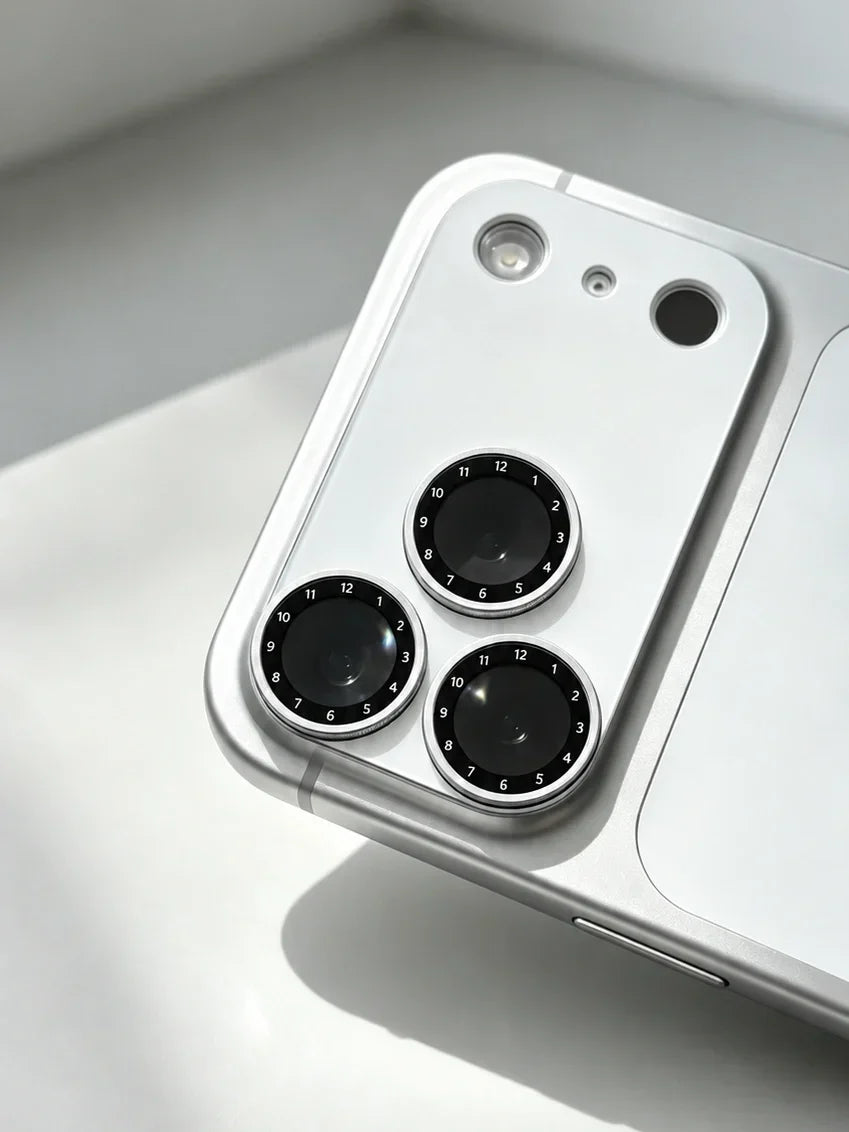
Instead of placing a passive clear cover over the camera, ZEERA SnapLens Trio turns the lens-protection layer into an adjustable photography tool.
Why ZEERA SnapLens Trio Uses Three Rotating CPL Filters
Independent CPL Control
SnapLens Trio places a dedicated CPL filter over each rear camera. When you switch from the main camera to Ultra Wide or telephoto, you can adjust the CPL positioned over that specific lens.
You do not need to rotate all three filters every time. Select the camera you want to use, then adjust its matching CPL ring.

360° Rotation
A fixed polarizing filter cannot provide the strongest effect in every scene. Polarization changes with the direction of the light, the position of the sun, the reflective surface and your shooting angle.
SnapLens Trio allows each CPL ring to rotate through 360 degrees. Watch the live Camera preview and stop when the reflection reaches the strongest or most natural-looking reduction.

Protection and Photography in One Design
Most camera lens protectors perform one passive job. SnapLens Trio combines its optical function with a precision aluminum structure surrounding the raised camera module.
The aluminum frame helps protect the lenses and surrounding camera area from desks, keys and everyday surface contact. Its low-profile construction also avoids the bulk of a separate phone cage, clip-on holder or large external filter rig.
SnapLens Trio is available in Black, Silver, Deep Blue, Light Blue, Burgundy and Orange. ZEERA offers model-specific versions for iPhone 17 Pro, iPhone 17 Pro Max, iPhone 18 Pro and iPhone 18 Pro Max.
Always select the exact iPhone model before ordering because camera-module dimensions can differ between generations and sizes.

Where Does an iPhone CPL Filter Make the Biggest Difference?
Car Photography
Car windows, windshields and painted body panels can reflect the sky, nearby buildings and the photographer. Rotating the CPL can reduce some of these distractions and reveal more interior or paint detail.
The effect is strongest on glass and painted or coated surfaces. A CPL does not remove reflections from exposed metal or chrome in the same way.
Water Photography
A lake or swimming pool may look like a bright mirror instead of showing the color and texture below the surface. At a suitable angle, a CPL can reduce part of that surface glare.
Rotate the filter rather than assuming the maximum polarization is always best. Keeping a controlled amount of reflection can make the water look more natural.
Shooting Through Glass
Store windows, hotel rooms, observation decks and museums frequently place reflective glass between the camera and the subject.
Move the iPhone close to the clean glass, block light coming from behind you and rotate the corresponding CPL ring while watching the preview. These techniques work better together than relying on only one of them.
Landscapes and Architecture
Reflections on leaves, wet surfaces and glass buildings can make outdoor scenes appear washed out. A CPL can control some of that glare and give the scene greater perceived contrast.
It may also deepen a blue sky when the sun and camera are at a suitable angle. The effect can vary across a very wide 0.5x image, so check the entire sky before taking the photo.
Does a CPL Filter Always Improve iPhone Photos?
No. A CPL is a specialized optical tool, not an automatic image-quality upgrade.
It does not increase the camera resolution, correct missed focus, replace good composition or automatically brighten a dark scene. It also cannot eliminate every kind of lens flare or every reflection from every surface.
A polarizing filter reduces some incoming light. In very dark environments where reflections are not the main problem, using it may provide little benefit and could require a slower shutter speed or higher sensitivity.
CPL performance also depends on the direction of the light. If rotating the ring produces little visible change, the current light, surface or shooting angle may not create a strong polarization effect.
Use the CPL when reflection control improves the subject—not simply because the filter is available.
Do These Tips Work for Both iPhone 17 Pro and iPhone 18 Pro?
Yes. Camera hardware may change between iPhone generations, but composition, exposure, lens selection and the physics of reflected light remain the same.
The iPhone 17 Pro camera system supports high-resolution 24MP and 48MP photos, multiple focal lengths and three rear cameras. These tools provide plenty of flexibility, but they do not change how polarized reflections behave.
Until Apple officially confirms every iPhone 18 Pro and iPhone 18 Pro Max camera feature, rumored sensor, aperture or zoom upgrades should not be treated as final specifications.
Even a newer camera cannot fully remove every reflection from glass, water or glossy surfaces through resolution alone. Reflected light still needs to be managed through the shooting angle, surrounding light or an optical tool such as a CPL.
FAQ
What are the best camera settings for iPhone 17 Pro and Pro Max?
Use 24MP for everyday photography and 48MP in good light when you need more detail or cropping flexibility. Turn on Grid, Level, Macro Control and Lens Correction, then tap the subject to control focus and exposure.
What are the best camera settings for iPhone 18 Pro and Pro Max?
Start with 24MP for everyday use, enable Grid and Level, use native zoom options and adjust exposure for the subject. Because final iPhone 18 camera features should be verified after Apple’s official announcement, available resolution and camera controls may need to be updated.
Should I use 24MP or 48MP on my iPhone?
Use 24MP for most everyday photos. Choose 48MP when the scene is well lit and you need maximum detail, a larger print or more room to crop. Higher resolution does not automatically produce a better photo in every condition.
How do I reduce glare and reflections in iPhone photos?
Clean the camera, change your shooting angle, move closer to glass and block stray light from behind the phone. If reflections remain on glass, water or another non-metallic surface, rotate a CPL filter while watching the Camera preview.
What does a CPL filter do on an iPhone?
A circular polarizing filter controls polarized reflected light before it enters the camera. In suitable conditions, it can reduce reflections from glass and water, control glare on painted surfaces and improve perceived contrast in outdoor photos.
Does ZEERA SnapLens Trio fit both iPhone 17 Pro and iPhone 18 Pro?
ZEERA offers SnapLens Trio versions for iPhone 17 Pro, iPhone 17 Pro Max, iPhone 18 Pro and iPhone 18 Pro Max. Select the exact model when ordering because the camera-module dimensions can differ.
Related Reading






