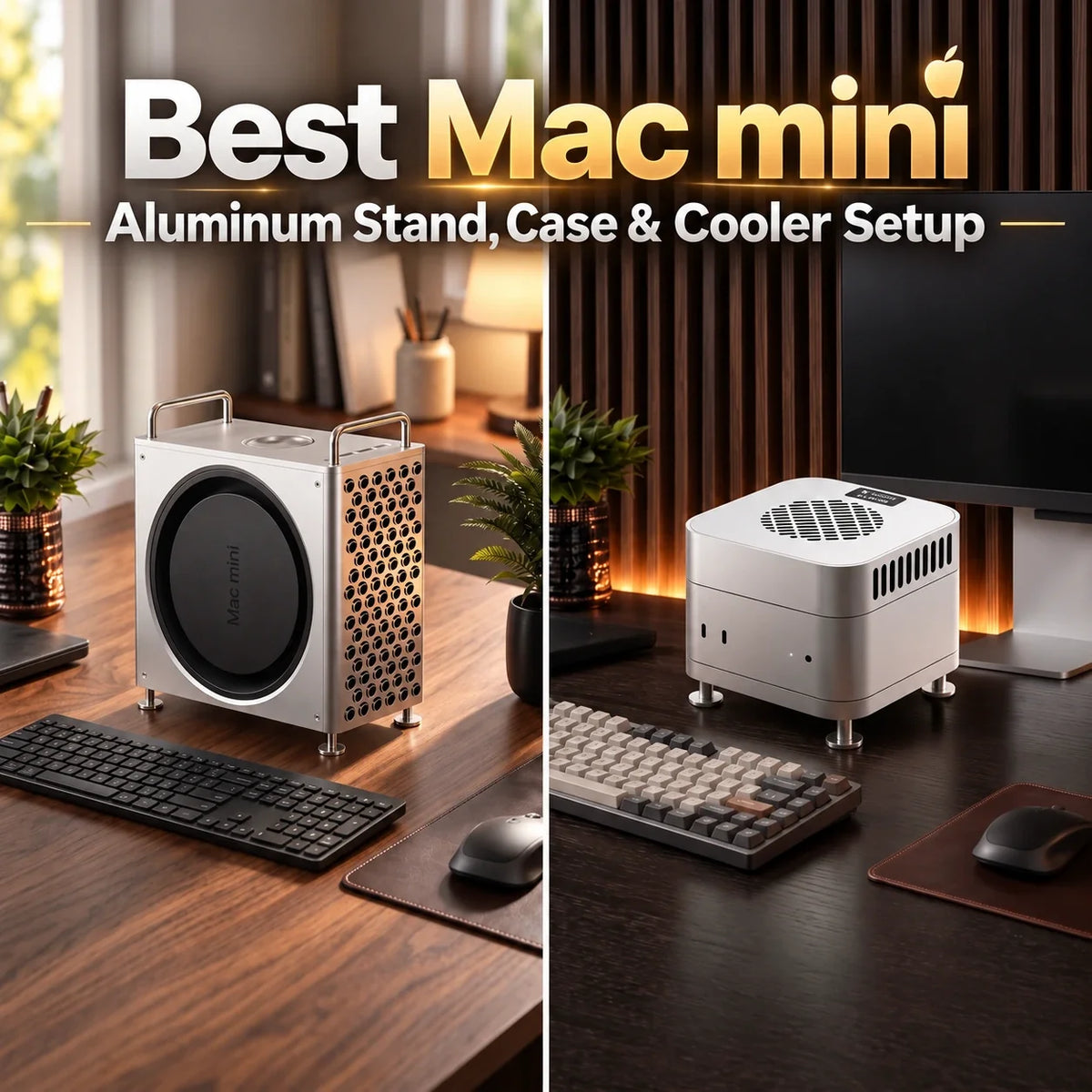
Your Mac mini can become part of your desk design instead of disappearing beneath a monitor.
Choose a Mac mini aluminum stand if you want a cleaner, elevated setup with better bottom clearance. Choose a Mac mini aluminum case if you want a complete visual transformation.
ZEERA MacForge Gen3 turns the Mac mini into a compact Mac Pro-inspired workstation. ZEERA MacFrost Pro keeps the original Mac mini visible while adding a matching CNC aluminum stand and optional active cooling.
Most users need only one of these two approaches—not both.

A good Mac mini accessory should improve the desk visually without sacrificing port access, airflow or everyday usability.
How Do You Make a Mac mini Setup Look Better?
The Mac mini is compact, quiet and deliberately understated. That makes it easy to place almost anywhere, but it can also make the computer feel disconnected from the rest of a carefully designed workspace.
A monitor, keyboard, desk lamp and speakers all contribute to the visual identity of a desk. The Mac mini is often pushed behind the display or surrounded by mismatched hubs, SSD enclosures and cables.
The better approach is to treat the computer as part of the desktop architecture.
A well-designed Mac mini stand, aluminum enclosure or cooling system can give the computer a more intentional position while solving practical problems such as limited airflow, inaccessible ports and loose external storage.
Raises the Mac mini, improves bottom clearance and keeps the original Apple design visible.
Transforms the Mac mini into a more substantial desktop object with a Mac Pro-inspired appearance.
Adds external cooling capacity for long exports, rendering, local AI and other sustained workloads.
Mac mini Aluminum Case: Turn the Computer Into a Desktop Centerpiece
A basic Mac mini case normally focuses on surface protection. The ZEERA MacForge Gen3 takes a different approach.
It is a CNC-machined Mac mini aluminum case designed to give Mac mini M6, M5 Pro and M4 a compact Mac Pro-inspired identity.
The three-dimensional front grille creates a recognizable workstation look, while the wider and more grounded proportions make the computer feel like a deliberate part of the desk rather than a small box placed beside the monitor.
CNC-Machined Aluminum
The rigid metal structure and brushed, hard-anodized surface match the material language of Apple’s desktop hardware.
Mac Pro-Inspired Grille
The precision front pattern gives the Mac mini a stronger visual presence while maintaining an open airflow path.
Top-Mounted I/O
A custom extension system brings the two front USB-C ports and headphone jack to an easier-to-reach position on top.
Optional SSD Storage
One version includes space for an external SSD enclosure up to 120 × 60 × 19 mm, reducing loose hardware around the computer.
Is MacForge Gen3 Just a Decorative Mac mini Enclosure?
No. Its appearance is the most immediately noticeable change, but the enclosure is also designed around airflow, port access and external-storage organization.
The larger internal volume and shaped airflow channels help reduce thermal congestion around the Mac mini. The aluminum structure can also spread heat across a broader surface.
That makes MacForge useful as a passive Mac mini cooling case, but it should not be confused with a powered Mac mini cooler. It does not use a fan, a thermoelectric module or cooling software.
Best for: minimalist desks, Mac Pro-inspired setups, creators using an external SSD, users who want easier front-port access, and anyone who wants the Mac mini to become a visible design object.
Mac mini Aluminum Stand: The Cleaner, More Minimal Upgrade
Not everyone wants to cover or transform the Mac mini. If you prefer Apple’s original compact shape, a matching aluminum stand for Mac mini is the more restrained choice.
The lower section of ZEERA MacFrost Pro is a 127 × 127 mm CNC aluminum stand built around the current Mac mini footprint.
It raises the computer to create additional space beneath the original bottom ventilation. A dedicated opening keeps the power button accessible, while a silicone contact ring helps prevent scratches and unwanted movement.
Matches the dimensions of Mac mini M6, M5 Pro and M4.
Creates extra bottom clearance without turning the computer into a tall tower.
Cushions the contact area and helps resist sliding on the stand.
For browsing, office work, streaming and short creative tasks, the aluminum stand may be all you need. The Mac mini already has its own internal cooling system, and normal workloads generally do not require an external fan.
Mac mini Cooler: When Does Active Cooling Make Sense?
A dedicated Mac mini cooler becomes more relevant when the computer spends long periods under continuous CPU or GPU load.
Examples include repeated 4K or 8K exports, 3D rendering, large code compilations, scientific workloads and local AI generation. These tasks create sustained heat rather than a short temperature spike.
MacFrost Pro is not a conventional Mac mini cooling fan that blows air toward the bottom intake. Its upper unit uses direct-contact thermoelectric cooling.
An included thermal silicone pad connects the cold plate to the top of the Mac mini’s aluminum enclosure. Heat transfers into the cooler, while its fan removes heat from the hot side of the thermoelectric system.

MacFrost Pro combines a top-mounted thermoelectric active cooler with a separate lower aluminum stand.
The recommended starting mode for long daily sessions and lighter creative work.
Stronger cooling for long exports, rendering, AI workloads and large builds. Fan noise is clearly noticeable.
Designed for performance-first sessions where cooling matters more than acoustic comfort.
Displays cooler-sensor temperature, fan RPM, voltage and power without requiring a macOS app.
ZEERA’s testing recorded minimum cooler-sensor temperatures of 15°C in 7W mode, 10.1°C in 20W mode and 6.9°C in 30W mode.
Those figures come from the MacFrost Pro sensor—not the Mac mini’s internal CPU or GPU sensor. Actual results depend on ambient temperature, humidity, thermal-pad contact, power delivery and workload.
Important: Higher cooling modes are substantially louder. In humid conditions, thermoelectric cooling may also lower a surface below the dew point. Stop using the cooler if moisture appears.
MacForge vs MacFrost: Which Mac mini Accessory Should You Buy?
MacForge Gen3 and MacFrost Pro share an aluminum-first design language, but they solve different problems. They should be treated as alternative desktop systems rather than accessories every buyer must combine.
You Want a Complete Visual Transformation
- Mac Pro-inspired desktop appearance
- Full CNC aluminum enclosure
- Passive airflow support
- Top-access USB-C and headphone ports
- Optional external SSD organization
- No fan noise or separate power supply
You Want Minimal Design or Active Cooling
- Original Mac mini enclosure remains visible
- Matching CNC aluminum stand
- Improved bottom-airflow clearance
- Optional 30W thermoelectric cooling
- OLED operating-data display
- Best suited to sustained professional loads
If aesthetics are the main priority, MacForge Gen3 creates the stronger transformation. If you prefer the Mac mini’s original shape, start with the MacFrost aluminum stand.
If your work repeatedly keeps the processor under heavy load, add the MacFrost active cooler and use the lowest mode that provides a meaningful benefit.
How to Build a Cleaner Mac mini Desk Setup
The right case or stand helps, but good desktop aesthetics come from the entire setup working together.
Give the Mac mini a Defined Position
Place it beside the monitor or beneath a raised display instead of hiding it among cables and storage devices.
Keep the Material Palette Consistent
Silver aluminum works naturally with Apple displays, metal monitor arms and neutral keyboards.
Reduce Loose External Storage
Use the MacForge SSD-storage configuration or mount external drives in a controlled location behind the display.
Protect the Airflow Path
Do not place the Mac mini on thick fabric, paperwork or another surface that restricts its bottom ventilation.
Route Cables in One Direction
Guide power, display and storage cables toward a single rear channel instead of allowing them to spread across the desk.
Use Lighting With Restraint
Soft task lighting usually complements an aluminum Mac setup better than multiple bright RGB accessories.
Does Every Mac mini Need a Stand, Case or Cooler?
No. The Mac mini works without any of these accessories.
A Mac mini aluminum stand is mainly useful when you want a cleaner presentation, more bottom clearance or easier access around the computer.
A Mac mini aluminum case is a design and organization upgrade. It is for users who want their computer to look more substantial and integrated into a professional workstation.
A powered Mac mini cooling system is the most specialized option. It makes sense for sustained workloads, warm environments or installations where heat accumulates over many hours. It is usually unnecessary for normal web browsing and office tasks.
Final Verdict: Make the Mac mini Part of the Desk
The best Mac mini desk setup is not necessarily the one with the most accessories. It is the one where every object has a clear visual and practical purpose.
Choose MacForge Gen3 when you want a full CNC aluminum Mac mini case, Mac Pro-inspired design, accessible top ports and cleaner external-storage organization.
Choose the MacFrost aluminum stand when you want a minimal upgrade that preserves the original Mac mini design. Choose the complete MacFrost Pro system when sustained performance and direct-contact active cooling are part of your workflow.
Both approaches follow the same idea: the Mac mini should not merely sit on your desk. It should belong there.
Frequently Asked Questions
What is the best stand for Mac mini?
A CNC aluminum stand that matches the Mac mini footprint, keeps the power button accessible and leaves its bottom ventilation unobstructed is the best choice for a clean desktop setup.
Does a Mac mini aluminum stand improve cooling?
It can provide more clearance beneath the computer and help preserve access to the original bottom airflow. A passive stand does not provide the same cooling capability as an active cooler.
Is an aluminum case safe for Mac mini Wi-Fi and Bluetooth?
A properly engineered enclosure must account for antenna placement. MacForge Gen3 is designed to maintain stable Wi-Fi and Bluetooth operation while surrounding the Mac mini with an aluminum structure.
Does the Mac mini need an active cooler?
Not for normal browsing, streaming or office work. A Mac mini active cooler is most useful for repeated video exports, 3D rendering, local AI, large code builds and other long, demanding workloads.
Is MacFrost Pro just a Mac mini cooling fan?
No. It uses direct-contact thermoelectric cooling on the top enclosure, while its separate aluminum stand preserves clearance around the Mac mini’s original bottom ventilation.
Can I use MacForge Gen3 and MacFrost Pro together?
They are designed as different Mac mini upgrade routes. MacForge is a full enclosure, while MacFrost is built to contact and support the original Mac mini body. Most users should choose the system that best matches their design or cooling priority.
Are MacForge and MacFrost compatible with Mac mini M6 and M4?
Yes. The current versions are designed for Mac mini M6, M5 Pro and M4 models using the 127 × 127 mm enclosure design.