
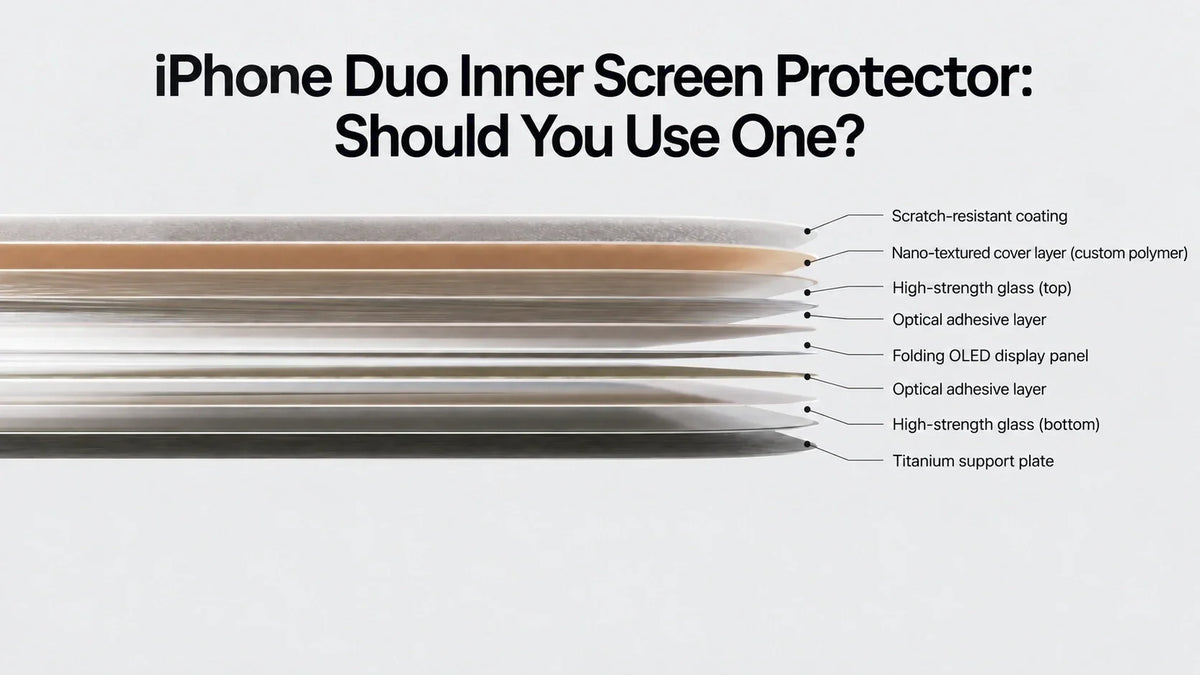
Can you put a screen protector on the iPhone Duo inner screen? A thin flexible film may physically adhere, but Apple has not approved or recommended third-party inner-screen protectors.
Should you install one? ZEERA’s answer is no—not unless Apple or a verified accessory maker explicitly confirms that the film is safe for the Duo’s folding display.
An added film can weaken the nano-texture’s anti-glare effect, change the feel of touch and Apple Pencil, collect fingerprints, lift at the crease, and add stress to a precisely engineered 10-layer display. Protect the outer screen, frame, corners and hinge instead.
The iPhone Duo creates a new screen-protection question for Apple users. On a normal iPhone, adding tempered glass is almost automatic. On a foldable iPhone, the display surface must bend every time the phone closes, so an extra layer is not a neutral addition.
Apple says the Duo’s inner display uses 10 ultrathin layers, a scratch-resistant coating and a custom nano-texture finish. It also uses optically clear adhesives that let the layers move slightly as the screen folds, reducing stress and minimizing the crease. That makes the inner screen an engineered moving system—not simply a flat panel waiting for another protector.
Can You Put a Screen Protector on the iPhone Duo Inner Screen?
Physically, a purpose-built flexible film could be applied. Technically, compatibility is still unconfirmed.
A normal tempered-glass protector cannot follow the Duo’s folding radius and should never be used on the inner display. A soft TPU, PET or other flexible film can bend, but that does not prove it is safe for the nano-texture cover, the center crease or the screen’s adhesive stack.
As of September 2026, Apple’s iPhone Duo technical specifications confirm the nano-texture finish, anti-reflective coating, fingerprint-resistant oleophobic coating and Apple Pencil support. They do not authorize a removable inner-screen protector.
The practical answer: “Can be attached” and “has been validated for thousands of folding cycles” are not the same thing.
Should You Put a Screen Protector on the iPhone Duo Inner Display?
No, ZEERA does not recommend adding one at launch. The factory surface is already part of the display’s optical and mechanical design. Covering it trades a known Apple-engineered surface for an unknown combination of film, adhesive, thickness and folding behavior.
Wait until Apple publishes explicit handling guidance or until a protector manufacturer can document compatibility with the final retail screen—not just with pre-release dimensions or a display mockup.
If Apple later sells or approves an inner-screen film, follow its installation and replacement process exactly. Do not stack another film on top of it and do not assume that a protector made for a different foldable phone is interchangeable.
Why a Screen Protector Can Defeat the Nano-Texture Finish
Nano-texture works by controlling how light reflects from the surface. Instead of behaving like a smooth mirror, the microscopic surface structure scatters strong reflections so glare is less distracting.
That same effect helps the iPhone Duo crease look less obvious. The physical fold still exists, but reduced mirror-like reflection makes the change in angle across the center less visible.
Adding a screen protector places a new optical surface above the nano-texture. Its adhesive can fill the microscopic texture while the smooth top film reintroduces sharper reflections. In plain language: you may cover the very feature you paid for.
Is the iPhone Duo Nano-Texture the Same as Apple’s Other Displays?
The purpose is familiar, but the material is not identical.
Apple has already offered nano-texture display options on products including Pro Display XDR, Studio Display, iMac, MacBook Pro and iPad Pro. On those products, Apple describes a nano-texture glass surface and provides special cleaning instructions.
The iPhone Duo is different because its inner screen must fold. The touch surface is a custom polymer cover layer over a multilayer folding display. Apple says this polymer offers up to 40 percent greater stiffness than comparable materials used elsewhere in the industry. Calling it “plastic” is understandable in everyday language, but incomplete.
Polymer is the broader material family; plastic is one category of polymer. Apple has not published the exact chemical formulation of the Duo cover. The accurate description is a custom, flexible polymer cover—not that the entire screen is “just plastic.”
What Is Inside the iPhone Duo Folding Display?
Apple has not published a complete factory bill of materials, but its public description supports the following simplified structure from the touch surface downward:
-
Scratch-resistant surface coating
Helps reduce everyday marks, but does not make the display scratch-proof. -
Nano-textured custom polymer cover layer
The flexible surface you touch; designed to reduce glare and remain compatible with folding. -
Upper high-strength glass layer
Provides optical and structural support within the flexible stack. -
Optically clear adhesive system
Allows microscopic relative movement between layers during folding. -
Folding OLED display panel
Creates the 7.6-inch Super Retina XDR image. -
Lower glass and adhesive layers
Support the panel while distributing bending stress. -
Titanium support plate
Adds stiffness and supports the display from below.
Apple describes the full inner display as a 10-layer construction, so the list above groups several coatings, adhesives and support layers rather than claiming to be an exact 10-line teardown.
Will the iPhone Duo Inner Screen Scratch?
Yes, it can. Scratch-resistant does not mean scratch-proof. A flexible polymer cover cannot behave exactly like the thick rigid cover glass on a conventional iPhone.
Most micro-scratches are more likely to come from hard particles than from clean fingertips. Sand, metal dust or grit trapped between the two halves can be dragged across the surface when the phone closes or when you wipe it.
Once the nano-textured polymer is visibly scratched, do not try to polish the mark away. Abrasive polishing can change the surface texture, remove coatings and create a glossy patch. A damaged inner display should be assessed by Apple or an authorized service provider. For repair-cost context, see our iPhone Duo screen, hinge and AppleCare+ repair guide.
Does Nano-Texture Make Fingerprints and Oil Harder to Clean?
It may make smudges look and behave different from those on smooth glass, but the iPhone Duo is not missing fingerprint protection. Apple lists a fingerprint-resistant oleophobic coating for both displays.
The trade-off is that nano-texture is not a perfectly smooth surface. Skin oil can spread unevenly across microscopic texture, so some marks may look cloudy and may take more careful wiping to remove. As the oleophobic coating naturally wears with use, fingerprints may become more noticeable.
This is already a known ownership consideration on Apple’s other nano-texture products. Apple tells owners of nano-texture Macs, Studio Display, Pro Display XDR and iPad Pro to use the supplied polishing cloth, with 70% isopropyl alcohol reserved for infrequent hard-to-remove smudges on those listed products.
Do not automatically transfer the alcohol guidance for nano-texture glass to the Duo’s polymer inner cover. Until Apple publishes Duo-specific instructions, use a clean, soft, dry lint-free cloth, apply minimal pressure and never spray liquid directly onto the display.
Does the Inner Display Look Less Vibrant Than the Outer Screen?
It can look slightly less glossy or “transparent,” especially beside the smooth outer display. This is a normal optical trade-off of an anti-glare surface, not evidence that the OLED panel has weaker specifications.
The nano-texture scatters ambient light. That reduces reflections, but it can also lower perceived contrast in some lighting and create a subtle grain or sparkle on bright white backgrounds. Smooth glass often makes colors appear punchier because reflections and specular contrast are sharper.
Apple lists the same wide P3 color, HDR support, 2,000,000:1 typical contrast ratio and up to 3000 nits outdoor peak brightness for both displays. So the difference is mainly in surface character: the outer display may look clearer and glossier, while the inner display should be easier to view around strong reflections.
A glossy inner protector would not truly restore the outer screen’s appearance. It would add another adhesive and optical layer, increase reflections and could make the crease easier to see.
Can Apple Pencil Scratch the iPhone Duo Inner Screen?
Apple officially confirms support for Apple Pencil (USB-C), which means normal use with a clean, undamaged Pencil tip should be part of the intended experience.
The bigger risk is contamination. A tiny hard particle caught between the Pencil tip and polymer cover can act like sandpaper. A damaged or sharply worn tip, excessive pressure or repeatedly drawing over grit may produce micro-scratches.
- Wipe the screen and Pencil tip before long writing or drawing sessions.
- Replace a visibly worn, rough or damaged Pencil tip.
- Use normal writing pressure; pressing harder does not make the surface safer.
- Do not add a paper-texture film unless it is specifically validated for iPhone Duo.
- Never close the phone with Apple Pencil or another object between the two halves.
A matte “paper feel” protector is especially questionable here. It adds friction, further reduces clarity and may change both Pencil response and the screen’s folding behavior.
What Type of iPhone Duo Screen Protection Is Safe?
The safest launch-day strategy is selective protection.
A good iPhone Duo case cannot make the inner display indestructible, but it can reduce the chance that a drop, exposed hinge or damaged frame transfers force into the folding panel.
How to Care for the iPhone Duo Nano-Texture Inner Display
- Check for sand or grit before closing the phone.
- Use a clean, soft, lint-free cloth and light pressure.
- Wipe oil before it builds into a cloudy patch.
- Keep fingernails and sharp objects away from the polymer surface.
- Clean the Apple Pencil tip before drawing.
- Do not use abrasive cloths, polishing compounds or household glass cleaner.
- Do not peel, lift or scrape any factory-applied display layer.
- Follow Apple’s Duo-specific care instructions when they become available.
If the crease, glare or long-term durability is your main concern, our iPhone Duo vs Galaxy Z Fold8 crease comparison explains why the fold is less visible without claiming that it has disappeared.
The iPhone Duo inner screen can probably accept a flexible film, but that does not mean owners should install one.
The inner surface is already an active part of Apple’s anti-glare, crease-minimizing and folding design. An added protector may reduce reflections less effectively, make the display feel different, collect oil, soften image clarity, lift at the fold or add mechanical stress.
The polymer cover will still be more vulnerable to micro-scratches than conventional rigid iPhone glass. That is a real compromise, and those marks cannot safely be polished away. For now, protect the outer screen, frame, hinge and corners; keep the inner display clean; and wait for verified compatibility before applying anything to it.
iPhone Duo Inner Screen Protector FAQ
Does iPhone Duo come with an inner screen protector?
Apple describes a scratch-resistant coating and nano-textured polymer cover as part of the display itself. Do not treat or peel any factory layer as disposable unless Apple explicitly labels it removable.
Can I use tempered glass on the iPhone Duo inner screen?
No. Rigid tempered glass cannot follow the center fold. Tempered glass is appropriate for the flat outer display when it is made for the Duo’s final dimensions.
Can I use a flexible TPU or PET film on the inner display?
It may physically fit, but compatibility depends on adhesive, thickness, edge clearance, nano-texture interaction and folding-cycle testing. ZEERA recommends waiting for explicit validation.
Will a screen protector remove the iPhone Duo crease?
No. The crease is part of the folding geometry. A glossy film could make reflections sharper and make the crease more visible from some angles.
Is the iPhone Duo inner display plastic?
The outer cover is a custom polymer, which can loosely be described as plastic. The complete display is a multilayer structure containing coatings, polymer, high-strength glass, adhesives, folding OLED and titanium support.
Does the nano-texture inner screen attract fingerprints?
Apple includes an oleophobic coating, but oil can appear uneven on a textured surface and may take careful wiping to remove. Fingerprint resistance can also decline with normal wear.
Does iPhone Duo support Apple Pencil?
Yes. Apple confirms support for Apple Pencil (USB-C), coming later in 2026. Keep both the tip and inner screen clean to reduce the risk of grit causing micro-scratches.
How should I clean the iPhone Duo inner screen?
Use a clean, soft, dry lint-free cloth with light pressure until Apple publishes more specific Duo guidance. Do not spray cleaner directly on the screen or use abrasives.
Sources: Apple iPhone Duo overview, Apple iPhone Duo technical specifications, Apple nano-texture display cleaning guidance, and Apple iPhone cleaning guidance. Product observations and screen-protector recommendations are ZEERA’s analysis based on Apple’s published display construction and care information.






