
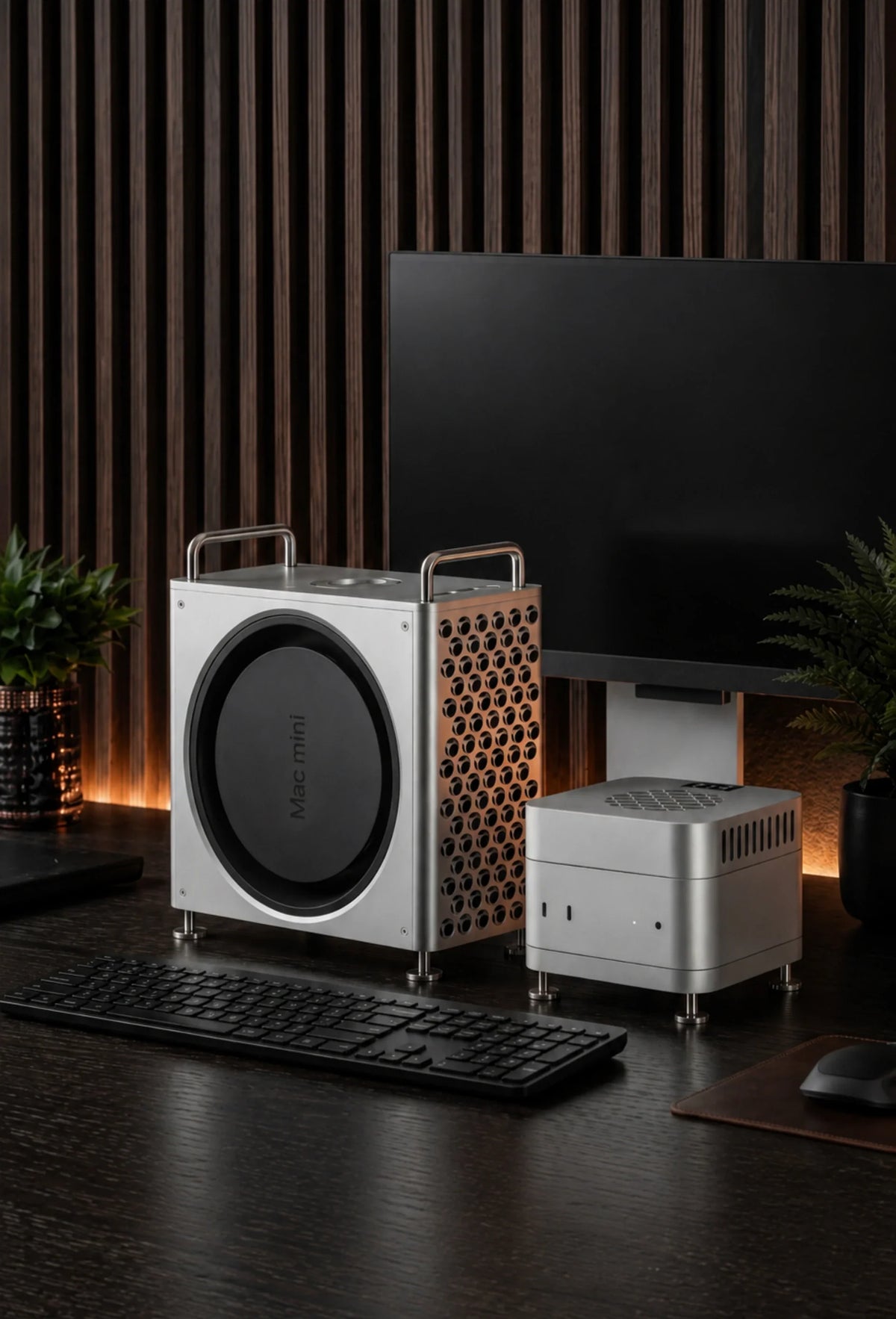
A Mac mini does not need a case for basic protection at a stationary desk, but the right case can make the computer easier to organize, give it a more substantial Mac Pro-style appearance and preserve clear airflow around the chassis. For Mac mini M6, M5 Pro and M4, our main recommendation is the ZEERA MacForge Gen3 CNC aluminum Mac mini case. If sustained cooling matters more than enclosure styling, choose the ZEERA MacFrost Pro active cooler instead. Mac mini M2 owners need a model-specific case because the older chassis is much larger.
Searching for a Mac mini case is more complicated than it first appears. One person may want a travel sleeve. Another wants a vertical mount, a Mac mini case with SSD storage or an aluminum enclosure that makes the tiny desktop look like a miniature Mac Pro.
That is why the best case for Mac mini is not simply the one with the thickest walls. It is the one that solves the correct problem without blocking ventilation, hiding ports or fitting the wrong generation.
This guide explains what each type of case for Mac mini actually does, how M6, M4 and M2 compatibility differs, and when MacForge or MacFrost makes more sense for your setup.
What Does “Mac Mini Case” Actually Mean?
Unlike an iPhone case, an Apple Mac mini case is rarely about protecting a computer that you carry all day. The term covers several different products:
- Desktop enclosures that change the appearance and organization of the setup
- Aluminum stands that raise the computer and preserve space around its air intake
- SSD enclosures or docks that add external storage
- Active coolers made for long CPU- and GPU-intensive workloads
- Travel cases that protect the Mac mini while it is being transported
- 3D-printed shells and mounts designed for a specific desk, wall or rack
Searches such as “Mac mini M4 case,” “M4 Mac mini case,” “case Mac mini M4” and the Spanish phrase “case para Mac mini” may therefore lead to very different products. Before buying, decide whether your priority is appearance, storage, placement, transport or cooling.
Do You Really Need a Case for a Mac Mini?
No, not everyone needs one. Apple designed the Mac mini to operate as a complete desktop computer without an external enclosure. If it sits safely on an open desk, its ports are accessible and your workload is light, leaving it as-is is perfectly reasonable.
A case becomes useful when it improves the way the Mac mini fits into your workspace. For example, it can create a more deliberate desktop centerpiece, contain an external SSD, move frequently used ports to a more convenient position or add cooling capacity for sustained work.
A case makes sense if you want:
- A Mac Pro-inspired desktop look
- Better organization for an external SSD
- Easier access to front connections
- A stable metal structure around the computer
- More intentional passive airflow
You may not need one if:
- Your Mac mini stays in one safe location
- You prefer its original compact appearance
- Your desk has ample open space
- You do not use external storage
- Your normal workload causes no thermal concern
Will the Same Case Fit Mac Mini M6, M4 and M2?
A Mac mini M6 case can also fit M4 only when the manufacturer explicitly supports both generations. The current M6 and M4 chassis share a compact 5 × 5-inch footprint. That makes a properly engineered enclosure such as MacForge Gen3 compatible with Mac mini M6, M5 Pro and M4.
A Mac mini M2 case is different. The M2 generation uses the older 7.75 × 7.75-inch body, so an M2 enclosure cannot be treated as interchangeable with an M4 or M6 design.
| Mac mini generation | Approximate chassis size | MacForge Gen3 fit | What to search for |
|---|---|---|---|
| Mac mini M6 | 5 × 5 × 2 in | Yes | Mac mini M6 case |
| Mac mini M5 Pro | 5 × 5 × 2 in | Yes | Mac mini M5 Pro case |
| Mac mini M4 / M4 Pro | 5 × 5 × 2 in | Yes | Mac mini M4 case or Mac mini case M4 |
| Mac mini M2 / M2 Pro | 7.75 × 7.75 × 1.41 in | No | Mac mini M2 case |
Do not judge compatibility from a product photo alone. Check the exact Mac mini generation, chassis dimensions, port alignment, power-button access and ventilation layout before ordering.
Apple lists the current Mac mini at 5 inches wide and deep, while its official M2 specifications list a 7.75-inch square footprint. That difference is large enough to make generation-specific fit essential.
How Should You Evaluate a Mac Mini Case for Your Use Case?
The easiest way to evaluate a Mac mini case is to start with the task you want it to perform. A beautiful enclosure can be the right choice for a visible home office, while a simple padded travel case may be better for a computer moved between studios.
| Your main use case | Best case type | What matters most | Best ZEERA option |
|---|---|---|---|
| Premium desk setup | CNC aluminum enclosure | Finish, proportions, port access | MacForge Gen3 |
| Mac Pro-style appearance | Cheese-grater case | Metal grille, structural quality | MacForge Gen3 |
| External SSD workflow | Case with SSD area | Drive dimensions, cable routing | MacForge Gen3 SSD version |
| Long video exports or local AI | Active cooler | Direct heat transfer, power, noise | MacFrost Pro |
| Frequent transport | Padded travel case | Impact protection, cable storage | Use a dedicated travel design |
| Custom wall or rack mounting | 3D-printed or metal mount | Load strength, heat and vent clearance | Use a purpose-built mount |
This use-case-first approach prevents a common mistake: buying an attractive case and only later discovering that it blocks the setup you actually wanted to build.
Why Choose an Aluminum Mac Mini Case?
A Mac mini M4 case aluminum design usually appeals to buyers who want the enclosure to feel like part of the computer rather than a plastic accessory placed around it.
Aluminum offers rigidity, weight and a surface finish that visually matches Apple hardware. It can also spread heat across a broader metal structure when the case is designed with appropriate internal clearance and airflow channels.
Material alone does not guarantee good cooling. A poorly designed metal box can trap warm air just as easily as another enclosure. Look for open airflow paths, clearance around the Mac mini’s original intake and exhaust, and reliable access to every connection.
MacForge Gen3 uses a solid CNC-machined aluminum structure, fine directional brushing and a hard-anodized finish. Its wider stance is designed to give the small Mac mini a grounded desktop presence while keeping the original computer removable and unmodified.

What Is a Mac Mini Mac Pro Case?
A Mac mini Mac Pro case is an external enclosure inspired by Apple’s professional desktop design. It is also commonly called a Mac mini case Mac Pro, mini Mac Pro enclosure or Mac mini cheese grater case.
The “cheese grater” name refers to the three-dimensional pattern associated with the Mac Pro grille. On a Mac mini enclosure, that pattern is mainly about industrial design, but it should also leave a clear route for air instead of acting as a closed decorative wall.
MacForge Gen3 takes this approach without pretending to turn the Mac mini into a real Mac Pro. It changes the physical presentation of the computer, improves desktop organization and supports passive heat dissipation, but it does not change the Mac’s processor, memory or internal cooling system.
Is a Mac Mini Case With SSD Storage Worth It?
A Mac mini case with SSD space is useful when external storage is part of your everyday workflow. Video libraries, photo catalogs, local AI models and project archives can quickly outgrow the Mac mini’s internal drive.
The advantage is organization. Instead of leaving an SSD enclosure and cable loose on the desk, a dedicated storage area gives the drive a defined position within the setup.
MacForge Gen3 is available in two configurations. The SSD-storage version accepts an external SSD enclosure up to 120 × 60 × 19 mm. The clean-minimal version removes that storage area for a more compact, near-square appearance.

Before choosing any SSD case, check four details:
- Physical fit: Compare the SSD enclosure’s full dimensions, not only the internal drive size.
- Connection speed: Make sure the enclosure and cable support the bandwidth your workflow requires.
- Heat: High-speed external SSDs can become warm during sustained transfers.
- Cable routing: A short, clean cable path is usually better than tightly bending or compressing the cable.
Does a Mac Mini Case Improve Cooling?
A well-designed case can help maintain an open environment around the Mac mini and may spread chassis heat through a larger aluminum structure. That is passive thermal support—not refrigeration and not a guarantee of lower internal temperatures in every workload.
For email, browsing, office apps and light creative work, the Mac mini’s own cooling system is normally sufficient. You do not need to add a fan simply because the aluminum body feels warm. The enclosure is part of the computer’s heat-dissipation path, so warmth at the surface can be normal.
If you regularly run long 4K or 8K exports, 3D rendering, local AI generation, large code builds or other sustained workloads, an active cooling system offers a more direct solution than a decorative case.
MacForge or MacFrost: Which One Should You Buy?
Choose MacForge Gen3 if your priority is the complete desktop enclosure. It is the better match for users who want CNC aluminum construction, Mac Pro-inspired design, optional SSD organization, top-access ports and passive airflow support.
Choose MacFrost Pro if cooling is the priority. It uses direct-contact thermoelectric cooling rather than simply blowing air toward the Mac mini. Its upper cooler sits on a thermal silicone pad on top of the Mac, while the matching lower stand raises the computer without blocking its original bottom ventilation.
| Feature | MacForge Gen3 | MacFrost Pro |
|---|---|---|
| Primary purpose | Appearance, organization and passive airflow | Active cooling for sustained workloads |
| Design | Mac Pro-inspired CNC aluminum enclosure | CNC aluminum TEC cooler and stand |
| SSD organization | Optional dedicated area | No integrated SSD compartment |
| Cooling method | Passive airflow and thermal diffusion | 7W, 20W or 30W thermoelectric cooling |
| Noise | No active cooling fan added | Varies by mode; higher modes are clearly louder |
| Best for | Premium desks and storage-focused setups | Long exports, AI, rendering and compilation |
MacFrost Pro provides 7W, 20W and 30W cooling levels plus an automatic mode. Its 0.96-inch OLED displays the cooler sensor temperature, fan speed, voltage and power. The displayed temperature belongs to the MacFrost sensor, not the Mac’s internal CPU or GPU sensor.
The quietest everyday setting is 7W. The 20W and 30W modes are designed for times when maximum cooling matters more than acoustic comfort. A 45W USB-C PD adapter is recommended for stable full 30W output.
Should You Buy or 3D Print a Mac Mini Case?
A Mac mini case 3D print can be a good option when you need a custom bracket, under-desk mount, rack adapter or experimental enclosure that does not exist as a finished product.
It is less suitable when you want the weight, finish and structural feel of machined aluminum. Layer lines, fastener strength, long-term material movement and heat resistance all depend on the printer, filament, wall thickness and design.
If you plan to print a case, do not simply wrap the Mac mini in a tight shell. Preserve generous clearance around the original intake and exhaust, confirm that the computer cannot slide out, and avoid placing plastic against unusually warm areas without checking the material’s temperature tolerance.
3D printing is best for:
- Custom mounting positions
- Prototype desk layouts
- Low-cost functional brackets
- Highly specific cable routing
CNC aluminum is best for:
- Premium desktop appearance
- Rigid long-term construction
- Refined surface finishing
- Greater physical stability
Can You Use a Desktop Case for Travel?
A desktop enclosure and a travel case solve different problems. MacForge Gen3 is intended to become part of a desk setup; it is not a padded carrying case.
If you move your Mac mini between home, office, school or a production location, use a travel case with cushioning, secure cable storage and protection against impact. Remove accessories that could shift against the computer during transport.
For air travel, remember that the Mac mini has no internal battery, but your keyboard, mouse, external SSD and power accessories may have separate packing requirements.
What Should You Check Before Buying a Mac Mini Case?
- Exact model compatibility: Confirm M6, M5 Pro, M4, M4 Pro, M2 or M2 Pro—not only “Apple Mac mini.”
- Ventilation: The case must not obstruct the computer’s original airflow path.
- Port access: Check USB-C, Thunderbolt, HDMI, Ethernet, audio and power connections.
- Power-button access: Make sure the button remains usable after installation.
- Wireless design: Metal enclosures should be engineered around dependable Wi-Fi and Bluetooth operation.
- SSD dimensions: “With SSD” does not mean every external enclosure fits.
- Desk footprint: The case may make the Mac mini wider, taller or heavier.
- Assembly: Review the manual and installation video before taking the enclosure apart.
- Cooling expectations: Decide whether you need passive airflow or true active cooling.
- Noise: If choosing a powered cooler, compare cooling modes with their real acoustic tradeoffs.
MacForge Gen3 also relocates the Mac mini’s two front USB-C ports and headphone jack to the top through a custom extension system. That is useful on a deep desk, but it is still worth planning the cable path before installation.

Which Mac Mini Case Is Best for Most Desk Setups?
For Mac mini M6, M5 Pro and M4 users who want the computer to look and feel like a more substantial desktop workstation, ZEERA MacForge Gen3 is our primary recommendation.
It combines the search features most buyers are actually looking for: a CNC aluminum body, Mac Pro-inspired cheese-grater design, organized top I/O, optional external SSD storage and an airflow-conscious internal structure.
If your Mac mini already looks fine and the real problem is sustained heat during long professional workloads, skip the decorative-enclosure decision and choose MacFrost Pro. It is the more direct cooling tool.
If you own a Mac mini M2, buy a product designed specifically for its larger chassis. Neither visual similarity nor the words “case for Mac mini” are enough to establish fit.
Frequently Asked Questions
Does a Mac mini need a protective case?
Not for normal stationary use. A case is optional and is most useful for improving desk organization, changing the appearance, adding SSD storage or supporting a specific mounting or cooling setup.
What is the best Mac mini M4 case?
For a premium desktop enclosure, ZEERA MacForge Gen3 is our recommended Mac mini M4 case. It uses CNC aluminum, offers a Mac Pro-inspired grille and is available with or without a dedicated external SSD enclosure area.
Will a Mac mini M4 case fit the M6 Mac mini?
Only if the case manufacturer explicitly confirms both models. MacForge Gen3 is designed for the shared 127 × 127 mm footprint of Mac mini M6, M5 Pro and M4.
Will an M2 Mac mini case fit an M4 Mac mini?
No. The M2 Mac mini has a much larger 7.75-inch-square chassis, while the M4 body is approximately 5 inches square. Buy a generation-specific enclosure.
Does the ZEERA Mac mini case include an SSD?
No. The MacForge Gen3 SSD version provides space for a compatible external SSD enclosure up to 120 × 60 × 19 mm; the SSD and its enclosure are separate.
Does an aluminum Mac mini case block Wi-Fi or Bluetooth?
A metal enclosure must be designed around the Mac mini’s wireless system. MacForge Gen3 uses a signal-aware internal layout intended to maintain stable Wi-Fi and Bluetooth performance.
Is a cheese-grater Mac mini case only for looks?
The Mac Pro-style grille is a visual feature, but a properly open pattern can also support airflow. It does not add Mac Pro performance or replace the Mac mini’s internal cooling system.
Is MacForge Gen3 an active cooling case?
No. MacForge Gen3 supports passive airflow and heat diffusion without adding a powered fan. For direct active cooling, choose MacFrost Pro.
Can I 3D print a Mac mini case?
Yes, especially for custom mounts and brackets. Use the correct model dimensions, preserve intake and exhaust clearance, choose heat-appropriate material and verify that the mount can safely support the computer.
Related Mac Mini Guides






