
Quick Answer
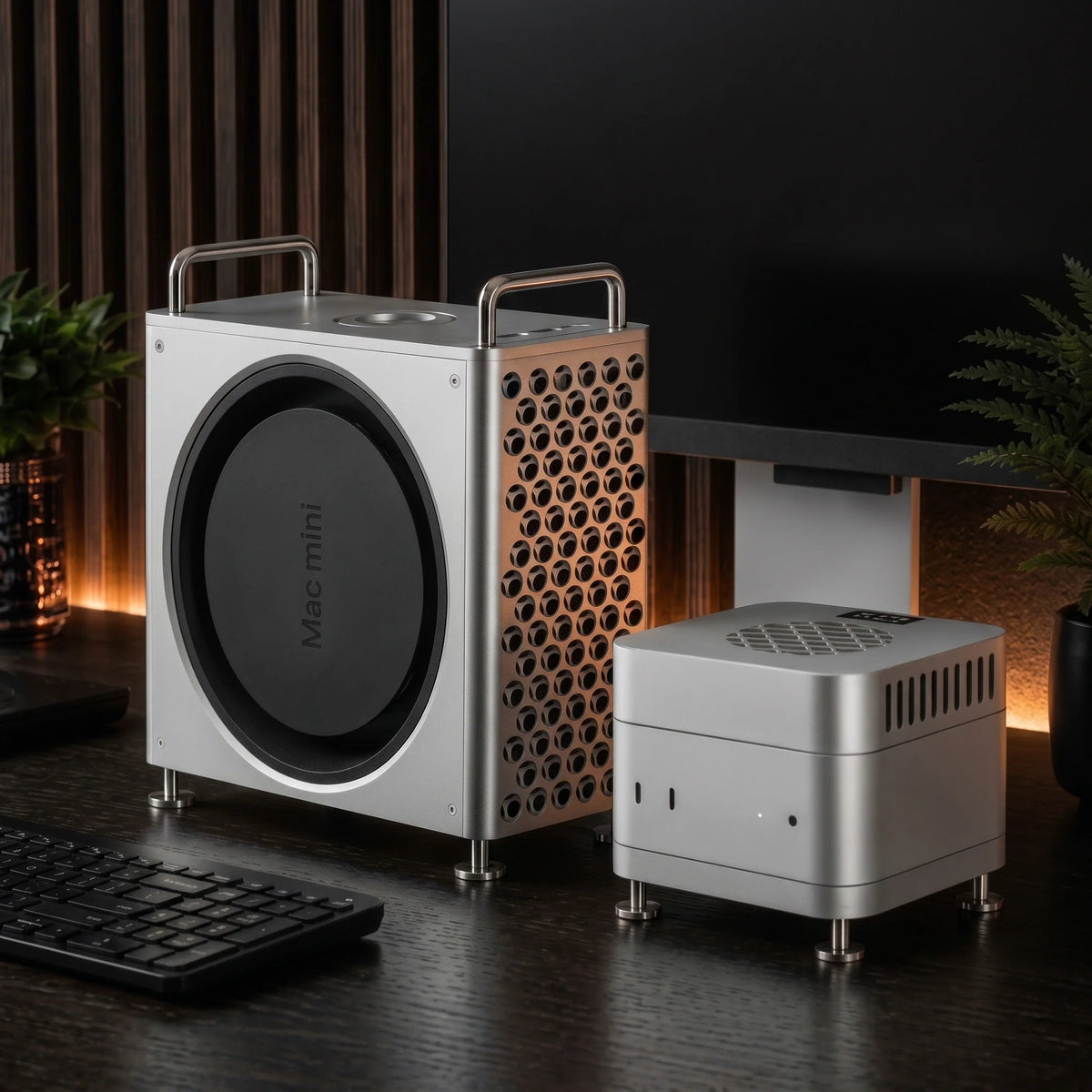
The best Mac mini case depends on what you mean by “with screen, SSD or fan.” Choose ZEERA MacForge Gen3 if you want a premium CNC aluminum case, Mac Pro-inspired design, improved passive airflow and an optional space for an external SSD enclosure. Choose ZEERA MacFrost Pro if cooling matters most: it adds 30W thermoelectric active cooling, a fan, a real-time OLED status screen and an aluminum stand. The MacFrost screen is a monitoring display, not a monitor for macOS.
Searching for a Mac mini case with screen, a Mac mini case with SSD slot or a Mac mini case with fan can lead to products that look similar but solve very different problems.
Some are decorative shells. Some are hubs with an NVMe slot. Some simply hold an external SSD. Others are cooling stands with a small display. Before buying, it helps to decide whether your real priority is appearance, storage organization, extra ports or sustained cooling.
This guide explains the difference and compares two purpose-built options for Mac mini M6, M5 Pro and M4: MacForge Gen3 for design, organization and passive thermal support, and MacFrost Pro for active cooling and live operating data.
Mac mini Case With Screen, SSD or Fan: What Is the Difference?
The phrase “Mac mini case” is used loosely online. It may describe a full enclosure, a stand-and-hub, an external SSD case, or an active cooler placed above or below the computer.
These products are not interchangeable. A compact hub may add ports and storage but provide little physical protection. A solid Mac mini aluminum chassis may transform the desktop appearance without adding an electronic SSD interface. A cooling accessory may include a screen, but that screen may show temperature rather than macOS.
| Search term | What shoppers usually want | Best match | Important limitation |
|---|---|---|---|
| Mac mini case with screen | Live temperature or fan information | MacFrost Pro | The OLED is a status display, not a macOS monitor |
| Mac mini case with monitor | A portable all-in-one Mac mini setup | Separate portable monitor | Neither recommended product contains a computer display |
| Mac mini case with SSD | Cleaner external-storage organization | MacForge Gen3 SSD Storage version | SSD and external enclosure are not included |
| Mac mini case with SSD slot | Built-in NVMe expansion | Electronic hub or SSD enclosure | MacForge provides storage space, not an integrated NVMe controller |
| Mac mini case with fan | Lower temperatures during long workloads | MacFrost Pro | Higher cooling modes are audibly louder |
| Mac mini aluminum case | Premium design, stability and passive airflow | MacForge Gen3 | It is not an active refrigerated cooler |
| Mac mini aluminum stand | More clearance under the bottom intake | MacFrost Pro lower stand | The stand alone does not provide powered cooling |
Best Mac mini Aluminum Case: ZEERA MacForge Gen3
ZEERA MacForge Gen3 is the better choice when the Mac mini itself should become a more substantial part of the desk. It surrounds the computer with a precision-machined aluminum structure and gives it a wider, Mac Pro-inspired profile.
This is more than a lightweight cover. The rigid Mac mini aluminum alloy case uses a brushed, hard-anodized finish designed to retain the character of the metal rather than imitate it with paint.

Why choose a Mac mini aluminum chassis?
An aluminum enclosure adds weight, rigidity and a visual match with Apple hardware. It can also spread surface heat across a larger metal structure when the internal layout preserves the Mac mini’s original air path.
MacForge Gen3 increases the usable air volume around the computer and uses optimized channels to reduce thermal congestion. It supports passive heat dissipation; it does not claim to replace the Mac mini’s internal cooling system or deliver the same result as active thermoelectric cooling.
The distinction matters. A well-designed Mac mini aluminum chassis stand should avoid sealing the intake or exhaust. A poorly designed shell may trap warm air even if it is made from metal.
Does MacForge Gen3 include storage?
MacForge Gen3 is available in two configurations. The SSD Storage version includes a dedicated top area for an external SSD enclosure up to 120 × 60 × 19mm. The Clean Minimal version removes that storage area for a more compact, near-square shape.

Important: MacForge Gen3 has an optional space that holds a compatible external SSD enclosure. It does not contain an SSD, an NVMe slot, a storage controller or a Thunderbolt hub. If you specifically need a functional SSD case for Mac mini, you still need a separate SSD enclosure and cable.
This design is useful for video editors, photographers and developers who already use fast external storage and want to keep it secured within one organized workstation instead of loose on the desk.
Does it make the front ports harder to reach?
No. A custom full-function extension system moves the Mac mini’s two front USB-C ports and headphone jack to the top of the enclosure. You keep the original port functions while gaining easier access from a seated position.

Who should buy MacForge Gen3?
- You want a premium Mac mini aluminum case with a true desktop presence.
- You like the Mac Pro-inspired grille and industrial Apple-style design.
- You want passive airflow support without adding fan noise.
- You frequently reach for the front USB-C ports or headphone jack.
- You want an optional space to organize an existing external SSD enclosure.
Best Mac mini Case With Fan and Screen: ZEERA MacFrost Pro
ZEERA MacFrost Pro is the stronger recommendation when cooling is the primary goal. It combines a direct-contact thermoelectric cooler, an integrated fan, a 0.96-inch OLED screen and a matching CNC aluminum stand.
Calling it a “case with fan” is understandable, but MacFrost is technically an external active cooling system. It sits directly on the top aluminum surface of the Mac mini using the included 100 × 100 × 3mm thermal silicone pad.

Is the screen a real Mac mini monitor?
No. The OLED shows the MacFrost sensor temperature, fan speed, operating voltage and cooling power. It does not display macOS, accept video input or replace a desktop monitor.
If you searched for a Mac mini case with monitor because you want a portable all-in-one computer, pair the Mac mini with a separate USB-C or HDMI portable display. Apple’s Mac mini technical specifications explain the display outputs supported by the M4 generation.
The MacFrost screen serves a different purpose: it makes the cooler’s own operation visible without requiring an app or installing monitoring software.
Why is thermoelectric cooling different from a basic fan?
A typical Mac mini fan stand only moves room-temperature air near the computer. MacFrost uses a thermoelectric cooling plate to draw heat from the top of the aluminum chassis, then uses its fan to remove that heat from the cooler.
Because the cooling plate works through direct surface contact, it does not blow air into the Mac mini or fight the computer’s original bottom airflow. The lower aluminum stand lifts the computer and preserves clearance around the bottom intake.

Which cooling mode should you use?
MacFrost Pro provides 7W, 20W and 30W modes plus automatic temperature control. More power delivers stronger cooling, but it also increases fan speed and noise.
| Mode | Fan speed | Measured noise at 50cm | Recommended use |
|---|---|---|---|
| 7W | 1,980 RPM | 38 dB | Everyday use and long work sessions |
| 20W | 2,880 RPM | 55 dB | Long exports and sustained workloads |
| 30W | 4,080 RPM | 60 dB | Maximum cooling when noise is secondary |
| Auto | Variable | Variable | Cooling that adjusts with sensor temperature |
For most long-term use, 7W is the balanced setting. The 20W and 30W levels make more sense for 4K or 8K video exports, local AI generation, 3D rendering, large code builds or a warm room where cooling performance is more important than quiet operation.
Use a USB-C PD charger rated at 20W or higher. A 45W USB-C PD adapter is recommended for stable operation at the full 30W cooling level.
Who should buy MacFrost Pro?
- Your Mac mini runs sustained CPU or GPU workloads for long periods.
- You work in a warm room or regularly notice high enclosure temperatures.
- You want more than a simple Mac mini case with fan.
- You want a small screen showing cooler temperature, RPM, voltage and power.
- You need a matching Mac mini aluminum stand that leaves the bottom air intake clear.
MacForge Gen3 vs MacFrost Pro: Which One Should You Buy?
Choose according to the problem you want to solve, not the longest feature list.
| Feature | MacForge Gen3 | MacFrost Pro |
|---|---|---|
| Primary purpose | Full aluminum enclosure, design and organization | Active thermal management |
| Material | CNC-machined, brushed and hard-anodized aluminum | CNC-machined aluminum cooler and stand |
| Cooling method | Passive airflow and thermal diffusion | Up to 30W direct-contact TEC cooling with fan |
| Screen | No | 0.96-inch OLED operating display |
| SSD support | Optional area for an external SSD enclosure up to 120 × 60 × 19mm | No SSD storage area or electronic SSD slot |
| Extra port access | Moves two USB-C ports and headphone jack to the top | No data-port expansion |
| Noise | No added fan noise | 38–60 dB depending on mode |
| Best for | Design-focused desks, creators and external SSD organization | Long exports, local AI, rendering and sustained heavy use |
For appearance first, choose MacForge Gen3. It is the more complete Mac mini aluminum alloy case and the better fit for users who want a mini Mac Pro look.
For cooling first, choose MacFrost Pro. It is the more appropriate answer to searches for a Mac mini case with screen or fan—as long as you understand that the screen monitors the cooler and is not a computer display.
For storage expansion alone, choose carefully. MacForge organizes a separate external SSD enclosure. If you need a true Mac mini case with SSD slot, look for a hub or enclosure that explicitly includes an NVMe controller, supported drive formats and a stated USB or Thunderbolt interface.
What to Check Before Buying a Mac mini Case
1. Confirm the exact Mac mini generation
Do not assume every Mac mini case fits every model. MacForge Gen3 and MacFrost Pro are designed around the compact 127mm-class body used by Mac mini M6, M5 Pro and M4. Older M1 and M2 enclosures use a different footprint.
2. Check whether “SSD support” means storage or electronics
A storage compartment only holds an existing drive enclosure. An SSD hub includes the electronic interface needed to connect an NVMe drive. Product listings sometimes blur these terms, so verify whether the SSD, enclosure, controller and host cable are included.
3. Keep the original ventilation path open
The Mac mini already contains its own thermal system. A case or stand should not block the bottom intake, rear exhaust or normal clearance around the chassis. More metal does not automatically mean better cooling if warm air cannot escape.
4. Decide how much fan noise is acceptable
Active cooling adds acoustic tradeoffs. MacFrost Pro’s 7W mode is the sensible starting point for regular use, while the 20W and 30W levels are intended for situations where extra cooling matters more than a quiet desk.
5. Do not confuse a status screen with a monitor
A small OLED on a case or cooler usually reports device data. It cannot show macOS unless the product explicitly includes a video input, display panel and a supported connection to the Mac mini.
Frequently Asked Questions
What is the best Mac mini case with screen?
MacFrost Pro is the better option if you want active cooling plus a small status screen. Its 0.96-inch OLED shows sensor temperature, fan RPM, voltage and cooling power. It is not a macOS display.
Is there a Mac mini case with a monitor built in?
Portable Mac mini builds with integrated displays exist, but most “case with screen” products use the screen only for temperature or system status. For a true monitor, choose a separate USB-C or HDMI portable display and verify its power requirements.
Does MacForge Gen3 have an SSD slot?
No electronic SSD slot is built in. The SSD Storage version provides a dedicated top area for a compatible external SSD enclosure up to 120 × 60 × 19mm. The enclosure, SSD and connection cable are separate.
Can I add external storage to a Mac mini?
Yes. You can connect an external SSD through a suitable USB-C or Thunderbolt enclosure. Speed depends on the SSD, enclosure interface, cable and Mac port used.
Does an aluminum case help cool a Mac mini?
It can support heat spreading and airflow when designed with open ventilation paths. MacForge Gen3 provides passive thermal support. It does not deliver powered cooling like MacFrost Pro.
Does every Mac mini need a fan stand or active cooler?
No. The Mac mini’s internal cooling is sufficient for typical browsing, office work and media playback. An active cooler is most useful for long video exports, local AI, 3D rendering, large code compilations or sustained work in a warm environment.
Can MacForge Gen3 and MacFrost Pro be used together?
No. They occupy and organize the Mac mini in different physical systems. Choose MacForge Gen3 for the full enclosure experience or MacFrost Pro for direct contact with the Mac mini’s aluminum top surface.
Which is better: MacForge Gen3 or MacFrost Pro?
MacForge Gen3 is better for appearance, passive airflow, top-access ports and external SSD organization. MacFrost Pro is better for measurable active cooling, live OLED data and demanding sustained workloads.
Final Recommendation
The best Mac mini case with storage, screen or fan is the one that accurately matches your workflow.
Choose MacForge Gen3 if you want a premium Mac mini aluminum chassis, a cleaner professional desk and optional space for an external SSD enclosure. Choose MacFrost Pro if you want a real active cooling system with a fan, thermoelectric plate, OLED monitoring and a matching Mac mini aluminum stand.
Neither product tries to be everything. That is exactly why the choice is clearer: MacForge Gen3 is built around design and organization, while MacFrost Pro is built around thermal performance.









