
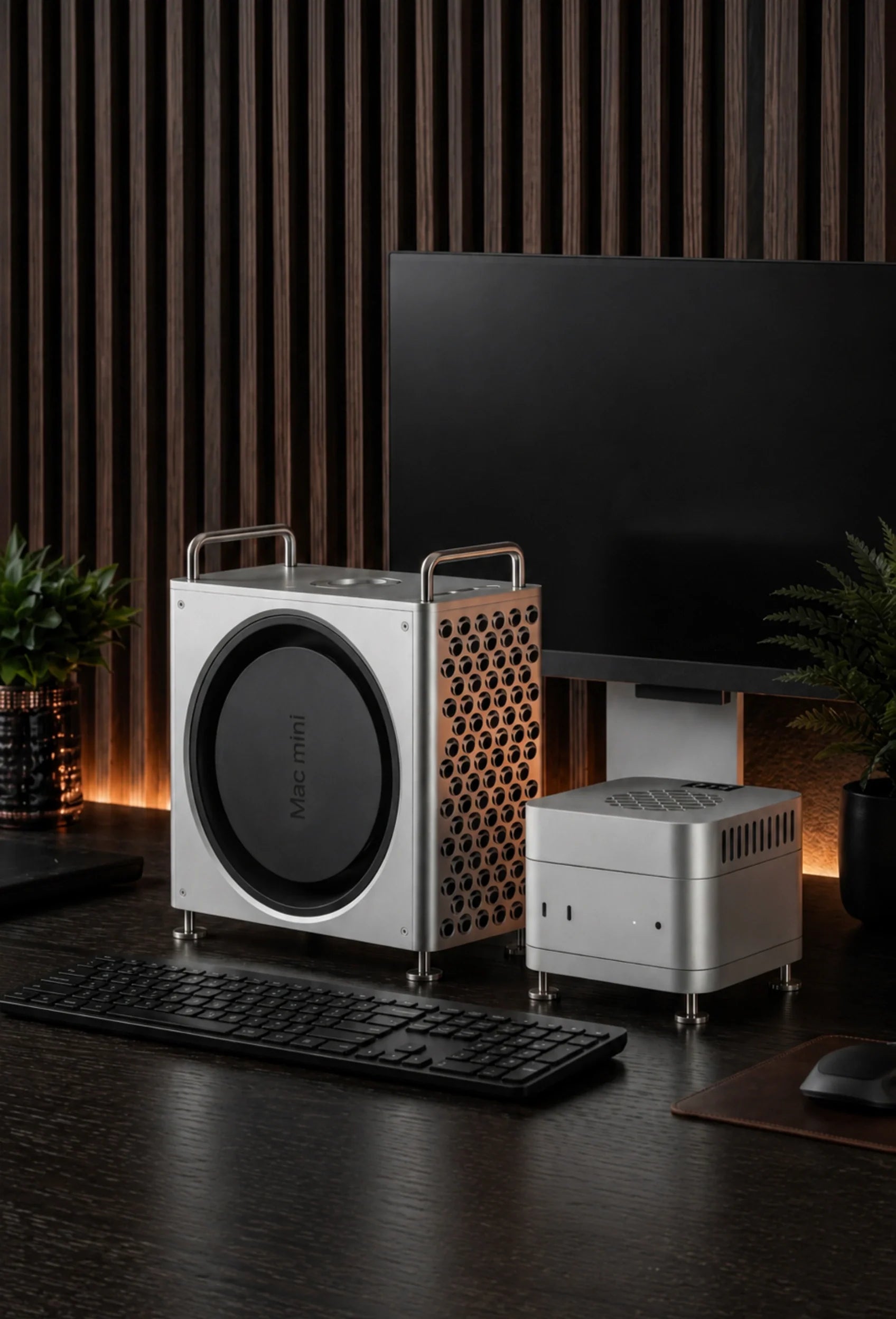
Quick Answer: The best Mac mini case depends on what you want it to do. Choose a vented desktop enclosure if appearance, stability and a cleaner workstation matter most. Choose a carrying case only for transport, and never run the Mac mini inside a closed travel bag.
For a premium Mac Pro-inspired setup, the ZEERA MacForge Gen3 is our appearance-first choice. If sustained cooling is the priority, choose the ZEERA MacFrost Pro instead.
Searching for a Mac mini case sounds simple, but the phrase can describe several completely different accessories.
One buyer may want a CNC aluminum enclosure that turns a Mac mini into a miniature Mac Pro. Another may need a padded Mac mini travel case, a vertical stand, an under-desk mount or an active cooling system.
Those products solve different problems. Choosing the right one starts with deciding whether your priority is appearance, protection in transit, extra ports, desk space or temperature control.
| What you want | Best type of Mac mini accessory | Main caution |
|---|---|---|
| A premium desktop look | Vented aluminum case or full enclosure | Do not choose a sealed shell that restricts airflow |
| Lower temperatures under long workloads | Purpose-built active cooler | Check cooling method, noise and power requirements |
| Protection while traveling | Padded carrying case or hard travel case | Remove the Mac mini before use |
| More ports or external storage | Mac mini hub with SSD enclosure | Verify data speed, SSD support and wireless stability |
| More desk space | Vertical stand, under-desk mount or VESA mount | Keep vents, cables and the power button accessible |
| Dust protection when not in use | Removable dust cover | Never cover a running or still-hot Mac mini |
Does a Mac mini Need a Case?
No, a Mac mini does not need a case for normal operation. Its aluminum body is already the computer’s exterior enclosure, and its internal cooling system is designed to work without an additional shell.
A desktop case is therefore an optional setup upgrade rather than basic protection. It can change the appearance, raise the computer, improve stability, reorganize port access or support airflow—provided the design respects the Mac mini’s original ventilation path.
A carrying case serves a more traditional protective role. It helps keep the computer, power cable and accessories separated while moving between a home office, studio, classroom or production location.
The important distinction is simple: a desktop enclosure is made to stay around the Mac mini while it runs; a travel case is normally made to hold it only while powered off and in transit.
What Is the Best Mac mini Case?
There is no single best case for every Mac mini owner. The best choice is the product that addresses your main setup problem without creating a new airflow, access or compatibility problem.
Fast buying rule:
Choose MacForge Gen3 if design, desktop presence, organization and silent passive thermal support matter most.
Choose MacFrost Pro if sustained cooling for long exports, local AI, rendering or code compilation matters most.
Choose a padded travel case if your Mac mini regularly leaves the desk.
Best-Looking Mac mini Case: ZEERA MacForge Gen3
The ZEERA MacForge Gen3 is designed for people who do not want the Mac mini to look like a small silver box sitting among displays, drives and cables.
Its CNC-machined aluminum structure and three-dimensional front grille give the workstation a Mac Pro-inspired appearance. The wider, grounded form also gives the small computer more visual presence on a professional desk.
MacForge is not a sealed cosmetic cover. The internal volume and ventilation channels are designed around passive airflow, while the aluminum structure helps spread surface heat across a larger area.
That does not turn MacForge into a powered cooler, and it should not be described as a replacement for the Mac mini’s internal fan. Its advantage is combining an enclosure-style design with open airflow and silent passive thermal support.
Two original front USB-C ports and the headphone connection are extended to the top of the enclosure. This makes frequently used connections easier to reach without claiming to add new data ports.
Buyers can also choose between a cleaner minimal version and a version with a dedicated area for a separate external SSD enclosure up to 120 × 60 × 19 mm.

Best Mac mini Cooling Case: ZEERA MacFrost Pro
If cooling is your first priority, an ordinary aluminum shell or fan stand is not the same as a purpose-built active cooler.
The ZEERA MacFrost Pro combines a top-mounted direct-contact thermoelectric cooler with a separate aluminum stand below the Mac mini.
The upper unit draws heat from the top aluminum surface through an included 100 × 100 × 3 mm thermal silicone pad. The lower stand raises the computer and keeps its original bottom ventilation area unobstructed.
MacFrost Pro offers 7W, 20W and 30W cooling levels plus an automatic temperature-controlled mode. Its 0.96-inch OLED displays the cooler sensor temperature, voltage, power and fan speed without requiring macOS software.
The OLED reading is not the Mac mini’s internal CPU or GPU temperature. It reports the cooler’s own sensor, so internal monitoring software is still required if you want to compare processor temperatures or clock behavior.
For routine work, the Mac mini’s built-in cooling is normally sufficient. MacFrost Pro makes the most sense for repeated 4K or 8K exports, local AI generation, 3D rendering, long code builds or a warm room where the computer remains under load for extended periods.
Cooling power also brings noise. ZEERA measures approximately 38 dB at 7W, 55 dB at 20W and 60 dB at 30W from around 50 cm away. The lowest effective mode is the sensible starting point for most users.
MacForge vs MacFrost: Which One Should You Buy?
MacForge and MacFrost are both desktop accessories, but they are built around different priorities. One is a complete visual enclosure with passive thermal support; the other is a dedicated active cooling system.
| Feature | MacForge Gen3 | MacFrost Pro |
|---|---|---|
| Best for | Appearance, organization and desktop presence | Sustained cooling and thermal headroom |
| Product type | CNC aluminum Mac mini enclosure | Thermoelectric active cooler plus aluminum stand |
| Cooling approach | Silent passive airflow and heat diffusion | Powered direct-contact cooling up to 30W |
| Noise | No added fan noise | Approximately 38–60 dB depending on mode |
| Port access | Extends two USB-C ports and headphone jack to the top | Does not add or extend data ports |
| SSD organization | Optional storage area for a separate SSD enclosure | No SSD enclosure |
| Extra power required | No | Yes; 20W PD minimum, with 45W PD recommended for the 30W mode |
If your Mac mini spends most of its time on office work, browsing, media playback or short creative tasks, MacForge is the more balanced lifestyle upgrade.
If your main question is “How can I keep my Mac mini cooler during a two-hour export?”, MacFrost is the more direct answer.
Will a Mac mini Case Cause Overheating?
A poorly designed case can contribute to heat buildup if it blocks the computer’s air intake, exhaust path or the free space needed around the chassis.
A properly designed Mac mini enclosure should preserve the native airflow path and provide enough clearance around the vents. Apple’s guidance for products with cooling fans is to keep ventilation openings unobstructed and use the device on a hard, flat surface.
Material alone does not guarantee good cooling. Aluminum can spread heat, but an aluminum box with inadequate ventilation can still trap warm air. Likewise, a plastic stand can work well if it creates stable clearance and does not cover the intake.
Look at the complete airflow design, not just words such as “cooling,” “metal” or “vented” in the product name.
Signs a desktop case may be restricting airflow
- The bottom intake or exhaust areas are partially covered.
- The Mac mini sits inside a tight, sealed cavity.
- Soft padding remains pressed against the computer while it is running.
- Fan speed, surface heat or performance changes noticeably after installation.
- The case has decorative openings that do not align with the computer’s real airflow path.
If temperatures or fan behavior become worse after adding a case, remove it and test the Mac mini again on a hard, open surface under the same workload.
Mac mini Aluminum Case vs Plastic Case
An aluminum Mac mini case usually offers greater rigidity, weight and a more premium match with Apple hardware. It can also distribute surface heat across a broader structure when the internal design provides effective contact or airflow.
A plastic case is lighter and can offer more colors, transparency or retro styling. Plastic can also reduce the risk of a surrounding metal structure affecting wireless signals, although actual Wi-Fi and Bluetooth performance depends on the complete layout rather than the material alone.
Neither material automatically protects the Mac mini from a serious fall. A heavy aluminum desktop enclosure is primarily a workstation accessory, while a padded hard-shell travel case is designed to absorb movement and impact during transport.
Desktop Enclosure vs Mac mini Carrying Case
A Mac mini carrying case or Mac mini travel case should protect the computer while it is switched off. Look for a fitted compartment, soft lining, impact-resistant walls and separate spaces for the power cable, keyboard, mouse or trackpad.
Loose accessories should not be able to strike the aluminum computer during travel. A snug fit matters, but the case should not press heavily on ports or connectors.
Do not turn on the Mac mini inside a padded sleeve, foam-lined hard case or closed bag. These materials are designed for protection, not operating airflow.
If you move the computer immediately after a heavy workload, allow it to cool before closing it inside a travel case.
Mac mini Case vs Stand, Hub and SSD Enclosure
Search results often mix together cases, stands, hubs and storage docks. The differences matter because a product may look like a full Mac mini case while offering only one function.
Mac mini stand
A stand raises or reorients the computer. It can improve desk clearance, make the bottom power button easier to reach or place ports in a more convenient direction.
Mac mini hub
A hub adds connections such as USB-A, USB-C, SD or microSD. Check the host connection and per-port speed, because the shape alone does not tell you whether a dock supports 5Gbps, 10Gbps, USB4 or Thunderbolt.
Mac mini SSD enclosure
An SSD enclosure contains a controller for an NVMe or SATA drive. Confirm the supported drive sizes, maximum capacity, interface speed and whether the enclosure needs its own thermal pad or airflow.
Mac mini VESA or under-desk mount
A mount hides the Mac mini behind a monitor or below a desk. It saves visible desk space but may make the power button, front ports and cable management less convenient.
Mac mini full enclosure
A full enclosure changes the computer’s exterior presentation. The strongest designs combine stable support, correct vent clearance, accessible ports and an interior that avoids scratching the Mac mini.
How to Choose a Mac mini Case
1. Check the exact Mac mini generation
Do not buy by the words “Mac mini” alone. Accessories made for the larger M1 or M2 body will not automatically fit the newer compact 127 × 127 mm chassis used by the current M4, M5 Pro and M6 generations.
Check both the chip name and the product year shown on the case listing. If the accessory surrounds the computer closely, even small differences in body size, port position or ventilation geometry matter.
2. Keep the native vents open
Inspect product images from below as well as from the front. A case should not trade a clean appearance for restricted airflow.
3. Check the power button and every port
The case should leave the rear connections usable and provide a practical way to reach the bottom-mounted power button. If it extends ports, confirm whether it preserves the original functions or adds a separate hub controller.
4. Decide whether you need passive or active cooling
Passive products use shape, clearance and material without a powered cooling element. They are quiet and suitable for most desks.
Active products add a fan, thermoelectric plate or another powered system. They can provide more thermal capacity but also introduce noise, power requirements and additional cables.
5. Protect wireless performance
Metal around a wireless device can affect signal behavior if the enclosure is not designed carefully. Look for real product testing or a signal-aware internal layout rather than assuming every aluminum case will behave the same way.
6. Check what “SSD support” actually means
An SSD storage area is not necessarily an SSD enclosure. Determine whether the product includes a drive controller and data connection or simply provides space to organize a separate external drive.
7. Consider installation and scratch protection
A close-fitting metal enclosure should use pads, liners or carefully controlled clearances where the Mac mini touches the case. Read the assembly guide before sliding the computer into place.
Six Types of Mac mini Case Explained
The word “case” covers products that should not be compared as direct alternatives. Understanding the six main categories makes search results much easier to evaluate.
1. CNC aluminum desktop enclosure
This is the closest match for buyers who want to change how the Mac mini looks on a desk. The computer sits inside a larger metal structure that can add visual weight, a different orientation and more deliberate cable routing.
A good aluminum enclosure should feel like part of the workstation rather than a loose decorative shell. Look for rigid construction, protected contact points, precise openings and enough internal space for air to move.
This category is best for a permanent desk, studio or showroom setup. It is not the most practical choice for people who pack the Mac mini away every evening.
2. Open desktop stand
An open stand supports the Mac mini without surrounding most of its body. Horizontal stands raise the computer, while vertical stands reduce the amount of desk surface it occupies.
This is often the simplest option when the desk itself is blocking bottom clearance. It can also keep the computer away from minor spills, dust and objects sliding across the desk.
Check stability before choosing a narrow vertical model. A stand that saves a few centimeters but tips when a stiff cable moves is not an improvement.
3. Hub stand with SSD enclosure
A hub stand usually matches the width of the Mac mini and sits below it. Depending on the model, it may add USB ports, memory-card readers, Ethernet, video output or an internal slot for an M.2 SSD.
This type is useful for a base-storage Mac mini or a setup that regularly connects cameras, cards and legacy USB devices. However, the hub’s controller, SSD and power circuitry can generate their own heat below the computer.
Check whether the top surface is recessed or vented, whether an installed SSD has a thermal pad, and whether heavy data transfers remain stable without optional external power.
4. Active cooling case or stand
Active cooling products use power to move or transfer heat. Basic versions place a fan below the Mac mini. More specialized systems use direct thermal contact with its aluminum enclosure.
A fan is not automatically helpful. Airflow should complement the Mac mini’s own cooling path rather than forcing dust or warm air back toward the intake.
Compare cooling products by repeatable results, fan noise, power input and how they behave during long workloads—not by maximum RPM alone.
5. Carrying sleeve or hard travel case
A soft sleeve protects against scratches and light contact inside a larger bag. A fitted hard case provides more crush and impact resistance, which is useful for location work or frequent travel.
The best layout keeps the Mac mini separate from the power cable and sharp-edged adapters. If you also carry a compact keyboard and trackpad, look for dividers that stop the accessories from rubbing against one another.
A travel case is not an operating enclosure. Foam, fabric and closed hard shells retain heat and block ventilation.
6. Dust cover
A dust cover is useful in workshops, studios or rooms where the Mac mini remains unused for long periods. It can reduce surface dust entering open areas while the computer is shut down.
Wait until the Mac mini has cooled before covering it. Remove the cover completely before powering the computer on, and never treat a dust cover as an always-on protective shell.
Best Mac mini Case by Use Case
For a clean home-office setup
Prioritize appearance, quiet operation and cable organization. A vented passive enclosure or stable stand is usually more appropriate than a high-power active cooler.
MacForge Gen3 fits this scenario because it changes the desktop presentation without adding another fan. The optional SSD storage area is useful if an external drive is already part of the setup.
For video editing and 3D rendering
Long exports can keep the CPU, GPU and media engines active well after a short benchmark would have finished. Start with good room ventilation and clear native vents.
If the Mac mini repeatedly becomes heat-limited during the same production workload, an active cooler such as MacFrost Pro is more relevant than a cosmetic case.
For local AI and large code builds
Local models, sustained inference, indexing and repeated compilation can create long periods of combined processor and memory activity. Cooling needs depend on workload duration, not simply whether an app is labeled “AI” or “developer.”
Measure actual behavior first. If fan speed, temperature and completion time remain consistent, the built-in cooling system is doing its job. If performance declines during long repeatable runs, additional thermal headroom may be useful.
For a shared family computer
Stability and simple access matter more than specialized cooling. Choose a stand or case that will not slide when someone connects a cable and that does not make the power button confusing to reach.
For travel and live production
Use a fitted hard case with separate accessory compartments. Count every item that must travel: the Mac mini, power cable, keyboard, pointing device, HDMI or Thunderbolt cable and any portable SSD.
At the destination, remove the computer from the case and give it a stable, ventilated surface. A compact travel setup still needs operating clearance.
For a minimalist desk
An under-desk or VESA mount may be more useful than a visible Mac mini case. Plan the cable route and confirm that the mounted position does not surround the computer with warm display exhaust.
Remember that hiding the Mac mini can make its power button and front ports inconvenient. A mount works best when the computer stays on and most peripherals remain connected.
Common Mac mini Case Buying Mistakes
Buying for the wrong generation
“Compatible with Apple Mac mini” is not specific enough. Older and newer chassis can differ substantially in size, vent placement and port access. Match the accessory to the exact chip generation listed by its manufacturer.
Assuming every metal case improves cooling
Metal can conduct heat, but only when the design gives that heat somewhere useful to go. A sealed aluminum shell can perform worse than an open plastic stand.
Confusing storage space with built-in storage
A product photo may show an SSD without including the drive, controller or cable. Read the package list and technical specification instead of relying on the image.
Ignoring Wi-Fi and Bluetooth layout
The Mac mini often connects to a wireless keyboard, mouse, headphones and network at the same time. An enclosure that looks excellent but weakens those connections creates a daily usability problem.
Focusing only on the front view
Product listings naturally lead with the most attractive angle. Also inspect the bottom, rear and interior. Those views reveal vent clearance, cable bends, power-button access and the surfaces touching the computer.
Expecting a desktop enclosure to provide travel protection
A heavy workstation case can improve stability, but it is not automatically shock absorbing. Use a purpose-built travel case when the Mac mini leaves the desk.
Buying active cooling before diagnosing the workload
A warm aluminum surface is not proof of a fault. Check Activity Monitor, fan behavior, room temperature and whether performance actually declines before adding a cooling system.
How to Install a Mac mini Desktop Case Safely
- Shut down the Mac mini and disconnect every cable.
- Let the aluminum chassis cool if it has just completed a heavy workload.
- Read the enclosure’s manual and identify every pad, fastener and extension cable.
- Check the inside for metal debris, loose screws or sharp edges before inserting the computer.
- Keep protective pads correctly positioned so aluminum surfaces do not rub together.
- Do not force a connector or tighten a fastener beyond the instructions.
- Confirm that intake and exhaust openings remain clear after assembly.
- Reconnect one cable at a time and check that no plug is under sideways pressure.
- Test Wi-Fi, Bluetooth, audio and every extended port before final cable management.
- Run a familiar workload and compare temperature, noise and stability with the previous setup.
For MacForge Gen3, follow the current digital manual and assembly video linked on its product page. Its top I/O system uses extension cables, so correct routing matters for both a clean installation and dependable port access.
For MacFrost Pro, place the included thermal silicone pad as instructed between the top of the Mac mini and the cooler. Use a USB-C PD adapter rated at 20W or higher; a 45W PD adapter is recommended when using the full 30W cooling level.
How to Test Whether a Cooling Case Actually Helps
Cooling claims are easy to exaggerate when the test conditions change. A useful comparison keeps the room, workload, duration and software settings as consistent as possible.
- Choose a real task you regularly run, such as a 30-minute export, render or code build.
- Record the room temperature and Mac power mode.
- Start from a similar idle state before each test.
- Measure task completion time, fan behavior and internal sensor data with the same tools.
- Repeat the test without the accessory and then with it installed.
- Compare the later part of each run, where sustained heat is more likely to matter.
Surface temperature is useful context but not the whole answer. A cooler top plate does not always mean the CPU is proportionally cooler, and a warm aluminum enclosure may simply be spreading heat away from internal components.
The most meaningful result is whether the accessory produces a repeatable improvement in temperature, fan noise or sustained completion time that matters to your work.
How to Clean and Maintain a Mac mini Case
Shut down and unplug the Mac mini before cleaning the computer or its enclosure. Use a soft, dry microfiber cloth for routine dust and fingerprints.
Do not spray liquid directly onto the Mac mini, the case, extension ports, OLED display or cooling unit. Avoid abrasive pads that can alter a brushed or anodized finish.
Check open grilles and lower ventilation areas periodically. Removing loose surface dust is safer than allowing a thick layer to build around the airflow path.
If a case uses pads or a thermal interface material, inspect them whenever the product is disassembled. Replace damaged, contaminated or displaced contact material according to the manufacturer’s instructions.
Which Mac mini Models Fit MacForge and MacFrost?
The current versions of ZEERA MacForge Gen3 and MacFrost Pro are designed around the compact 127 × 127 mm Mac mini footprint and list support for Mac mini M6, M5 Pro, M4 and M4 Pro.
They are not universal accessories for every Mac mini ever released. Owners of M1, M2, M2 Pro, Intel or older unibody models should buy products specifically dimensioned for those larger generations.
Compatibility should always be confirmed on the live product page before purchase, especially if Apple changes the chassis in a future Mac mini generation.
Can a Mac mini Case Improve Performance?
A case does not upgrade the processor, memory or storage inside the Mac mini. For normal workloads, you should not expect a decorative enclosure to make the computer faster.
A well-ventilated stand or enclosure can improve the physical conditions around the computer by preserving clearance and reducing localized heat buildup.
An active cooler may help during a sustained workload if heat is limiting performance, but the result depends on the model, room temperature, workload duration, power mode and the Mac mini’s own fan behavior.
Judge cooling accessories with repeatable tests: use the same task, room temperature, power mode and monitoring method before and after installation.
Which Mac mini Case Should You Buy?
For most people searching for a premium Mac mini M4 case, Mac mini M5 Pro case or Mac mini M6 case, the purchase decision comes down to design versus active cooling.
Choose MacForge Gen3 if the Mac mini is a visible part of your desk and you want a substantial CNC aluminum enclosure, Mac Pro-inspired grille, cleaner SSD organization and accessible top I/O.
Choose MacFrost Pro if the computer regularly spends long periods rendering, exporting, compiling or running local AI, and reducing sustained surface heat matters more than a full enclosure transformation.
Choose a dedicated padded carrying case if the computer travels. Choose a hub if missing ports are your real problem. Choose a VESA or under-desk mount if freeing desk space is the goal.
The best Mac mini case is not the one with the longest feature list. It is the one that solves your primary need while keeping airflow, ports, power-button access and model compatibility intact.
Mac mini Case FAQ
Does the Mac mini M4 need a case?
No. A Mac mini M4 works without an additional case. Buy one only if you want a different desktop design, more stability, easier organization or transport protection.
What is the best Mac mini case for cooling?
For cooling-first use, choose a purpose-built active system that leaves the original vents open. ZEERA MacFrost Pro uses direct-contact thermoelectric cooling and a raised aluminum stand rather than relying only on decorative vents.
What is the best-looking Mac mini case?
ZEERA MacForge Gen3 is designed for appearance-first setups. Its CNC aluminum body and grille turn the compact Mac mini into a more substantial Mac Pro-inspired desktop workstation.
Can an aluminum case make a Mac mini overheat?
Yes, if its design blocks airflow or traps warm air. Aluminum alone does not guarantee better cooling. Choose an enclosure that preserves the Mac mini’s intake, exhaust and surrounding clearance.
Can I use my Mac mini inside a carrying case?
No. A padded carrying case or hard travel case is for a powered-off Mac mini. Remove the computer and place it on a hard, ventilated surface before use.
Will a Mac mini M4 case fit a Mac mini M1 or M2?
Usually not. The newer compact chassis has different dimensions and port geometry. Always check the exact models listed by the case manufacturer.
Is a Mac mini case the same as a hub?
No. A case changes or protects the exterior setup. A hub adds data ports. Some products combine both functions, but MacForge Gen3 extends existing ports rather than adding a separate multiport hub.
Does MacForge Gen3 include an SSD enclosure?
No. One MacForge Gen3 version includes a storage area for a separate external SSD enclosure up to 120 × 60 × 19 mm; it does not include an SSD controller or drive.
Is MacFrost Pro noisy?
Noise depends on the selected mode. ZEERA measures about 38 dB at 7W, 55 dB at 20W and 60 dB at 30W from approximately 50 cm away. Higher modes are intended for demanding sustained work.






