
Quick Answer
iFixit’s iPhone Duo teardown points to a possible mechanical cause of the bright horizontal lines appearing on some inner screens.
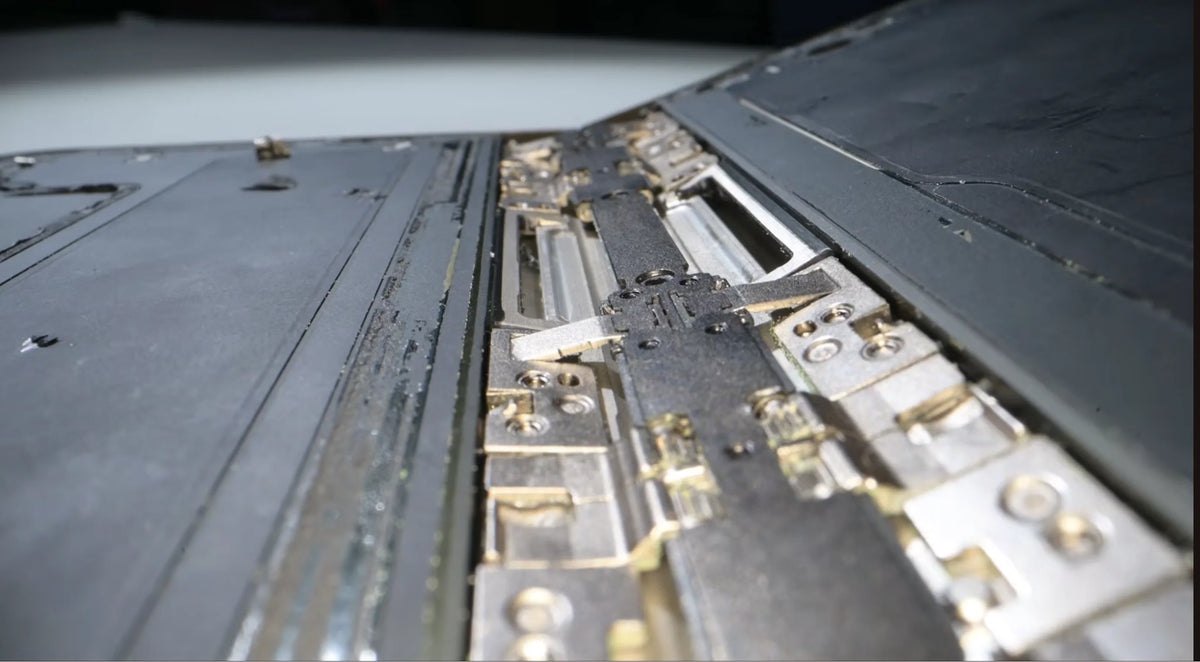
The area under investigation is where the central hinge support meets the opening for the cable connecting the two halves.
A support that does not lower far enough during closing could put concentrated pressure on the folding OLED. This remains a hypothesis.
The Duo also earns a provisional 5/10 repairability score—iFixit’s highest for a foldable smartphone so far—while inner-screen service remains expensive.
What Is the iPhone Duo Screen Problem?
Some owners describe a similar sequence: the hinge becomes unusually resistant, a crunch or pop occurs while opening or closing, and a bright line appears across the inner display near the fold. A small damaged area can produce a much larger visible line.
ZEERA’s earlier iPhone Duo screen-crack report covers the initial cases. The new teardown adds a closer look beneath that recurring damage location.
Where iFixit Found a Possible Hinge Stress Hotspot
In its October 25 teardown, iFixit compared its hinge model and CT scans with reported screen damage. The relevant spot sits slightly below the cable crossing, at the transition between the cable opening and the central hinge support.
Several edges meet in a small area
The central pivot’s link plates, the pleated cable above them and the nearby battery edge create a complicated change in support beneath the display. The question is whether that geometry concentrates force as the phone closes.
A support bar may not retreat far enough
iFixit’s illustrative closing simulation shows the curved display coming down onto a central support that has not lowered sufficiently. That provides a plausible route to localized pressure; it does not establish that every affected phone fails this way.
The cable opening is a useful location marker, but proximity alone does not show that the cable has torn. Pressure, trapped particles, repeated bending and manufacturing variation remain possible contributors.
Video: iFixit, Apple’s Folding iPhone Might Have a Screen Problem!
How the iPhone Duo Hinge Controls the Folding Screen
The teardown reveals a dense arrangement of gears, springs, guides and linked metal joints. Each part has a different job in controlling the flexible panel.
Gears coordinate the movement
Synchronization gears keep the two sides moving together. The linked joints bend through limited angles, while curved guides help reduce stretching and compression in the display above.
Springs balance the screen’s resistance
The springs counter the folded panel’s tendency to open. Their changing leverage helps the hinge move smoothly and hold intermediate positions without relying entirely on friction.
The display layers need room to slide
Like pages in a closing book, the outer layers travel farther than the inner ones. Sliding adhesives accommodate that difference, while carbon-fiber support plates and a titanium bottom layer provide reinforcement.
The accordion-shaped cable also expands and contracts across multiple bends. For more on the panel itself, see our iPhone Duo display structure guide.
Dust Reached the Hinge Despite the IP68 Rating
iFixit placed the Duo in fluorescent powder, operated the hinge and then traced the particles during disassembly. Most powder stopped at the adhesive barriers protecting the electronics. Some still entered the moving hinge and produced a crunching sound.
The encouraging result: iFixit found less visible powder in the hinge than in its previous Galaxy Z Fold8 and Pixel 11 Pro Fold challenges.
The practical limit: this was a comparative dust challenge, not an IP certification test. Protected internal cavities and a grit-free moving hinge are different things. Accessing contaminated hinge parts still requires major disassembly.
Why iFixit Gave the Duo a Provisional 5/10
Repairability describes how practical a repair is after something goes wrong. The Duo’s best-ever foldable score reflects several useful construction choices, rather than a prediction of its failure rate.
- Both batteries release electrically. Each cell uses two adhesive strips, reducing the need for forceful prying.
- The outer screen and inner trim survived removal. Reaching another part is less likely to create an additional broken component.
- Many smaller parts are relatively accessible. The layout avoids burying every component under several others.
- Repair documentation is available. Apple has published an iPhone Duo repair manual.
The inner OLED and hinge remain the difficult repairs, and the teardown required five screwdriver types. The score is provisional because iFixit was still waiting for replacement-part availability when it published its assessment.
Inner OLED Repair and Cover-Layer Service Are Different
The matte nano-texture sits on a replaceable flexible cover. Refreshing that surface is a separate service from replacing the OLED that produces the image.
Inner display: $999 without coverage
This is the U.S. out-of-coverage inner-display service figure cited in the teardown. It is not an automatic charge for every newly failed phone; the service assessment and coverage determine the applicable remedy.
Cover layer: $49, or $19 with AppleCare+
These cited U.S. cover-layer prices apply to a different component. Replacing a scratched surface will not repair failed OLED pixels or a bright line caused by panel damage. Local pricing varies.
The cover also scatters reflections to make the crease less conspicuous. Removing it exposes a surface that scratches more easily. Our glossy-versus-matte comparison explains that visual change.
What to Do If Your Duo Crunches or Shows a Bright Line
- Stop pushing through unusual resistance. Avoid repeated folding to reproduce the noise.
- Document the symptoms. Photograph the line, hinge and phone exterior, and note when the problem began.
- Back up accessible data. If the phone remains usable, prepare for service or replacement.
- Arrange a service assessment. Contact Apple or an Authorized Service Provider. Avoid pressing the damaged area or peeling the cover layer.
FAQ
Can an iOS update fix a line that appears after a hinge crunch?
If the line comes from physical OLED damage, a software update cannot repair it. A service assessment is more useful than repeatedly resetting the phone.
Can a hinge-protection case prevent this internal failure?
A case can add exterior coverage and improve grip, depending on its design. There is no evidence here that an external case corrects an internal support-bar problem.
Related Reading
- iPhone Duo Screen Cracks: Early Reports and Service Questions
- iPhone Duo Drop Test: Tougher Than Expected, With One Weak Spot
- Inside iPhone Duo’s Display: OLED, Brightness and Materials
- Inside iPhone Duo’s Two Steel-Cased Batteries
- iPhone Duo Nano-Texture Layer Removed: Glossy vs Matte
- Why iPhone Duo Inner-Screen Fingerprints Are Hard to Clean






