
Quick Answer
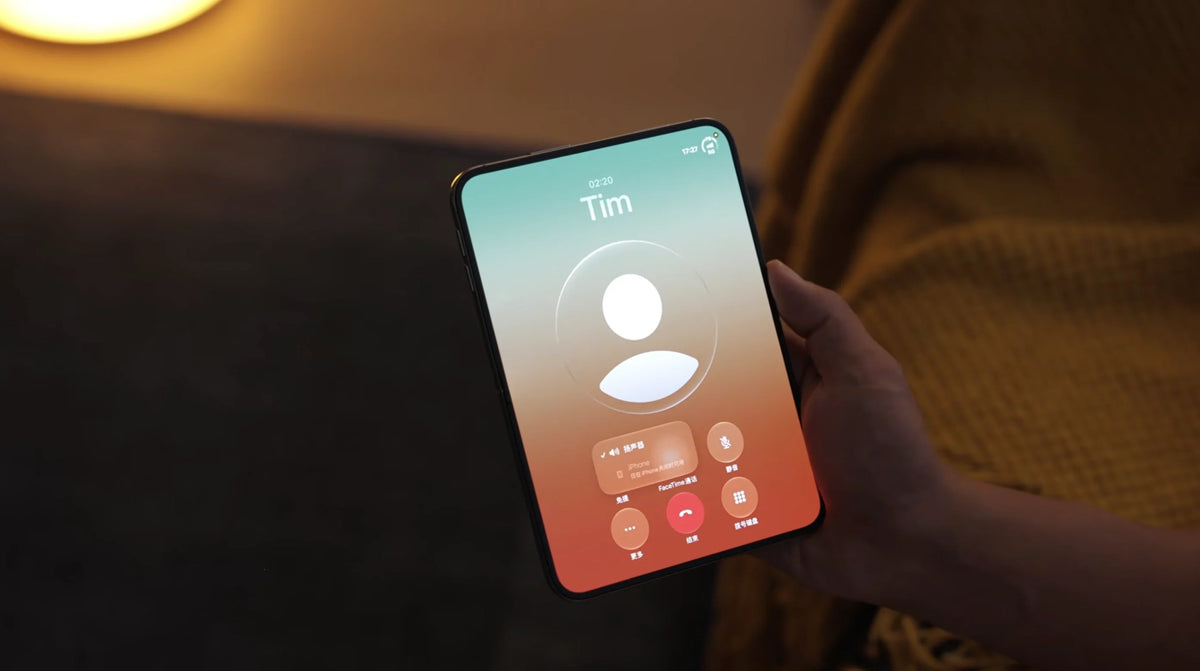
In Mediastorm’s iPhone Duo review, opening the phone makes call audio default to speakerphone.
The reviewer explains that the inner-screen side has no earpiece for private, ear-held calls.
To use the phone’s earpiece, the reviewer says you need to close the Duo.
Before unfolding during a private conversation, select a connected headset and check the audio destination.
This is a review observation; the supplied segment does not establish every app, headset or software-version exception.
Why does iPhone Duo switch to speaker when unfolded?
According to Mediastorm’s iPhone Duo review, the inner display has no earpiece structure. Opening the device therefore makes the system default to loudspeaker output in the demonstrated calling scenario.
The practical distinction is simple: the large inner screen gives you more room to work, but the reviewer says private calls through the phone’s own earpiece require the Duo to be closed.
What exactly did Mediastorm test?
The reviewer addresses the idea of swinging the Duo open to take a call like an old-school oversized handset. That gesture does not deliver the imagined ear-held calling experience: opening the phone activates external audio instead.
Three observations from the supplied review transcript
- No inner-screen earpiece: the reviewer explicitly identifies the missing receiver structure on the inside.
- Opening defaults to speakerphone: the described change happens when the Duo is opened.
- Close it for the earpiece: the reviewer demonstrates the folded form as the way to use that private listening mode.
This observation comes from Mediastorm, not a ZEERA hardware test. The supplied segment does not identify the iOS build, provide a complete audio-routing test matrix or explain Apple’s engineering rationale.
Why this matters when you open the screen during a call
Looking up a booking or reading a message
Imagine taking a private call, then opening the Duo to check an order number or document. Based on the review, that gesture can also change how the other person’s voice is played. In an office, train carriage or café, nearby people may hear the conversation.
Using the big screen for notes
The inner display can be useful while talking, but plan the audio first. A connected headset is the option to check if you want to keep listening privately while using the expanded screen. Confirm the route before the caller shares anything sensitive.
Making a hands-free call at home
When you already want speakerphone, the reported behavior may suit your routine. A compatible stand case can make a desk setup more convenient. A stand changes how you position the phone; it does not add an inner earpiece or control iOS call routing.
Unfolding also brings other everyday trade-offs. Our iPhone Duo vs Pro Max video-size guide looks at another question worth checking before choosing a folding phone.
How to keep a call private before unfolding iPhone Duo
1. Stay folded for a normal ear-held conversation
This is the option directly described in the review. If you do not need the inner display, keep the phone closed and use its earpiece. If you have already opened it, close it and check that the call has returned to the listening mode you want.
2. Select your headset before opening the phone
Connect your AirPods or another compatible calling headset. In the call controls, tap Audio and select the headset if it is available. Check that you hear the caller through it before unfolding. Apple documents the Audio control for choosing a call destination, but the supplied Duo review does not test whether every headset retains its route through an unfold transition.
3. Check Call Audio Routing if speakerphone also starts while folded
Apple’s general iPhone guide places this setting at Settings > Accessibility > Touch > Call Audio Routing. Review the selected destination if your calls unexpectedly start on speaker even without opening the Duo.
This is a separate diagnostic check. Changing a routing preference cannot create the inner earpiece that the reviewer says is absent, and Apple’s general guide does not promise an override for the Duo’s unfolded behavior.
Apple explains these controls in While on a call on iPhone and Route and automatically answer calls on iPhone.
Is this a bug, and can a software update fix it?
The review connects the speakerphone behavior to the missing inner-screen earpiece. That makes it a hardware-related usability limitation in the scenario shown, rather than evidence on its own that an individual phone is defective.
Audio routing and physical hardware are different
Software could potentially change routing choices or add a prompt. That is a possibility, not an announced fix. It would not add a physical receiver to the inner-screen side. There is no basis in the supplied segment to promise a future iOS update that enables conventional inner-screen earpiece calls.
If your issue is missing or distorted call audio while the Duo is closed, treat that as a separate symptom. Check the selected audio destination and seek support if it persists; this review observation does not explain every call-audio fault.
Should frequent callers choose iPhone Duo or a Pro Max?
Consider Duo if your calls already use a headset
If you routinely use headphones and want a larger screen for documents, test that exact combination before buying. The key check is whether your preferred headset and calling app keep the audio where you expect when you unfold.
Give conventional phone handling more weight if you often call without headphones
If your routine involves holding a phone to your ear and glancing at information mid-call, decide whether switching between folded and unfolded use would interrupt you. Compare that routine with an iPhone 18 Pro or Pro Max in person rather than choosing from display size alone.
A case also affects daily handling. Our iPhone Duo case-free versus slim-case guide covers that separate purchase decision.
Can a case or charging stand change the calling behavior?
No case or charging stand adds an inner-screen earpiece. Choose those accessories for grip, protection, positioning or power. For private audio while working on the open screen, the relevant choice is a supported audio device and the active call destination.
If you also use a Mac mini in your desk setup, the following accessories address its enclosure and cooling needs separately.
FAQ
Does opening iPhone Duo automatically answer an incoming call?
The supplied review segment does not establish that. It describes call-audio behavior when the phone is opened; do not assume that unfolding also answers a ringing call.
Will folding iPhone Duo end the call?
The reviewer says closing the phone is necessary for earpiece use. The segment does not establish a flip-to-hang-up feature.
Does the same thing happen in WhatsApp, WeChat or FaceTime?
The transcript does not provide an app-by-app test. Check your preferred app, audio destination and software version before relying on identical behavior.
Can I keep it half-open and still use the earpiece?
The review does not specify the hinge angle that triggers the change. Its advice is to close the phone for earpiece use. There is no verified angle-based workaround in the supplied material.
Will tapping Mute stop other people hearing the caller?
Mute controls your microphone. Use the audio destination control or close the Duo and confirm earpiece output to address the caller’s voice playing aloud.
Sources and review scope
- Mediastorm / 影视飓风: iPhone Duo in-depth review. The calling observations above are based on the Chinese transcript supplied for this article, specifically the section about opening the phone, speakerphone and folded earpiece use.
- Apple: While on a call on iPhone. General call controls and audio destination selection.
- Apple: Route and automatically answer calls on iPhone. General Call Audio Routing settings; not a Duo-specific confirmation of unfolded behavior.
Related Articles
- iPhone Duo Screen Feels Soft at the Crease: Kang’s Wrinkle Test Explained
- iPhone Duo Folio Teardown: Kang Reveals Apple’s Hidden Sliding Mechanism
- iPhone Duo Video Size Explained: Is 16:9 Really Bigger Than Pro Max?
- iPhone Duo Without a Case: AppleCare, Slim Cases & Everyday Trade-Offs
- Physical SIM to iPhone Duo: Transfer eSIM Before You Erase
- The Perfect MagSafe Battery Pack for iPhone Duo That Doesn’t Stick Out






