
iPhone camera filters are useful when you want an optical effect that editing cannot fully recreate. A CPL filter controls reflections, an ND filter reduces bright light for video and motion blur, a Black Mist filter softens highlights, and a UV filter mainly adds everyday protection.
For several creative looks, choose a multi-filter kit. For always-ready reflection control and lens protection, choose an integrated rotating CPL protector. Explore both options in the ZEERA SnapLens iPhone Camera Filters collection
The iPhone can already capture excellent photos and video, so does putting another piece of glass in front of its cameras really help?
It can—but only when the filter matches the problem in front of you. The right filter changes the light before the iPhone records the image. That is why it can control reflections, brightness or highlight glow in ways that a preset applied afterward cannot fully duplicate.
The key is not buying the largest filter set. It is knowing which effect you will actually use.

What Do iPhone Camera Filters Actually Do?
Camera filters are small optical tools. Each type changes incoming light for a different purpose.
A CPL filter can make a shop window easier to photograph through. An ND filter can help video retain natural-looking motion in bright sunlight. A Black Mist filter can soften harsh lights at night. A clear UV filter is the simple choice when protection matters more than an obvious visual effect.
| Filter | What it changes | Best for | What to expect |
|---|---|---|---|
| CPL | Controls polarized light and reflections | Glass, water, cars, foliage and landscapes | Less glare and stronger perceived contrast when the angle is right |
| ND32 | Reduces the amount of light entering the camera | Bright outdoor video and intentional motion blur | More exposure control without changing the scene's color on purpose |
| 1/4 Black Mist | Diffuses highlights and lowers harsh digital contrast | Portraits, night scenes and cinematic video | Softer highlights and a controlled glow around bright light sources |
| UV | Adds a clear layer over the camera | Everyday shooting and lens protection | A mostly neutral look with added protection from direct contact |
Which iPhone Camera Filter Should You Use?
Use a CPL filter for reflections, water and outdoor color
CPL stands for circular polarizing filter. Its most useful job is reducing reflections from non-metallic surfaces such as glass and water.
For example, rotate a CPL while filming through a car window and distracting reflections may fade, revealing more of the scene outside. Around a lake, it can reduce surface glare and reveal more texture beneath the reflection.
A CPL can also deepen the appearance of blue skies and improve separation in foliage, but the result depends on the direction of the light and your shooting angle. It is an adjustable effect, not a one-tap guarantee.
Use an ND32 filter for bright daylight video
An ND filter works like sunglasses for the camera. ND32 substantially reduces incoming light, making it most useful outdoors rather than in dim rooms or at night.
Why reduce light when an iPhone can adjust exposure automatically? In video, the phone may use a very fast shutter speed under strong sunlight. That can make movement look unusually crisp or choppy. An ND filter gives creators more room to use a slower shutter speed for smoother, more natural-looking motion when a camera app offers manual controls.
ND32 can also help create intentional motion blur in moving water, traffic or crowds. For the most predictable result, use a tripod and a camera app that lets you control shutter speed.
Use a 1/4 Black Mist filter for a softer cinematic look
Modern iPhone footage can look very sharp and clean. A 1/4 Black Mist filter takes the edge off that digital look by gently diffusing bright highlights.
Streetlights, signs and practical lights can gain a subtle halo. Skin and highlights may feel less harsh, while the scene keeps more detail than it would with a strong diffusion filter.
This effect is especially visible at night or in backlit portraits. It is a creative choice, so remove the filter when you want maximum contrast and the crispest possible detail.
Use a UV filter for simple everyday protection
On a modern iPhone, a UV filter is mainly a clear physical barrier. It helps keep fingerprints, dust and direct surface contact away from the original camera lenses.
It is the least dramatic option visually. Choose it when you want the magnetic mounting plate to stay useful while keeping a neutral filter on the camera during ordinary shooting.
SnapLens vs SnapLens Trio: Which One Fits You?
The two SnapLens products solve different problems.
Choose the SnapLens Creator Kit if you want to change the look of your footage. Its separate CPL, ND32, Black Mist and UV filters give you more creative range for travel, street photography, portraits and mobile video.
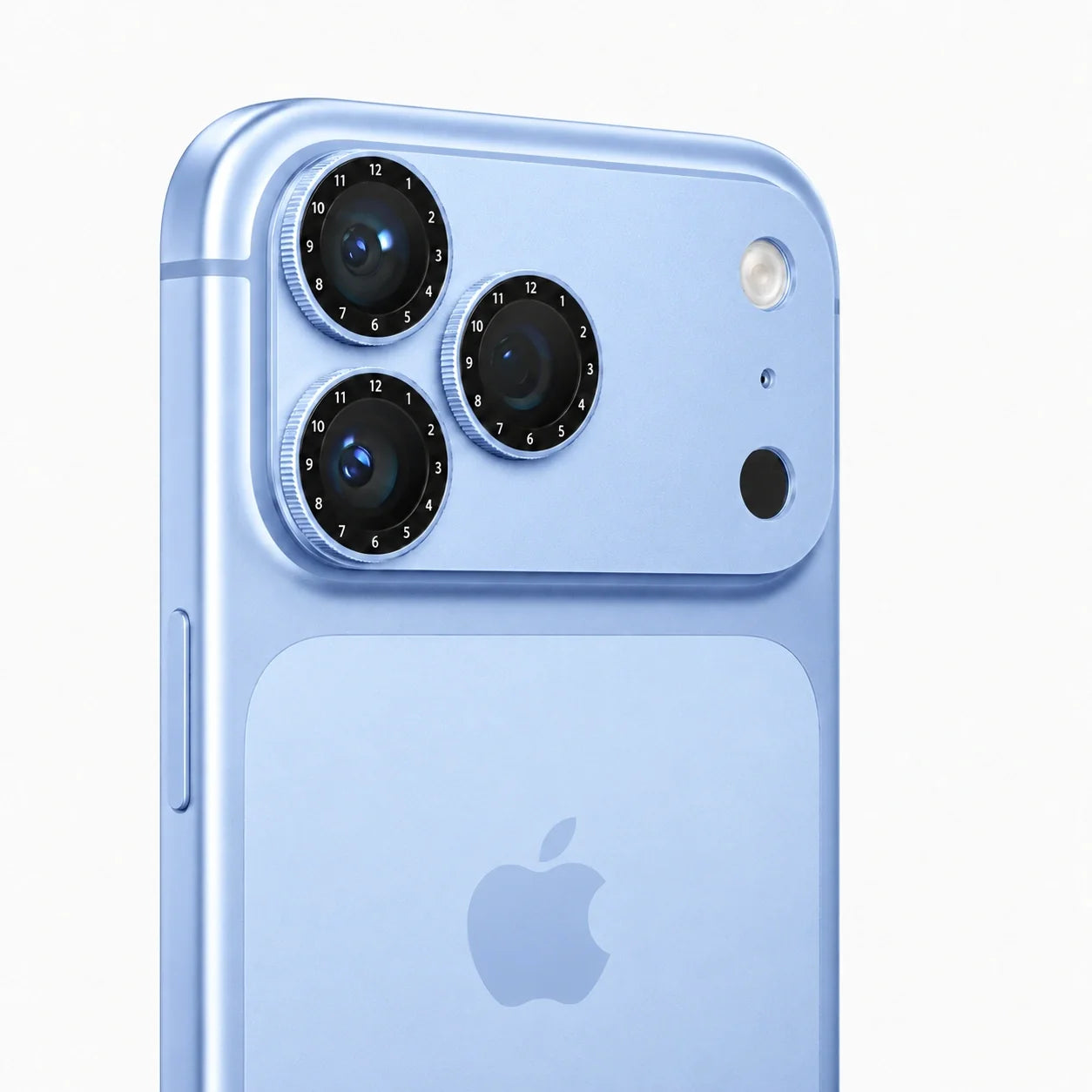
Choose SnapLens Trio if reflections are your main problem and you want the filter to stay on the phone. Its three CPL filters are integrated into a low-profile aluminum camera protector, with one independently rotating ring for each rear camera.
| Feature | SnapLens Creator Kit | SnapLens Trio |
|---|---|---|
| Main purpose | Creative filter changes | Everyday CPL control plus camera protection |
| Included optics | UV, ND32, CPL and 1/4 Black Mist | Three independently rotating CPL filters |
| How it attaches | Filters snap onto a slim magnetic camera plate | CPL filters are built into the aluminum lens protector |
| Best match | Video creators and photographers who want several effects | Users who often shoot glass, water, cars or outdoor scenes |
| Compatible models | iPhone 14, 15, 16 and 17 Pro/Pro Max versions | iPhone 17 and 18 Pro/Pro Max versions |
How to Get Better Results With an iPhone Lens Filter
Clean both surfaces first. Dust or fingerprints on the iPhone lens or filter can reduce contrast and create flare around bright lights.
Check every camera you plan to use. Switch between the main, ultra-wide and telephoto cameras before recording. Confirm that the filter is aligned correctly and does not appear at the edge of the frame.
Adjust a CPL while watching the screen. Slowly rotate it and watch the reflection change in the live preview. The strongest setting is not always the most natural one.
Use ND filters with manual video controls. An ND filter becomes more useful when you can lock ISO and shutter speed. In fully automatic mode, the iPhone may compensate for the darker image in ways that reduce the effect you wanted.
Remove filters when they do not help. CPL and ND filters reduce light, while diffusion filters deliberately soften parts of the image. At night, indoors or whenever maximum clarity matters, the best filter may be no creative filter at all.
Case compatibility tip: SnapLens does not require a special photography case, but a case with a tight or raised camera opening may interfere with the mounting plate or filter. Check the camera cutout around your exact iPhone model before combining accessories.
FAQ
Do camera filters really improve iPhone photos?
They can improve a photo when they solve a specific lighting problem. A CPL can reduce reflections, an ND filter can control bright-light exposure, and a Black Mist filter can soften highlights. A filter will not improve every image automatically.
What is the best iPhone camera filter for everyday use?
A CPL is the most versatile creative option for travel and outdoor photography because it can control reflections and glare. If protection is the main goal, a clear UV filter or an integrated CPL lens protector may be more convenient.
What does a CPL filter do on an iPhone?
A CPL filter controls polarized light. When rotated to the right angle, it can reduce reflections from glass, water and other non-metallic surfaces while improving perceived contrast in some outdoor scenes.
Can an iPhone camera app replace a CPL filter?
No. Editing can darken highlights or boost contrast, but it cannot reliably recover scene detail that was hidden behind a strong reflection when the photo was captured.
Is ND32 too dark for iPhone video?
ND32 is intended for bright conditions. It may be too dark indoors, around sunset or at night. Use it when strong daylight would otherwise force a very fast shutter speed.
Does a Black Mist filter make iPhone footage blurry?
A 1/4 Black Mist filter intentionally softens bright highlights and lowers harsh contrast, but it should not make the entire frame look out of focus. The effect is most visible around lamps, signs and backlighting.
Can I leave a CPL filter on my iPhone all the time?
You can leave an integrated CPL protector installed for convenience, but remember that a polarizer reduces some incoming light. In very dark scenes, removing it may provide a cleaner image.
Do ZEERA SnapLens filters require a special case?
No special photography case is required. The SnapLens magnetic system uses a model-specific camera mounting plate. However, always check whether your existing case leaves enough space around the camera module.






