
Quick Answer
The iPhone Duo / iPhone ultra’s outer display should benefit from a screen protector, but you probably should not add a third-party protector to its folding inner display.
The outer screen works more like a normal smartphone screen and remains exposed when the phone is closed. The flexible inner display is different: if Apple ships it with a factory-applied protective layer, that layer should be left in place.
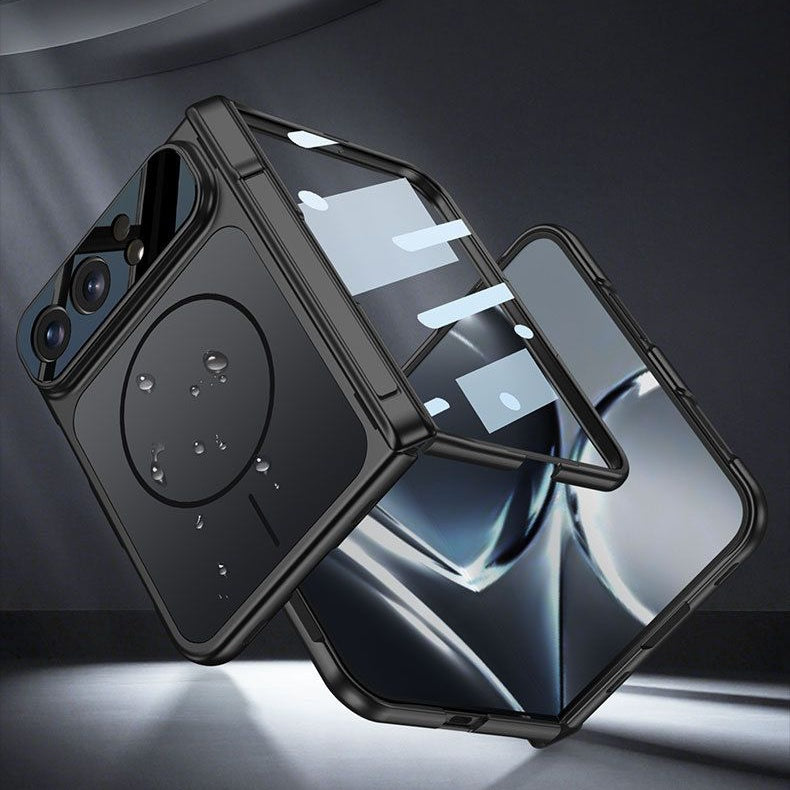
For outer-screen, frame and hinge protection, explore the ZEERA iPhone Duo / iPhone ultra Case Collection, including selected cases with an integrated outer-display screen protector.
Do not add tempered glass, hydrogel film or another adhesive layer to the inner screen unless Apple specifically approves it for the iPhone Duo / iPhone ultra.
Inner vs Outer Display Protection
A foldable iPhone has two screens with very different protection needs.
The outer display is rigid and exposed during normal use. The inner display must bend every time the phone opens or closes, so it cannot be treated like ordinary smartphone glass.
| Display | How It Is Used | Recommended Protection | What to Avoid |
|---|---|---|---|
| Outer display | Exposed when the phone is closed and used like a regular iPhone screen | Tempered glass, compatible film or a case with an integrated outer-screen protector | Stacking multiple protectors unless the case maker confirms compatibility |
| Inner display | Folds through the center and remains protected when the phone is closed | Use the factory-installed layer and follow Apple’s care instructions | Third-party glass, adhesive film, stickers or removing the factory layer yourself |
Why Shouldn’t You Put a Screen Protector on the Inner Display?
The simple answer is that the inner display is part of a moving structure.
A regular screen protector is designed to remain flat. A foldable display repeatedly bends along a precise radius near the hinge.
Any protective layer used there must have the correct flexibility, thickness, adhesive strength and crease behavior. A protector designed for a normal phone may not meet those requirements.
Tempered glass cannot follow the fold
Tempered glass is rigid. It cannot repeatedly bend through the center of a book-style foldable phone without cracking, lifting or preventing the device from closing correctly.
That makes tempered glass suitable for the outer screen, not the flexible inner screen.
An extra film may lift around the crease
Even a flexible hydrogel or plastic film can behave differently from the layer selected by the display manufacturer.
An incompatible film may wrinkle, bubble or separate around the crease after repeated folding. Its adhesive can also place uneven stress on the softer display underneath.
The factory layer may be part of the display system
On existing foldable phones, the pre-installed inner protector is not ordinary shipping plastic. It is a specially designed protective layer intended to move with the display.
Samsung says its foldable screen protector is designed to withstand folding and unfolding. Google similarly tells Pixel Fold owners not to remove the pre-installed protector or apply a third-party one.
Apple may use different materials, but the safe approach is the same: do not peel, replace or cover the inner layer unless Apple says it is user-removable.
Does the Outer iPhone Duo / iPhone ultra Screen Need a Protector?
For most users, the answer is yes.
The outer display remains exposed while the iPhone Duo / iPhone ultra is folded. It can contact keys, coins, tables and other hard surfaces during everyday use.
It is also the screen most likely to hit the ground first during a closed-phone drop.
A compatible tempered glass protector can help reduce everyday scratches and provide an additional sacrificial layer above the cover display.
You can also choose a case with an integrated outer-screen protector. This keeps the protector aligned with the case frame and avoids the difficulty of matching two separately installed accessories.
What Should You Do If the Inner Protector Bubbles or Lifts?
Do not peel the layer off, puncture the bubble or press it down with a hard object.
A lifting area near the crease can collect dust or create uneven pressure when the phone closes. Continuing to fold the device repeatedly may make the problem worse.
Instead, contact Apple or an Apple Authorized Service Provider and ask whether the protective layer requires inspection or professional replacement.
You should request service promptly if you notice:
- A bubble or lifted edge near the crease
- Cracking, popping or unusual resistance while folding
- Black spots, bright lines or flickering pixels
- Touch response failing near the fold
- Dust or debris trapped beneath the factory layer
How to Protect the Inner Screen Without Adding Another Film
The best way to protect a folding inner display is to keep damaging objects away from it.
- Check for sand, crumbs or other debris before closing the phone.
- Clean the display gently with a soft microfiber cloth.
- Avoid pressing the screen with fingernails, pens or hard tools.
- Do not place cards, coins or other objects between the two halves.
- Avoid liquid adhesives and do-it-yourself protector installation kits.
- Use a compatible case to protect the frame, corners, hinge and outer display.
The inner screen is naturally protected from many everyday scratches when the device is closed. Careful handling is more important than adding another adhesive layer.
FAQ
Will the iPhone Duo / iPhone ultra come with an inner screen protector?
Apple has not yet confirmed the final screen-layer design. If the iPhone Duo / iPhone ultra includes a factory-applied inner protector, treat it as part of the display and do not remove it unless Apple says otherwise.
Can I put tempered glass on the iPhone Duo / iPhone ultra inner screen?
No. Tempered glass is rigid and cannot follow the repeated folding movement of a flexible inner display. It should only be considered for the rigid outer screen.
Can I use a hydrogel protector on the inner display?
Do not install one unless Apple specifically approves that protector for the iPhone Duo / iPhone ultra’s inner display. Being flexible does not automatically make a film safe for the hinge radius or factory display layer.
Does the outer iPhone Duo / iPhone ultra screen need tempered glass?
It is not mandatory, but it is recommended for users who want additional scratch and impact protection. The outer display is exposed whenever the phone is folded.
Is a case with a built-in screen protector enough?
A well-fitted case with an integrated tempered glass protector can protect the outer display without a separate film. It does not add a protector to the folding inner display.
Should I remove a bubbling factory inner protector?
No. Avoid peeling it off yourself. Contact Apple or an authorized service provider because incorrect removal could damage the flexible screen underneath.
This guide reflects established foldable-screen care principles from current devices. Final protection and repair recommendations should follow Apple’s official iPhone Duo / iPhone ultra documentation after release.






