Quick Answer
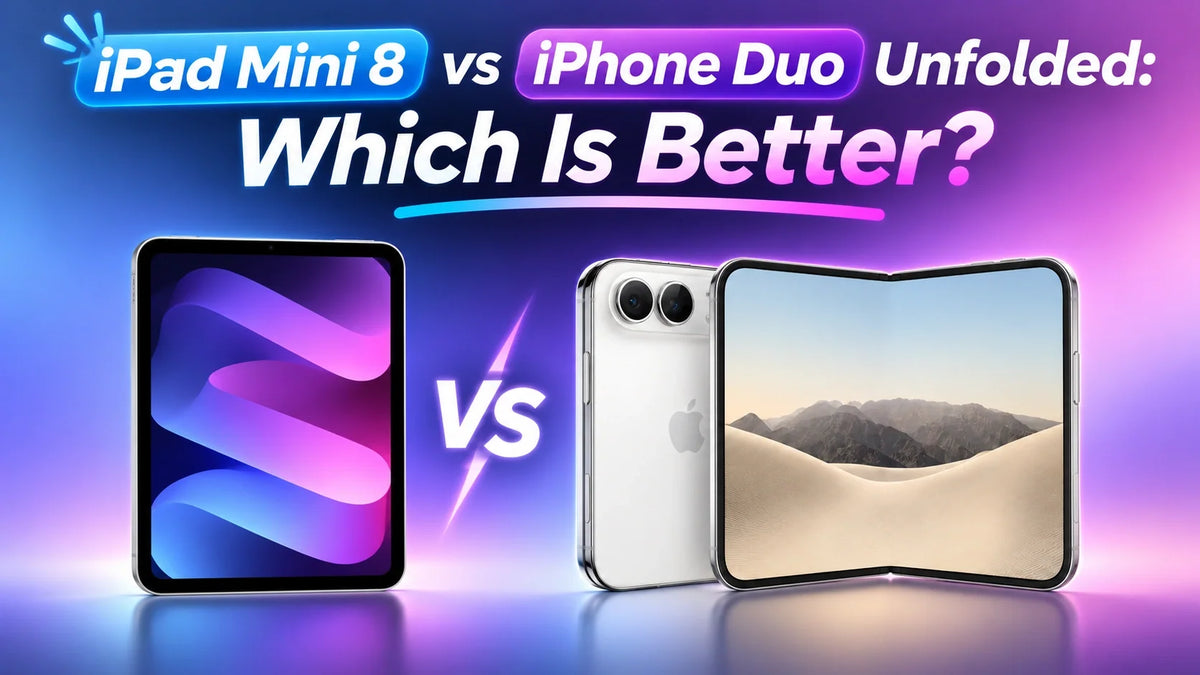
iPad mini 8 is the better tablet for drawing, flexible multitasking and Mac workflows; iPhone Duo unfolded is the better choice for a large screen you can carry in a pocket.
The mini 8 now has an 8.5-inch OLED display, so this comparison is no longer OLED versus LCD. Duo counters with a 7.6-inch folding OLED screen and ProMotion up to 120Hz.
Video shape, screen finish and software matter more than diagonal size alone. A widescreen movie may look little larger on Duo than on an iPhone 18 Pro Max.
At U.S. starting prices, an iPhone 18 Pro Max plus a Wi-Fi mini 8 costs $1,998, versus $1,999 for Duo. Choose around when and where you actually use the larger screen.
Can an Unfolded iPhone Duo Replace an iPad mini 8?
Only if your tablet needs are mostly reading, watching and using two apps during short breaks. A larger iPhone display does not automatically deliver the same working space or controls as iPadOS.
In his one-week iPhone Duo review, PeterSun (彼得森) preferred an iPhone 18 Pro Max plus an iPad mini. He tested an older A17 Pro mini; the comparison below carries over his practical observations while updating the mini side to Apple's current A20 Pro model, commonly called iPad mini 8.
iPad mini 8 vs iPhone Duo Unfolded: Key Differences
Sources: Apple iPad mini specifications, iPhone Duo specifications and the review's software demonstrations. For the new mini's display upgrade, see our iPad mini 8 overview.
Which Is Better for Movies and YouTube?
The shape of the video determines how much of the screen you actually use. In the review, Duo was noticeably more comfortable than the 18 Pro Max for conventional video, but the advantage shrank as the content became wider.
16:9 videos: a clear reason to unfold
Standard YouTube videos occupied a visibly larger picture on Duo than on the landscape iPhone 18 Pro Max. The reviewer also found the two phones similar enough in handheld weight for Duo's larger picture to feel worthwhile.
2:1 videos: a smaller improvement
Wider productions left more unused space above and below the picture. Duo still offered extra room, but the improvement was less dramatic than its unfolded screen initially suggested.
21:9 movies: the surprise
Very wide films looked almost the same size on Duo and the landscape 18 Pro Max in the review. Once the picture is limited by screen width, extra screen height mainly becomes black bars.
This is why a 7.6-inch diagonal does not guarantee a much bigger movie. The mini's larger canvas is the stronger choice for a dedicated viewing session, although exact picture size also depends on orientation, cropping and the player.
The older mini in the video looked dimmer than Duo. That brightness comparison should not decide a mini 8 purchase: Apple's new model adds OLED and up to 1,200-nit peak HDR brightness, substantially changing the comparison.
Reading, Manga and HDR: The Matte-Screen Trade-Off
Books and manga: Duo can feel more inviting
Reading the same book at a similar text size, the reviewer saw more text per page on the mini, while the conventional iPhone required more frequent page turns. He nevertheless preferred reading on Duo because its matte inner surface made the text feel softer and more paper-like.
The same appeal carried over to manga. He could see a shallow crease when looking for it, but stopped noticing it while reading. A broad comic spread also felt less compromised than on the much narrower conventional phone.
Dark HDR scenes: room lighting changes the result
With the room lights on, the reviewer found Duo's dark scenes hazier than expected, even beside his older LCD mini. His uncovered OLED iPhone 18 Pro Max showed cleaner-looking blacks, making it his preferred sofa or bedtime movie device.
A matte surface scatters incoming light, which can reduce the perceived depth of black in a lit room. That observation concerns the complete screen surface and viewing environment; it does not mean the OLED pixels cannot turn off.
For mini 8, choose the finish as carefully as the device. Its standard OLED glass and optional nano-texture are different buying choices. The review's old LCD result cannot establish which mini 8 finish beats Duo in HDR; a direct comparison under the same lighting would answer that. Also, the reviewer describes Duo's surface as a matte film, while Apple calls it a nano-texture finish.
Multitasking and Typing: Tablet Software Makes the Difference
Two equal apps versus a flexible workspace
Duo's side-by-side mode gives two apps equal space. In the review, the divider could not be dragged to make a document wider and a chat narrower. The mini allowed more flexible window sizes, and the reviewer demonstrated three windows together.
Equal halves can work well for a map beside messages or a browser beside notes. The limitation appears when one task deserves most of the screen. Our iPhone Duo split-screen guide explains this layout in more detail.
Small keyboard details add up
The reviewer needed extra keyboard-layer switches for numbers and symbols on Duo. On the iPad keyboard, flicking down on a key could enter its alternate character—for example, a number—without changing the whole layout.
That may barely matter in a short reply. In repeated note-taking or document work, fewer mode switches can make the mini feel more natural. Available keys and gestures depend on the chosen keyboard and language.
His description of Duo as two phones joined together captures the software difference. Duo increases the room available to iPhone apps; the mini starts with a tablet interface and tablet workflows.
Apple Pencil: Quick Notes or Serious Drawing?
Apple's compatibility list confirms Apple Pencil (USB-C) support on iPhone Duo with iOS 27.2. The A20 Pro iPad mini supports both that model and Apple Pencil Pro.
Duo: a useful pocket notebook
The reviewer found ordinary handwriting responsive enough for notes. Moving the tip across the center crease produced a small dip and rise that interrupted the feel of a continuous stroke. This makes pen comfort a separate issue from how visible the crease is when reading.
mini 8: a stronger drawing setup
The mini offers a flat drawing surface and Apple Pencil Pro support. Pencil Pro's features include squeeze controls and pressure sensitivity; the mini also supports hover for previewing placement before the tip touches down.
For casual diagrams, Duo can be enough. For repeated drawing sessions, brush control and uninterrupted strokes, the mini is the more convincing choice. Both Pencils are separate purchases.
Where iPhone Duo Has Advantages a Separate iPad Cannot Match
A smooth larger screen that still fits in your pocket
Duo combines a folding display with ProMotion up to 120Hz. The mini 8 remains at 60Hz, despite its OLED upgrade. The difference is most relevant when scrolling pages, moving through interfaces or playing supported high-frame-rate content.
A static page does not require constant high refresh, and 120Hz does not turn a 24fps film into native 120fps footage. The benefit is the combination of fluid interaction, usable screen size and pocket carry.
A quicker transition from phone to connected big screen
On a train or bus, Duo can come straight out of a pocket, unfold and use its existing mobile connection. A Wi-Fi mini may involve taking out a bag and connecting to the phone's hotspot, which also uses the phone's battery.
A cellular mini removes the hotspot step when it has an active plan. It still leaves you carrying two devices. That distinction matters more than claiming every iPad needs Wi-Fi; our mini 8 Wi-Fi versus Cellular comparison explains the extra $150 hardware cost.
Dual-screen photography changes the conversation
The person being photographed can check framing on Duo's outer display while the photographer uses the other screen. They can ask for a different angle or composition before the shot, rather than reviewing every image afterward.
The reviewer also highlighted using the outer screen to attract a child's attention and framing selfies with the rear cameras. Apple's Duo camera features include Duo Preview and Kid Cue.
A separate iPhone and mini do not provide the same built-in front-and-back shooting arrangement. This is a distinct reason to choose Duo even if an iPad remains better for drawing or office tasks.
Using a MacBook: The mini Has Another Job
iPad mini can extend or mirror a compatible Mac desktop through Sidecar. Apple's Sidecar guide supports wired and wireless connections with compatible devices signed in to the same Apple Account. Duo does not offer this iPad feature.
For someone working from a café, a second screen can hold a reference document or another Mac window. That adds a role beyond simply opening larger mobile apps.
Mouse control and external displays are separate questions
The reviewer found the mini easier to operate with a mouse. On Duo, he enabled AssistiveTouch and used its circular pointer, which felt less natural for document work.
He also connected the devices to an external display. Supporting video output alone does not establish a complete desktop workspace: the practical questions are how the apps behave, how the pointer works and what happens to the windows. Do not assume every iPad has the same external-display multitasking features as an iPad Pro.
The $2,000 Question: One Duo or iPhone Plus mini?
The reviewer's purchasing argument still holds at the entry level. Here are U.S. Apple starting prices checked on November 8, 2026, before tax, accessories and service plans:
Price sources: iPhone Duo, iPhone 18 Pro Max and iPad mini.
The $1 difference compares different storage configurations; it is a choice between two ways of spending roughly the same budget. If you already own a suitable iPhone, the decision is simpler: adding a $699 mini requires much less new spending than buying a Duo.
Which Should You Choose?
Choose iPad mini 8 if you usually sit down to use it
A mini makes more sense for longer viewing sessions, drawing, flexible app layouts and working beside a MacBook. If a small bag is already part of your day, taking out a tablet may be little extra effort.
This explains PeterSun's preference: he usually drives, then works at home, in an office or in a café. Carrying the mini suited that routine better than paying for a screen that folds into his phone.
Choose iPhone Duo if you need the big screen between destinations
Duo is easier to justify when you repeatedly unfold it on public transport, in queues or during short breaks. Its value grows when a separate tablet would stay at home or remain inside a bag.
Its high-refresh screen and dual-screen camera experience add reasons beyond replacing a tablet. For that routine, the best device may be the larger screen you actually have with you.
Our pick: iPad mini 8 for the fuller tablet experience; iPhone Duo for immediate access to more screen space. The deciding question is how often folding the tablet-sized view into your phone changes what you can do during your day.
Related Reading
- iPad mini 8: OLED, A20 Pro and the 60Hz trade-off
- iPad mini 8 Wi-Fi vs Cellular: is $150 worth it?
- Why you cannot resize iPhone Duo's split-screen apps
- Made for iPhone Duo: app compatibility and updates
- FoldAero vs FoldShield vs FoldArmor: which iPhone Duo case fits your routine?
FAQ
Can I watch on the mini while using my iPhone independently?
Yes. A two-device setup lets the mini keep playing a video while the phone handles a call or another app. On Duo, those activities share one device and its screen layout. That independence can be useful during longer sessions.
Should you remove Duo’s inner surface to improve HDR blacks?
The review is a viewing comparison, not a recommendation to peel the inner display. Follow Apple's care guidance for the folding screen rather than treating its factory surface like an ordinary removable glass screen protector.
Does this review settle which device has better battery life?
No. It discusses the inconvenience and phone-battery cost of hotspot use, but does not provide a controlled mini 8-versus-Duo battery test. Its strongest evidence concerns screen use, input and everyday workflow.