
Quick Answer
Apple’s iPhone Duo cover-layer repair guide, dated October 23, 2026, shows how the factory nano-texture matte film is replaced.
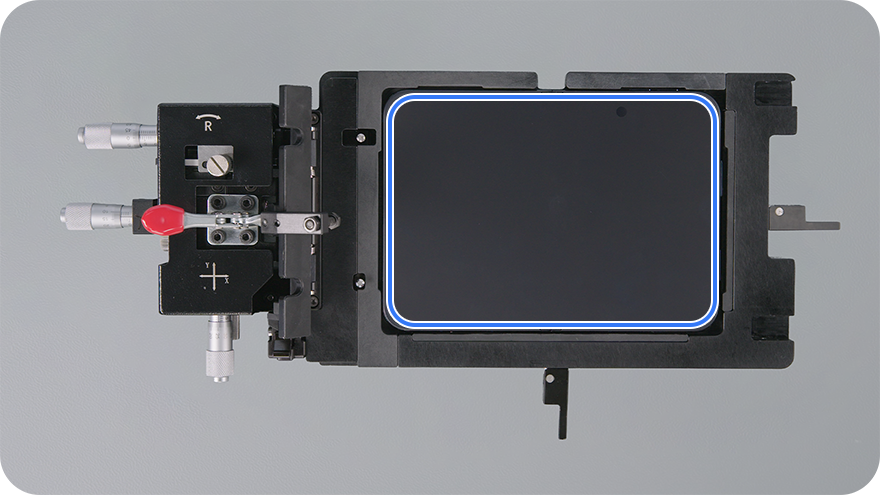
A dedicated fixture uses locating pins, rotation adjustment, X/Y controls and locks to position the replacement precisely.
After removal, Apple specifies ethanol wipes for adhesive residue and prohibits IPA wipes on the exposed inner display.
The intact nano-texture surface has separate care instructions that allow occasional cleaning with a cloth moistened with 70% IPA.
The guide also changes the film angle at the hinge to prevent bubbles during application.
What Has Apple Published for iPhone Duo Cover-Layer Replacement?
Apple’s iPhone Duo Cover Layer repair manual documents removal, adhesive cleanup, alignment and application. The tools include a display fixture, base, support bar, roller and squeegee. This is the service process behind replacing the matte surface of the folding screen.
It adds the missing practical detail to the replaceable cover-layer story: how Apple positions a large flexible sheet accurately before its adhesive touches the display.
How Does Apple’s Film Jig Keep the Cover Layer So Precisely Aligned?
The fixture makes the alignment adjustable and holds it in place. The replacement layer’s pinholes fit over locating pins, while the phone sits in its own fixture and base.

Three adjustments, followed by locks
- Rotation: a knob corrects the layer’s angle using the enclosure trim and camera opening as references. A rotation lock holds that setting.
- X and Y: separate knobs fine-tune the position. Apple instructs the technician to look directly over the camera opening to check alignment, then lock the Y axis.
- Final X setting: the micrometer reading is increased by 13 before the X axis is locked. Apple’s example changes a reading of 34 to 47.
The last instruction is a prescribed adjustment on the tool’s scale. The written step does not specify a displacement unit or claim a 13-micron installation tolerance.

That explains the neat fit: the jig provides a stable reference, lets the technician correct position and angle, and preserves those settings during application. The support bar keeps the exposed adhesive away from the display until the layer is ready to be rolled down.
Why Does the Repair Guide Specify Ethanol Instead of IPA?
After the old cover layer is removed, Apple directs the technician to clean residual adhesive from the inner display with an ethanol wipe, including residue trapped under the trim. It then explicitly says not to use IPA wipes.

Does IPA damage a coating underneath?
That is a possible explanation, but the manual gives no material-level reason for the restriction. It does not identify coating loss as the cause. What it establishes is the approved solvent for this repair stage: ethanol. Its IPA prohibition is not qualified by concentration.
It is also important to identify the surface correctly. This is the exposed surface of the folding inner display after its cover layer has been removed. It is separate from the smaller outer display used when the phone is closed.
Can You Use 70% IPA on the Intact Nano-Texture Film?
Yes, for infrequent cleaning of hard-to-remove smudges under Apple’s nano-texture display cleaning instructions, which explicitly include iPhone Duo. Apple permits a suitable cloth moistened with a 70% IPA solution.
Factory cover layer still installed: use a suitable clean cloth for dust and smudges. For stubborn marks, Apple allows occasional use of a cloth moistened with 70% IPA.
Cover layer removed during repair: follow the service manual’s ethanol-wipe adhesive-cleanup procedure. The intact-surface cleaning permission does not apply to that exposed surface.
The distinction is the surface being cleaned and the task being performed. The daily-care guide addresses the finish you normally touch; the repair guide addresses adhesive cleanup underneath it.
Why Does Apple Change the Film Angle at the Hinge?
The roller stage is just as deliberate as the alignment. Apple specifies holding the cover layer at 20 degrees while rolling toward the hinge, raising it to 70 degrees at the hinge to avoid air bubbles, then returning to 20 degrees after passing it.

The procedure calls for five back-and-forth rolling passes, followed by a squeegee for visible bubbles. After a one-minute setting period, the top liner is peeled back at 180 degrees to avoid lifting the newly attached layer.
These details show how Apple controls the difficult part of applying a large sheet over a folding area: the film stays positioned while contact progresses across the screen.
What Does This Mean for Owners With a Scratched or Lifting Cover Layer?
The useful news is that the replacement process is documented and uses dedicated equipment. Alignment, adhesive cleanup and bubble control are all part of the service, rather than simply peeling off one sheet and pressing down another.
Apple’s consumer care guidance still tells owners to leave the factory cover layer in place. For a worn or lifting layer, arrange an assessment with Apple or an Apple Authorized Service Provider.
If you are curious about the surface underneath, our glossy-versus-matte screen comparison shows the visual change after removal. The new manual explains what it takes to restore the intended cover layer accurately.
FAQ
Does Apple’s removal procedure require heating the screen?
The cover-layer procedure provided here does not list a heating step. It uses a sticky note to lift a corner, prohibits hard or sharp tools, and specifies a continuous 45-degree peel to reduce adhesive residue.
What happens if the replacement is misaligned or still has bubbles?
Apple’s final check requires alignment with the camera and enclosure and no air bubbles. If the layer is improperly installed, the manual directs the technician to repeat the removal and reassembly process.
Related iPhone Duo Guides
- iPhone Duo Replaceable Cover Layer: Cost, Crease and Screen Protection
- Nano-Texture Layer Removed: Glossy vs Matte Screen Compared
- Why the iPhone Duo Crease Is Harder to See
- Should You Add an Inner-Screen Protector?
- Built-In Outer-Screen Protection: Can You Add Extra Glass?
- iPhone Duo Cases: Common Problems and Solutions
Sources: Apple’s iPhone Duo Cover Layer repair manual (October 23, 2026) and nano-texture display cleaning guide (October 22, 2026). Service illustrations and animations: Apple.
By Guichang Chen · ZEERA WIRELESS · October 24, 2026






