
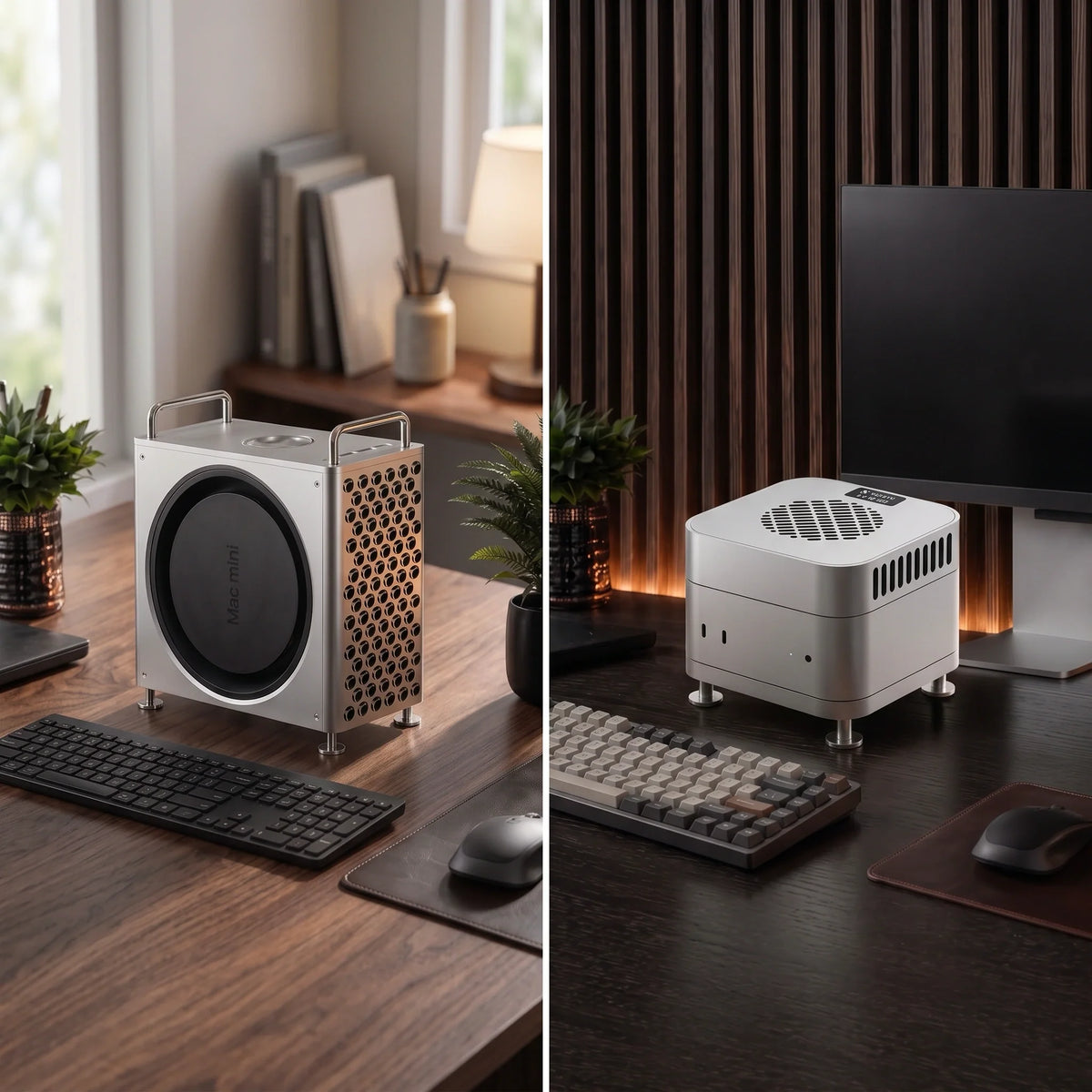
Updated September 2026: The original MacForge Gen2 featured in this guide has now been succeeded by the new ZEERA MacForge Gen3. This article has been expanded to explain the redesigned Gen3 enclosure and when the new ZEERA MacFrost Pro active cooler is the better Mac mini cooling solution.
Quick Answer: A Mac mini cooling base can improve bottom airflow clearance and help create a cleaner, more stable desktop setup. For a Mac Pro-inspired aluminum enclosure with passive airflow support, choose ZEERA MacForge Gen3. If you run long video exports, local AI, 3D rendering or large code builds and want more direct heat removal, ZEERA MacFrost Pro is the stronger option because it adds up to 30W of thermoelectric active cooling.
The compact Apple Mac mini delivers impressive performance, but its small footprint also makes desk placement and ventilation important. Users searching for a Mac mini cooling base, Mac mini cooler stand or Mac mini cooling fan are usually trying to solve one of two problems: limited airflow around the computer or heat buildup during sustained workloads.
The original ZEERA MacForge Gen2 introduced a Mac Pro-inspired aluminum enclosure for the 2024 Mac mini M4. Its distinctive design, SSD organization and ventilation-focused structure helped turn the compact Mac into a more substantial desktop workstation.
What Is a Mac Mini Cooling Base?
A Mac mini cooling base is an accessory designed to improve placement, airflow clearance or external heat management. Some products simply raise the Mac mini. Others use aluminum to create a stable passive structure, while active coolers add a fan or thermoelectric cooling system.
The Mac mini already has an internal cooling system. Web browsing, document editing, streaming and other short workloads normally do not require an external cooler.
An additional cooling solution becomes more relevant when the Mac mini spends long periods under continuous CPU or GPU load, especially during video exports, 3D rendering, local AI generation, gaming or large software builds.
Important: A cooling base should support a properly functioning Mac mini. If the computer remains unusually hot at idle, crashes, shuts down or stays loud after a task has finished, check Activity Monitor, software behavior and ventilation before adding an external cooler.
From MacForge Gen2 to the New MacForge Gen3
MacForge Gen2 established the original design concept: a precision aluminum Mac mini enclosure inspired by the Apple Mac Pro. It gave Mac mini M4 users a more professional desktop appearance while maintaining access to the computer’s ventilation system.

The ZEERA MacForge Gen3 is the current generation. It expands the original concept with a wider, more balanced profile, a redesigned internal airflow layout and improved everyday access to the Mac mini’s front connections.
Gen3 is designed for the current 127 × 127 mm Mac mini form factor, including Mac mini M6, M5 Pro, M4 Pro and M4.
What Is New in ZEERA MacForge Gen3?
Redesigned Passive Airflow Architecture
MacForge Gen3 provides more internal air volume and optimized airflow channels around the Mac mini. The structure is designed to reduce thermal congestion without replacing or obstructing the computer’s original cooling system.
This makes it a practical Mac mini aluminum cooling base for users who value silent passive cooling support, desk organization and industrial design.
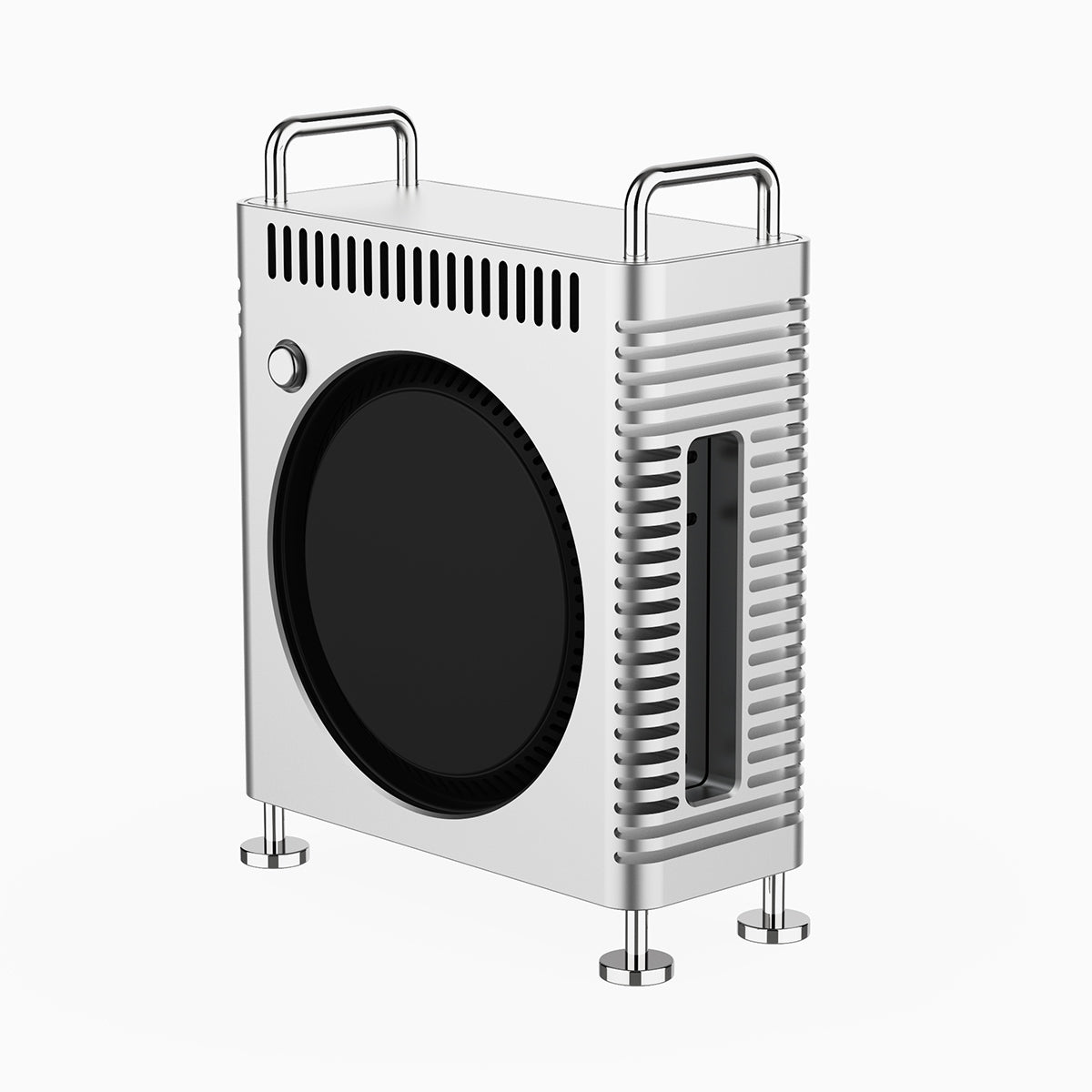
Mac Pro-Inspired CNC Aluminum Construction
The three-dimensional front grille gives the Mac mini a recognizable Mac Pro-style appearance. Its CNC-machined aluminum construction creates a rigid, stable workstation instead of using a lightweight decorative shell.
A brushed surface and hard-anodized finish improve surface hardness, corrosion resistance and long-term color stability while preserving the natural appearance of aluminum.

Top-Access USB-C and Headphone Connections
Both Gen3 versions include a custom I/O extension system. It brings the Mac mini’s two front USB-C ports and headphone jack to the top of the enclosure, making them easier to reach in a permanent desktop setup.
Optional External SSD Enclosure Storage
MacForge Gen3 is offered in two configurations. The SSD Storage version includes a dedicated top area for an external SSD enclosure measuring up to 120 × 60 × 19 mm. The Clean Minimal version removes the SSD storage space for a more compact, near-square appearance.
This storage area organizes a separate external drive; it is not an integrated SSD, hub or electronic docking station.
Mac Mini Cooling Base vs Cooling Fan vs Active Cooler
Searches for “Mac mini cooler” often combine several different accessory types. The best choice depends on whether you want better clearance, passive airflow support or active heat removal.
| Cooling option | How it works | Noise | Best for |
|---|---|---|---|
| Raised Mac mini stand | Creates additional clearance beneath the computer | Silent | Everyday use and desks with restricted bottom airflow |
| Passive aluminum cooling base | Raises and organizes the Mac mini while supporting open airflow | Silent | Clean desk setups and light thermal support |
| Mac mini cooling fan base | Uses a fan to move additional air near the computer | Varies | Users who want increased airflow and accept fan noise |
| Thermoelectric active cooler | Draws heat through direct contact with the aluminum enclosure | Varies by power mode | Long, repeatable CPU- and GPU-heavy workloads |
A basic Mac mini cooling pad or fan stand may help move air, but not every design works with the Mac mini’s original bottom intake. Avoid placing the computer on a soft surface or using an accessory that blocks its ventilation openings.
Performance That Stays Cool
The Mac mini can become warm during demanding work without necessarily overheating. Its aluminum enclosure spreads heat across the outer surface, so warmth alone is not evidence of a problem.
MacForge Gen3 is primarily a premium enclosure with passive airflow support. It does not contain a powered cooling fan or thermoelectric module.
If your priority is design, SSD organization and a Mac Pro-inspired workstation, MacForge Gen3 is the better fit. If maximum cooling performance is the priority, choose MacFrost Pro.

When Is MacFrost Pro the Better Mac Mini Cooler?
ZEERA MacFrost Pro is designed for users who need more than a passive stand or Mac mini cooling fan base. It combines a top-mounted thermoelectric cooler with a separate CNC aluminum stand beneath the computer.
The upper cooling plate draws heat directly through the Mac mini’s aluminum enclosure. An included 100 × 100 × 3 mm thermal silicone pad improves contact between the cooler and the computer.
The lower aluminum stand raises the Mac mini while keeping its original bottom ventilation area and power button accessible. This creates two complementary functions: direct-contact active cooling above and unobstructed native airflow below.
Does Every Mac Mini Need Active Cooling?
No. The internal cooling system is normally sufficient for browsing, documents, video playback and intermittent creative work. Adding a powerful cooler to a lightly loaded Mac mini may provide little practical performance benefit.
MacFrost Pro is more relevant when heat builds continuously during tasks such as:
- Long 4K or 8K video exports
- Extended 3D rendering sessions
- Local AI model generation
- Large software compilations
- Sustained gaming or benchmark loops
- Heavy workloads in a warm room
For most extended daily sessions, the 7W level is the best starting point. Stronger 20W and 30W modes provide more aggressive cooling but also produce more audible fan noise.
MacFrost Pro requires a USB-C PD adapter rated at 20W or higher. A 45W USB-C PD adapter is recommended when using the full 30W cooling level.
MacForge Gen3 or MacFrost Pro: Which Should You Choose?
| Your priority | Recommended product | Why |
|---|---|---|
| Mac Pro-inspired appearance | MacForge Gen3 | CNC aluminum enclosure with a three-dimensional front grille |
| Silent passive airflow support | MacForge Gen3 | No fan or powered cooling system |
| External SSD organization | MacForge Gen3 SSD version | Dedicated space for a compatible external SSD enclosure |
| Maximum external cooling | MacFrost Pro | Up to 30W of direct-contact thermoelectric cooling |
| Long professional workloads | MacFrost Pro | Adds thermal headroom during sustained CPU and GPU use |
| Simple bottom clearance | MacFrost aluminum stand | Raises the computer while preserving its original ventilation path |
MacForge Gen3 and MacFrost Pro solve different problems. MacForge focuses on enclosure design, passive airflow, port access and SSD organization. MacFrost focuses on active thermal performance.
How to Improve Mac Mini Cooling Safely
- Use a hard, open surface. Avoid carpet, fabric and enclosed cabinets that can restrict airflow.
- Keep the bottom vents clear. Do not place another object directly beneath the intake area.
- Check Activity Monitor. A background process can create continuous heat even when the Mac appears idle.
- Remove dust around the ventilation area. Do not force debris deeper into the computer.
- Measure repeatable workloads. Compare temperatures, fan behavior and completion times during the same task.
- Use the lowest effective cooling mode. Additional fan speed is worthwhile only when it delivers a meaningful benefit.
Mac mini cooling discussions on Reddit often focus on surface temperature alone. A more useful test is whether the computer repeatedly slows down, becomes unstable or produces excessive fan noise during the same workload.

Final Verdict
The best Mac mini cooling base depends on what you want to improve.
Choose ZEERA MacForge Gen3 if you want a Mac Pro-inspired CNC aluminum enclosure, passive airflow support, convenient top I/O access and optional SSD enclosure storage.
Choose ZEERA MacFrost Pro if you regularly run sustained professional workloads and want a purpose-built Mac mini active cooler with direct-contact thermoelectric cooling.
The original MacForge Gen2 helped establish this category for the 2024 Mac mini M4. MacForge Gen3 now brings the enclosure concept into its next generation, while MacFrost Pro provides a dedicated option for users who place cooling performance first.
Frequently Asked Questions
Does the Mac mini M4 need a cooling base?
Not for normal browsing, documents or streaming. A raised or passive cooling base can improve bottom clearance, while an active cooler is mainly useful for long workloads that keep the CPU and GPU under continuous load.
What is the best Mac mini cooler for M4?
Choose MacForge Gen3 for silent passive airflow support and a premium enclosure. Choose MacFrost Pro when you need stronger external cooling for long video exports, rendering, AI workloads or code builds.
Does a Mac mini cooling fan base work?
A fan base can increase airflow, but its effectiveness depends on placement and design. It should not block the Mac mini’s original bottom ventilation or force unnecessary dust toward the intake.
What is the difference between MacForge Gen3 and MacFrost Pro?
MacForge Gen3 is a Mac Pro-inspired aluminum enclosure with passive airflow support. MacFrost Pro is an active thermoelectric cooler with 7W, 20W and 30W modes, Auto control and a separate aluminum stand.
Is MacForge Gen3 compatible with Mac mini M4 Pro?
Yes. MacForge Gen3 is designed for the current Mac mini enclosure used by Mac mini M6, M5 Pro, M4 Pro and M4.
Is MacFrost Pro compatible with Mac mini M6, M5 Pro and M4?
Yes. MacFrost Pro is designed around the 127 × 127 mm Mac mini footprint shared by these current models.
Does MacFrost Pro block the Mac mini’s bottom airflow?
No. Its separate lower stand raises the computer and preserves access to the original bottom ventilation area. The active cooling unit sits above the Mac mini.
Can a Mac mini cooling base fix overheating at idle?
It should not be the first fix. If a Mac mini remains unusually hot at idle, first check Activity Monitor, background software, ventilation, dust and possible hardware issues.






