Quick Answer: Most Mac mini users do not need an external cooler for browsing, office work or streaming. A raised Mac mini cooling stand can improve airflow, while a cooling fan or pad mainly moves room-temperature air around the computer.
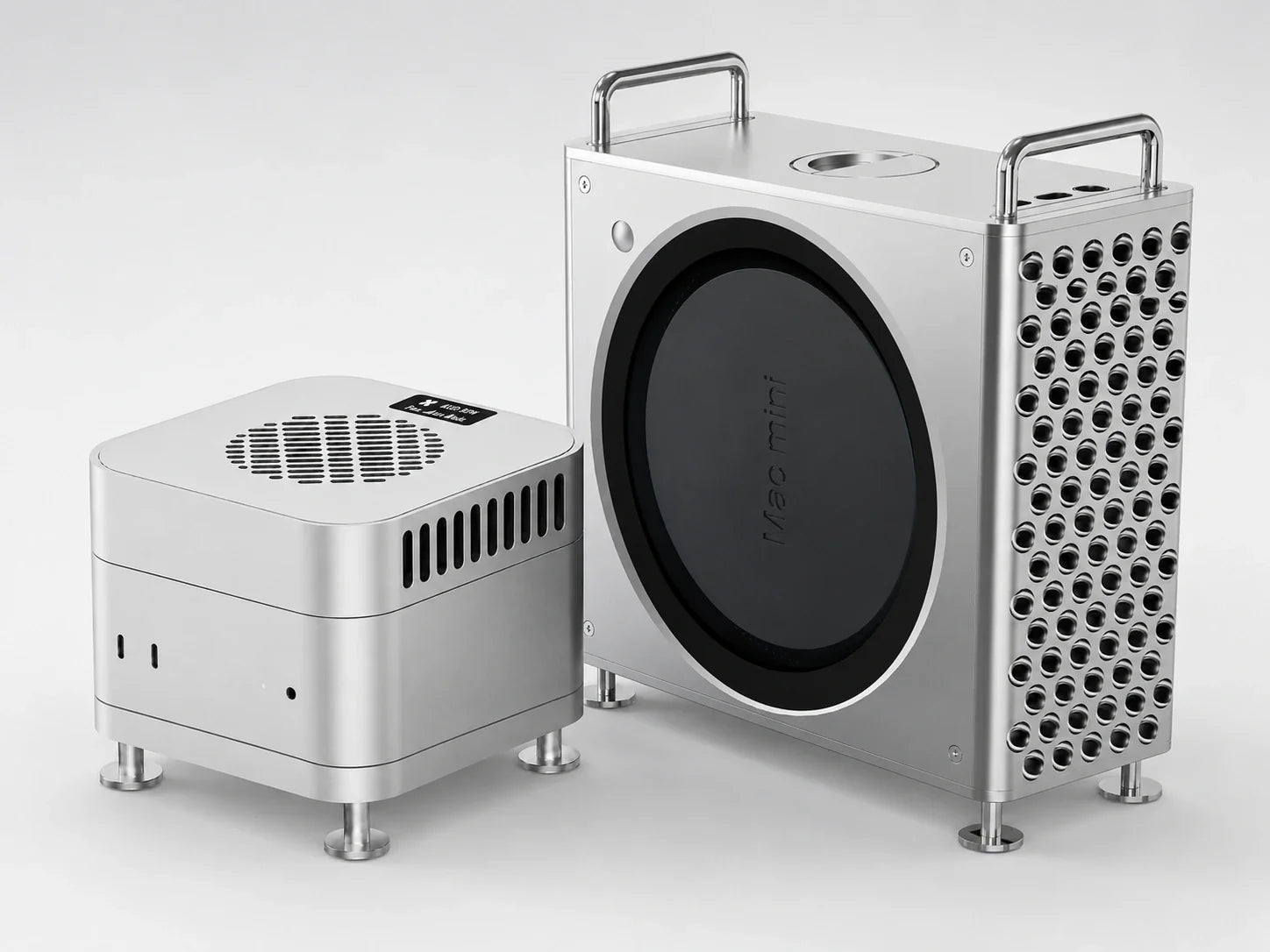
For sustained workloads such as long video exports, 3D rendering, local AI and large code builds, an active thermoelectric cooler can remove heat more directly. The ZEERA MacFrost Pro combines up to 30W TEC cooling with a CNC aluminum stand for Mac mini M6, M5 Pro and M4.
Search for a Mac mini cooler and you will find several very different products: raised stands, bottom fans, laptop-style cooling pads, aluminum bases and active semiconductor coolers.
They may look similar in product listings, but they do not cool a Mac mini in the same way.
A basic stand only creates more space under the computer. A fan moves ambient air. An active TEC cooler creates a cold contact surface that draws heat through the Mac mini’s aluminum enclosure.
This guide compares the most common Mac mini cooling options and explains which one makes sense for everyday use, video editing, rendering, software development and other sustained workloads.

Does a Mac mini Actually Need a Cooler?
Most Mac mini owners do not need additional cooling for normal daily use.
Email, web browsing, documents, music, video playback and short editing sessions usually do not create the kind of continuous load that justifies an external Mac mini cooling fan or active cooler.
It is also normal for the aluminum enclosure to feel warm. The metal body can conduct and release heat generated inside the computer, so a warm case does not automatically mean the Mac mini is overheating.
Apple recommends placing the Mac mini on a hard, stable surface with adequate air circulation underneath and around the computer. Apple also lists an operating ambient temperature range of 50° to 95° F, or 10° to 35° C.
Additional cooling becomes more relevant when the workload stays heavy for an extended period rather than appearing in short bursts.

Usually No Extra Cooler Needed
Browsing, streaming, office work, messaging, light photo editing and other short or intermittent tasks.
Extra Cooling May Help
Long video exports, 3D rendering, local AI, large code builds, virtual machines and continuous professional workloads.
Check the Room
A warmer room gives the Mac mini less temperature headroom, especially during summer or in enclosed workspaces.
Check the Workload
If the Mac mini is hot while apparently idle, inspect CPU activity before assuming that the cooling system is inadequate.
If your Mac mini suddenly feels much hotter than usual, open Activity Monitor and sort the CPU column. A background process, cloud synchronization, indexing task or unresponsive application may be keeping the processor busy.
An external cooler should support a properly functioning Mac mini. It should not be used to hide a software problem, blocked vent or possible hardware fault.
Mac mini Cooling Stand vs Fan vs Cooling Pad vs Active Cooler
The best Mac mini cooler depends on what you expect it to do.
If your goal is simply to give the bottom vents more clearance, a raised stand may be enough. If you want more airflow, a fan can help move air around the enclosure. If you need more direct heat removal during a long workload, active thermoelectric cooling is the stronger option.
| Cooling option | How it works | Cooling strength | Noise | Best for |
|---|---|---|---|---|
| Raised cooling stand | Creates more clearance around the bottom intake area | Low | Silent | Everyday use and improved desktop placement |
| Passive aluminum stand | Raises the Mac mini and may spread a limited amount of enclosure heat | Low to medium | Silent | Clean setups with light cooling needs |
| Cooling pad | Moves room-temperature air around or toward the computer | Low to medium | Low to medium | Users who want inexpensive additional airflow |
| External cooling fan | Directs ambient air toward the Mac mini or its intake area | Medium | Medium | Longer workloads where extra airflow is useful |
| Active TEC cooler | Uses a powered cold plate to draw heat through the aluminum enclosure | High | Depends on mode | Video exports, rendering, local AI and sustained professional workloads |
Do Mac mini Cooling Stands Work?
A Mac mini cooling stand can work, but its effect depends on what “work” means in your setup.
A raised stand improves the amount of open space beneath the Mac mini. This can help the computer access room air more easily and reduces the chance that its bottom ventilation area will sit too close to another surface.
This is particularly useful if the Mac mini is placed on a crowded desk, inside a shelf or on a surface that restricts airflow.
A passive stand, however, does not actively create cold air or pull a large amount of heat away from the computer. Its main benefit is positioning and ventilation clearance.
An aluminum stand may distribute some surface heat, but the effect is not the same as a direct-contact active cooler.
For normal workloads, this simple improvement may be all that is needed. For hours of continuous rendering or exporting, a stand alone offers limited cooling capacity.

Do Mac mini Cooling Fans and Cooling Pads Work?
A Mac mini cooling fan or cooling pad can lower the temperature of the air immediately around the enclosure and improve airflow across its surface.
The effectiveness depends on fan placement, airflow direction, room temperature and whether the accessory works with or against the Mac mini’s original ventilation design.
What a Cooling Fan Can Do
A fan can move warm air away from the Mac mini and replace it with room-temperature air. This may help during longer workloads, particularly when the computer is positioned in a confined area.
A larger fan operating at a lower speed may also provide useful airflow without becoming excessively loud.
What a Cooling Fan Cannot Do
A conventional fan cannot produce air colder than the surrounding room.
If the room is already hot, a cooling fan is still moving hot ambient air. It may improve convection, but its cooling ceiling is determined by the environment.
What to Check Before Buying
Do not judge a Mac mini cooling base only by the number or size of its fans.
Check whether it leaves the original vents open, where the air is directed and whether the design may pull additional dust toward the intake.
You should also consider noise. Adding a second fan to a computer chosen partly for its quiet operation may not be a worthwhile tradeoff for every user.
What Is an Active Thermoelectric Cooler for Mac mini?
An active thermoelectric cooler uses electrical power to create a cold side and a hot side.
The cold plate contacts the Mac mini’s aluminum enclosure. Heat moves from the enclosure into the cooling plate, while the cooler’s own heatsink and fan release that heat into the surrounding air.
This technology is also described as TEC cooling, semiconductor cooling or thermoelectric cooling.
Unlike a basic Mac mini cooling pad, a TEC cooler is not limited to moving room-temperature air across the computer. It creates an additional direct-contact path for heat to leave the enclosure.
This does not replace the Mac mini’s internal cooling system. The built-in thermal controls, fan and ventilation remain responsible for managing the internal components.
An active cooler provides additional thermal headroom from outside the computer.
Actual results will still depend on ambient temperature, workload duration, cooling power, contact quality and the specific Mac mini configuration.

Who Benefits Most From Active Mac mini Cooling?
Active cooling is most relevant when a workload keeps the processor, graphics cores or memory system busy for a long time.
Video Editors
Long 4K or 8K exports and repeated transcoding jobs produce a more sustained thermal load than basic timeline editing.
Local AI Users
Running local models can maintain high CPU, GPU or Neural Engine activity for extended periods.
3D Artists
Rendering and simulation workloads can keep the Mac mini under continuous pressure until the job finishes.
Developers
Large builds, multiple containers and virtual machines may create longer and less predictable periods of high utilization.
Music Producers
Large projects with many software instruments, effects and sample libraries can create sustained system activity.
Hot-Room Workstations
Higher ambient temperatures reduce the difference between the computer and the air available to cool it.
If you only use your Mac mini for email, web browsing and video playback, a powered active cooler may be unnecessary.
If the computer is part of a production workstation and regularly stays under load for hours, stronger cooling becomes easier to justify.
Best Active Cooler for Mac mini M6, M5 Pro & M4
The ZEERA MacFrost Pro is designed for users who need more than a basic Mac mini stand or bottom cooling fan.
It combines a top-mounted thermoelectric cooling unit with a separate CNC aluminum stand underneath the Mac mini.
The upper unit creates a direct-contact cooling path through the aluminum enclosure. The lower stand raises the computer without forcing another fan directly into its original bottom intake area.
Why Is the Cooler Placed on Top?
Many Mac mini cooling bases place another fan underneath the computer. That approach attempts to increase airflow near the Mac mini’s existing intake area.
MacFrost Pro takes a different approach.
The active cooling plate sits on top of the Mac mini and draws heat through the aluminum enclosure. The separate stand below raises the computer and preserves clearance around the original bottom ventilation area.
This gives the Mac mini two complementary cooling paths: its original internal airflow and an external direct-contact cooler.
Why Does Contact Matter?
An active cooler depends on efficient contact with the aluminum surface.
MacFrost Pro includes a 100 × 100 × 3 mm thermal pad for the first installation. The pad helps fill small surface gaps between the cooler and the Mac mini so heat can transfer more consistently.
The cooling plate should be installed according to the supplied instructions. Avoid using an active contact cooler without the correct interface material.
7W vs 20W vs 30W: Which Cooling Mode Should You Use?
The highest setting is not required for every task.
Choosing the appropriate mode helps balance cooling strength, power use and fan noise.
| Mode | Typical use | What to expect |
|---|---|---|
| 7W | Light workloads and general temperature control | Lower cooling output with quieter operation |
| 20W | Long exports, development work and moderate sustained loads | Stronger cooling with increased fan activity |
| 30W | Rendering, local AI and the most demanding sustained tasks | Maximum cooling output and the highest fan speed |
| Auto | Mixed daily workloads | Automatic adjustment based on temperature |
At 5V input, MacFrost Pro operates at 7W. The 20W and 30W modes require a 12V input.
A power adapter rated at 20W or more is recommended for basic operation. For stable access to the maximum 30W cooling mode, a 45W USB-C PD power adapter is the safer choice.
Users who prioritize quiet operation can remain at 7W or use Auto mode. Maximum cooling is intended for situations where sustained performance matters more than silence.
Can a Cooler Improve Mac mini Performance?
A cooler does not automatically make every Mac mini faster.
If your Mac mini is already maintaining its expected performance and temperature during a short task, additional cooling may not produce a meaningful speed increase.
The potential benefit becomes more relevant during a sustained workload.
As internal temperature increases, macOS and Apple silicon can adjust power, fan behavior and available processing capacity to keep the system within its thermal limits.
Apple explains that the kernel_task process can respond to thermal conditions by making less CPU capacity available to processes that are using the processor intensely.
By removing more heat from the enclosure, an external cooler may provide additional thermal headroom and help the system remain more consistent during a long job.
The result depends on the workload. A ten-second action and a two-hour render do not create the same cooling requirement.
Mac mini M6 vs M5 Pro vs M4: Who Needs More Cooling?
The chip name alone does not determine whether you need an external cooler.
A Mac mini M6 used mainly for web browsing may generate less sustained heat than an M4 used continuously for rendering. Workload duration, configuration, ambient temperature and software behavior matter as much as the processor generation.
Mac mini M6
Most M6 owners will not need external cooling for normal use. A Mac mini M6 cooler is better viewed as a workstation accessory for sustained creative, development and AI workloads.
Mac mini M5 Pro
The M5 Pro configuration is more likely to be selected for demanding professional work. Users who regularly keep its CPU and GPU resources busy for long periods may have a stronger reason to consider active cooling.
Mac mini M4 and M4 Pro
M4 and M4 Pro systems remain capable computers. Additional cooling can still be useful for extended exports, rendering and other workloads that run continuously rather than in short bursts.
The best decision should therefore be based on how the computer is used—not simply whether it carries an M6, M5 Pro or M4 label.
How to Choose the Best Cooler for Mac mini
Before buying a Mac mini cooling stand, fan or active cooler, check the following points.
1. Cooling Method
Decide whether you only need more clearance, more airflow or active heat removal.
A passive stand, external fan and TEC cooler solve different levels of the same problem.
2. Vent Clearance
The accessory should not block the Mac mini’s original ventilation openings.
A visually attractive base is not useful if it restricts the airflow the computer already relies on.
3. Workload Duration
Short tasks rarely justify maximum cooling. Long exports, rendering jobs and continuous local AI workloads are stronger reasons to consider an active cooler.
4. Noise
More aggressive cooling normally requires faster fan operation.
If the Mac mini is used in a recording room, bedroom or quiet office, compare cooling requirements with acceptable noise levels.
5. Power Requirements
Passive stands need no power. Cooling fans commonly use USB power, while a higher-output thermoelectric cooler may require a suitable USB-C PD adapter.
6. Physical Fit
Choose a cooler designed for the correct Mac mini footprint. The accessory should remain stable and make even contact where required.
7. Temperature Control
An automatic mode is useful when the workload changes throughout the day. Manual modes are better when you want predictable cooling strength.
8. Construction Material
Aluminum provides a more stable, premium structure and visually matches the Mac mini better than many lightweight plastic accessories.
Which Mac mini Cooling Option Should You Buy?
For ordinary browsing, office work and media playback, start with proper placement. Keep the Mac mini on a hard surface and leave open space around its ventilation area.
If the bottom intake has limited clearance, choose a raised Mac mini cooling stand.
If the workspace is enclosed or warm, a carefully positioned external fan or cooling pad may provide additional airflow.
If the Mac mini regularly handles long video exports, 3D rendering, local AI, software builds or other sustained workloads, an active thermoelectric cooler provides a more direct cooling method.
For users specifically looking for an active Mac mini cooler rather than a basic stand or fan, the ZEERA MacFrost Pro offers the most complete combination: up to 30W TEC cooling, automatic temperature control, an OLED display and a separate CNC aluminum stand.
FAQ
Does a Mac mini need a cooling fan?
Most Mac mini users do not need an external fan for everyday tasks. A cooling fan may help during sustained workloads or in a warm room, provided it does not block or disrupt the computer’s original airflow.
Do Mac mini cooling stands actually work?
A raised stand can improve clearance beneath the Mac mini and help its original ventilation system access room air. A passive stand does not actively remove heat like a fan or thermoelectric cooler.
Is a cooling pad safe for a Mac mini?
A cooling pad can be safe if it supports the Mac mini securely and leaves its vents unobstructed. Check the airflow direction and avoid designs that push excessive dust directly toward the intake.
What is the best cooler for Mac mini?
A raised stand is sufficient for basic airflow. For sustained video editing, rendering, local AI or compiling, an active TEC cooler offers stronger and more direct heat removal.
Does a Mac mini M6 need an external cooler?
Not for normal everyday use. Additional cooling may be useful when a Mac mini M6 runs demanding professional workloads for long periods or operates in a high-temperature room.
Does a Mac mini M5 Pro need active cooling?
It is not required for every M5 Pro system. It becomes more relevant for users running long CPU- and GPU-intensive tasks such as rendering, video encoding, local AI and large software builds.
Can a cooler stop Mac mini thermal throttling?
A cooler may provide additional thermal headroom, but it cannot guarantee that thermal limiting will never occur. Results depend on workload, room temperature, system configuration and the effectiveness of the cooling design.
Is an active cooler better than a fan?
An active TEC cooler creates a cold contact surface, while a conventional fan only moves room-temperature air. Active cooling is stronger, but it requires more power and can produce more noise at maximum output.
Where should a Mac mini cooler be placed?
A cooler should never obstruct the Mac mini’s native vents. MacFrost Pro places the contact cooler on top and uses a separate stand underneath to keep the original bottom airflow path open.
Is it normal for a Mac mini to feel hot?
Yes. The aluminum enclosure can feel warm because it conducts heat away from internal components. Unexpected heat while idle, prolonged maximum fan activity, instability or repeated performance drops should be investigated separately.
Final Verdict
The best Mac mini cooler is not necessarily the accessory with the largest fan.
It is the cooling method that matches your workload.
A raised stand is the simplest choice for improved clearance. A fan or cooling pad can increase airflow. An active thermoelectric cooler is designed for users who need more direct heat removal during long, demanding tasks.
For Mac mini M6, M5 Pro and M4 workstations used for video production, local AI, rendering or development, the ZEERA MacFrost Pro provides a stronger cooling solution without blocking the computer’s original bottom ventilation path.
Explore the ZEERA MacFrost Pro Active Cooler for Mac mini →
Related reading: