
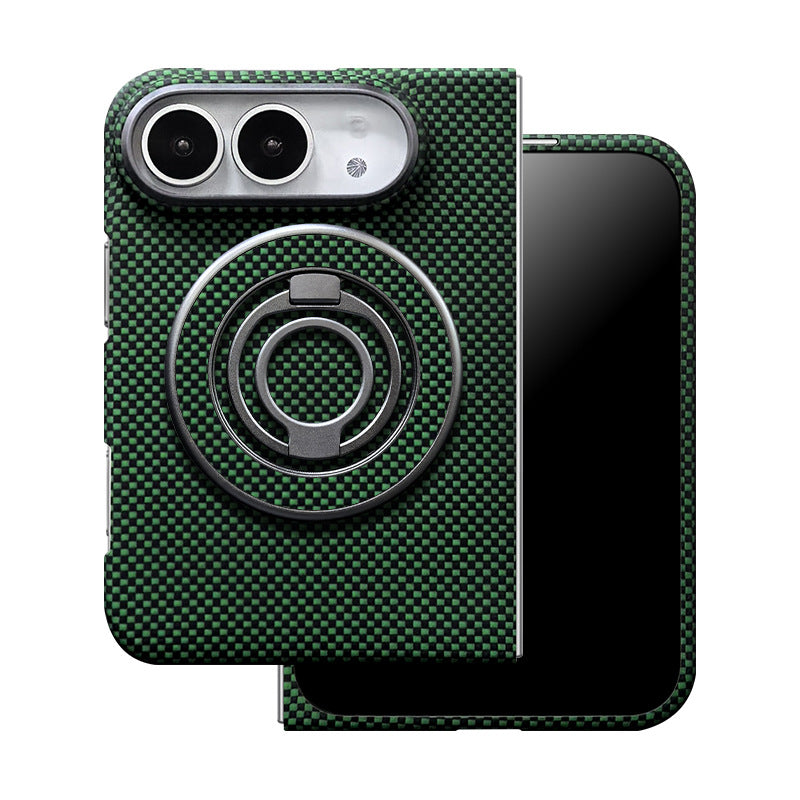
Quick Answer
Yes. MagSafe charging works with ZEERA FoldAero Pro, FoldFlex Pro and FoldPivot Pro for iPhone Duo.
FoldAero Pro: remove the optional detachable ring stand, leave the case on, then attach your compatible MagSafe charger.
FoldFlex Pro: let the finger strap retract and fold the built-in ring flat. The ring stays attached during charging.
FoldPivot Pro: fold its built-in rotating ring back into place and charge with the case and ring installed.
Compatibility does not promise a fixed charging speed: the phone, charger, power adapter, alignment and temperature also matter.
Does a ring stand block wireless charging?
A ring stand does not automatically block wireless charging. What matters is how the accessory is designed and whether the charger can sit correctly against the case's charging area. A removable attachment occupying that area and a built-in ring engineered for case-on charging need different handling.
For these three ZEERA models, the practical distinction is simple: detach FoldAero Pro's optional ring; fold the integrated rings on FoldFlex Pro and FoldPivot Pro flat. You do not need to remove the entire case for normal compatible MagSafe charging.
Which iPhone Duo ring stand cases need the ring removed?
Use this comparison before choosing an iPhone Duo case with ring and MagSafe charging. “Remove the ring” and “remove the case” are different steps.
| ZEERA case | Ring design | Before MagSafe charging |
|---|---|---|
| FoldAero Pro | Optional, detachable magnetic ring stand | Remove the ring stand; keep the case on. |
| FoldFlex Pro | Built-in ring stand with integrated finger strap | Retract the strap and fold the ring flat. No removal. |
| FoldPivot Pro | Built-in 360° rotating ring stand | Fold the ring back into place. No removal. |
If your priority is charging without managing a loose ring accessory, compare FoldFlex Pro and FoldPivot Pro. If you prefer a light case with a stand you can add or remove, consider FoldAero Pro.
How to charge each case correctly
FoldAero Pro: take off the ring, keep the aramid case on

FoldAero Pro pairs a slim aramid-fiber case with an optional matching magnetic ring stand. The stand is a separate attachment, rather than a folding mechanism built into the shell.
- Detach the optional ring stand from the back.
- Leave the FoldAero Pro case installed.
- Attach a powered, compatible MagSafe charger directly to the case's magnetic charging area.
- Check the charging indicator before leaving the phone.
The listed 0.9mm thickness and 18.2g weight refer to the case; the optional stand is excluded from that weight. Select With Ring Stand if you want the accessory included. Choose Without Ring Stand if you only want the case.
FoldFlex Pro: retract the finger strap and close the ring
FoldFlex Pro has a Kickstand with Integrated Finger Strap. Its rear ring opens for viewing, while an auto-retracting silicone strap provides finger support.
- Remove your finger and let the silicone strap retract.
- Fold the ring flat against the back.
- Attach your powered, compatible MagSafe charger.
- Confirm that the phone shows it is charging.
The ring and strap remain part of the case. The product's circular plastic center cover is designed to stay in place during wireless charging; you do not need to remove that cover.
FoldPivot Pro: fold the rotating ring back before charging
FoldPivot Pro integrates a 360° rotating ring stand into its slim PC case. Use the ring for hands-free viewing, then return it to its folded position when switching to a charger.
- Finish using the ring as a stand.
- Fold it back into place against the case.
- Attach a powered, compatible MagSafe charger without dismantling the ring.
- Check the charging indicator and make sure the charger is seated correctly.
Why can a charger attach magnetically but fail to charge?
Magnetic attachment helps position an accessory. Wireless charging also needs a powered charger, suitable alignment and a workable gap between the charging surfaces. Feeling the magnets connect is not proof that power is reaching the battery.
A detachable ring is still in the charging area
On FoldAero Pro, attach the charger after removing the optional ring stand. Do not sandwich that accessory between the case and charging puck, even if the magnets appear to hold.
The built-in stand has not returned to its charging position
On FoldFlex Pro and FoldPivot Pro, return the ring flat before charging. On FoldFlex Pro, also let the strap retract. “No need to remove the ring” means the integrated part can remain fitted; it does not mean every open stand position works against every charger.
The charger housing touches another part first
Look at the entire charger, not just its magnetic circle. A wide housing can contact a camera surround, case hardware or hinge cover before the charging face sits correctly. Check the actual contact area when changing from a charging puck to a stand, car charger or battery pack.
Apple's wireless charging guidance explains that objects between the phone and charger can reduce performance and recommends checking the case when charging fails. These general checks complement the charging instructions for each ZEERA design.
Will a ring stand case reduce MagSafe charging speed?
These three cases support compatible MagSafe charging in the configurations above. Their ring designs alone do not establish an exact wattage or a charging-time comparison.
Check the complete charging setup
- Phone and charger: use a compatible combination; a magnetic mount without charging electronics will not charge the phone.
- Power adapter and cable: follow the charger's input requirements.
- Alignment and clearance: keep the charging faces correctly seated, with the ring in the right configuration.
- Temperature and battery state: these can change the power the phone accepts.
Apple notes that actual MagSafe power varies with the phone model, adapter and system conditions. A charger advertised as “up to 25W” describes a supported peak for eligible setups, rather than a constant output promised by the case. See Apple's MagSafe charging instructions.
Can you use the same case with a desk charger and car charger?
Yes, provided the charger is compatible and its body clears the case hardware. Use the same preparation each time: detach FoldAero Pro's optional ring, or fold the integrated ring flat on FoldFlex Pro and FoldPivot Pro.
At a desk, confirm that the charging face sits correctly. In a car, also check the mount's installation and its ability to support your phone configuration. Ring-case charging compatibility does not by itself establish stability with the phone unfolded.
Check accessory dimensions before reusing a large magnetic battery pack or wallet. Our iPhone Duo MagSafe accessory-fit guide covers the physical-clearance question.
What to check if your ring stand case is not charging
- Prepare the ring correctly. Remove FoldAero Pro's detachable stand; close the integrated rings on FoldFlex Pro and FoldPivot Pro.
- Remove other rear accessories. Take wallets, extra grips and loose objects out of the charging path.
- Check the power supply. Confirm the charger is powered and uses its recommended adapter and cable.
- Reseat the charger. Inspect alignment and check for contact with the camera or case hardware.
- Look for the charging indicator. Do not rely only on the magnetic snap. If the phone reports a temperature-related pause, let it cool and try again.
- Isolate the cause. Try a known-working compatible charger. If needed, compare charging without the case and contact support with the case model, charger model and a photo of their contact position.
For a broader comparison of grip and stand mechanisms, read our iPhone Duo ring, grip strap and stand guide. If charging convenience is your deciding factor, FoldFlex Pro and FoldPivot Pro avoid a loose ring accessory; FoldAero Pro offers a removable stand with a lightweight case.
Related iPhone Duo guides
- Compare finger grips, ring stands and strap designs
- Choose a case by the problem you want to solve
- Compare the wider ZEERA iPhone Duo case lineup
- MagSafe wallet and battery-pack fit explained
- MagSafe cases with stands and integrated outer-screen protection
- Choose between slim cases, wallet designs and hinge protection
Sources and product details
Product details checked October 15, 2026. Charging configurations reflect ZEERA's product specifications and product guidance: FoldAero Pro's optional ring is removed for charging; FoldFlex Pro and FoldPivot Pro retain their built-in rings in the folded position. Recommendations are based on these designs; no comparative charging-speed or temperature measurements are claimed.
- ZEERA FoldAero Pro: case and optional detachable ring stand
- ZEERA FoldFlex Pro: built-in ring and retracting finger strap
- ZEERA FoldPivot Pro: integrated rotating ring stand
- Apple Support: How to use your MagSafe Charger with iPhone
- Apple Support: How to wirelessly charge your iPhone
FAQ: ring stand cases and MagSafe charging
Does FoldAero Pro still support MagSafe without buying the ring stand?
Yes. The case itself has a MagSafe-compatible magnetic design. The optional ring stand adds a removable viewing accessory; it is not needed to enable compatible magnetic charging.
Do I need to remove FoldFlex Pro's plastic center cover?
No. The product is designed to charge with that cover in place. Let the silicone finger strap retract and fold the ring flat before attaching the compatible charger.
Can I use the built-in stand open while MagSafe charging?
Use the folded-ring configuration described here. An open stand may obstruct a charger or change its contact position. For hands-free viewing during charging, a compatible charging stand can support the phone with the case ring folded.
Does MagSafe compatibility mean every wireless charging pad will work?
No universal physical fit follows from that description. A nonmagnetic pad also needs compatible charging electronics and correct alignment. Check the pad's instructions and whether the case sits correctly on its charging area.
Is a metal ring enough to make any case wirelessly charge?
No. A ring can provide magnetic attachment without establishing electrical compatibility or a clear charging path. Choose a case and ring arrangement explicitly designed for wireless charging rather than adding an arbitrary metal ring over the charging area.
Can these cases use MagSafe charging while the phone is plugged into USB-C?
Apple states that the iPhone uses the wired connection when connected to both a wireless charger and USB power. Disconnect the charging cable when checking whether your wireless setup is working.









