Quick Answer
To reduce iPhone Duo camera wobble without a bulky case, fit a near-flush cover such as ZEERA DuoFlat around the raised rear lenses. The adhesive-backed polycarbonate piece adds about 1.23 g and brings the surrounding camera area closer to lens height, so the folded phone can sit steadier when you tap or type on a hard, level desk. Both lenses and the nearby openings stay exposed. DuoFlat works on a bare iPhone Duo and is designed to fit Apple’s Folio and Liquid Silicone cases. If you use another case, look for a single roomy camera opening and check whether its rim or kickstand changes how the phone rests on the desk.
Why does the iPhone Duo rock on a desk?
Set a folded iPhone Duo face up and the raised cameras can leave part of the back slightly above the desk. Tap an unsupported corner of the outer display and the phone can pivot around the camera area. If you already use a case, check which part touches the desk first. A raised rim or a protruding kickstand can also be the contact point, so start by testing the phone on the same surface with the case off.
Wobble Solution: How to Make Your iPhone Duo Lay Flat
The ZEERA DuoFlat camera lens cover fills in the area around the lenses with a wider, near-level surface. The practical goal is less rocking under your fingers. The lens height, the desk and anything else touching it still affect how flat the phone sits.

Try the same tap before and after
- Close the iPhone Duo and set it face up on a hard, level desk.
- Tap near the same corner of the outer display a few times. Watch the opposite edge for lift.
- Repeat after installing DuoFlat, using the same spot and similar pressure. If you switch between bare and cased use, check each setup separately.
Watch the DuoFlat desk test
Watch the ZEERA WIRELESS desk test below. When you try the same check at home, look at the edge opposite your tap. It’s easier to spot that edge lifting than to judge movement at the camera bump.
How DuoFlat changes the camera profile
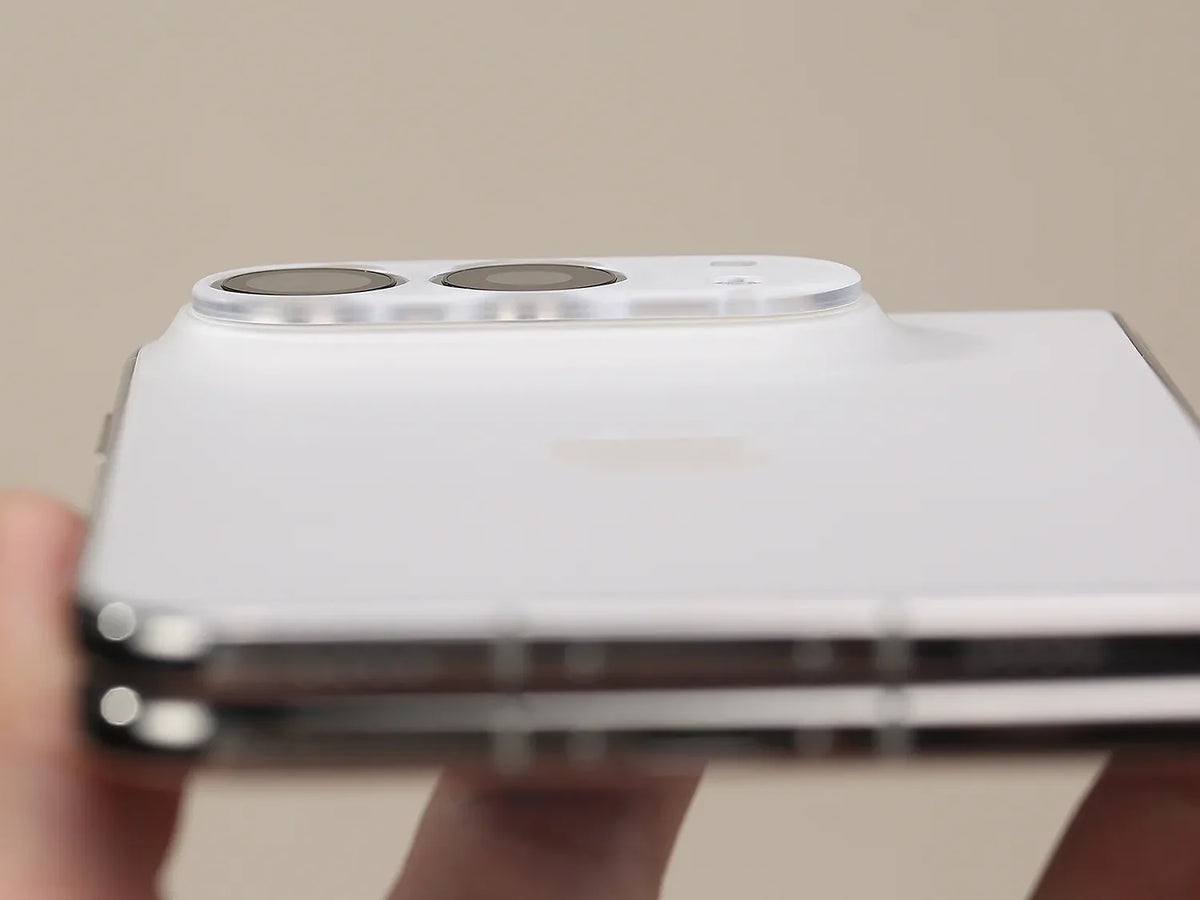
The cover fits around the camera module with two large lens cutouts and smaller openings beside them. From the side, you can see how the top surface comes close to the height of the lens rims. DuoFlat covers the area immediately around the cameras while leaving the rest of the back, frame and hinge exposed on a bare phone.


- Weight
- Approx. 1.23 g
- Dimensions
- Approx. 53.8 × 19.3 mm
- Material
- Matte polycarbonate (PC)
Will DuoFlat fit your iPhone Duo case?
ZEERA lists the Apple Folio and Liquid Silicone cases as compatible. DuoFlat sits inward by roughly 0.85 mm per side from the camera area’s edge. Most third-party cases with a single large opening can fit when that opening leaves enough room around the cover.
Before pressing down the adhesive, check the case opening against the loose cover. Look for an inward lip or individual lens holes that might overlap its edges. Once the case is seated, repeat the desk test with it on. If the case has the highest contact point, it will dictate how the phone rests.
If you want one case to provide both coverage and a wider resting surface, see our guide to iPhone Duo cases that sit flatter on a desk.

How to install DuoFlat
- Clean and dry the camera area. Remove dust and fingerprints from the surfaces around the lenses.
- Line up the openings. Set DuoFlat in place lightly. Check both lens cutouts and the smaller openings before applying pressure.
- Press evenly around the cover. Once it’s aligned, press the cover into place and verify that every opening is clear. Refit your case if you use one, then repeat the desk check.
Four matte finishes
DuoFlat comes in White, Black, Burgundy and Light Blue. The color is applied to the underside, leaving the exposed face with a smooth matte finish.


Related reading
FAQ
Does DuoFlat put glass over the cameras?
Both lenses look through open cutouts. The adhesive-backed cover sits on the surrounding camera area, leaving the camera glass and nearby openings exposed.
Can I remove DuoFlat and put it back on?
Yes. ZEERA recommends lifting it slowly from the edge with a thin paper card or fine thread. Place it adhesive-side down on the smooth side of the included storage sticker and keep it free of dust until you reapply it.
Why does my phone still rock with DuoFlat installed?
Try the folded phone on a hard, level surface with the case off. Check that the cover sits evenly around the cameras. If it only rocks with the case on, look for a raised camera rim, kickstand or other part of the case touching the desk first.