
Quick Answer
Apple announced the M6 iMac on October 27, 2026, with U.S. pricing from $1,499. Pre-orders open October 28 at 10:10 a.m. Pacific Time, and availability begins November 6.
The update brings a faster M6 chip, a Dual 16-core Neural Engine, Wi-Fi 7 and Bluetooth 6, while keeping the colorful 24-inch 4.5K all-in-one design. The main buying decision is between the 10-core, two-port model and the 12-core, four-port model: that choice also affects memory and storage limits, external-display support, included Touch ID and access to nano-texture glass.
M6 iMac: Official Specs at a Glance
M6 performance
10-core CPU / 10-core GPU or 12-core CPU / 12-core GPU; Dual 16-core Neural Engine and GPU Neural Accelerators.
Memory and storage
16GB unified memory and 256GB SSD to start. The lineup reaches 32GB memory and 2TB storage on the 12-core model.
Display and colors
24-inch 4.5K Retina, 500 nits, P3 color. Seven finishes; optional nano-texture glass on the four-port model.
Connections
Wi-Fi 7, Bluetooth 6, available 2.5Gb Ethernet. Two or four Thunderbolt ports; up to two external 6K displays, depending on model.
U.S. starting prices
10-core: $1,499.
12-core: $1,699.
Education: $1,449 / $1,599 respectively.
Pre-order and launch
October 28, 2026, at 10:10 a.m. PT: pre-orders.
November 6, 2026: customer deliveries and retail availability.
M6 iMac Price and Release Date
The $200 step from the base iMac to the 12-core model buys more than two extra CPU and GPU cores. It opens the higher configuration limits and more flexible desk setup detailed below. Both starting prices are for 16GB memory and a 256GB SSD; larger capacities cost extra.
Apple’s initial rollout covers 35 countries and regions, including the United States. Eligible U.S. buyers can also use Apple Upgrade, with a 36-month lease advertised from $28.99 per month before taxes and trade-in credit. A lease requires returning the device or exercising a purchase option under the program’s terms. See Apple’s iMac store for local pricing and order estimates.
10-Core vs 12-Core M6 iMac: The Important Differences
Choose the hardware tier before deciding how much memory or storage to add. Some options belong exclusively to the four-port model.
10-core M6: the simpler setup
CPU: 2 super + 3 performance + 5 efficiency cores.
GPU: 10 cores.
Memory: 16GB or 24GB.
SSD: 256GB, 512GB or 1TB.
Connections: two Thunderbolt / USB 4 ports; optional 2.5Gb Ethernet.
Included input: Magic Keyboard and Magic Mouse.
Glass: standard.
12-core M6: more room to grow
CPU: 2 super + 4 performance + 6 efficiency cores.
GPU: 12 cores.
Memory: 16GB, 24GB or 32GB.
SSD: 256GB, 512GB, 1TB or 2TB.
Connections: four Thunderbolt 4 ports and 2.5Gb Ethernet.
Included input: Magic Keyboard with Touch ID and Magic Mouse.
Glass: standard or optional nano-texture.
For email, schoolwork, spreadsheets and a mostly wireless desk, the base model is a reasonable starting point. The 12-core version makes more sense if you already know you need two external displays, several wired accessories, 32GB memory or the glare-reducing glass option.
What M6 Changes for Performance and AI
The GPU now has a Neural Accelerator in every core, alongside the Dual 16-core Neural Engine. Apple’s headline AI comparison measures how quickly a local language model processes a prompt, so it is especially relevant to local AI workflows rather than every everyday task.
Apple’s M4 comparisons
Up to 1.5× in Excel productivity tasks.
Up to 2× in Affinity graphics tasks and ray-traced gaming.
Up to 5× in LM Studio prompt processing.
Apple’s older-iMac comparisons
Against M1: up to 2.5× in Excel, 3.3× in Affinity graphics and 12× in local AI prompt processing. The Intel comparison reaches 18× in a specific image-processing test.
These are Apple’s workload-specific results. Its headline comparisons use a preproduction 12-core M6 iMac with 32GB memory and a 2TB SSD. For the LM Studio comparisons, Apple used a 14-billion-parameter model with 4-bit quantization and an 8K-token prompt, measuring time to the first token.
M6 also offers up to 170GB/s memory bandwidth and up to twice the previous generation’s Neural Engine AI compute. Apple rates SSD read and write performance at up to 2× the previous generation. These improvements target different bottlenecks: model processing, graphics work and file access.
If you are comparing the chip with other Apple desktops, our M6 vs M5 vs M4 performance guide provides useful background from Mac mini testing; those results describe that desktop’s configuration and cooling.
Display, Nano-Texture Glass and Seven Colors
The display remains a major reason to choose an iMac: the computer, screen, camera and speakers arrive as one system. The 4480 × 2520 panel delivers 218 pixels per inch, True Tone, more than a billion colors, P3 wide color and 500-nit brightness. Its marketed size is 24 inches; the actual diagonal is 23.5 inches.
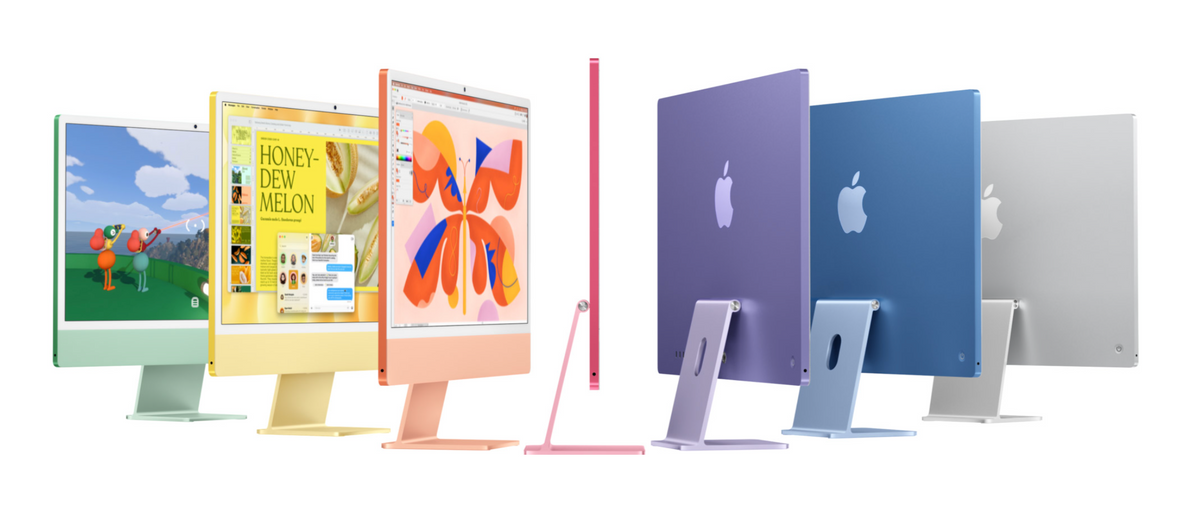
Blue, Purple, Pink, Orange, Yellow, Green and Silver are the seven listed finishes. Each pairs the thin desktop with color-matched accessories.
When nano-texture is worth considering
Nano-texture glass reduces reflections and glare in difficult lighting, such as a desk beside a window or under bright overhead lights. Choose it for that environment rather than assuming every desk needs it. It is an optional configuration on the 12-core, four-port iMac.
Ports, Networking and External Displays
Apple’s N1 chip supports Wi-Fi 7, Bluetooth 6 and Thread networking. The 2.5Gb Ethernet connection is useful for large transfers to compatible network storage. Your router, switch and storage system still determine the speed of the complete connection.
The USB-C-shaped Thunderbolt ports handle external storage, docks and displays. Both tiers support Thunderbolt 4 / USB 4 transfers up to 40Gb/s; a 3.5mm headphone jack is also provided.
External screens: 10-core model
One external display: 6K/60Hz or 4K/165Hz, alongside the built-in screen.
External screens: 12-core model
Two external displays at 6K/60Hz or 4K/165Hz, or one at 8K/60Hz, 5K/120Hz or 4K/240Hz. The built-in screen stays active.
For a desk with an SSD, dock and monitor, count the connections you will use at the same time before choosing the two-port model. Our USB-C vs Thunderbolt SSD guide explains why the enclosure and cable matter as much as the shape of the connector.
Camera, Speakers and Included Accessories
The 12MP Center Stage camera supports 1080p video recording and keeps you framed as you move or other people join a video call. Desk View adds a top-down view of your workspace, which is helpful for demonstrations, remote lessons and showing a physical project.
A six-speaker system combines two pairs of force-cancelling woofers with two tweeters, with Spatial Audio support for Dolby Atmos content. Directional beamforming helps the studio-quality microphones focus on your voice.
What comes with the computer
Both models include a mouse, keyboard, 143W adapter, 2m power cord and USB-C charge cable. The 12-core model’s keyboard includes Touch ID; nano-texture configurations add a polishing cloth. Keyboard and trackpad configuration options are available at checkout.
macOS 27, Siri AI and Working With iPhone
The new iMac runs macOS 27 with Apple Intelligence and Siri AI. On the Mac, Siri AI appears in Spotlight for questions and follow-ups, and can help draft or review writing. Apple also highlights Private Cloud Compute for requests that need larger server-based models.
Useful everyday AI features
Safari can group tabs by topic and monitor pages for changes such as a restock or price drop. Shortcuts can build an automation from a description. Photo tools include Spatial Reframing, Extend and enhanced Clean Up.
Move between iPhone and iMac
Universal Clipboard moves copied text and images between devices. Calls and messages can reach the Mac, while iPhone Mirroring lets you interact with the phone from the desktop. Mirroring requires the same Apple Account with two-factor authentication and nearby devices with Wi-Fi and Bluetooth enabled.
Siri AI is in beta in macOS 27. Apple lists English, French, Japanese, Korean, Portuguese and Spanish as its initial supported languages; some AI features have daily usage limits, and feature availability varies by language and region.
Which Configuration Should You Buy?
Home, school and everyday office work
Start with the 10-core model if its ports meet your needs. A 512GB SSD is a practical upgrade if you keep photos, downloads and work files locally; 256GB requires more deliberate storage management.
Creative work and local AI
Consider the 12-core model with 24GB or 32GB memory when several demanding apps or local models are part of your routine. Choose capacity around the work you actually run. Our 16GB vs 24GB vs 32GB local AI guide explains the capacity trade-offs.
For an Intel iMac owner, the new system also brings modern Apple silicon features, a newer camera and the current wireless platform. For an M1 owner, heavy creative work and local AI create a clearer reason to upgrade than routine browsing. An M4 owner should identify a specific bottleneck before replacing a desktop that already handles daily work comfortably.
M6 iMac or Mac mini?
Choose iMac if you want the integrated display, camera, speakers and matching input devices in one purchase. Choose Mac mini if you already have a good monitor or want more freedom to change screen size and desk layout. Compare the complete setup cost, including peripherals.
For readers taking the separate-display route, the following Mac mini accessories support that style of workstation.
A Mac mini enclosure offers a different way to organize the small desktop while keeping its ports accessible.
Media Support and Environmental Details
M6 includes hardware-accelerated H.264, HEVC, ProRes and ProRes RAW, plus AV1 decoding and hardware ray tracing. Video playback supports Dolby Vision, HDR10+/HDR10 and HLG; audio formats include Apple Lossless, FLAC and Dolby Atmos.
Apple reports 15% recycled material by weight, including a stand made from 100% recycled aluminum. Manufacturing uses 40% renewable electricity, and the packaging is entirely fiber-based. Low Power Mode is available through System Settings > Energy for users who want to reduce energy use during operation.
Related Reading
- Apple’s October 2026 Mac lineup: earlier rumors and expectations
- Mac mini M6 vs M5 vs M4: performance tests
- Mac mini M6 for local AI: 16GB vs 24GB vs 32GB
- External SSD speeds: USB-C vs Thunderbolt
Official sources: Apple’s October 27 announcement, iMac overview, technical specifications and U.S. store. Published October 27, 2026. Prices shown are U.S. prices before tax.
FAQ
Can I order the M6 iMac for a monitor arm?
Yes. Apple offers an iMac configuration with a built-in VESA Mount Adapter for an adjustable arm or wall mount. Select that version when ordering.
How much desk space does it need?
With its stand, iMac is 54.7cm wide, 46.1cm high and 14.7cm deep. The 10-core model weighs 4.42kg; the 12-core model weighs 4.44kg. Allow extra room behind it for cables.
Can I transfer files from an older Mac or a Windows PC?
Yes. Migration Assistant can transfer files and accounts from a Mac or PC. Apple also offers online Personal Setup sessions with direct purchases to help with setup and data transfer.
What protection options does Apple offer?
AppleCare+ is available for the Mac; AppleCare One covers multiple eligible products in supported markets. Check local plan terms for accidental-damage coverage, service fees and support.






