
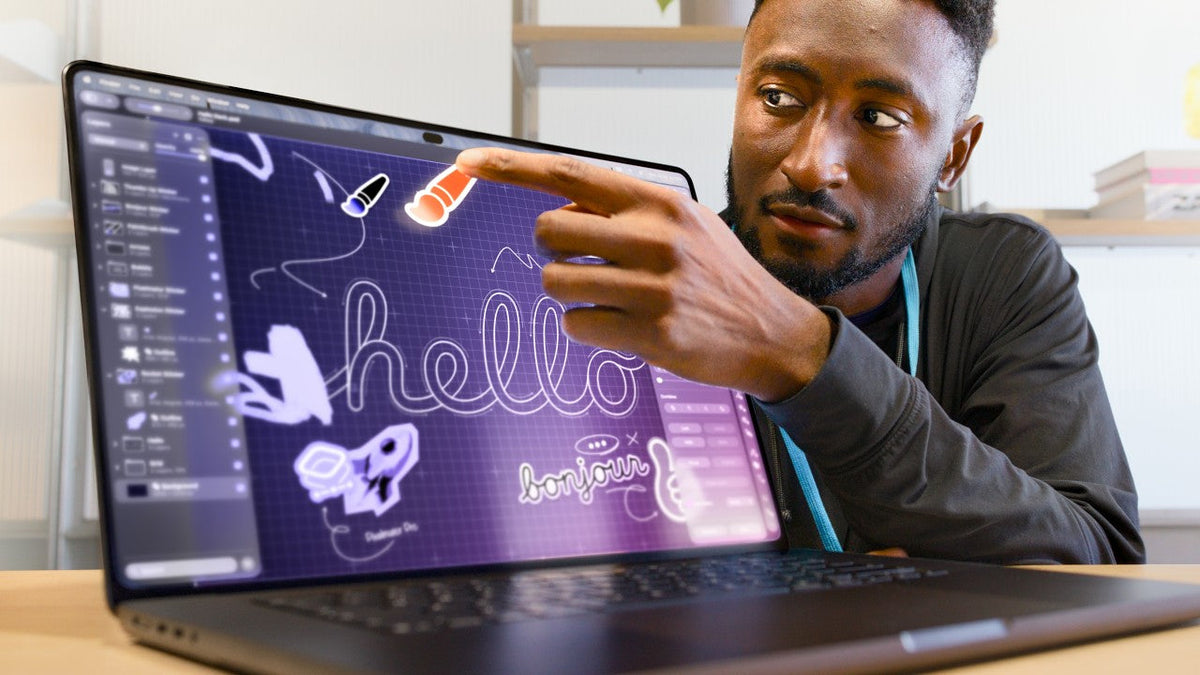
Quick Answer
MKBHD likes the new OLED MacBook Pro, but its touchscreen has not given him a compelling reason to change how he works. After a brief hands-on, he found touch responsive while still encountering familiar drawbacks: reaching toward a vertical display, screen movement and desktop controls built around a pointer. He is much more interested in the OLED picture and lighter body. His reaction is a personal no to using touch, with continued interest in the laptop itself.
What Is MKBHD Actually Saying No To?
In Macbook PROLED XDR Impressions: They Said They Wouldn't!, Marques Brownlee separates an impressive new computer from a feature he rarely wants. He ends the video interested in the machine’s display and portability, without announcing a decision to buy or skip it.
That distinction makes his reaction useful. A feature can work beautifully in a demonstration and still do little for someone whose hands already move comfortably between keyboard and trackpad.
Touch Works. The Ergonomics Still Bother Him.
Brownlee credits the screen’s responsiveness. Scrolling, pinching to zoom and multi-finger gestures behave as he expects. His objection concerns the effort and interruptions involved in using them on a laptop.
Reaching up adds movement
Touching a vertical screen takes a hand away from its resting position. He has used many touchscreen laptops and says he often forgets they support touch, because he rarely feels a need to reach for the display. He also dislikes leaving fingerprints on it.
The hinge still moves under a finger
He noticed that Apple had made the hinge stiffer through its middle range, but the screen still wobbled slightly when pressed. A hinge must also remain easy to open and close; adding touch does not remove that physical compromise.
The Steve Jobs clip at the start of his video sets up this question: has a modern touchscreen made sustained vertical interaction more comfortable? His brief experience did not convince him that Apple had resolved it. This is an observation about using touch, rather than evidence of a hinge reliability problem.
macOS Adapts to Fingers, but His Workflow Does Not
The software makes accommodations. Brownlee demonstrates small window controls enlarging before selection, windows being flicked into tiled layouts, and a swipe down from the Dynamic Island to open search. He sees the thought behind these changes, while questioning whether they improve the tasks he already performs.
Search illustrates the issue neatly: reaching up to summon Spotlight can be followed immediately by returning to the keyboard to type. An existing shortcut already does the first part without moving a hand to the screen.
Compatibility does not automatically create a habit
His broader argument is that Mac developers serve a large audience using keyboards, trackpads and mice. He expects those controls to remain central to desktop apps. That is his assessment of the ecosystem, rather than proof that developers cannot create valuable touch features.
Apple is taking that possibility seriously. Its launch announcement describes touch tools for Logic Pro, Pixelmator Pro and Final Cut Pro. Brownlee’s question is how often he would choose those interactions during an ordinary working day. Our guide to why Apple finally brought touch to the Mac explores the company’s side of that decision.
The Touchscreen Use Case He Does Find Convincing
One example gets a warmer response: testing an iPhone app in Xcode’s simulator. Tapping and swiping inside the simulated phone lets a developer interact directly with an interface originally designed for fingers.
That has a clearer purpose than adding a screen gesture to something he already does comfortably with a trackpad. The input method fits the content being tested.
What the creative demos showed him
He also watched professional users manipulate 3D content and play onscreen instruments, and tried an impressive interactive installation himself. Those experiences showed what touch could do. He nevertheless saw screen interaction appearing only occasionally within workflows that still relied heavily on conventional controls.
OLED and Lower Weight Are the Upgrades He Wants
Brownlee’s enthusiasm becomes much clearer when he discusses the tandem OLED display: deep blacks, less blooming and striking HDR images. He also keeps returning to how much lighter the laptop feels beside the 16-inch MacBook Pro he carries and uses for editing.
For reference, Apple lists the new models at 3 pounds for the 14-inch and 4 pounds for the 16-inch, reductions of 0.5 and 0.7 pounds respectively. The U.S. starting price for the 14-inch M5 Pro model is $2,899.
Benefits that fit his existing routine
A better display is visible while he edits, watches or reads. Less weight is noticeable when he packs up and travels. Neither benefit requires him to learn a new interaction habit, which helps explain why they interest him more than touch.
He would also have placed Face ID much higher on his wish list. In his hands-on, the Dynamic Island contains a camera and ambient light sensor, while login still uses Touch ID. He notes the absence of Apple Pencil support too. These details help explain why the feature mix does not match everything he personally hoped for.
For buyers weighing the whole package, our MacBook Pro $400 premium breakdown looks at the value of the combined upgrades.
What His Reaction Means for Your Buying Decision
Our reading of his impressions is that the value of this MacBook Pro depends on which improvements you will use regularly. His priorities provide a useful test, without settling the decision for every buyer.
Start with the work you already do
If you carry a large laptop daily or care deeply about its built-in display, the design and OLED panel deserve attention. If touch is your main reason to upgrade, try the specific app and gesture you expect to use. Check the reach, the screen movement and the return to typing, as well as the responsiveness of the panel.
For a recent MacBook Pro owner already happy with performance, Brownlee offers no urgent upgrade argument. For an iOS developer or someone who enjoys direct manipulation in creative apps, his personal preference leaves room for a different answer. He ultimately treats touch as another available option and remains interested in the computer around it.
Watch MKBHD’s Original Impressions
FAQ
Is this MKBHD’s full MacBook Pro review?
No. The video presents a brief event hands-on. He invites viewers to suggest questions for a full review, so it does not establish long-term touch habits, measured battery endurance or sustained performance results.
Related Reading
- Why Apple Finally Changed Its Mind About Touchscreen Macs
- New Touchscreen MacBook Pro: What Problems Remain?
- MacBook Pro Nano-Texture vs Standard Glass for Touch
- Why the OLED MacBook Pro Uses M5 Pro Instead of M6
- Is the Touchscreen MacBook Pro Worth the Extra $400?
- The Glowing Apple Logo Returns to MacBook Pro






