iPhone Gets Hot While Charging in Summer? Why Qi2.2 25W Active Cooling Chargers Matter
If your iPhone gets hot while charging, you are not alone. This becomes even more noticeable in summer, especially when you are using wireless charging, GPS navigation, CarPlay, 5G, video calls, or a thick phone case.
For battery-conscious users, the real question is not only “How fast can my iPhone charge?” but also “How can I charge faster without adding too much heat?” Heat is not just uncomfortable to touch. It can affect charging speed, charging stability, and long-term iPhone battery health.
This is why Qi2.2 25W wireless charging should not only be discussed as a speed upgrade. As wireless charging gets faster, heat control becomes more important. A good modern charger should help your iPhone charge faster, stay more stable, and reduce unnecessary heat during summer travel, daily desk use, and in-car charging.

Why Does Your iPhone Get Hot While Charging?
Your iPhone may get warm during charging because power conversion naturally creates heat. Wireless charging can generate even more heat than wired charging because energy is transferred through magnetic alignment instead of a direct cable connection.
In summer, several real-world factors can make this worse:
- High outdoor temperature: Hot weather makes it harder for your iPhone to release heat.
- Car interior heat: A parked or sun-exposed car can become much hotter than the outside temperature.
- GPS navigation and CarPlay: Navigation keeps the screen, GPS, data connection, and processor active.
- 5G and background apps: Heavy phone use while charging increases power demand.
- Thick phone cases: Some cases trap heat and slow down cooling.
- Fast wireless charging: Higher charging power makes thermal design more important.
If your iPhone feels hot while charging, the charger may slow down, charging may become unstable, or iOS may limit certain functions to protect the device.

Common Signs Your iPhone Is Getting Too Hot While Charging
Heat does not always show up as a warning message. Many users first notice small changes during charging, especially in summer or inside a warm car.
Common signs include:
- charging suddenly becomes slower,
- the iPhone screen dims automatically,
- wireless charging disconnects or reconnects randomly,
- the phone stops charging during GPS navigation,
- the iPhone feels hot near the back or camera area,
- battery health seems to drop faster over time.
These symptoms are often related to heat buildup and iOS thermal protection. Apple explains that if the internal temperature exceeds the normal operating range, iPhone may slow or stop charging, dim the display, or reduce performance to protect internal components.
Why Heat Matters for iPhone Battery Health
Many users worry that repeated overheating during wireless charging may cause iPhone battery health to drop faster over time. They may also wonder whether wireless charging is bad for the battery, why charging slows down when the phone gets hot, or whether a hot MagSafe charger can affect long-term battery life.
Heat is one of the biggest factors that can affect lithium-ion battery aging. Apple recommends avoiding prolonged exposure to high ambient temperatures while using or charging iPhone, because excessive heat can affect long-term battery lifespan. Apple specifically notes that using or charging iPhone in ambient temperatures higher than 95°F / 35°C can permanently reduce battery lifespan.
That does not mean your battery is damaged every time your iPhone feels slightly warm. But repeated high-heat charging, especially in summer, inside a hot car, or during long GPS navigation sessions, is not ideal for long-term battery health.
If you care about preserving iPhone battery health, the goal is simple: reduce unnecessary heat during charging. That means avoiding direct sunlight, removing thick cases when heat builds up, limiting heavy phone use while charging, and choosing wireless chargers with better thermal control.
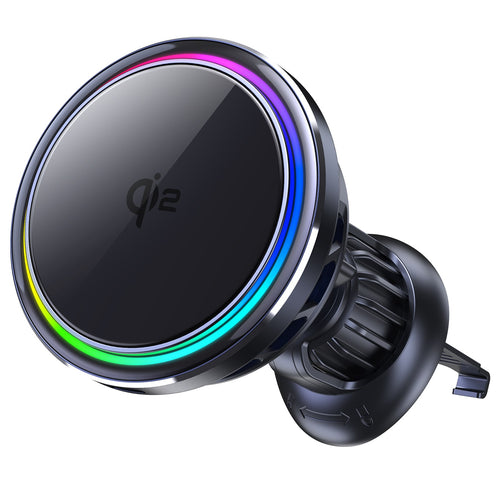
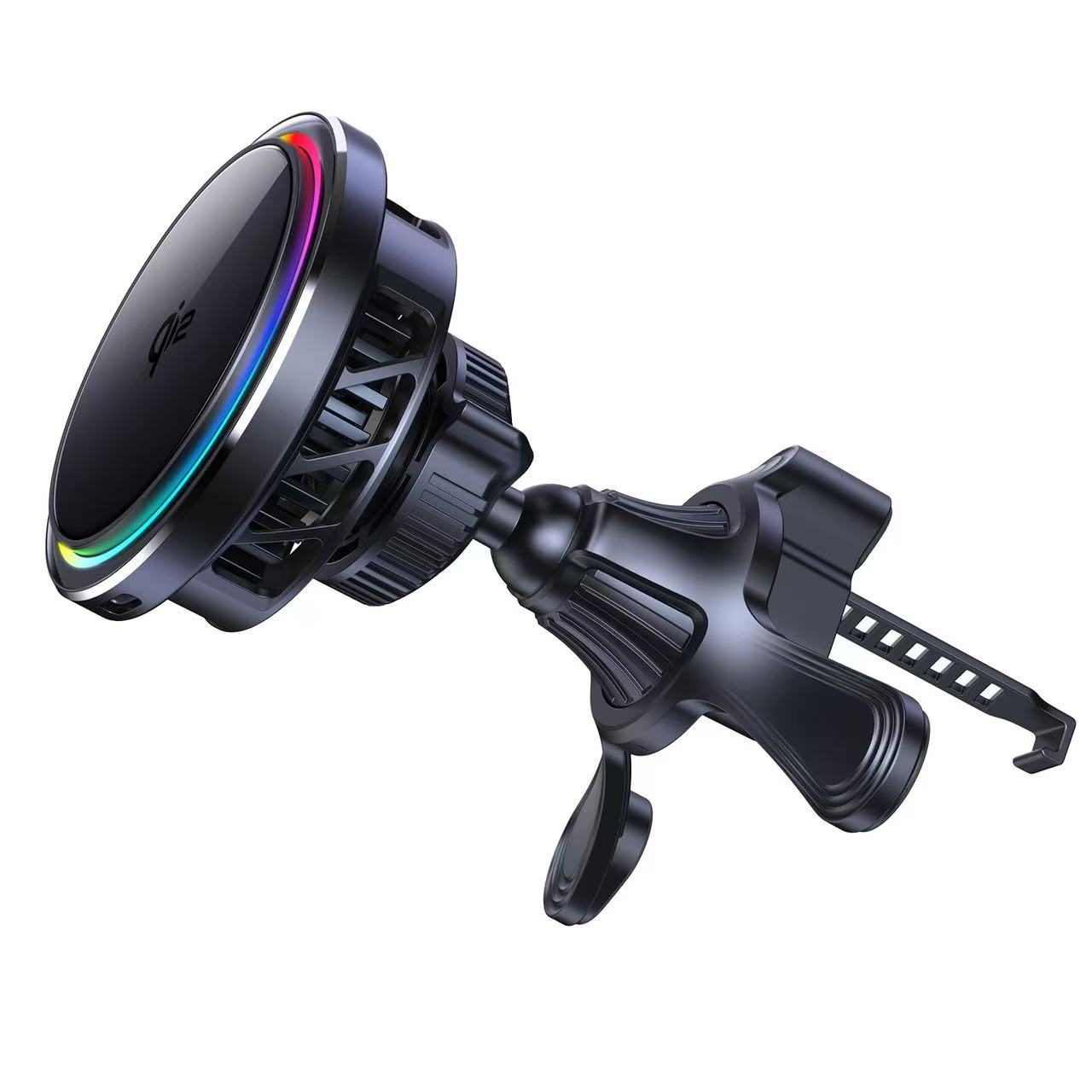
SuVolt Gen5 Qi2.2 25W Car Charger
Qi2.2 active cooling car charger for stable high-speed wireless charging.
Supports up to 25W fast charging with intelligent temperature control system.
Built for navigation, long drives, and secure magnetic mounting stability.

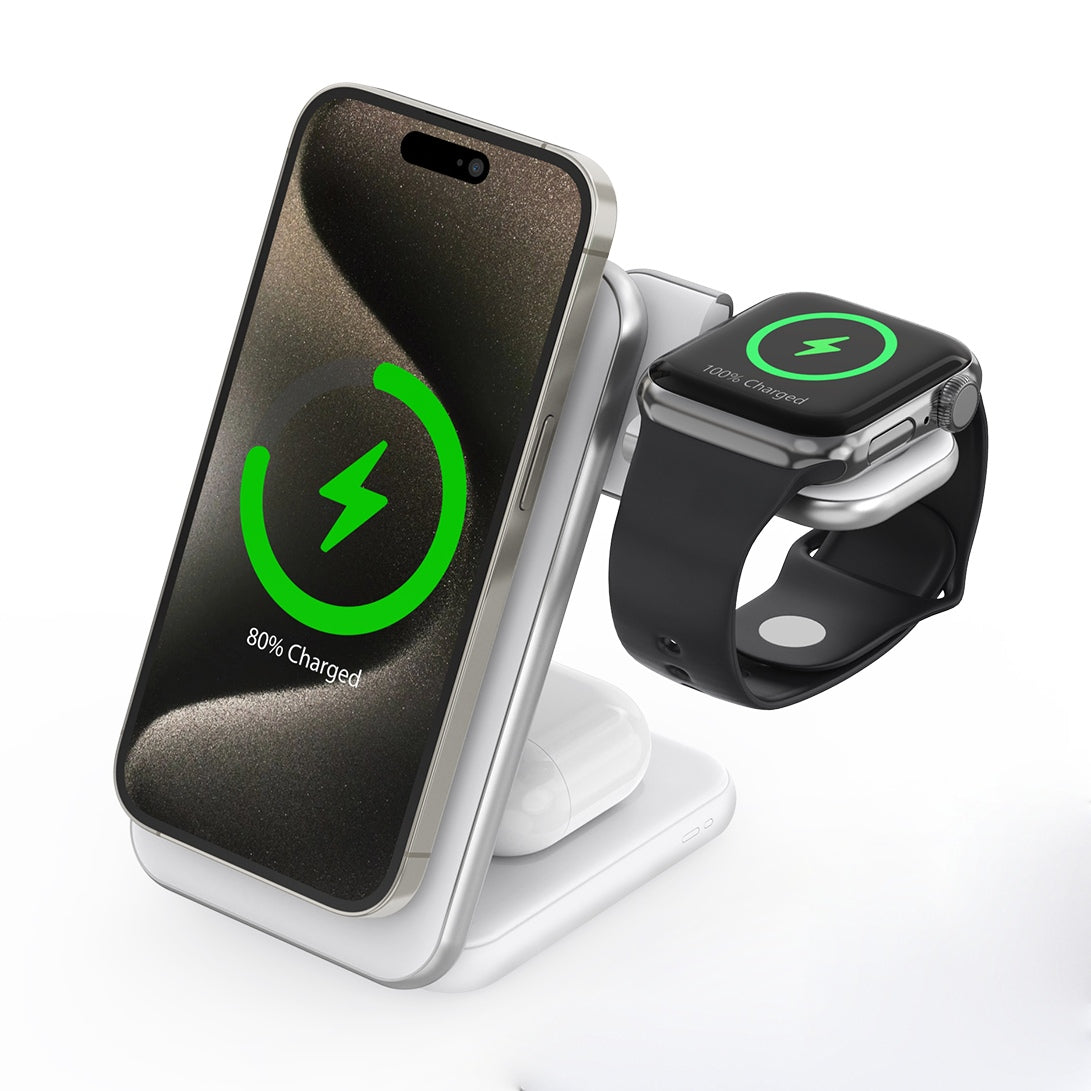
ZEERA MagTri Gen2 Qi2.2 MagSafe Charging Stand
All-in-one 3-in-1 charging station for iPhone, AirPods, and Apple Watch.
25W Wireless Fast Charging, Active Cooling & Compact Travel Design.
Foldable Design, Built for Travel.
Qi2 vs Qi2.2: What Is the Difference?
Qi2 and Qi2.2 both focus on magnetic wireless charging, but the biggest difference for most users is charging power. Qi2 is commonly associated with 15W magnetic wireless charging, while Qi2.2 pushes supported devices toward faster 25W wireless charging.
| Feature | Qi2 | Qi2.2 |
|---|---|---|
| Wireless charging speed | Up to 15W | Up to 25W on supported devices |
| Magnetic alignment | Yes | Yes, with faster charging support |
| Heat control importance | Important | More important because of higher charging power |
| Best for | Everyday wireless charging | Faster wireless charging with better thermal design |
The key point is simple: faster wireless charging is useful, but it also makes thermal design more important. That is why Qi2.2 25W chargers with active cooling are especially relevant for summer, car charging, travel, and long charging sessions.
Why Qi2.2 25W Makes Cooling More Important
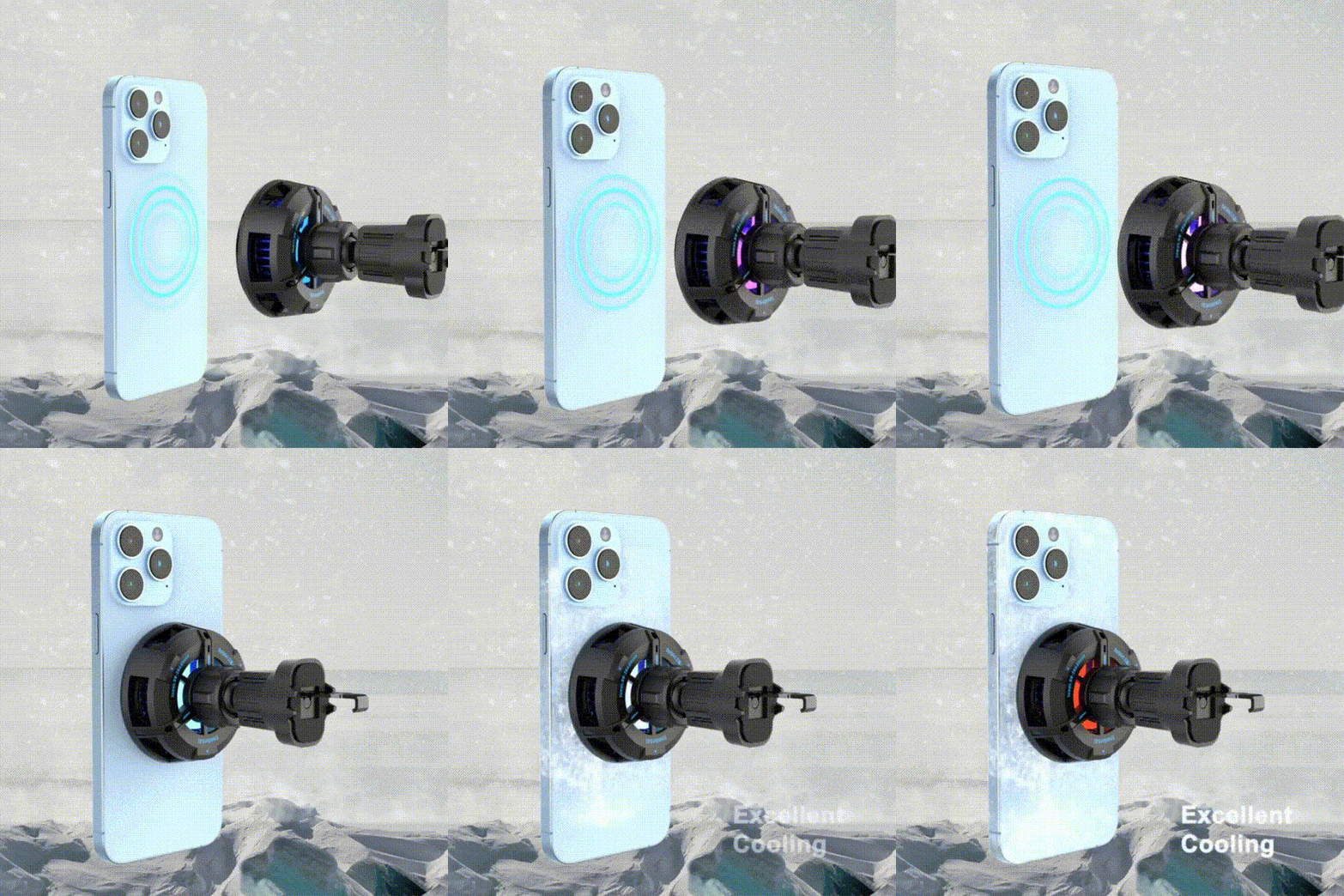
Higher wireless charging power can reduce waiting time, but it also increases the importance of heat management. A charger that only focuses on wattage may not deliver the best real-world experience if heat causes charging to slow down.
A better charging setup should balance three things:
- Speed: 25W wireless charging for supported devices.
- Stability: secure magnetic alignment and consistent power delivery.
- Heat control: active cooling to reduce temperature buildup during long use.
This balance matters most when your iPhone is already working hard, such as during navigation, CarPlay, video recording, cloud syncing, gaming, or summer travel.
Active Cooling: The Upgrade Fast Wireless Chargers Need
Active cooling is different from simply using a metal shell or passive heat dissipation. A charger with active cooling uses a built-in cooling system to help move heat away during charging.
This is especially useful in real-world summer scenarios:
- charging while using GPS navigation,
- charging during long road trips,
- charging in a warm room or hotel,
- charging while syncing photos, messages, or cloud backups,
- charging multiple Apple devices during travel.
For battery-health-conscious users, active cooling is not just a comfort feature. It helps support a more stable charging environment, which is important when you want faster charging without unnecessary heat.
For Summer Driving: Why Active Cooling Car Chargers Make Sense
Summer driving is one of the hardest charging scenarios for an iPhone. Your phone may be mounted near the windshield, exposed to sunlight, running GPS navigation, connected to CarPlay, using mobile data, and charging at the same time.
Because of this, more users are starting to look for wireless car chargers with active cooling instead of focusing only on charging wattage. The goal is not just faster charging, but more stable charging with better heat control.
The ZEERA SuVolt Gen5 Qi2.2 Active Cooling Car Charger is designed around this exact problem: keeping wireless charging more stable during summer driving, GPS navigation, CarPlay use, and long-distance travel.
ZEERA SuVolt Gen5 is a magnetic wireless car charger with active cooling technology, available in Qi2 15W and Qi2.2 25W versions. The Qi2.2 version is designed for users who want higher wireless charging performance on supported devices, while still keeping heat control at the center of the charging experience.
For drivers, this matters because heat can cause wireless charging to slow down or become less stable. A car charger with active cooling can help create a better charging environment when your iPhone is already working hard.

For Travel and Desk Use: Fewer Cables, Faster Charging, Better Heat Control
Not every heat problem happens in the car. Many users also charge their iPhone at a desk, in a hotel room, on a nightstand, or during summer travel. In these situations, a compact charger that can handle multiple Apple devices can be more convenient than carrying separate cables and adapters.

The ZEERA MagTri Gen2 Qi2.2 Foldable MagSafe Charger is designed for this type of everyday Apple setup. It combines Qi2.2 25W wireless charging, active cooling, and a foldable 3-in-1 design for iPhone, Apple Watch, and AirPods.
For battery-health-conscious users, the main value is not only speed. It is the combination of faster wireless charging, cleaner travel setup, and better heat management during longer charging sessions.
MagTri Gen2 is a strong fit for:
- summer travel charging,
- hotel nightstand charging,
- desk setups,
- Apple Watch and AirPods users,
- iPhone users who want fast wireless charging with better heat management.

Which ZEERA Qi2.2 Charger Should You Choose?
| Use Case | Best Choice | Why |
|---|---|---|
| Summer driving, GPS navigation, CarPlay | ZEERA SuVolt Gen5 | Active cooling car mount for in-car charging and navigation |
| Travel, hotel, desk, nightstand | ZEERA MagTri Gen2 | Foldable 3-in-1 charger for iPhone, Apple Watch, and AirPods |
| iPhone gets hot while charging in the car | ZEERA SuVolt Gen5 | Designed for heat control during driving and navigation |
| One charger for multiple Apple devices | ZEERA MagTri Gen2 | Cleaner setup with fewer cables |
| Battery-health-conscious charging | Both | Qi2.2 25W charging with active cooling helps reduce heat buildup |
Tips to Protect iPhone Battery Health While Charging in Summer
A better charger helps, but your charging habits also matter. If your goal is to protect iPhone battery health, follow these simple tips:
- Avoid direct sunlight: Do not charge your iPhone on a dashboard or by a sunny window.
- Do not leave your iPhone in a hot car: Parked cars can become much hotter than the outside temperature.
- Use active cooling for long charging sessions: This is especially useful during navigation, travel, or gaming.
- Remove thick cases if heat builds up: Some cases trap heat during wireless charging.
- Use well-designed wireless chargers: Better alignment and thermal control can improve charging stability.
- Keep iOS updated: Software updates can improve charging, thermal, and battery management.
The goal is not to keep your iPhone cold at all times. The goal is to avoid repeated high-heat charging, because heat is one of the biggest long-term enemies of battery health.

ZEERA AirFlat – Anti-Wobble Lens Cover
Ultra-flat lens cover designed for iPhone Air camera stability.
Reduces wobble and improves flat placement on any surface.

ZEERA MagSkin – Ultra-Thin MagSafe Back Plate
Minimalist magnetic back plate for MagSafe compatibility.
Ultra-thin design keeps iPhone Air lightweight and protected.
FAQ
Why does my iPhone get hot while wireless charging?
Wireless charging creates heat during power transfer. Heat can increase when you use GPS, 5G, CarPlay, video calls, or a thick phone case while charging.
Does heat damage iPhone battery health?
Repeated charging in very hot conditions can affect long-term battery health. Apple warns that using or charging iPhone above 95°F / 35°C can permanently reduce battery lifespan.
Is wireless charging bad for iPhone battery?
Wireless charging is not automatically bad for your iPhone battery. The bigger concern is heat. A well-designed wireless charger with good alignment and heat control can create a more stable charging experience.
Why is my iPhone battery health dropping faster?
Battery health can decline for many reasons, including normal battery aging, charging habits, heat exposure, heavy usage, and long periods in hot environments. Repeated overheating during charging can make battery wear worse over time.
Is Qi2.2 25W better than Qi2 15W?
Qi2.2 25W is designed for faster wireless charging on supported devices. Because power is higher, heat control becomes more important, especially during summer or long charging sessions.
What is the best MagSafe charger for summer travel?
For travel and desk use, a foldable 3-in-1 charger like ZEERA MagTri Gen2 is a practical choice. For car charging and navigation, ZEERA SuVolt Gen5 is better suited because it is designed as an active cooling car charger.
What is the best iPhone car charger for hot weather?
A good summer car charger should offer strong magnetic alignment, stable wireless charging, and active cooling. ZEERA SuVolt Gen5 is designed for in-car charging, GPS navigation, and hot environments.
Final Thoughts
In 2026, iPhone users need more than just faster wireless charging. They also need smarter heat control, especially in summer, during travel, and inside hot cars.
If your iPhone gets hot while charging, the problem is not only about comfort. It can also affect charging speed, charging stability, and long-term battery health. That is why Qi2.2 25W wireless charging with active cooling is a meaningful upgrade.
For drivers, the ZEERA SuVolt Gen5 Qi2.2 Active Cooling Car Charger is built for navigation, CarPlay, and hot-weather charging. For travel, desk, and bedside use, the ZEERA MagTri Gen2 Qi2.2 Foldable MagSafe Charger gives Apple users one compact 3-in-1 charging solution.
Fast charging matters. But in summer, cooler and more stable charging may matter even more.