
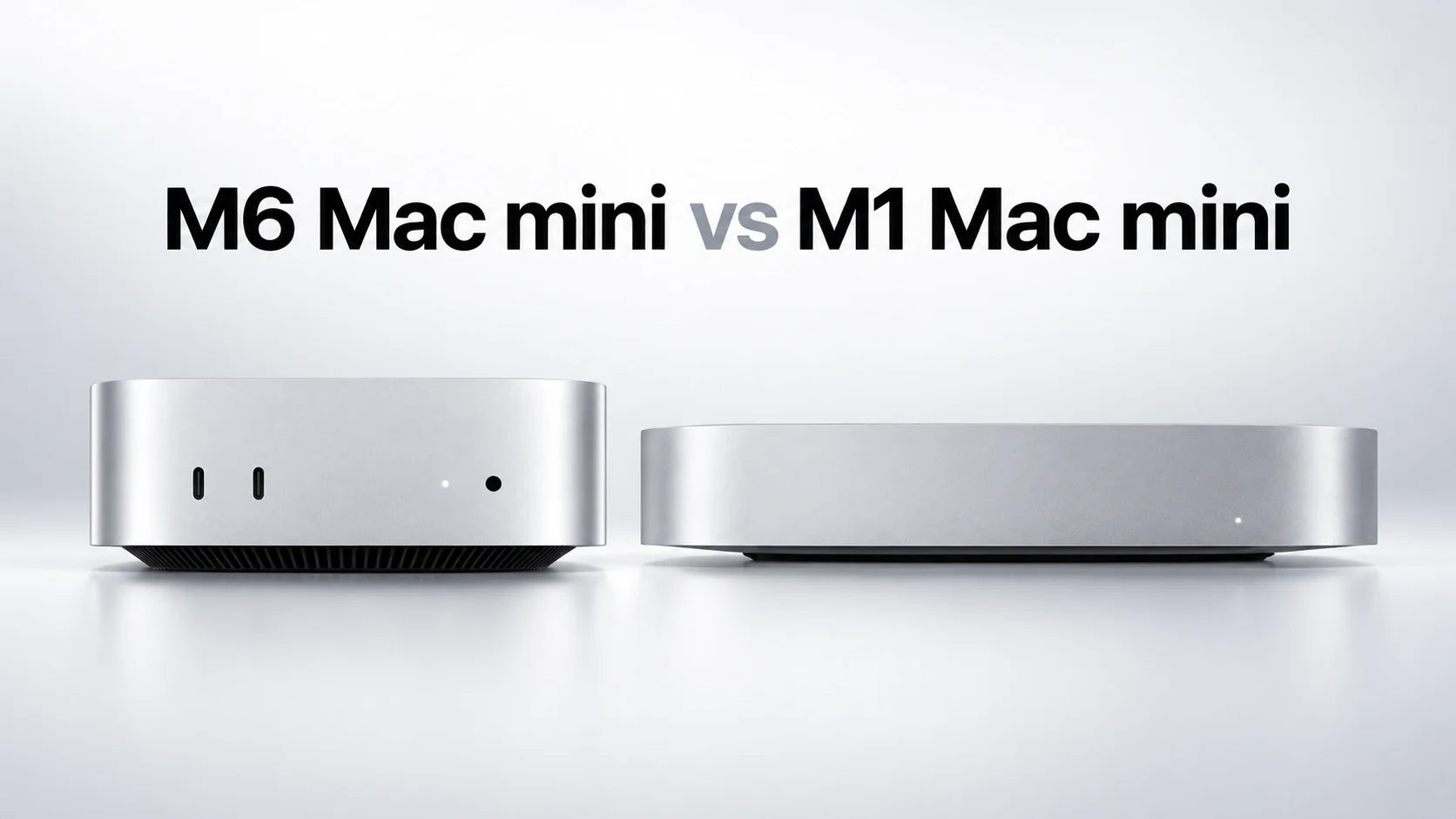
Quick Answer: The M6 Mac mini is a substantial upgrade from the M1 Mac mini, especially if your M1 has only 8GB of memory or you need faster local AI, graphics, video editing, external storage and multi-monitor support.
Apple says the M6 can be up to 13.5 times faster in a specific LM Studio test, 3.2 times faster for image processing in Affinity and 2.3 times faster for Excel calculations than the M1. It also starts with 16GB of memory, supports up to three displays and adds five USB-C ports across the front and back.
You can keep the M1 if it still handles browsing, office work, streaming and light creative tasks without memory pressure. Upgrade when the M1 is delaying real work—not simply because the M6 is newer.
For an upgraded desktop setup, choose ZEERA MacForge Gen3 for a Mac Pro-inspired CNC aluminum enclosure and organized workstation, or ZEERA MacFrost Pro when sustained cooling is the higher priority.
M6 Mac mini vs M1: What Are the Biggest Differences?
The Mac mini M1 was introduced in 2020 as Apple’s first Apple-silicon desktop. It remains capable, but the M6 Mac mini is separated from it by several generations of CPU, GPU, memory, storage, display and connectivity improvements.
The difference is larger than a normal annual processor update. Apple has also replaced the original 7.7-inch Mac mini enclosure with the newer 5-inch design, added front ports and increased the standard memory from 8GB to 16GB.
| Feature | M6 Mac mini | M1 Mac mini |
|---|---|---|
| Introduced | 2026 | 2020 |
| Starting price at launch | $899 in the U.S. | $699 in the U.S. |
| CPU | 12 cores: 2 super, 4 performance and 6 efficiency cores | 8 cores: 4 performance and 4 efficiency cores |
| GPU | 12-core GPU with Neural Accelerators and hardware ray tracing | 8-core GPU without hardware ray tracing |
| Neural Engine | Dual 16-core Neural Engine | 16-core Neural Engine |
| Unified memory | 16GB standard; configurable to 24GB or 32GB | 8GB standard; configurable to 16GB |
| Memory bandwidth | 153GB/s with 16GB; 170GB/s with 24GB or 32GB | Lower-bandwidth first-generation Apple silicon memory system |
| Internal storage | 256GB to 2TB | 256GB to 2TB |
| External displays | Up to three | Up to two |
| Thunderbolt ports | Three rear Thunderbolt 4 ports | Two rear Thunderbolt 3 / USB 4 ports |
| Additional USB ports | Two front USB-C ports at up to 10Gb/s | Two rear USB-A ports at up to 5Gb/s |
| Ethernet | 2.5Gb standard; configurable to 10Gb | 1Gb standard; configurable to 10Gb |
| Wireless | Wi-Fi 7, Bluetooth 6 and Thread | Wi-Fi 6 and Bluetooth 5.0 |
| Dimensions | 5 × 5 × 2 inches | 7.7 × 7.7 × 1.4 inches |
| Weight | 1.5 pounds | 2.6 pounds |
Apple says the M6 model’s footprint is less than half the size of the M1 Mac mini. It is slightly taller, but it occupies substantially less desk space and weighs about 1.1 pounds less.
How Much Faster Is the M6 Mac mini Than the M1?
There is no single percentage that accurately describes every M6 versus M1 workload. Opening a browser tab, exporting a video, running a local language model and rendering a ray-traced 3D scene place very different demands on the computer.
Apple has published several workload-specific comparisons against the M1 Mac mini:
| Apple Test | Claimed M6 Improvement Over M1 | What It Means |
|---|---|---|
| LM Studio prompt processing | Up to 13.5× faster | The largest advantage appears in newer local-AI workloads designed to use the M6 architecture. |
| Affinity image processing | Up to 3.2× faster | Useful for photographers and designers applying demanding edits or batch processing. |
| Microsoft Excel calculations | Up to 2.3× faster | Large spreadsheets and complex calculations should finish more quickly. |
| Logic Pro Alchemy plug-ins | Up to 2.7× more | Music projects can support more demanding software instruments and effects. |
| Ray-traced Blender rendering | Up to 10.3× faster | The M6 has hardware ray tracing, while the M1 does not. This is not a general 10.3× GPU claim. |
Will the M6 feel dramatically faster in everyday use?
For Safari, email, music, streaming and simple documents, a healthy M1 Mac mini can still feel responsive. The M6 will be faster, but light tasks may not make the five-generation difference feel dramatic every minute.
The upgrade becomes easier to notice when you run several apps together, process large photo libraries, export video, compile code, use multiple virtual environments or load local AI models.
An 8GB M1 can also become limited by memory before its CPU becomes the main problem. If Activity Monitor regularly shows high memory pressure or heavy swap use, moving to an M6 with 16GB, 24GB or 32GB may improve consistency as much as the newer processor.
What about M6 Mac mini benchmarks?
At the time of this update, the M6 Mac mini is available to pre-order but does not begin shipping until September 22, 2026. Final independent Geekbench, application and sustained-performance results should be evaluated after retail units become available.
Leaked or isolated benchmark scores may not represent the final macOS version, cooling conditions, memory configuration or real-world workload. Apple’s official application tests are useful reference points, but they are not substitutes for independent testing.
Is 16GB on the M6 Better Than 8GB or 16GB on the M1?
The M1 Mac mini started with 8GB of unified memory and could be configured with 16GB. The M6 starts with 16GB and can be ordered with 24GB or 32GB.
This matters because unified memory cannot be upgraded later. The CPU, GPU and Neural Engine share the same memory pool, so creative software, local AI tools, development environments and browser-heavy workflows can consume it quickly.
The 24GB and 32GB M6 configurations also receive up to 170GB/s of memory bandwidth, compared with 153GB/s on the 16GB configuration.
If your 16GB M1 still has normal memory pressure during your heaviest workload, memory alone may not justify upgrading. If you have an 8GB M1 that constantly relies on swap, the move to M6 is much easier to recommend.
Is the M6 Mac mini Better for Video Editing and Photography?
Yes. The M6 has a newer CPU, stronger GPU, higher memory ceiling and a media engine supporting hardware-accelerated H.264, HEVC, ProRes and ProRes RAW encoding and decoding. It also supports AV1 decoding.
For photographers, Apple’s claimed 3.2× Affinity image-processing result indicates a meaningful gain in a supported professional workflow. Large Lightroom or Capture One libraries should also benefit from faster processing and additional memory, although performance varies by application.
For video editors, the practical advantage depends on the codec, resolution, effects and export length. Basic 1080p projects can still run well on the M1. Multicam footage, high-resolution effects, AI-assisted tools and long 4K or 8K exports make a stronger case for M6.
If video editing is a regular part of your work, 24GB memory and at least 512GB of internal storage provide a more balanced configuration than the 16GB/256GB base model.
Is the M6 Mac mini Better for Coding and Local AI?
The M6 is substantially better suited to modern development and on-device AI workloads. It provides more CPU cores, up to twice the M1’s maximum memory, faster memory bandwidth and GPU-based Neural Accelerators.
Developers working with Xcode, multiple simulators, Docker containers, databases, large codebases or several IDE and browser sessions should see the greatest benefit from 24GB or 32GB of memory.
For local AI, model size is often limited by available memory. The M6’s 32GB maximum allows it to run workloads that may be impractical on an 8GB M1 and constrained on a 16GB M1.
Apple’s up-to-13.5× LM Studio result shows the potential of the M6 in one specific prompt-processing test. Actual token speed and model capacity still depend on model size, quantization, context length, software and memory configuration.
How Many Monitors Can M6 and M1 Mac mini Support?
The M1 Mac mini supports up to two external displays: one display up to 6K at 60Hz through Thunderbolt and a second display up to 4K at 60Hz through HDMI.
The M6 Mac mini supports up to three external displays. Apple lists configurations including two displays up to 6K at 60Hz or 4K at 165Hz, plus a third display up to 5K at 60Hz through Thunderbolt or 4K at 60Hz through HDMI.
With up to two displays connected, the M6 can also drive one display up to 8K at 60Hz, 5K at 120Hz or 4K at 240Hz, plus a second supported display.
If your M1 setup is restricted by its two-display limit or 60Hz output combinations, monitor support can be one of the most practical reasons to upgrade.
See our complete Mac mini M6 monitor support guide for dual-display, triple-display and high-refresh-rate configurations.
Are the M6 Mac mini Ports Better Than the M1?
The M6 provides more USB-C connectivity and much easier access from the front. It has two front USB-C ports supporting USB 3 at up to 10Gb/s, plus three rear Thunderbolt 4 ports at up to 40Gb/s.
The M1 has two rear Thunderbolt 3 / USB 4 ports and two rear USB-A ports. It therefore has fewer high-speed USB-C connections, but its built-in USB-A ports remain useful for older keyboards, hard drives and accessories.
The M6 does not include USB-A. M1 owners who still use USB-A peripherals should budget for a USB-C hub, dock or adapters when upgrading.
Networking also improves from standard Gigabit Ethernet on M1 to standard 2.5Gb Ethernet on M6. Both generations could be configured with 10Gb Ethernet, but the M6 adds Wi-Fi 7 and Bluetooth 6 instead of Wi-Fi 6 and Bluetooth 5.0.
Does the M6 Mac mini Run Hotter Than the M1?
A warm aluminum enclosure does not automatically mean that either Mac mini is overheating. The chassis helps spread heat, and temperature changes are normal during exports, gaming, local AI, rendering and large code compilations.
The M6 uses Apple’s newer compact thermal architecture, with air moving through the foot of the computer. Its internal cooling system is designed to manage ordinary workloads without an external fan or cooler.
However, M1 owners moving to M6 specifically for longer AI, video, 3D or development workloads may keep the new machine under sustained CPU and GPU load for much longer periods. In those situations, additional thermal headroom can be useful.
Which M6 Mac mini Configuration Should M1 Owners Buy?
The $899 M6 Mac mini includes 16GB of unified memory and 256GB of storage. It is powerful enough for everyday work, but 256GB can become restrictive after installing creative software, development tools, games or local AI models.
| M6 Configuration | Best For | Buying Advice |
|---|---|---|
| 16GB / 256GB | Browsing, office work, education and cloud-based storage | Choose it only if you are comfortable using an external SSD or keeping most files in the cloud. |
| 16GB / 512GB | General users upgrading from an 8GB M1 | The most balanced option for everyday ownership. |
| 24GB / 512GB | Coding, photography, video editing and heavy multitasking | A strong long-term configuration for most advanced users. |
| 32GB / 512GB or 1TB | Local AI, larger development environments and demanding creative work | Choose 32GB when memory capacity is more important than minimizing price. |
Memory cannot be upgraded after purchase. Storage can be expanded with an external USB4 or Thunderbolt SSD, although external storage does not replace the convenience of having enough internal capacity for apps and frequently used files.
Can You Reuse M1 Mac mini Accessories With the M6?
USB keyboards, mice, displays, external drives and many docks can still work, provided you have the correct USB-C, Thunderbolt or HDMI connection.
Physical accessories are different. The M1 measures 7.7 × 7.7 inches, while the M6 measures 5 × 5 inches. An M1 Mac mini stand, under-desk mount, fitted case or cooling base should not be assumed to fit the M6.
You may also need adapters for USB-A devices because the M6 replaces the M1’s two USB-A ports with additional USB-C connectivity.
Should You Keep the M1 Mac mini in 2026?
The M1 Mac mini remains useful. Replacing a computer that already handles your work efficiently may provide less value than upgrading your monitor, storage, keyboard or backup system.
Keep the M1 if:
- Browsing, Office, email and streaming still feel fast.
- Your normal workload does not create high memory pressure.
- You use only one or two 60Hz displays.
- You do not need hardware ray tracing or demanding local AI.
- Your existing apps and accessories work reliably.
- Saving $899 or more is currently more valuable than shorter processing times.
A 16GB M1 has aged better than the base 8GB model. For light and moderate work, it can remain practical even though the M6 is significantly faster in demanding applications.
Who Should Upgrade From M1 to M6 Mac mini?
Upgrade to the M6 if:
- Your 8GB M1 frequently uses swap or shows high memory pressure.
- You regularly wait for photo processing, video exports, code builds or spreadsheet calculations.
- You want to run local language models or newer AI-assisted creative tools.
- You need three external displays or higher refresh-rate monitor support.
- You need more Thunderbolt connections, front USB-C ports or standard 2.5Gb Ethernet.
- You want more than the M1’s 16GB maximum memory.
- You expect to keep the new Mac for several years and want a newer support runway.
The strongest upgrade case is an 8GB M1 being used for professional or memory-heavy work. The weakest case is a 16GB M1 that still completes every required task comfortably.
MacForge or MacFrost: Which M6 Accessory Should You Choose?
MacForge Gen3 and MacFrost Pro solve different problems.

Best when industrial design, passive airflow, accessible ports and optional external SSD organization are your priorities.
View MacForge Gen3
Best when additional cooling capacity for sustained video, AI, rendering or compilation workloads is the main priority.
View MacFrost ProMost users should choose according to their primary need instead of assuming they require both. MacFrost Pro needs direct thermal contact with the Mac mini’s aluminum top surface.
Final Verdict: Is the M6 Mac mini Worth Upgrading From M1?
Yes—the M6 Mac mini is a meaningful upgrade from the M1, but not every M1 owner needs to replace their computer immediately.
The M6 offers a faster 12-core CPU, stronger graphics with hardware ray tracing, substantially better local-AI performance, 16GB of standard memory, up to 32GB of RAM, three-display support, more USB-C ports and newer networking.
Upgrade if your M1 is limited by 8GB of memory, long processing times, two-display support or older connectivity. A 16GB/512GB M6 is the balanced choice for general use, while 24GB/512GB is the stronger recommendation for coding and creative work.
Keep the M1 if it still feels fast and your work is mainly browsing, Office, streaming and light creative tasks. The M1 has not suddenly become unusable simply because the M6 is much faster.
The best decision is based on time saved and problems solved. If the M6 removes a limitation you encounter every week, it is a worthwhile upgrade. If it only makes already-fast tasks slightly faster, keeping the M1 remains the better value.
M6 Mac mini vs M1 FAQ
Is the M6 Mac mini worth upgrading from the M1?
Yes, if your M1 is limited by 8GB of memory, slow creative exports, local-AI performance, two-display support or older connectivity. You can keep the M1 if it still handles your normal workload comfortably.
How much faster is the M6 Mac mini than the M1?
It depends on the application. Apple claims up to 13.5× faster LM Studio prompt processing, 3.2× faster Affinity image processing and 2.3× faster Excel calculations in its specific tests.
Is the M1 Mac mini still good in 2026?
Yes. An M1 Mac mini remains suitable for browsing, office work, streaming, study, light coding and basic photo or video projects. The 16GB version is more flexible than the 8GB model.
Does the M6 Mac mini start with 16GB of RAM?
Yes. The base M6 includes 16GB of unified memory and can be configured with 24GB or 32GB. The memory cannot be upgraded after purchase.
Should M1 owners buy 16GB, 24GB or 32GB of M6 memory?
Choose 16GB for general use, 24GB for coding and regular creative work, or 32GB for larger local-AI models, demanding development environments and heavier professional workloads.
Is 256GB enough for the M6 Mac mini?
It can be enough for light work and cloud storage, but 512GB is more practical for long-term ownership. External USB4 or Thunderbolt storage can provide additional capacity.
How many monitors does the M6 Mac mini support?
The M6 supports up to three external displays. The M1 supports up to two, with one connected through Thunderbolt and one through HDMI.
Does the M6 Mac mini have USB-A ports?
No. It has two front USB-C ports and three rear Thunderbolt 4 ports. M1 owners with USB-A accessories may need a hub or adapter.
Will an M1 Mac mini case or stand fit the M6?
No fitted accessory should be assumed to fit. The M1 chassis measures 7.7 × 7.7 inches, while the M6 uses the newer 5 × 5-inch design.
Does every M6 Mac mini need an active cooler?
No. Apple’s internal cooling system is designed for everyday use. Active cooling is mainly useful for users running long video exports, local AI, 3D rendering, large code builds or other sustained workloads.
When will the M6 Mac mini be released?
Apple opened pre-orders on August 25, 2026. Deliveries and in-store availability begin September 22, 2026.
How much does the M6 Mac mini cost?
The M6 Mac mini starts at $899 in the United States. Apple’s U.S. education price starts at $799.






