
Quick Answer
iPhone Duo supports Apple Pencil (USB-C); Apple Pencil Pro and older Pencil models are incompatible.
Early feedback confirms Pencil input in the iOS 27.2 Release Candidate, ahead of the expected public update.
Both displays support pen input, giving you room for notes, sketches and document annotations.
The USB-C Pencil has no pressure sensitivity, and iPhone Duo does not support Pencil Hover.
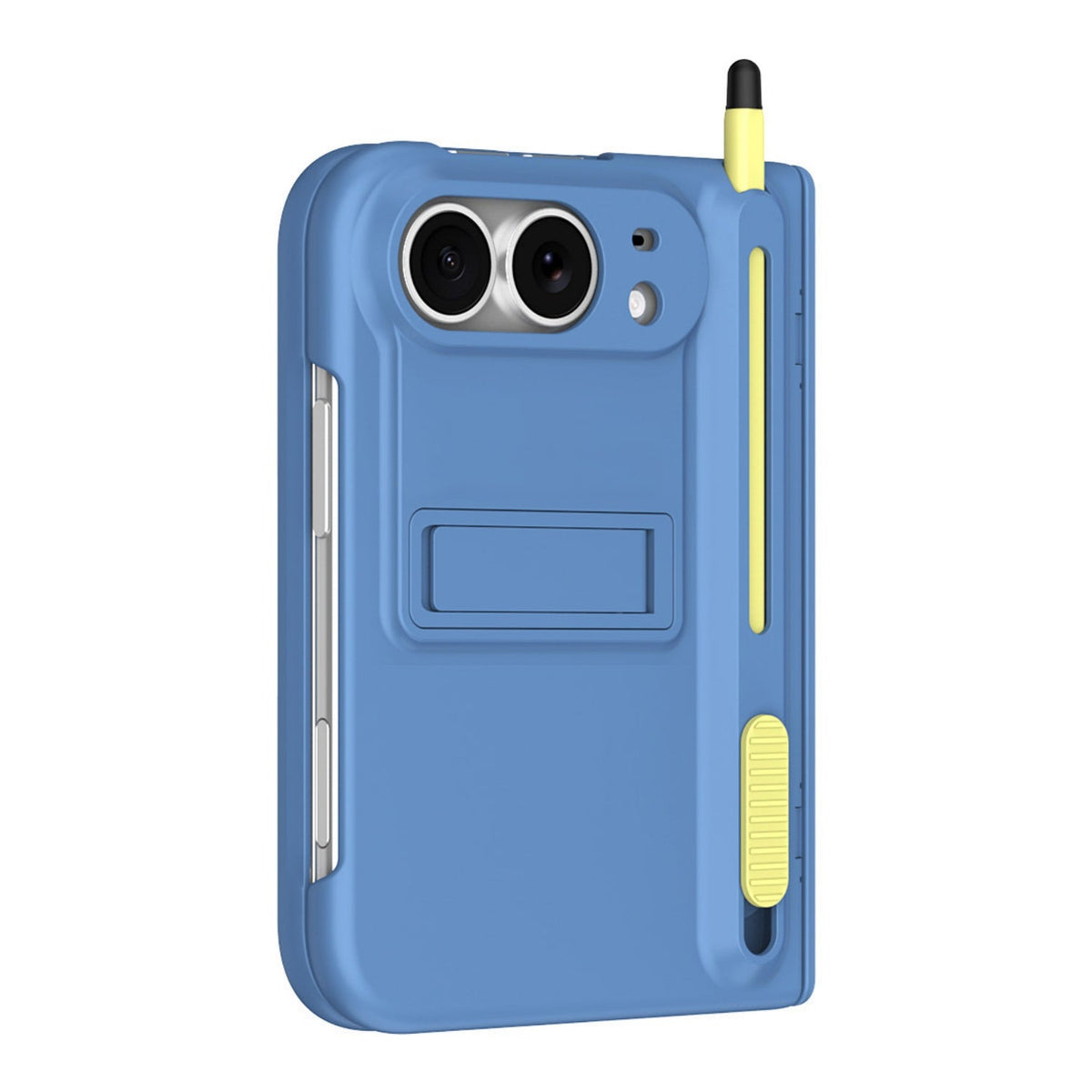
For an included stylus with case storage, compare ZEERA FoldPen Pro, FoldFolio Pro and FoldGrip Pro below.
What Changes With iOS 27.2?
The important change is timing: Apple Pencil support is moving beyond Apple’s original “later this year” window. On October 21, Max Weinbach reported that his Pencil worked on iPhone Duo after installing the iOS 27.2 RC. His original X post was reproduced in 9to5Mac’s coverage.
As of October 24, 2026: the demonstrated version is the RC. The public update is expected the following week; check Software Update for availability rather than treating an expected date as a completed rollout.
Which Apple Pencil Works With iPhone Duo?
- Apple Pencil (USB-C): compatible. Apple lists iPhone Duo in this model’s technical specifications. Apple’s US store price is $79.
- Apple Pencil Pro: incompatible. Buying the more expensive Pencil does not unlock extra Duo features.
- Apple Pencil, 2nd generation: incompatible. A Pencil you already use with an older iPad Pro or iPad Air is a different model.
- Apple Pencil, 1st generation: incompatible. A Lightning-to-USB-C adapter does not establish display compatibility.
This update adds software support to compatible Duo hardware. It does not turn every USB-C iPhone into an Apple Pencil device. For the original announcement and model background, see our iPhone Duo Apple Pencil compatibility guide.
What Can You Do With Apple Pencil on Duo?
Apple’s Duo specifications list USB-C Pencil support for both displays. The useful difference is workspace: use the outer screen for a brief mark or note, then open the phone when you need more room.
Notes, sketches and annotations
Handwritten reminders, rough diagrams and marking up documents are the clearest reasons to use a pen. The inner display gives you a larger canvas for handwriting and reviewing a page.
Choose an app’s writing or markup tool first. Pen support does not mean every app interprets a stroke in the same way or offers the same editing tools.
The limits that matter for drawing
Apple Pencil (USB-C) offers precision, low latency and tilt sensitivity, but no pressure sensitivity. Changing how hard you press will not provide pressure-controlled brush strokes. Apple’s Pencil feature comparison separates these capabilities.
Apple also explicitly says Hover is unavailable on iPhone Duo in its Duo FAQ. Squeeze, barrel roll and haptic feedback belong to Pencil Pro, which is incompatible.
Our take: this is a useful upgrade for quick handwriting and document work. If pressure-sensitive illustration is your priority, compare the full device-and-pen setup in our iPhone Duo versus iPad mini guide.
How Does the USB-C Pencil Pair and Charge?
The USB-C model uses a cable for pairing and charging. Slide back the Pencil’s end cap to expose its port, and connect it with a USB-C cable. Follow the pairing prompt on compatible, updated hardware.
Before your first writing session:
- Check Settings → General → Software Update for the public iOS 27.2 release when available.
- Confirm that your accessory is labeled Apple Pencil (USB-C) and has charge.
- Turn on Bluetooth, connect the Pencil by cable and complete any on-screen pairing instructions.
- Start with a built-in drawing or markup tool before checking your preferred third-party app.
Magnetic storage and charging are separate features. The USB-C Pencil does not charge wirelessly. Likewise, a case’s included pen slot should be treated as storage for its supplied stylus unless Apple Pencil fit is specifically stated.
Three ZEERA Alternatives for Keeping a Stylus With Duo
Apple Pencil makes sense when you want Apple’s supported pen input. A case with an included stylus addresses another everyday need: keeping a pen, stand and protection together. The following are case-and-stylus alternatives, with holders designed for their supplied pens.
These product listings do not promise Apple Pencil pairing, pressure sensitivity or equivalent palm rejection. Choose between them by the extra feature you will use most: FoldPen’s button-operated access, FoldFolio’s card storage or FoldGrip’s hand support.
Which would we choose? FoldPen Pro, shown above, is the straightforward option if stylus storage and a rear stand are your priorities. Choose FoldFolio Pro to carry two cards, or FoldGrip Pro if the right-hand strap and adjustable camera stand suit your routine. Our FoldPen versus FoldFolio comparison looks more closely at the first two designs.
FAQ
Does iOS 27.2 make my current iPad stylus compatible?
No. Compatibility follows the exact accessory model and its supported devices. “Works with iPad” or “USB-C charging” alone does not mean a third-party stylus supports iPhone Duo.
Can I store an Apple Pencil inside these ZEERA cases?
The dedicated slots are specified for the included styluses. Do not assume the full-size Apple Pencil fits those slots.
Does a magnetic hinge cover mean the case supports MagSafe?
No. FoldPen Pro explicitly has no built-in MagSafe ring; its magnets operate the hinge cover. Check charging compatibility separately when choosing a stylus case.
Related Reading
- iPhone Duo Apple Pencil: Models and Original Support Timeline
- iPhone Duo Case With Stylus Holder: FoldPen vs. FoldFolio
- iPhone Duo Case Hub: Materials, Protection and Fit
- Should You Add an iPhone Duo Inner Screen Protector?
- iPhone Duo vs. iPad mini: Can It Replace an iPad?
- iPhone Duo Review Hub: Specs, Problems and Tests
- FoldFolio Pro vs. FoldWallet Pro: Choosing a Wallet Case
Browse the ZEERA iPhone Duo case collection to compare stylus storage, stands, wallet features and protection by model.
By Guichang Chen · ZEERA WIRELESS. Updated October 24, 2026.






